cube旋转立方体(Qt-OpenGL)
·
cube旋转立方体(Qt-OpenGL)
opengl坐标系
按照惯例,OpenGL是一个右手坐标系。简单来说,就是正x轴在你的右手边,正y轴朝上,而正z轴是朝向后方的。想象你的屏幕处于三个轴的中心,则正z轴穿过你的屏幕朝向你。坐标系画起来如下:
coordinate_systems_right_handed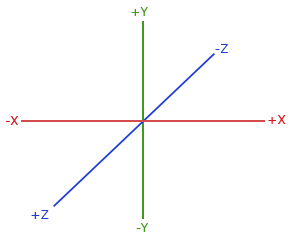
为了理解为什么被称为右手坐标系,按如下的步骤做:
沿着正y轴方向伸出你的右臂,手指着上方。
大拇指指向右方。
食指指向上方。
中指向下弯曲90度。
如果你的动作正确,那么你的大拇指指向正x轴方向,食指指向正y轴方向,中指指向正z轴方向。如果你用左臂来做这些动作,你会发现z轴的方向是相反的。这个叫做左手坐标系,它被DirectX广泛地使用。注意在标准化设备坐标系中OpenGL实际上使用的是左手坐标系(投影矩阵交换了左右手)。
纹理坐标
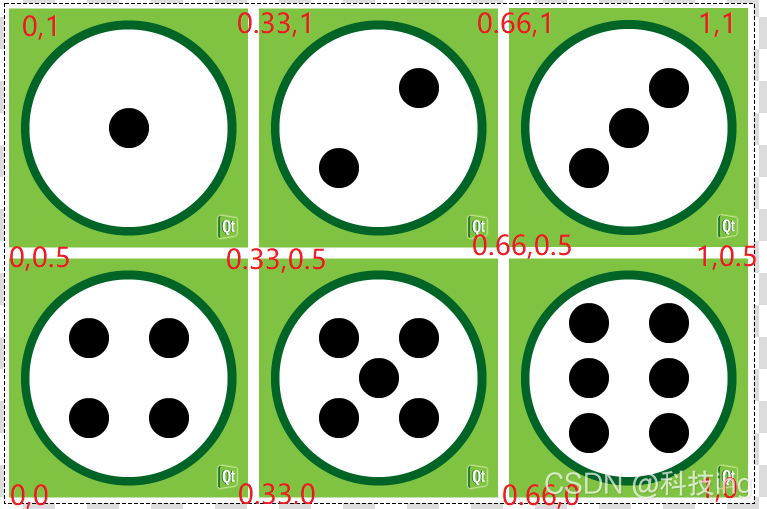
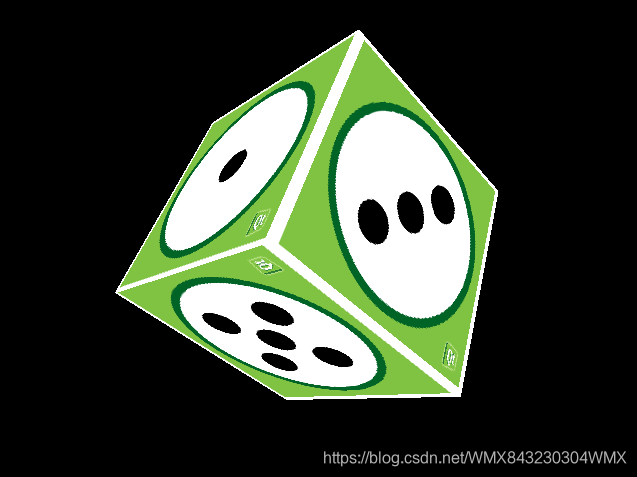
主窗口类MainWidget
MainWidget : public QOpenGLWidget, protected QOpenGLFunctions
- 鼠标事件,更新四元数用于旋转
void MainWidget::mousePressEvent(QMouseEvent *e)
{
    // Save mouse press position
    mousePressPosition = QVector2D(e->localPos());
}

//! @brief 释放鼠标,更新四元数
void MainWidget::mouseReleaseEvent(QMouseEvent *e)
{
    // Mouse release position - mouse press position
    QVector2D diff = QVector2D(e->localPos()) - mousePressPosition;

    // Rotation axis is perpendicular to the mouse position difference
    // vector
    //--旋转轴(矢量) 垂直于鼠标位置差
    QVector3D n = QVector3D(diff.y(), diff.x(), 0.0).normalized();

    // Accelerate angular speed relative to the length of the mouse sweep
    //--角加速度与鼠标扫过的长度关联
    qreal acc = diff.length() / 100.0;

    // Calculate new rotation axis as weighted sum
    //--计算新的 四元数的旋转轴矢量 为加权和
    //-- 旋转轴矢量 = 原来的旋转轴矢量 + 新的旋转轴矢量
    rotationAxis = (rotationAxis * angularSpeed + n * acc).normalized();

    // Increase angular speed
    //--增加角速度(四元数的偏转角度)
    angularSpeed += acc;
}
- 定时器事件: 减少偏转角,更新四元数,更新UI
//! @brief 定时触发减少偏转角,更新四元数,更新UI
void MainWidget::timerEvent(QTimerEvent *)
{
    // Decrease angular speed (friction)
    //--降低角速度(摩擦)
    angularSpeed *= 0.99;

    // Stop rotation when speed goes below threshold
    //--当速度低于阈值时停止旋转
    if (angularSpeed < 0.01) {
        angularSpeed = 0.0;
    } else {
        // Update rotation
        //--更新旋转(四元数)
        rotation = QQuaternion::fromAxisAndAngle(rotationAxis, angularSpeed) * rotation;

        // Request an update
        //--更新UI
        update();
    }
}
- 重写函数 initializeGL()
初始化OpenGL
创建立方体引擎GeometryEngine
启动定时器事件
void MainWidget::initializeGL()
{
    //--初始化OpenGL
    initializeOpenGLFunctions();

    //--清除颜色\透明度
    glClearColor(0, 0, 0, 1);

    initShaders();
    initTextures();

//! [2]
    // Enable depth buffer
    //--启用深度缓冲
    glEnable(GL_DEPTH_TEST);

    // Enable back face culling
    //--启用背面剔除
    glEnable(GL_CULL_FACE);
//! [2]

    geometries = new GeometryEngine;

    // Use QBasicTimer because its faster than QTimer
    timer.start(12, this);
}
- 重写函数 resizeGL() ,窗体尺寸改变时刷新
void MainWidget::resizeGL(int w, int h)
{
    // Calculate aspect ratio
    //--计算纵横比
    qreal aspect = qreal(w) / qreal(h ? h : 1);

    // Set near plane to 3.0, far plane to 7.0, field of view 45 degrees
    //--设置近平面为3.0,远平面为7.0,视野45度
    const qreal zNear = 3.0, zFar = 7.0, fov = 45.0;

    // Reset projection
    //--重置投影
    projection.setToIdentity();

    // Set perspective projection
    //--设置透视投影
    projection.perspective(fov, aspect, zNear, zFar);
}
- 重写函数 paintGL(),画出cube立方体,并且启用四元数旋转
void MainWidget::paintGL()
{
    // Clear color and depth buffer
    //--清除颜色和深度缓冲区
    glClear(GL_COLOR_BUFFER_BIT | GL_DEPTH_BUFFER_BIT);

    //--将此纹理绑定到当前活动的纹理单元
    texture->bind();

    // Calculate model view transformation
    //--计算 模型视图转换 MVP
    QMatrix4x4 matrix;
    matrix.translate(0.0, 0.0, -5.0);

    //--按照给定的四元数旋转
    matrix.rotate(rotation);

    // Set modelview-projection matrix
    //--设置MVP矩阵
    //--MVP矩阵按照四元数旋转
    program.setUniformValue("mvp_matrix", projection * matrix);

    // Use texture unit 0 which contains cube.png
    //--使用包含cube.png的纹理单元0
    program.setUniformValue("texture", 0);

    // Draw cube geometry
    //--画立方体几何
    geometries->drawCubeGeometry(&program);
}
- 初始化纹理
/*!
 * \brief 初始化纹理
 */
void MainWidget::initTextures()
{
    // Load cube.png image
    //--加载纹理
    texture = new QOpenGLTexture(QImage(":/cube.png").mirrored());

    // Set nearest filtering mode for texture minification
    //--设置 纹理缩小 为 最近滤波模式
    texture->setMinificationFilter(QOpenGLTexture::Nearest);

    // Set bilinear filtering mode for texture magnification
    //--设置 纹理放大 为 双线性滤波模式
    texture->setMagnificationFilter(QOpenGLTexture::Linear);

    // Wrap texture coordinates by repeating
    // f.ex. texture coordinate (1.1, 1.2) is same as (0.1, 0.2)
    //--重复封装纹理坐标
    texture->setWrapMode(QOpenGLTexture::Repeat);
}
- 初始化着色器
/*!
 * \brief 初始化着色器
 */
void MainWidget::initShaders()
{
    // Compile vertex shader
    //--源码编译顶点着色器
    if (!program.addShaderFromSourceFile(QOpenGLShader::Vertex, ":/vshader.glsl"))
        close();

    // Compile fragment shader
    //--源码编译片段着色器
    if (!program.addShaderFromSourceFile(QOpenGLShader::Fragment, ":/fshader.glsl"))
        close();

    // Link shader pipeline
    //--链接着色器管道
    if (!program.link())
        close();

    // Bind shader pipeline for use
    //--绑定着色器管道以供使用
    if (!program.bind())
        close();
}
立方体引擎GeometryEngine
GeometryEngine : protected QOpenGLFunctions
- 顶点结构体
/*!
 * \brief 顶点数据
 */
struct VertexData
{
    //--顶点位置
    QVector3D position;

    //--纹理坐标
    QVector2D texCoord;
};
- 初始化 立方体几何 并将其传输到 缓冲区对象
void GeometryEngine::initCubeGeometry()
{
    // For cube we would need only 8 vertices but we have to
    // duplicate vertex for each face because texture coordinate
    // is different.
    //--对于正方体我们只需要8个顶点,但是我们必须为每个面复制顶点,因为纹理坐标是不同的。
    //--6个面对应24个顶点

    ///坐标系是右手系,原点位于立方体中心,x,y,z坐标范围是[-1,-1,-1] 到 [1,1,1]
    /// 纹理坐标 可以看上面分解
    //QVector3D 定点坐标,QVector2D 纹理坐标
    VertexData vertices[] = {
        // Vertex data for face 0 正面
        {QVector3D(-1.0f, -1.0f,  1.0f), QVector2D(0.0f, 0.0f)},  // v0
        {QVector3D( 1.0f, -1.0f,  1.0f), QVector2D(0.33f, 0.0f)}, // v1
        {QVector3D(-1.0f,  1.0f,  1.0f), QVector2D(0.0f, 0.5f)},  // v2
        {QVector3D( 1.0f,  1.0f,  1.0f), QVector2D(0.33f, 0.5f)}, // v3

        // Vertex data for face 1 右侧
        {QVector3D( 1.0f, -1.0f,  1.0f), QVector2D( 0.0f, 0.5f)}, // v4
        {QVector3D( 1.0f, -1.0f, -1.0f), QVector2D(0.33f, 0.5f)}, // v5
        {QVector3D( 1.0f,  1.0f,  1.0f), QVector2D(0.0f, 1.0f)},  // v6
        {QVector3D( 1.0f,  1.0f, -1.0f), QVector2D(0.33f, 1.0f)}, // v7

        // Vertex data for face 2 背面
        {QVector3D( 1.0f, -1.0f, -1.0f), QVector2D(0.66f, 0.5f)}, // v8
        {QVector3D(-1.0f, -1.0f, -1.0f), QVector2D(1.0f, 0.5f)},  // v9
        {QVector3D( 1.0f,  1.0f, -1.0f), QVector2D(0.66f, 1.0f)}, // v10
        {QVector3D(-1.0f,  1.0f, -1.0f), QVector2D(1.0f, 1.0f)},  // v11

        // Vertex data for face 3 左侧
        {QVector3D(-1.0f, -1.0f, -1.0f), QVector2D(0.66f, 0.0f)}, // v12
        {QVector3D(-1.0f, -1.0f,  1.0f), QVector2D(1.0f, 0.0f)},  // v13
        {QVector3D(-1.0f,  1.0f, -1.0f), QVector2D(0.66f, 0.5f)}, // v14
        {QVector3D(-1.0f,  1.0f,  1.0f), QVector2D(1.0f, 0.5f)},  // v15

        // Vertex data for face 4 底面
        {QVector3D(-1.0f, -1.0f, -1.0f), QVector2D(0.33f, 0.0f)}, // v16
        {QVector3D( 1.0f, -1.0f, -1.0f), QVector2D(0.66f, 0.0f)}, // v17
        {QVector3D(-1.0f, -1.0f,  1.0f), QVector2D(0.33f, 0.5f)}, // v18
        {QVector3D( 1.0f, -1.0f,  1.0f), QVector2D(0.66f, 0.5f)}, // v19

        // Vertex data for face 5 顶面
        {QVector3D(-1.0f,  1.0f,  1.0f), QVector2D(0.33f, 0.5f)}, // v20
        {QVector3D( 1.0f,  1.0f,  1.0f), QVector2D(0.66f, 0.5f)}, // v21
        {QVector3D(-1.0f,  1.0f, -1.0f), QVector2D(0.33f, 1.0f)}, // v22
        {QVector3D( 1.0f,  1.0f, -1.0f), QVector2D(0.66f, 1.0f)}  // v23
    };

    // Indices for drawing cube faces using triangle strips.
    // Triangle strips can be connected by duplicating indices
    // between the strips. If connecting strips have opposite
    // vertex order then last index of the first strip and first
    // index of the second strip needs to be duplicated. If
    // connecting strips have same vertex order then only last
    // index of the first strip needs to be duplicated.
    //--使用 三角形条方式 绘制正方体的索引。
    //在条带之间三角形方式可以通过复制索引来连接。
    //如果连接条 相反顶点顺序,然后是第一个条带的最后一个索引和第二条带的第一个索引,索引需要复制。
    //如果连接条 有相同的顶点顺序,然后只有最后需要复制第一个条带的索引。
    GLushort indices[] = {
         0,  1,  2,  3,  3,     // Face 0 - triangle strip ( v0,  v1,  v2,  v3)
         4,  4,  5,  6,  7,  7, // Face 1 - triangle strip ( v4,  v5,  v6,  v7)
         8,  8,  9, 10, 11, 11, // Face 2 - triangle strip ( v8,  v9, v10, v11)
        12, 12, 13, 14, 15, 15, // Face 3 - triangle strip (v12, v13, v14, v15)
        16, 16, 17, 18, 19, 19, // Face 4 - triangle strip (v16, v17, v18, v19)
        20, 20, 21, 22, 23      // Face 5 - triangle strip (v20, v21, v22, v23)
    };

    // Transfer vertex data to VBO 0
    //--将顶点数据传输到VBO 0
    arrayBuf.bind();
    arrayBuf.allocate(vertices, 24 * sizeof(VertexData));

    // Transfer index data to VBO 1
    //--将索引数据传输到VBO 1
    indexBuf.bind();
    indexBuf.allocate(indices, 34 * sizeof(GLushort));

}
- 外部调用
OpenGL在缓冲区vbo中定位数据,提供着色器程序获取数据值,然后绘制图形
void GeometryEngine::drawCubeGeometry(QOpenGLShaderProgram *program)
{
    // Tell OpenGL which VBOs to use
    //--告诉OpenGL使用哪个vbo
    arrayBuf.bind();
    indexBuf.bind();

    //-------------------------------
    // 接着告诉OpenGL在缓冲区vbo中定位数据
    //-------------------------------

    // Offset for position
    quintptr offset = 0;

    // Tell OpenGL programmable pipeline how to locate vertex position data
    //--告诉OpenGL可编程管道如何定位VBO中的顶点位置数据
    //--设置 vshader.glsl 文件中的 a_position 为VBO中的顶点值
    int vertexLocation = program->attributeLocation("a_position");
    program->enableAttributeArray(vertexLocation);

    /*!
     * @brief
     *  从当前绑定的顶点缓冲区中的特定偏移量开始,
     *  设置着色器程序的位置属性为顶点数组值。
     *  步长表示顶点之间的字节数。
     *  默认的步长值为0表示值数组中的顶点被密集地填充。
     */
    program->setAttributeBuffer(vertexLocation, GL_FLOAT, offset, 3, sizeof(VertexData));

    // Offset for texture coordinate
    offset += sizeof(QVector3D);

    // Tell OpenGL programmable pipeline how to locate vertex texture coordinate data
    //--告诉OpenGL可编程管道如何定位VBO中的纹理坐标数据
    //--设置 vshader.glsl 文件中的 a_texcoord 为VBO中的纹理坐标值
    int texcoordLocation = program->attributeLocation("a_texcoord");
    program->enableAttributeArray(texcoordLocation);
    program->setAttributeBuffer(texcoordLocation, GL_FLOAT, offset, 2, sizeof(VertexData));

    // Draw cube geometry using indices from VBO 1
    //--使用VBO 1中的索引绘制立方体几何
    /*!
     * @brief
     * @param   mode        GL_TRIANGLE_STRIP
     * @param   count       34个indices(索引数量)
     * @param   type        GL_UNSIGNED_SHORT
     * @param   indices     0
     * @return
     */
    glDrawElements(GL_TRIANGLE_STRIP, 34, GL_UNSIGNED_SHORT, 0);
}

开源鸿蒙跨平台开发社区汇聚开发者与厂商,共建“一次开发,多端部署”的开源生态,致力于降低跨端开发门槛,推动万物智联创新。
更多推荐


 2
2 0
0- 0


 已为社区贡献6条内容

所有评论(0)