使用React&Electron I构建音乐播放器:设置和基本概念
Scotch is going to help you learn an awesome library in a really fun way. What could be more fun than making a music app?Scotch将以一种非常有趣的方式帮助您学习很棒的图书馆。 有什么比制作音乐应用程序更有趣?Yeah I get it! You have been ...
Scotch is going to help you learn an awesome library in a really fun way. What could be more fun than making a music app?
Scotch将以一种非常有趣的方式帮助您学习很棒的图书馆。 有什么比制作音乐应用程序更有趣?
Yeah I get it! You have been hearing React thrown around these days but you have had no reason to learn it yet or rather you have tried but it just didn't work. Together we will build a fairly complex but easy to understand music app with React, Soundcloud and Electron which is going to cover everything you need to know about React and its best practices.
是的,我明白了! 这些天来,您一直在听到React声音,但是您还没有理由学习它,或者您已经尝试过,但是它没有用。 我们将一起使用React, Soundcloud和Electron一起构建一个相当复杂但易于理解的音乐应用程序,它将涵盖您需要了解的有关React及其最佳实践的所有信息。
It is difficult to convince people to learn a new library or framework and I understand that. I am coming from an Angular background and I consider myself a professional for that matter. For that reason I never considered learning React until I came across this video.
很难说服人们学习一个新的库或框架,我理解这一点。 我来自Angular背景,因此我认为自己是专业人士。 因此,在看完这段视频之前,我从未考虑过学习React。
我们将建立什么 ( What we will build )
A quick gif:
快速gif:

The working CodePen
工作中的CodePen
必修知识 ( Required Knowledge )
A basic knowledge of HTML and JavaScript (ES6) is enough for you to understand this tutorial. On the other hand the only fairly advanced topic you need is an understanding of the mystries of this keyword.
对HTML和JavaScript(ES6)的基本了解足以使您理解本教程。 另一方面,您需要的唯一相当高级的主题是this关键字的奥秘的理解 。
设置和先决条件 ( Setup and Prerequisites )
Browserify和Babel: (Browserify and Babel:)
Browserify helps us use client JS libraries like React and jQuery with Node's require() and makes bundling easy:
Browserify帮助我们通过Node的require()使用客户端JS库(如React和jQuery require() ,并使绑定变得容易:
npm install -g browserifyIf you want to learn more abou Browserify, check out Peleke's tutorial
如果您想了解更多有关Browserify的信息,请查看Peleke的教程
Not all browsers have EcmaScript 2015 (ES6) support, therefore a transpile tool will be needed in such case. JavaScript transpilers are important. here is an article on when and why we use them.
并非所有浏览器都支持EcmaScript 2015(ES6),因此在这种情况下将需要使用转换工具。 JavaScript编译器很重要。 这是一篇有关何时以及为何使用它们的文章 。
To install Babel (which is the transformer) and its squad of tools called presets, we will include them in our package.json which we will address soon.
要安装Babel (它是变压器)及其工具组(称为“ presets ,我们将它们包含在package.json ,我们将尽快解决。
We also need to create ./.babelrc file to inform babal which presets we are using:
我们还需要创建./.babelrc文件来通知babal我们正在使用哪些预设:
"presets" : [ "es2015" , "react" ]电子 (Electron)
Electron is a tool for building cross platform desktop apps with web technologies. This means that you do not have to learn an OS native language so as to build an app that runs natively on computers. The amazing aspect actually is that you write ones and build the same code for different platforms (OSX, Windows, Linux). We have written an article on Angular and Electron and can learn more from this Jasim's tutorial
Electron是使用Web技术构建跨平台桌面应用程序的工具。 这意味着您不必学习OS本地语言即可构建在计算机上本地运行的应用程序。 实际上,令人惊奇的方面是您编写代码并为不同的平台(OSX,Windows,Linux)构建相同的代码。 我们已经写了一篇关于Angular和Electron的文章,可以从Jasim的教程中学到更多
Our app is expected to run as a standalone app and not in a browser. Electron is in my opinion the most popular tool for building desktop apps with web technologies (HTML, CSS, JS):
我们的应用程序有望作为独立应用程序运行,而不是在浏览器中运行。 在我看来,Electron是使用Web技术(HTML,CSS,JS)构建桌面应用程序的最受欢迎的工具:
# Clone the Quick Start repository
$ git clone https://github.com/electron/electron-quick-start scotch-player

# Go into the repository
$ cd scotch-player
The starter has two important files: main.js and index.html. These files serve as entry to an Electron project.
入门程序有两个重要文件: main.js和index.html 。 这些文件用作Electron项目的条目。
To see the expected blank workspace, run:
要查看预期的空白工作空间,请运行:
# Launch the App with Electron
npm start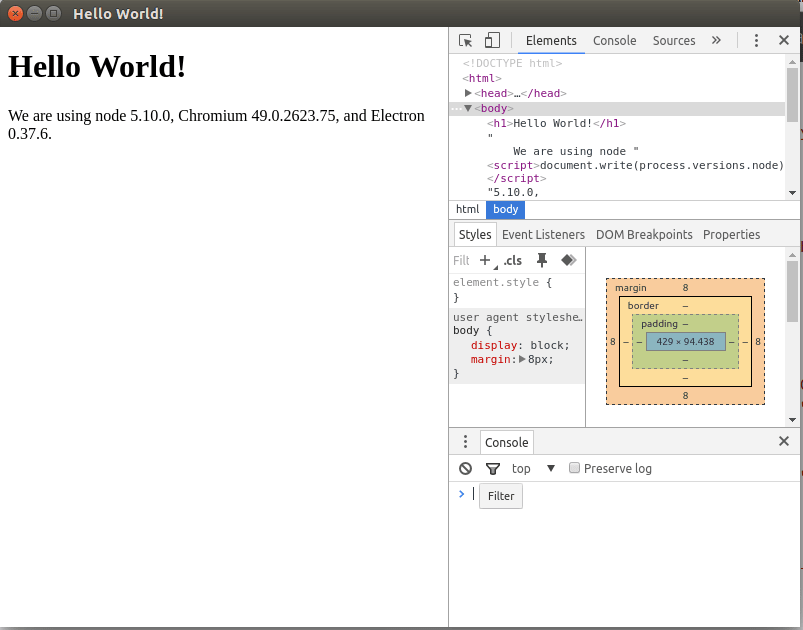
目录结构 (Directory Structure)
Below is the directory structure of what we are building and will serve as guide down the journey:
以下是我们正在构建的目录结构,并将作为后续工作的指南:
| ---app #All React projects goes here
| ----components # Presentation Component Directory
| ------details.component.js
| ------footer.component.js
| ------player.component.js
| ------progress.component.js
| ------search.component.js
| ----containers # Container Component Directory
| ------app.container.js
| ----app.js
| ---public # Client Files here
| ----css
| ------global.css
| ----img
| ------logo.png
| ------soundcloud.png
| ----js
| ------bundle.js
| ---index.html # Electron Default View
| ---main.js # Electron entry point
| ---package.json
| ---.babelrc # Babal's Configurations配置package.json (Configure package.json)
{
  "name" : "scotch-player" ,
  "productName" : "Scotch Player" ,
  "version" : "1.0.0" ,
  "description" : "Scotch Demo Player" ,
  "main" : "main.js" ,
  "scripts" : {
    "start" : "electron main.js" ,
    "watch" : "watchify app/app.js -t babelify -o public/js/bundle.js --debug --verbose"
  } ,
  "author" : "Scotch" ,
  "license" : "MIT" ,
  "dependencies" : {
    "axios" : "^0.9.1" ,
    "babel-preset-es2015" : "^6.6.0" ,
    "babel-preset-react" : "^6.5.0" ,
    "babelify" : "^7.2.0" ,
    "classnames" : "^2.2.3" ,
    "electron-prebuilt" : "^0.36.0" ,
    "electron-reload" : "^0.2.0" ,
    "jquery" : "^2.2.3" ,
    "react" : "^0.14.8" ,
    "react-autocomplete" : "^1.0.0-rc2" ,
    "react-dom" : "^0.14.7" ,
    "react-sound" : "^0.4.0" ,
    "soundmanager2" : "^2.97.20150601-a"
  }
}
Our concerns are the scripts and dependencies section. The scripts has two commands, the firsts (start) starts the app and the second (watch) tells browserify to watch the app folder and bundle the JS content to public/js/bundle.js
我们关心的是scripts和dependencies部分。 scripts有两个命令,第一个( start )启动应用程序,第二个( watch )告诉Browserify监视应用程序文件夹并将JS内容捆绑到public/js/bundle.js
Go ahead and install the dependencies:
继续并安装依赖项:
npm install输入React:演示与容器组件 ( Enter React: Presentation vs Container Components )
React is really a simple and small library. It only echoes one word, Components. React is simply a UI library that helps web designers/developers build reusable UI components. Reusable from as small as a button to as complex as navigation menus. See Ken's article for more on getting started with React.
React实际上是一个简单而小型的库。 它只呼应一个单词Components 。 React只是一个UI库,可帮助Web设计人员/开发人员构建可重用的UI组件。 从很小的按钮到复杂的导航菜单都可以重复使用。 请参阅Ken的文章 ,以获取更多有关React入门的信息。
A simple component could be:
一个简单的组件可能是:
// ES6 Component
// Import React
import React  from 'react' ;
// Search component created as a class
class Search extends React . Component {

// render method is most important
// render method returns JSX template
    render ( ) {
    return (
            < form >
                < input type = "text" / >
                < input type = "submit" / >
            < / form >
        ) ;
    }
}

// Export for re-use
export default Search
We will see more of that while we build the app. The only weird thing here is the XML-like content in our JavaScript. It is called JSX and just a convenient way to write HTML in JavaScript. You have the option to go hardcore with document.createElement.
在构建应用程序时,我们会看到更多。 唯一奇怪的是我们JavaScript中类似XML的内容。 它被称为JSX,它只是用JavaScript编写HTML的便捷方式。 您可以选择使用document.createElement进行硬核。
A little exception could be made though - components are not just for UIs, they can be used to manage state of UI component. Let's have a deeper look:
但是可以做一点例外-组件不仅用于UI,还可以用于管理UI组件的状态。 让我们更深入地了解一下:
演示组件 (Presentation Components)
This components are simple and very straightforward. They just present UI details and nothing much. It should never manage state but should only receive properties to be bound to its UI.
该组件非常简单。 他们只是呈现UI详细信息而已。 它永远不要管理状态,而应该只接收绑定到其UI的属性。
Events also are handled as callbacks via properties and not in components.
事件也通过属性而不是组件作为回调处理。
One more thing, for no reason should a presentation component be aware of how data sent to it came about. It should be possible to isolate it.
还有一件事,表示组件毫无理由应该知道发送给它的数据是如何产生的。 应该可以隔离它。
A simple example:
一个简单的例子:
import React  from 'react' ;

class Search extends React . Component {
// Props is received via the constructor
  constructor ( props ) {
  //...and props is sent back to the parent Component
  //class using super()
    super ( props ) ;
    // Initial State of the component is defined
    // in the constructor also
    this . state = {
      value : ''
    } ;
  }

  handleSubmit ( ) {
    //postRequest is assumed to be the function
    // that makes an Ajax request
    postRequest ( this . state . value ) ;
  }

  handleChange ( e ) {
  // Bind value state with current input
    this . setState ( { value : e . target . value } ) ;
  }

  render ( ) {
      return (
        < form
          onSubmit = { this . handleSubmit . bind ( this ) } >
            < input type = "text"
              value = { this . state . value }
              onChange = { this . handleChange . bind ( this ) } / >
            < input type = "submit" / >
        < / form >
      ) ;
    }
}

export default Search
The above example is doing exactly what we do not want a presentation component to do. It knows how values are manipulated and sent to the server. Let's refactor:
上面的示例正是在执行我们不希望演示组件执行的操作。 它知道如何操作值并将其发送到服务器。 让我们重构一下:
import React  from 'react' ;
// Simplified component
class Search extends React . Component {
  render ( ) {
      return (
        < form
          onSubmit = { this . props . handleSubmit } >
          { /* Notice how values and callbacks are passed in using props */ }
           < input type = "text"
             value = { this . props . searchValue }
             onChange = { this . props . handleChange } / >
           < input type = "submit" / >
        < / form >
      ) ;
    }
}
Now the component is extra lean and is focused on presenting content depending on the values passed to it via this.props. It also handles events with functions passed to it via this.props too. So where do the states and those event handlers go to? They are moved to the container components.
现在,该组件非常精简,并且专注于呈现内容,具体取决于通过this.props传递给它的值。 它还处理通过this.props传递给它的函数的事件。 那么状态和那些事件处理程序要去哪里呢? 它们被移至容器组件。
Note on
propsandstates注意
props和statesProperties and states join forces to make React an amazing and awesome tool. Properties are just read only values passed from one component to another or a component to its UI elements. Props are accessed with just
this.propsbecause they are read only.属性和状态共同作用,使React成为一个了不起的工具。 属性只是从一个组件传递到另一个组件或从一个组件传递到其UI元素的只读值。 仅使用
this.props访问道具,因为它们是只读的。States on the other hand are writable and that is the way we update our application data (state). States are accessible via
this.stateand because they are writable, can be updated withthis.setState({value: 'value'}).另一方面,状态是可写的,这就是我们更新应用程序数据(状态)的方式。 可以通过
this.state访问this.state并且因为它们是可写的,所以可以使用this.setState({value: 'value'})进行更新。
容器组件 (Container Components)
This works with the concept of service provider. They tend to expose APIs for the presentation components. This is where you can get your hands dirty and do the dirty jobs of updating states and defining application behaviors. This is the guy that takes care of all those jobs we asked presentation components to drop.
这符合service provider的概念。 他们倾向于公开表示组件的API。 在这里,您可以动手做更新状态和定义应用程序行为的肮脏工作。 这个人负责我们要求演示组件删除的所有那些工作。
To better understand container components, let us have a look at one that compliments our above Search Component:
为了更好地理解容器组件,让我们看一下与上述Search Component互补的Search Component :
import React  from 'react' ;
import Search from './search' ;

class AppContainer extends React . Component {
  constructor ( props ) {
    super ( props ) ;
    this . state = {
      value : ''
    } ;
  }

  // Makes a request to the server (simulated for this tutorial)
  handleSubmit ( ) {
    postRequest ( this . state . value ) ;
  }

  // React input update (binding) is manual which
  // makes it rubust. This is how you keep the input box
  // in sync with keystroke inputs
  handleChange ( e ) {
    // New values are availbale from the event object
    this . setState ( { value : e . target . value } ) ;
  }

  // Container components wrap presentation component
  render ( ) {
      return (
        < Search
          handleSubmit = { this . handleSubmit . bind ( this ) }
          handleChange = { this . handleChange . bind ( this ) }
          searchValue = { this . state . value } / >
      ) ;
    }
}

export default AppComponent
See how the above component abstracts the state update and event handling from the presentation component. Once an event is called on the presentation component, it asks its parent container component to handle the event and if any change in state, pass it back.
查看上面的组件如何从表示组件中抽象状态更新和事件处理。 在表示组件上调用事件后,它会要求其父容器组件处理该事件,如果状态发生任何更改,则将其传递回去。
Do not panic, we learn better with examples and there are few examples in the demo we will talk about.
不要惊慌,我们将通过示例学习更好,在演示中我们将谈论的示例很少。
在电子中React ( React in Electron )
It is very simple to use React in an Electron project. You can bundle with Browserify or Webpack but in our case we will use browserify. The following checklist is good for setting React in any platform including Electron:
在Electron项目中使用React非常简单。 您可以将Browserify或Webpack捆绑在一起,但在我们的情况下,我们将使用browserify。 以下清单适合在包括Electron在内的任何平台上设置React:
- Install Browserify: [✔] 安装Browserify:[✔]
- Install Babel: [✔] 安装Babel:[✔]
- Configure Babel presets using
package.jsonor.babelrc: [✔] 使用package.json或.babelrc配置Babel预设:[✔] - Add a
watchscript topackage.json: [✔] 将watch脚本添加到package.json:[✔] - Create a component and render it to the index.html 创建一个组件并将其呈现到index.html
- Run
startandwatchscripts to start Electron and bundling respectively 运行start和watch脚本以分别启动Electron和捆绑
As you can see, we have accomplished 1 to 4 and that is why they are checked. Let us have a look at 5 and 6.
如您所见,我们已经完成了1到4,这就是为什么要检查它们的原因。 让我们看一下5和6。
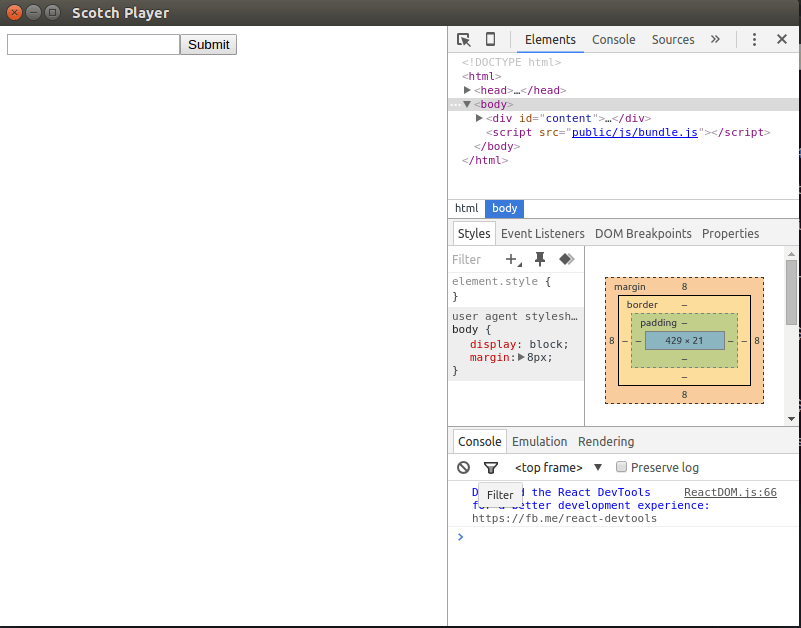
Create app.js in the app folder as shown in the directory structure with the following:
如以下目录结构所示,在app文件夹中创建app.js :
// ES6 Component
// Import React and ReactDOM
import React from 'react' ;
import ReactDOM from 'react-dom' ;
// Search component created as a class
class Search extends React . Component {

    // render method is most important
    // render method returns JSX template
    render ( ) {
        return (
          < form >
            < input type = "text" / >
            < input type = "submit" / >
          < / form >
        ) ;
    }
}

// Render to ID content in the DOM
ReactDOM . render ( < Search / > ,
    document . getElementById ( 'content' )
) ;
Something new is ReactDOM which is used to render components to the DOM. The index.html in our case:
ReactDOM是新的东西,用于将组件呈现到DOM。 本例中的index.html :
<!DOCTYPE html>
< html >
  < head >
    < meta charset = " UTF-8 " >
    < title > Scotch Player </ title >
  </ head >
  < body >

    < div id = " content " > </ div >

  < script src = " public/js/bundle.js " > </ script >
  </ body >
</ html >
We are pointing to a non existing file, bundle.js. It will contain our bundled app therefore create the file and leave it empty then run:
我们指向一个不存在的文件bundle.js 。 它将包含我们捆绑的应用程序,因此创建文件并将其保留为空,然后运行:
npm run watchBrowserify comes with two flavors:
browserifyandwatchify. The difference is that watchify just waites for change and re-creates the bundle whilebrowserifybundles only when you issue the command.Browserify带有两个口味:
browserify和watchify。 不同的是,watchify只是韦特的变化,而重新创建束browserify包只有当你发出命令。
It is painful to continue running npm start for every change just to update Electron with the changes. We can automate it by adding the following in the main.js:
对于每个更改继续运行npm start只是为了用更改来更新Electron是很痛苦的。 我们可以通过在main.js添加以下内容来使其main.js :
require ( 'electron-reload' ) ( __dirname ) ;We already install the package using package.json.
我们已经使用package.json安装了软件包。
下一个... ( Up Next... )
Hopefully, you have a fair knowledge of React, how it is useful, and the two types components. If you need more on component types Dan's Medium post will help. In the next tutorial, we will design our presentation components. See you then...
希望您对React有一定的了解,它的用法以及这两种类型的组件。 如果您需要更多有关组件类型的信息, Dan的Medium帖子会有所帮助。 在下一个教程中 ,我们将设计演示组件。 回头见...
- Part I: Setup & Basic Concepts (this article) 第一部分:设置和基本概念 (本文)
- Part 2: Making the UI 第2部分:制作UI
- Part 3: Bringing it All Together 第3部分:将所有内容放在一起
翻译自: https://scotch.io/tutorials/build-a-music-player-with-react-electron-i-setup-basic-concepts

开源鸿蒙跨平台开发社区汇聚开发者与厂商,共建“一次开发,多端部署”的开源生态,致力于降低跨端开发门槛,推动万物智联创新。
更多推荐


 0
0 0
0- 0


 已为社区贡献16条内容

所有评论(0)