Qt之QLabel点击事件
·
概述:
今天小案例是QLabel控件实现点击事件,项目要求点击后要做一些逻辑处理。
1.首先创建一个类继承自QLabel
2.重写鼠标按下事件
代码示例:
.h
#ifndef MYQLABEL_H
#define MYQLABEL_H

#include <QObject>
#include <QLabel>
#include <QMessageBox>

class MyQLabel : public QLabel
{
    Q_OBJECT
public:
    MyQLabel(const QString &Titter,QWidget *parent=0);
    ~MyQLabel();
signals:
	//点击信号
    void clicked();
public slots:
	//点击信号响应槽
    void slotClicked();
protected:
	//鼠标按下事件
    void mousePressEvent(QMouseEvent*/* event*/);
};

#endif // MYQLABEL_H
.cpp
#include "MyQLabel.h"

MyQLabel::MyQLabel(const QString &Titter, QWidget *parent)
    :QLabel(parent)
{
     this->setText(Titter);
     connect(this, SIGNAL(clicked()), this, SLOT(slotClicked()));
}

MyQLabel::~MyQLabel()
{

}
void MyQLabel::slotClicked()
{
    QMessageBox::information(NULL, QString("单击"),
                             QString("QLabel点击事件好辣!"), QMessageBox::Yes | QMessageBox::No, QMessageBox::Yes);

}
void MyQLabel::mousePressEvent(QMouseEvent*)
{
    emit clicked();
}
界面类.cpp
#include "ReWriteLable.h"
#include "ui_ReWriteLable.h"
#include <MyQLabel.h>

ReWriteLable::ReWriteLable(QWidget *parent) :
    QWidget(parent),
    ui(new Ui::ReWriteLable)
{
    ui->setupUi(this);
    MyQLabel *my_label = new MyQLabel("重写QLable类",this);
    my_label->setGeometry(QRect(20,20,150,30));
}

ReWriteLable::~ReWriteLable()
{
    delete ui;
}
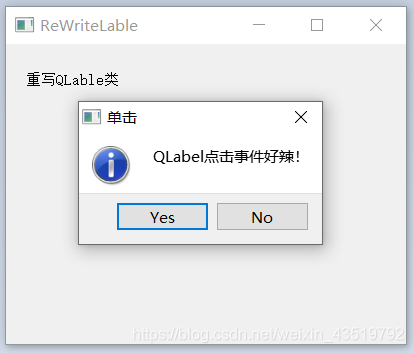
执行效果图
over:
欢迎大家关注作者在文末评论、点赞、转发以及批评指正!
如果大家有更好的方法或有问题可以在文末评论一起讨论!
共同学习!
共同进步!
文末一句话:
要成功,需要朋友!
要取得巨大的成功,需要敌人!

开源鸿蒙跨平台开发社区汇聚开发者与厂商,共建“一次开发,多端部署”的开源生态,致力于降低跨端开发门槛,推动万物智联创新。
更多推荐


 3
3 0
0- 0


 已为社区贡献23条内容

所有评论(0)