Qt第一天问题
目录命令行编写qt==在qt中文件路径不能包含中文!!!==我使用mac命令行直接编译cpp文件命令行编写qt1.新建app.cpp文件,编写:#include<QApplication>#include<QLabel>int main(int argc,char* argv[]){QApplication app(argc,argv);QLabel*...
·
我使用mac命令行直接编译cpp文件
命令行编写qt
1.新建app.cpp文件,编写:
#include<QApplication>
#include<QLabel>
int main(int argc,char* argv[])
{
	QApplication app(argc,argv);
	QLabel* label = new QLabel ("Hello Tsinghua!");
	label->show();
	return app.exec()	;
2.在app.cpp目录下打开终端,输入:
qmake -project
qmake app.pro
make
但是最开始显示;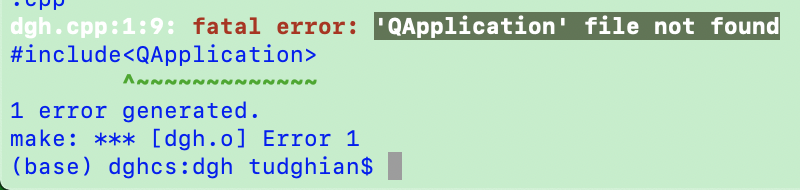
问题出在需要在app.pro文件中添加一句:QT += widgets
######################################################################
# Automatically generated by qmake (3.1) Mon Aug 19 14:19:25 2019
######################################################################

TEMPLATE = app
TARGET = dgh
INCLUDEPATH += .

# The following define makes your compiler warn you if you use any
# feature of Qt which has been marked as deprecated (the exact warnings
# depend on your compiler). Please consult the documentation of the
# deprecated API in order to know how to port your code away from it.
DEFINES += QT_DEPRECATED_WARNINGS

# You can also make your code fail to compile if you use deprecated APIs.
# In order to do so, uncomment the following line.
# You can also select to disable deprecated APIs only up to a certain version of Qt.
#DEFINES += QT_DISABLE_DEPRECATED_BEFORE=0x060000    # disables all the APIs deprecated before Qt 6.0.0

# Input
SOURCES += dgh.cpp
QT +=widgets
然后就可以显示一个命令窗口了: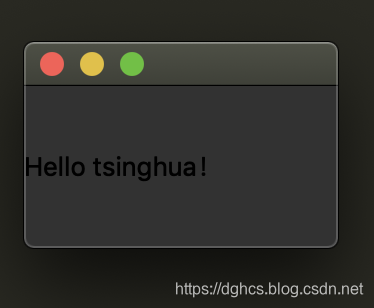
在qt中文件路径不能包含中文!!!
一般在mainwindow的构造函数里面进行信号与槽的链接
好像是在mac上使用
我的mac因为之前有anaconda的kit,所以一直报错-lQt5Widgets_debug
很奇怪的错误,我谷歌csdn都没有用
后来发现只需要调整为Desktop Qt clang就OK啦

开源鸿蒙跨平台开发社区汇聚开发者与厂商,共建“一次开发,多端部署”的开源生态,致力于降低跨端开发门槛,推动万物智联创新。
更多推荐
 0
0 0
0- 0


 已为社区贡献3条内容

所有评论(0)