QT之二维码生成以及识别
文章目录
二维码(QR Code)是用某种特定的几何图形按一定规律在平面(二维方向)分布的黑白相间的图形记录数据符号信息的。是所有信息数据的一把钥匙。应用十分广泛,如:产品防伪/溯源、广告推送、网站链接、数据下载、商品交易、定位/导航、电子凭证、车辆管理、信息传递、名片交流、wifi共享等。
二维条码常用的码制:
Data Matrix、MaxiCode、Aztec、QR Code、Vericode、PDF417、Ultracode、Code 49、Code 16K等。
二维码与一维码
二维码与一维码的对比:
- 一维码:只能在一个方向(一般是水平方向)上表达信息,只能由数字和字母组成。
- 二维码:在水平和垂直方向都可以存储信息,能存储汉字、数字和图片等信息。
二维码编解码库
- ZXing
ZXing是一个开放源码的,用Java实现的多种格式的1D/2D条码图像处理库,包含了联系到其他语言的端口。
网址:https://code.google.com/p/zxing. - Libqrencode
Libqrencode(QRencode)是一个用C语言编写的用来解析二维条形码(QR Code)的程序库,Libqrencode通过手机的CCD摄像头来扫描二维条形码。二维码容量可达7000个数字或4000个字符,是非常强大的。
网址:http://fukuchi.org/works/qrencode/. - ZBar
ZBar是款桌面电脑用条形码/二维码扫描工具,支持摄像头及图片扫描,支持多平台包括iPhone手机。同时 ZBar提供了二维码扫描的API开发包。
网址:http://zbar.sourceforge.net.
更多参考:http://sourceforge.net/apps/mediawiki/zbar/index.php. - Open Source QR Code Library
二维码编码/解码的Java库(J2SE, J2ME MIDP2.0/CLDC1.0)。
网址:http://qrcode.sourceforge.jp/index.html.en. - QZXing
Qt包装ZXing的解码库。
网址:http://sourceforge.net/projects/qzxing.
更多参考:https://projects.developer.nokia.com/QZXing.
二维码生成
Libqrencode(QRencode)二维码生成
qrencode是开源的二维码QR码编码库,主要C语言编写的,这样方便移植到各种平台下。QR Code码特点: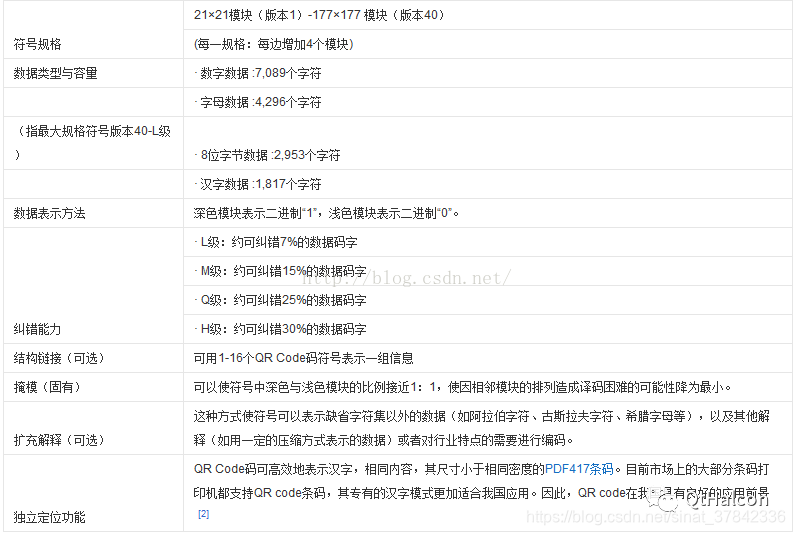
QRcode结构体中,qrcode->data包含了二维码图像的信息,其中每个数据中的bit0位代表了点的颜色,1表示黑色,0表示白色。
QT+QRencode使用
下载qrcode库后,解压后只留下下图红框所框住的文件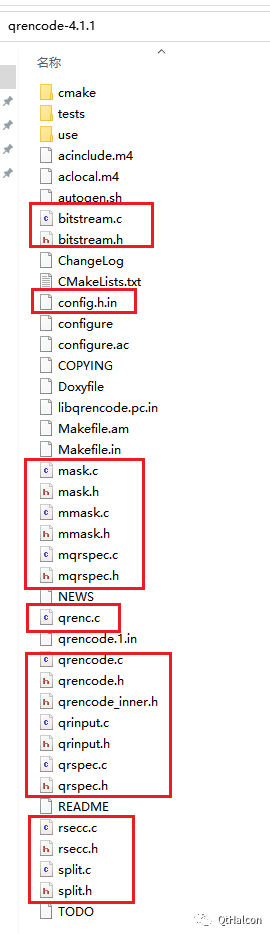
其中将config.h.in更名为 config.h 在文件中将MAJOR_VERSION、 MICRO_VERSION、MINOR_VERSION 、VERSION要在对应的#undef下方添加下图定义
#define MAJOR_VERSION 1
#define MICRO_VERSION 1
#define MINOR_VERSION 1
#define VERSION 1
在pro文件中加入配置并且将其中的.c文件和.h文件都添加进去
DEFINES += HAVE_CONFIG_H
https://github.com/chideat/qrencode
其中cpp文件中添加编写二维码的代码部分
StringTo_QrCodeImage(QString codestr, int imagew, int imageh)
{
    QRcode *qrcode;
    qrcode=QRcode_encodeString(codestr.toStdString().c_str(),2,QR_ECLEVEL_Q,QR_MODE_8,1);
    qint32 temp_width  = imagew;
    qint32 temp_height = imageh;

    qint32 qrcode_width=qrcode->width>0?qrcode->width:1;
    double scale_x=(double)temp_width/(double)qrcode_width;
    double scale_y=(double)temp_height/(double)qrcode_width;

    QImage mainimg=QImage(temp_width,temp_height,QImage::Format_ARGB32);
    QPainter painter(&mainimg);
    QColor background(Qt::white);
    painter.setBrush(background);
    painter.setPen(Qt::NoPen);
    painter.drawRect(0,0,temp_width,temp_height);
    QColor foreground(Qt::black);
    painter.setBrush(foreground);

    unsigned char* pqrdata = qrcode->data;
    for(qint32 y = 0; y < qrcode_width; ++y) {
        for(qint32 x = 0; x < qrcode_width; ++x) {
            if((*pqrdata++) &0x01) {
                QRectF r(x*scale_x, y*scale_y, scale_x, scale_y);
                painter.drawRects(&r, 1);
            }
        }
    }
    QRcode_free(qrcode);
    return mainimg;
}
//生成二维码
void MainWindow::on_pushButton_2_clicked()
{
	QImage imageShow= StringTo_QrCodeImage(ui->textEdit->toPlainText(), 750, 750);
    ui->label_2->setPixmap(QPixmap::fromImage(imageShow).scaled(ui->label_2->width(),ui->label_2->height()));
}
深色背景二维码无法识别
在利用QT编写二维码生成程序后,背景颜色设置为了深蓝色,在利用解码程序验证时,二维码一直识别不出来
但是使用微信可以成功进行识别
参考别人的做法:二维码不能使用的原因主要包括:
- 质量差(图案图像清晰)
- 反转颜色(经典的二维码在白色的背景上加入黑色方块,一定要使用浅色背景和深色前景,交换颜色不是所有的设备都可以识别)
- 小尺寸(二维码的大小= 距离/10 或 2 x 2英寸)
- 对比度差(即使使用对比色,前景也要比背景暗40%以上)
- 二维码的内容过多(过多的内容,让像素点更为密集,识别更加困难,二维码最多容纳128个字符,否则可以使用url进行表示)
二维码识别
QZXing二维码识别
QZXing编译
在Github上下载代码,其中src就是我们需要的源代码
QT调用QZXing实现解码(根据二维码解出相应信息)
在pro文件中添加
include(D:/Opencv/QZXing-master/source/QZXing.pri)
主文件中解码部分
QImage img;        //加载图像
if(!(img.load(m_fileName)))
{
    QMessageBox::information(this,
                             tr("打开图像失败"),
                             tr("打开图像失败!"));
    return;
}
img = img.scaled(ui->label->width(),ui->label->height(),Qt::KeepAspectRatio);
ui->label ->setPixmap(QPixmap::fromImage(img));

QZXing decoder;

decoder.setDecoder(QZXing::DecoderFormat_QR_CODE | QZXing::DecoderFormat_CODE_128);
ui->lineEdit->setText(decoder.decodeImage(img));
ZXing二维码识别
opencv4.5.1添加了对于二维码识别的支持(contrib库中进行支持)
具体使用需要DNN模块
#include "pch.h"
#include <iostream>
#include <opencv2/opencv.hpp>
#include <opencv2/wechat_qrcode.hpp>

using namespace std;
using namespace cv;

int main()
{
  //加载图片解码
  Ptr<wechat_qrcode::WeChatQRCode> detector;
  string detect_prototxt = "./model/detect.prototxt";
  string detect_caffe_model = "./model/detect.caffemodel";
  string sr_prototxt = "./model/sr.prototxt";
  string sr_caffe_model = "./model/sr.caffemodel";

  Mat img = imread("./QR/T33/result.bmp");
  try
  {
    detector = makePtr<wechat_qrcode::WeChatQRCode>(detect_prototxt, detect_caffe_model,
                                                  sr_prototxt, sr_caffe_model);
  }
  catch (const std::exception& e)
  {
    cout <<
      "\n---------------------------------------------------------------\n"
      "Failed to initialize WeChatQRCode.\n"
      "Please, download 'detector.*' and 'sr.*' from\n"
      "https://github.com/WeChatCV/opencv_3rdparty/tree/wechat_qrcode\n"
      "and put them into the current directory.\n"
      "---------------------------------------------------------------\n";
    cout << e.what() << endl;
    return 0;
  }

  vector<Mat> vPoints;
  vector<String> strDecoded;
  strDecoded = detector->detectAndDecode(img, vPoints);
  for (int i = 0; i < strDecoded.size(); i++)
  {
    cout << "decode-" << i+1 << ": " << strDecoded[i] << endl;
    Point pt1 = Point((int)vPoints[i].at<float>(0, 0), (int)vPoints[i].at<float>(0, 1));
    Point pt2 = Point((int)vPoints[i].at<float>(1, 0), (int)vPoints[i].at<float>(1, 1));
    Point pt3 = Point((int)vPoints[i].at<float>(2, 0), (int)vPoints[i].at<float>(2, 1));
    Point pt4 = Point((int)vPoints[i].at<float>(3, 0), (int)vPoints[i].at<float>(3, 1));
    line(img, pt1, pt2, Scalar(0, 255, 0), 2);
    line(img, pt2, pt3, Scalar(0, 255, 0), 2);
    line(img, pt3, pt4, Scalar(0, 255, 0), 2);
    line(img, pt4, pt1, Scalar(0, 255, 0), 2);
    putText(img, strDecoded[i], pt1, 0, 0.5, Scalar(255, 0, 0), 2);
  }
  imshow("wechat_qrcode", img);
  waitKey();
  imwrite("result.png", img);
核心函数strDecoded = detector->detectAndDecode(img, vPoints);
可以得到QRCode位置和解码内容,使用到的模型下载地址如下: https://github.com/WeChatCV/opencv_3rdparty

开源鸿蒙跨平台开发社区汇聚开发者与厂商,共建“一次开发,多端部署”的开源生态,致力于降低跨端开发门槛,推动万物智联创新。
更多推荐

 0
0 0
0- 0


 已为社区贡献4条内容

所有评论(0)