electron的安装与打包跨平台程序
跨平台打包可以使用QT,但是QT的依赖比较多,并且对于Linux系统gcc依赖是个很头疼的问题。如果我们只是想使用web相关的内容,那么可以尝试一下electron,可以很方便的进行跨平台打包安装。
electron的安装与打包跨平台程序
如需转载请标明出处:http://blog.csdn.net/itas109
QQ技术交流群:129518033
环境:
OS : winows 7 64bit
Node Version : 10.15.3
npm : 6.4.1
cnpm : 6.1.0
electron : 6.0.4
相关文章:
nodejs在Linux下的安装
前言
跨平台打包可以使用QT,但是QT的依赖比较多,并且对于Linux系统gcc依赖是个很头疼的问题。如果我们只是想使用web相关的内容,那么可以尝试一下electron,可以很方便的进行跨平台打包安装。
1.nodejs安装
略过
2.electron的安装
2.1 安装cnpm加快下载速度
$ npm install -g cnpm --registry=https://registry.npm.taobao.org
2.2 cnpm安装electron
cnpm install -g electron
2.3 检查是否安装成功
electron -v
3.electron快速开始
# 1.下载
git clone https://github.com/electron/electron-quick-start

# 2.进入目录
cd electron-quick-start

# 3.!!!查看注意事项

# 4.安装依赖
npm install

# 5.运行测试程序
npm start
注意:
electron-quick-start的electron可能和安装版本不一致。可以修改package.json
"electron": "^6.0.3" => "electron": "^6.0.4"
否则在执行npm install时,可能会安装6.0.3的依赖包,而且不能使用cnpm,下载速度非常慢
4.代码修改
main.js修改,使用loadURL直接打开百度网址
// Modules to control application life and create native browser window
const {app, BrowserWindow} = require('electron')
const path = require('path')

// Keep a global reference of the window object, if you don't, the window will
// be closed automatically when the JavaScript object is garbage collected.
let mainWindow

function createWindow () {
  // Create the browser window.
  mainWindow = new BrowserWindow({
    width: 1920,
    height: 1080,
    webPreferences: {
      preload: path.join(__dirname, 'preload.js')
    }
  })

  // and load the index.html of the app.
  // mainWindow.loadFile('index.html')
  mainWindow.loadURL('https://www.baidu.com')

  // Open the DevTools.
  // mainWindow.webContents.openDevTools()

  // Emitted when the window is closed.
  mainWindow.on('closed', function () {
    // Dereference the window object, usually you would store windows
    // in an array if your app supports multi windows, this is the time
    // when you should delete the corresponding element.
    mainWindow = null
  })
}

// This method will be called when Electron has finished
// initialization and is ready to create browser windows.
// Some APIs can only be used after this event occurs.
app.on('ready', createWindow)

// Quit when all windows are closed.
app.on('window-all-closed', function () {
  // On macOS it is common for applications and their menu bar
  // to stay active until the user quits explicitly with Cmd + Q
  if (process.platform !== 'darwin') app.quit()
})

app.on('activate', function () {
  // On macOS it's common to re-create a window in the app when the
  // dock icon is clicked and there are no other windows open.
  if (mainWindow === null) createWindow()
})

// In this file you can include the rest of your app's specific main process
// code. You can also put them in separate files and require them here.
5.打包程序
# 1.安装打包器
cnpm install electron-packager -g

# 2.打包程序
electron-packager .
可能遇到的错误:
    WARNING: Make sure that .NET Framework 4.5 or later and Powershell 3 or later ar
    e installed, otherwise extracting the Electron zip file will hang.
解决:
安装Microsoft .NET Framework 4.5和Powershell 3(需要Windows Management Framework 4.0)
6.结果
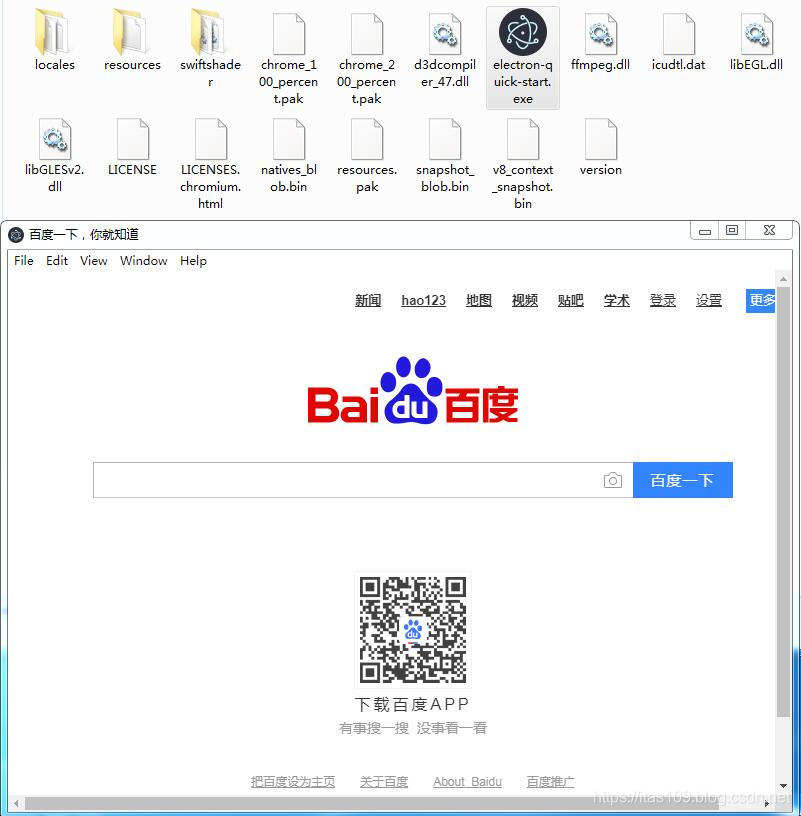
觉得文章对你有帮助,可以扫描二维码捐赠给博主,谢谢!
如需转载请标明出处:http://blog.csdn.net/itas109
QQ技术交流群:129518033
License
License under CC BY-NC-ND 4.0: 署名-非商业使用-禁止演绎
Reference:
NULL

开源鸿蒙跨平台开发社区汇聚开发者与厂商,共建“一次开发,多端部署”的开源生态,致力于降低跨端开发门槛,推动万物智联创新。
更多推荐

 0
0 0
0- 0


 已为社区贡献5条内容

所有评论(0)