

flutter bloc
什么是启动画面? (What is a Splash Screen?)
When you open your app on your phone, some apps showing you a logo or a loading bar. That is a splash screen. We can add some actions in splash screen like connection checking, fetch the data, etc.
当您在手机上打开应用程序时,某些应用程序会显示徽标或加载栏。 那是一个启动画面。 我们可以在初始屏幕中添加一些操作,例如连接检查,获取数据等。
In this article, I will show you how to build a splash screen using Flutter BLoC state management. I have written some articles about Flutter BLoC. You can read it on these links:
在本文中,我将向您展示如何使用Flutter BLoC状态管理来构建初始屏幕。 我写了一些有关Flutter BLoC的文章。 您可以在以下链接上阅读它:
The core concepts of BLoC are Events and States. Simply put, we can call input in BLoC as Events and output as States.
BLoC的核心概念是事件和状态。 简而言之,我们可以将BLoC中的输入称为事件,将输出称为状态。
1.项目设置 (1. Project Setup)
Create a new project:
创建一个新项目:
flutter create ftips_bloc_splashWhen I’m writing this article, the flutter version I used in this project:
当我写这篇文章时,我在这个项目中使用的版本是:
Flutter 1.12.13+hotfix.7 • channel stable • https://github.com/flutter/flutter.git
Framework • revision 9f5ff2306b (4 months ago) • 2020–01–26 22:38:26 -0800
Engine • revision a67792536c
Tools • Dart 2.7.0
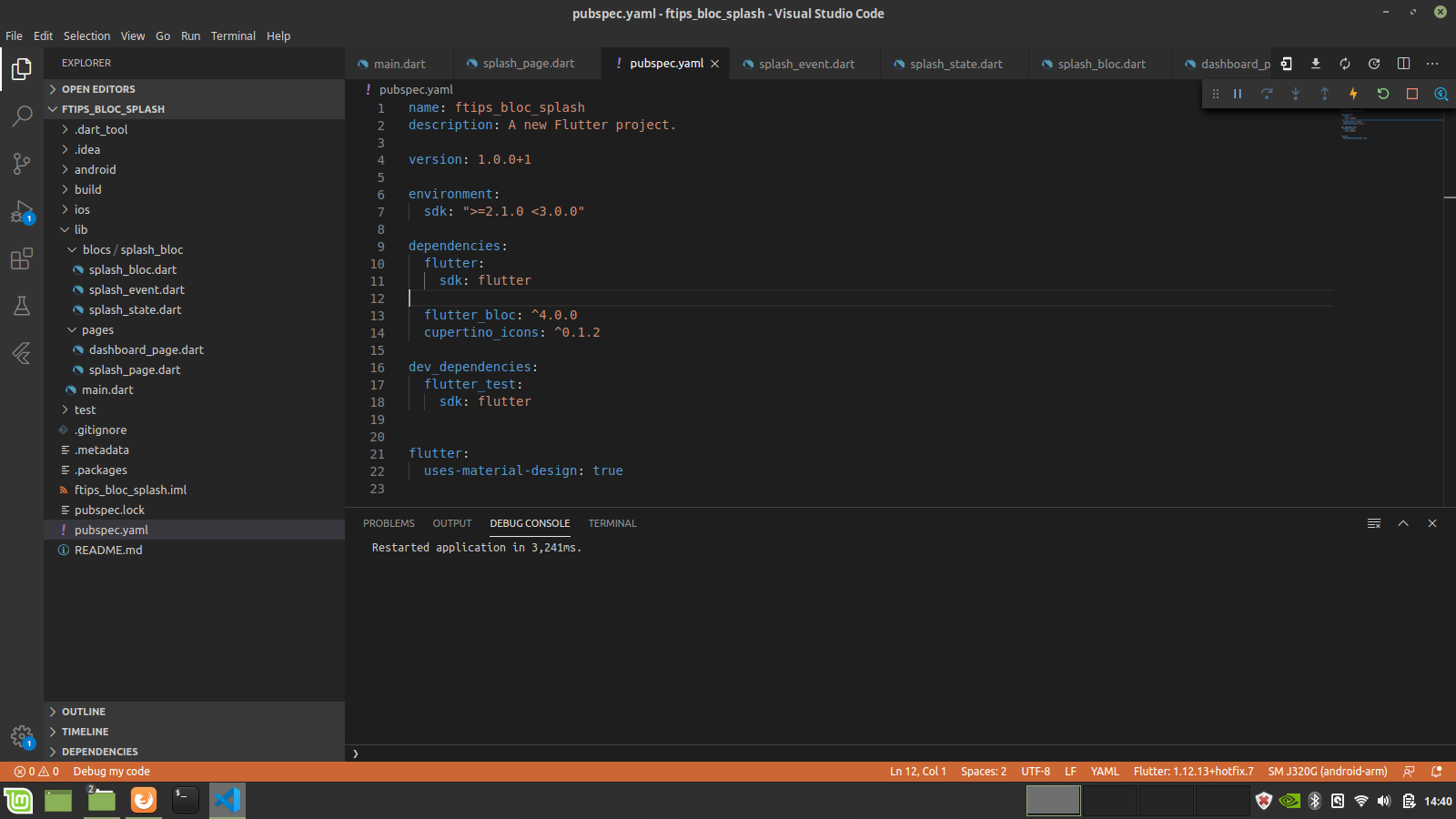
Add some dependencies in pubspec.yaml:
在pubspec.yaml添加一些依赖pubspec.yaml :
name: ftips_bloc_splash
description: A new Flutter project.


version: 1.0.0+1


environment:
  sdk: ">=2.1.0 <3.0.0"


dependencies:
  flutter:
    sdk: flutter


  flutter_bloc: ^4.0.0
  cupertino_icons: ^0.1.2


dev_dependencies:
  flutter_test:
    sdk: flutter


flutter:
  uses-material-design: true
flutter_bloc is a flutter package that helps implement the BLoC pattern.
flutter_bloc 是一个flutter软件包,帮助实现BLoC模式 。
and create some folders to store our files, so the structure of the project will be as follows:
并创建一些文件夹来存储我们的文件,因此项目的结构如下:
2.设置BLoC (2. Setup BLoC)
I will write three separate files:
我将编写三个单独的文件:
事件 (Event)
Create a file called splash_event.dart under lib/blocs/splash_bloc. If you have installed a bloc package in vscode, you can simply generate the three bloc files.
在lib/blocs/splash_bloc splash_event.dart下创建一个名为splash_event.dart的文件。 如果您在vscode中安装了bloc软件包,则只需生成三个bloc文件即可。
part of 'splash_bloc.dart';


@immutable
abstract class SplashEvent {}


class SetSplash extends SplashEvent {}
州 (State)
Create a file called splash_state.dart under lib/blocs/splash_bloc .
在lib/blocs/splash_bloc splash_state.dart下创建一个名为splash_state.dart的文件。
part of 'splash_bloc.dart';


@immutable
abstract class SplashState {}


class SplashInitial extends SplashState {}


class SplashLoading extends SplashState {}


class SplashLoaded extends SplashState {}
I write three classes:
我写了三节课:
SplashInitialfor initial the state,SplashInitial用于初始状态,SplashLoadingto inform the view that some actions are being executed.SplashLoading通知视图某些操作正在执行。SplashLoadedto inform the view that some actions have already been executed.SplashLoaded通知视图某些操作已经执行。
集团 (BLoC)
Create a file called splash_bloc.dart under lib/blocs/splash_bloc .
在lib/blocs/splash_bloc splash_bloc.dart下创建一个名为splash_bloc.dart的文件。
import 'dart:async';


import 'package:bloc/bloc.dart';
import 'package:meta/meta.dart';


part 'splash_event.dart';
part 'splash_state.dart';


class SplashBloc extends Bloc<SplashEvent, SplashState> {
  @override
  SplashState get initialState => SplashInitial();


  @override
  Stream<SplashState> mapEventToState(
    SplashEvent event,
  ) async* {
    if (event is SetSplash) {
      yield SplashLoading();
      //todo: add some actions like checking the connection etc.
      //I simulate the process with future delayed for 3 second
      await Future.delayed(Duration(seconds: 3));
      yield SplashLoaded();
    }
  }
}
3.页数 (3. Pages)
Last but not least, create some files called splash_page.dart and dashboard_page.dart under lib/pages.
最后但并非最不重要的一点是,在lib/pages下创建一些名为splash_page.dart和dashboard_page.dart文件。
初始页 (Splash Page)
I will use BlocListener to handle navigation.
我将使用BlocListener来处理导航。
import 'package:flutter/material.dart';
import 'package:flutter_bloc/flutter_bloc.dart';
import 'package:ftips_bloc_splash/blocs/splash_bloc/splash_bloc.dart';
import 'dashboard_page.dart';


class SplashPage extends StatefulWidget {
  @override
  _SplashPageState createState() => _SplashPageState();
}


class _SplashPageState extends State<SplashPage> {
  final SplashBloc _splashBloc = SplashBloc();


  @override
  void initState() {
    _splashBloc.add(SetSplash());
    super.initState();
  }


  @override
  Widget build(BuildContext context) {
    return Scaffold(
      body: Container(
        width: MediaQuery.of(context).size.width,
        height: MediaQuery.of(context).size.height,
        color: Colors.blue,
        child: BlocProvider(
          create: (_) => _splashBloc,
          child: BlocListener<SplashBloc, SplashState>(
            listener: (context, state) {
              if (state is SplashLoaded) {
                Navigator.pushReplacement(
                  context,
                  MaterialPageRoute(
                    builder: (BuildContext context) => DashboardPage(),
                  ),
                );
              }
            },
            child: _buildSplashWidget(),
          ),
        ),
      ),
    );
  }


  Widget _buildSplashWidget() {
    return Center(
      child: Text(
        "Logo Splash",
        style: TextStyle(fontSize: 28.0, color: Colors.white),
      ),
    );
  }
}
仪表板页面 (Dashboard Page)
After 3 seconds loading, the page will directed from SplashPage to DashboardPage .
加载3秒后,页面将从SplashPage到DashboardPage 。
import 'package:flutter/material.dart';


class DashboardPage extends StatelessWidget {
  @override
  Widget build(BuildContext context) {
    return Scaffold(
      body: Center(
        child: Text(
          "Dashboard Page",
          style: TextStyle(fontSize: 28.0),
        ),
      ),
    );
  }
}Thanks for reading,
谢谢阅读,
stay safe, stay healthy.
保持安全,保持健康。
翻译自: https://medium.com/swlh/flutter-tips-build-a-splash-screen-with-flutter-bloc-9468dfca707b
flutter bloc


 已为社区贡献60条内容

所有评论(0)