RN 抽屉导航DrawerNavigator
RN 抽屉导航DrawerNavigator一、DrawerNavigator接口二、抽屉导航页面三、 打开抽屉式导航四、遇到的问题一、DrawerNavigator接口DrawerNavigator(RouteConfigs,DrawerNavigatorConfig)其中RouteConfigs部分和StackNavigator的完全一样。DrawerNavigatorConfig的各个...
·
RN 抽屉导航DrawerNavigator
一、DrawerNavigator接口
DrawerNavigator(RouteConfigs,DrawerNavigatorConfig)
其中RouteConfigs部分和StackNavigator的完全一样。DrawerNavigatorConfig的各个参数如代码注释
const DrawerNavigatorDemo =DrawerNavigator(
  {
    Home: {screen: MyHomeScreen},
    Notifications: {screen: MyNotificationsScreen}
  },
  {
    /**
     * 抽屉式导航的 宽度
     */
    drawerWidth: totalWidth*0.8,
    /**
     * 抽屉式导航的 从哪个方向出来, rihgt, left
     */
    drawerPosition: 'left',
    /**
     * 自定义抽屉菜单的 内容
     */
    // contentComponent: props => {
    //     console.log(props);
    //     return (
    //         <View>
    //             <View style={{ height: 90, backgroundColor: '#ff0000' }}>
    //                 <View style={{ height: 20 }} />
    //                 <Text>123</Text>
    //             </View>
    //             <StatusBar backgroundColor="blue" barStyle="dark-content" />
    //             <ScrollView>
    //                 <SafeAreaView>
    //                     {/* SafeAreaView
    //                        匹配iphonex  安全区域视图 */}
    //                     <DrawerItems {...props} />
    //                 </SafeAreaView>
    //             </ScrollView>
    //         </View>
    //     )
    // },
    /**
     * 启用本地动画,测试好像没啥变化
     */
    useNativeAnimations: true,
    /**
     * 抽屉容器的背景颜色 默认为白色
     */
    drawerBackgroundColor: '#fff',
    /**
     * 路由默认
     */
    initialRouteName: 'Home',
    /**
     * 需要显示的路由,也可以进行排序
     */
    // order: []
    /**
     * 后退按钮是否会切换到初始路由? 如果是,设置为initialRoute,否则为none。 默认为initialRoute行为
     */
    backBehavior: null,
    /**
     * 内容选项
     */
    contentOptions: {
      /**
       * 活动标签的标签和图标颜色
       */
      activeTintColor: '#ff0000',
      /**
       * 活动标签的背景颜色
       */
      activeBackgroundColor: 'lightgray',
      /**
       * 非活动标签的标签和图标颜色
       */
      inactiveTintColor: '#000',
      /**
       * 非活动标签的背景颜色
       */
      inactiveBackgroundColor: '#fff',
      /**
       * 按下时触发
       */
      onItemPress(router) {
        console.log(router)
      },
      /**
       * 容器的样式 View
       */
      itemsContainerStyle: {
        //backgroundColor: 'yellow'
      },
      /**
       * 单个item容器样式 View
       */
      itemStyle: {
       //backgroundColor: 'yellow'
      },
      /**
       * label 字体样式
       */
      labelStyle: {
        color: '#000'
      },
      /**
       * icon 容器样式
       */
      iconContainerStyle: {
        backgroundColor: 'blue'
      }
    }
  }
);
二、抽屉导航页面
class MyHomeScreen extends React.Component {
  static navigationOptions = {
    drawerLabel: 'Home',
    drawerIcon: ({ tintColor, focused }) =>
      <Image style={styles.icon}
             source={{uri:focused?'https://img.58cdn.com.cn/escstatic/fecar/pmuse/intelligent_guide/sellcar.png':'https://img.58cdn.com.cn/escstatic/fecar/pmuse/inteliigent_guide/%E4%BC%B0%E8%BD%A6%E4%BB%B7%E5%BA%95%E9%83%A8%E5%B0%8F%E5%9B%BE@2x.png'}}/>
  };

  openDrawer = () => {
    // 打开抽屉式导航
    const { navigate } = this.props.navigation;
    navigate('DrawerOpen')
  };

  render() {
    return (
      <View
        style={{
          flex: 1,
          alignItems: 'center',
          justifyContent: 'center',
          flexDirection: 'column'
        }}
      >
        <Button onPress={()=>{this.props.navigation.navigate('Notifications')}}
          title="Go to notifications"
        />
        <Button onPress={() => this.openDrawer()} title="OpenDrawer" />
      </View>
    )
  }
}

class MyNotificationsScreen extends React.Component {
  static navigationOptions = {
    drawerLabel: 'Notifications',
    drawerIcon: ({ tintColor, focused }) =>
      <Image style={styles.icon}
             source={{uri:focused?'https://img.58cdn.com.cn/escstatic/fecar/pmuse/intelligent_guide/sellcar.png':'https://img.58cdn.com.cn/escstatic/fecar/pmuse/inteliigent_guide/%E4%BC%B0%E8%BD%A6%E4%BB%B7%E5%BA%95%E9%83%A8%E5%B0%8F%E5%9B%BE@2x.png'}}/>
  };

  render() {
    return (
      <View
        style={{
          flex: 1,
          alignItems: 'center',
          justifyContent: 'center',
          flexDirection: 'column'
        }}
      >
        <Button onPress={()=>{this.props.navigation.navigate('Home')}}
                title="Go back home"
        />
      </View>
    )
  }
}
三、 打开抽屉式导航
const { navigate } = this.props.navigation; navigate('DrawerOpen')
四、遇到的问题
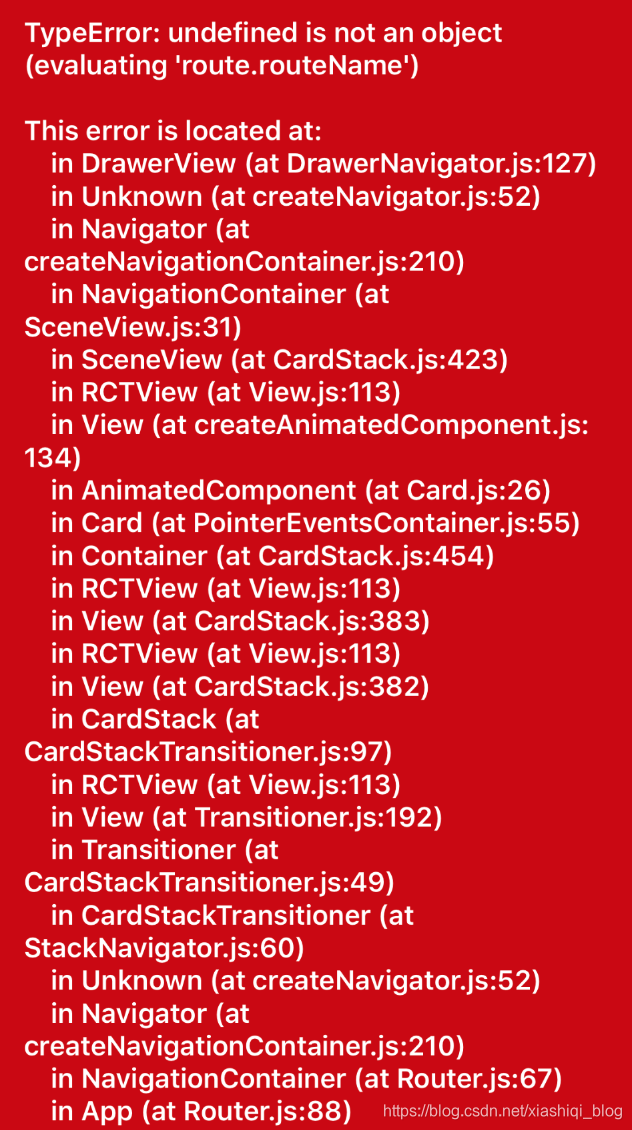
期间遇到了这个bug,排查后发现为 react-navigation@1.0.0-beta.22的bug
npm uninstall react-navigation && npm install react-navigation@1.0.0-beta.21 可以解决,最终效果如图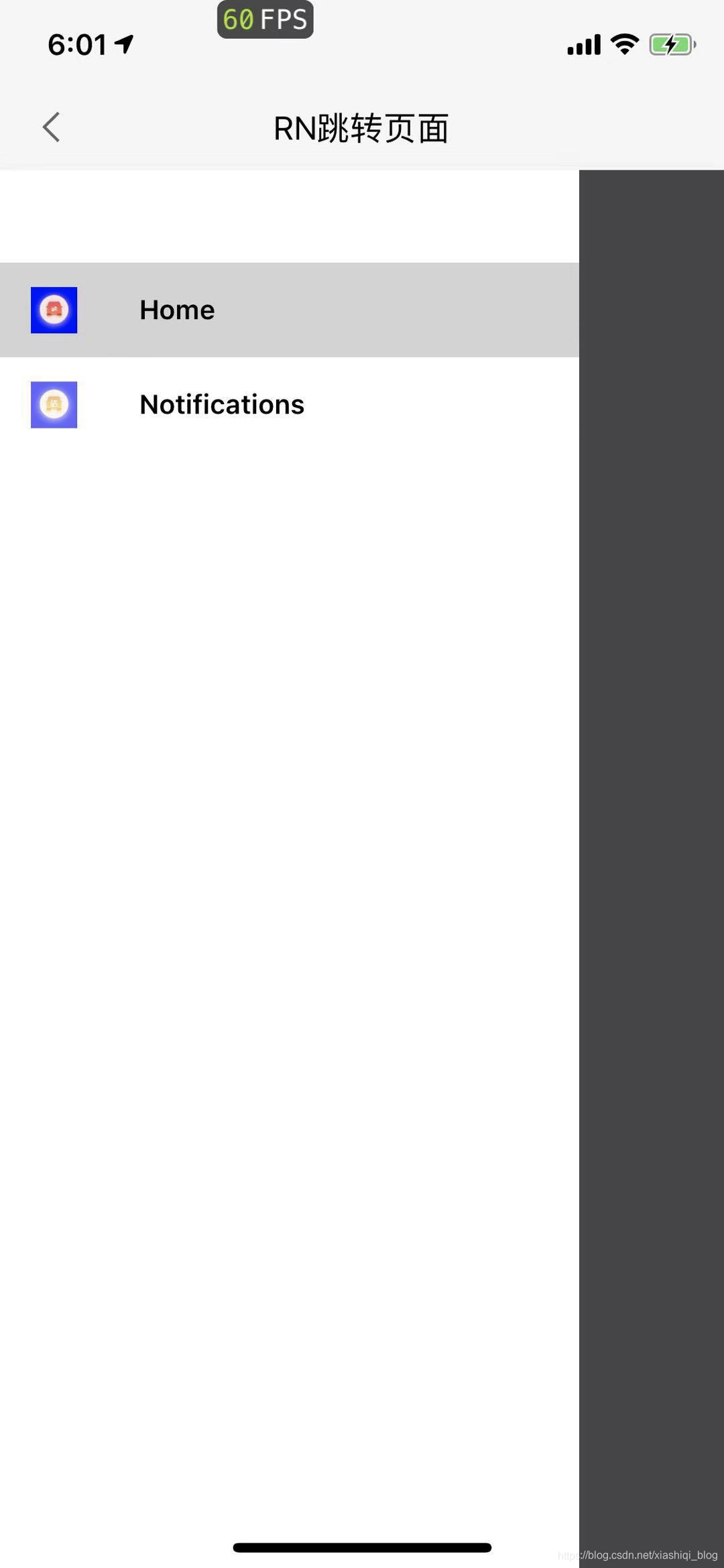

开源鸿蒙跨平台开发社区汇聚开发者与厂商,共建“一次开发,多端部署”的开源生态,致力于降低跨端开发门槛,推动万物智联创新。
更多推荐

 0
0 0
0- 0


 已为社区贡献7条内容

所有评论(0)