Flutter劫富济贫计划(一)——flutter布局实战
本计划 就是帮助 大家学习Flutter 的计划, 在这里我会分享出一些APP中常用到的页面,记得点击关注~登录页面效果截图import 'dart:async';import 'package:flutter/material.dart';import 'package:fluttertoast/fluttertoast.dart';import 'package:projec...
·
本计划 就是帮助 大家学习Flutter 的计划, 在这里我会分享出一些APP中常用到的页面,记得点击关注~
登录页面
效果截图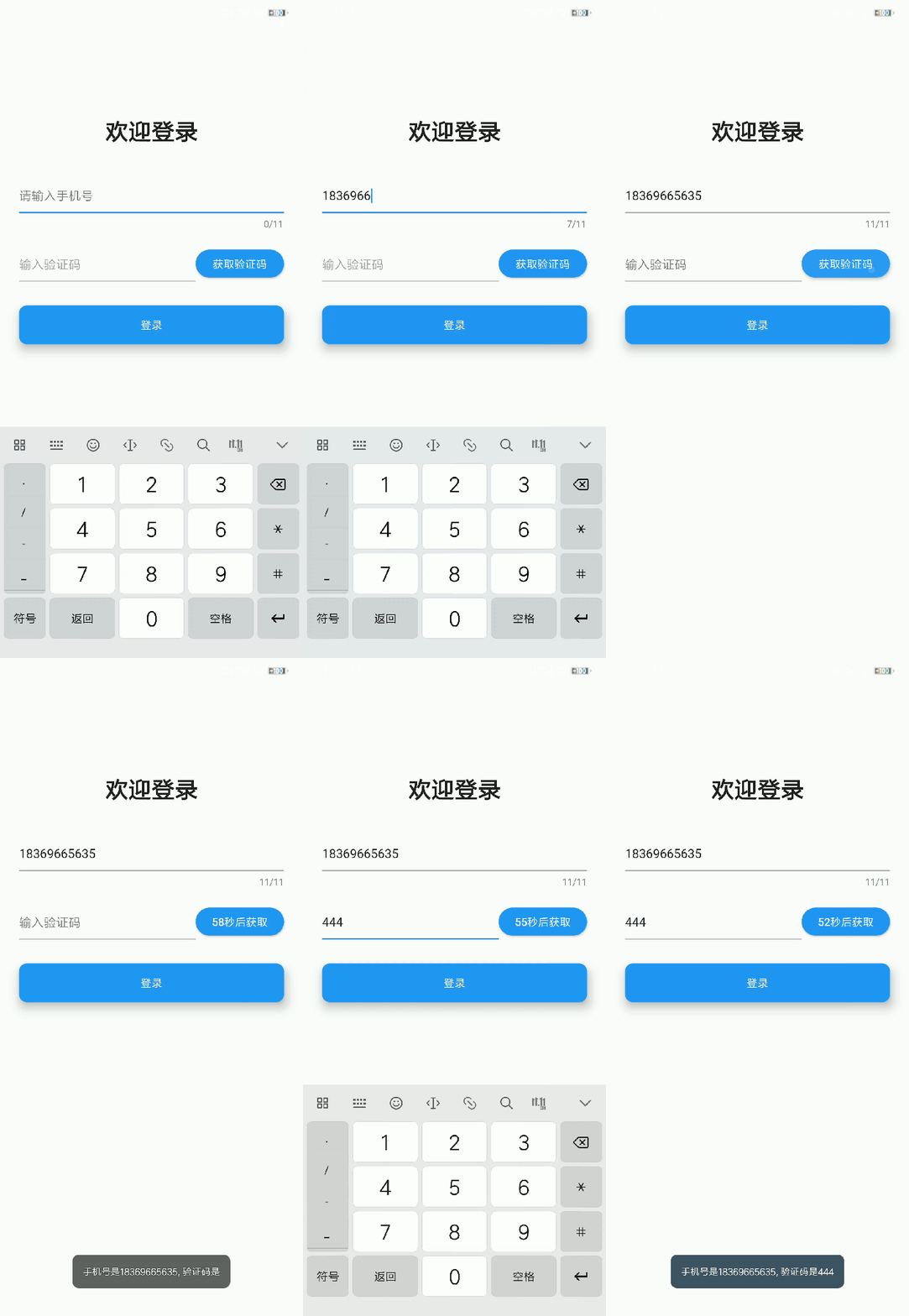
import 'dart:async';

import 'package:flutter/material.dart';
import 'package:fluttertoast/fluttertoast.dart';

import 'package:project/plugins/Plugins.dart';

// import 'package:project/plugins/timer.dart';

class LoginPage extends StatefulWidget {
  @override
  _LoginPageState createState() => _LoginPageState();
}

class _LoginPageState extends State<LoginPage> {

  TextEditingController  _phone = new TextEditingController();        // 手机号、验证码
  TextEditingController  _verification = new TextEditingController();        // 手机号、验证码
  Timer _timer;
  int _countdownTime = 0;
  bool _isget;                      // 验证码Widget
  bool _verification_available;     // 输入框是否可用

  Widget getVerification(){
    if(_isget){
      return Text('获取验证码');
    }else{
      return Text('${_countdownTime}秒后获取');
    }
  }

 // 倒计时
  void startCountdownTimer() {

      const oneSec = const Duration(seconds: 1);
      var callback = (timer) => {
        setState(() {
        if (_countdownTime < 1) {
          _timer.cancel();
          setState(() {
           _isget = true;
          });
        } else {
          _countdownTime = _countdownTime - 1;    // 倒计时 自减
        }
        })
    };
    _timer = Timer.periodic(oneSec, callback);
}


  // 初始化
  @override
  void initState() {
    super.initState();
    // _phone.addListener((){
    //   print(_phone.text);
    // });
    _verification_available = false;
    _isget = true;
  }

  // 销毁时
  @override
  void dispose() {
  super.dispose();
  if (_timer != null) {
    _timer.cancel();
  }
  }

  @override
  Widget build(BuildContext context) {
    return Scaffold(
      // appBar: AppBar(
      //   backgroundColor:Colors.white,
      //   leading:IconButton(
      //     icon: Icon(
      //       Theme.of(context).platform == TargetPlatform.iOS ? Icons.arrow_back_ios : Icons.arrow_back,
      //       color: Theme.of(context).accentColor,
      //     ),
      //     onPressed: (){
      //       Navigator.of(context).pop();
      //     },
      //   )
      // ),
      body: Container(
        width:double.infinity,
        margin: EdgeInsets.symmetric(horizontal: 25.0),
        padding: EdgeInsets.fromLTRB(0, 150.0, 0, 0),
        child: Column(
          children: <Widget>[
            Container(
              child: Text('欢迎登录',style: TextStyle(
                fontSize: 30.0,
                fontWeight: FontWeight.bold
              )),
              margin: EdgeInsets.fromLTRB(0, 0, 0, 40.0),
            ),
            TextField(
              // autofocus: true,
              decoration: InputDecoration(
                hintText: "请输入手机号",
                // errorText: ,
              ),
              maxLength: 11,
              controller: _phone,         // 表示默认值
              onChanged:(value){
                _phone.text = value;
                //  判断如果手机号可用才能进行验证码操作
                if(Plugins.isChinaPhoneLegal(value)){
                  setState(() {
                    _verification_available = true;
                  });
                }else{
                  setState(() {
                    _verification_available = false;
                  });
                }
                //  将光标一直置于末尾
                 _phone.selection = TextSelection.fromPosition(
                  TextPosition(offset: _phone.text.length)
                );
              },
              onSubmitted: (val){
                print(_phone.text);
                print("点击了键盘上的动作按钮,当前输入框的值为:${val}");
              },
              keyboardType:TextInputType.number
            ),
            SizedBox(height: 20.0),
            Row(
              children: <Widget>[
                Expanded(
                  child: TextField(
                    decoration: InputDecoration(
                      hintText: '输入验证码',
                    ),
                    enabled:_verification_available ? true : false,
                    controller: _verification,
                    onChanged: (val){
                      _verification.text = val;
                      _verification.selection = TextSelection.fromPosition(
                        TextPosition(offset: _verification.text.length)
                      );
                    },
                    onSubmitted: (val){
                      print("点击了键盘上的动作按钮,当前输入框的值为:${val}");
                    },
                    keyboardType:TextInputType.number
                  ),
                  flex: 2,
                ),
                Expanded(
                  child: RaisedButton(
                    child: getVerification(),
                    shape: RoundedRectangleBorder(
                      borderRadius: BorderRadius.circular(25)
                    ),
                    color: Theme.of(context).accentColor,
                    textColor: Colors.white,
                    onPressed: (){

                      _verification_available ?
                      Fluttertoast.showToast(
                        msg: '手机号是${_phone.text}'
                      )
                      :
                      Fluttertoast.showToast(
                        msg: '请输入正确的手机号'
                      );
                      if (_verification_available && _countdownTime == 0) {
                        setState(() {
                          _countdownTime = 60;
                          _isget = false;
                        });
                        //开始倒计时
                        startCountdownTimer();
                        }
                      // print('手机号是${_phone.text}, 验证码是${_verification.text}');
                    },
                  ),
                  flex: 1,
                )
              ],
            ),
            SizedBox(height: 30.0),
            Row(
              children: <Widget>[
                Expanded(
                  child: Container(
                    height: 50.0,
                    child: RaisedButton(
                      child: Text('登录',style: TextStyle(),),
                      color: Theme.of(context).accentColor,
                      textTheme: ButtonTextTheme.primary,
                      onPressed: () {
                        _verification_available ?
                        Fluttertoast.showToast(
                          msg: '手机号是${_phone.text}, 验证码是${_verification.text}'
                        )
                        :
                        Fluttertoast.showToast(
                          msg: '请输入正确手机号或输入正确验证码'
                        );
                      },
                      elevation: 10,
                      shape: RoundedRectangleBorder(
                        borderRadius:BorderRadius.circular(10)
                      ),
                    ),
                  ),
                )
              ],
            )
          ],
        ),
      ),
    );
  }


}
数据展示页面
数据是我随便编的。。。 不要举报我 o(╥﹏╥)o
效果截图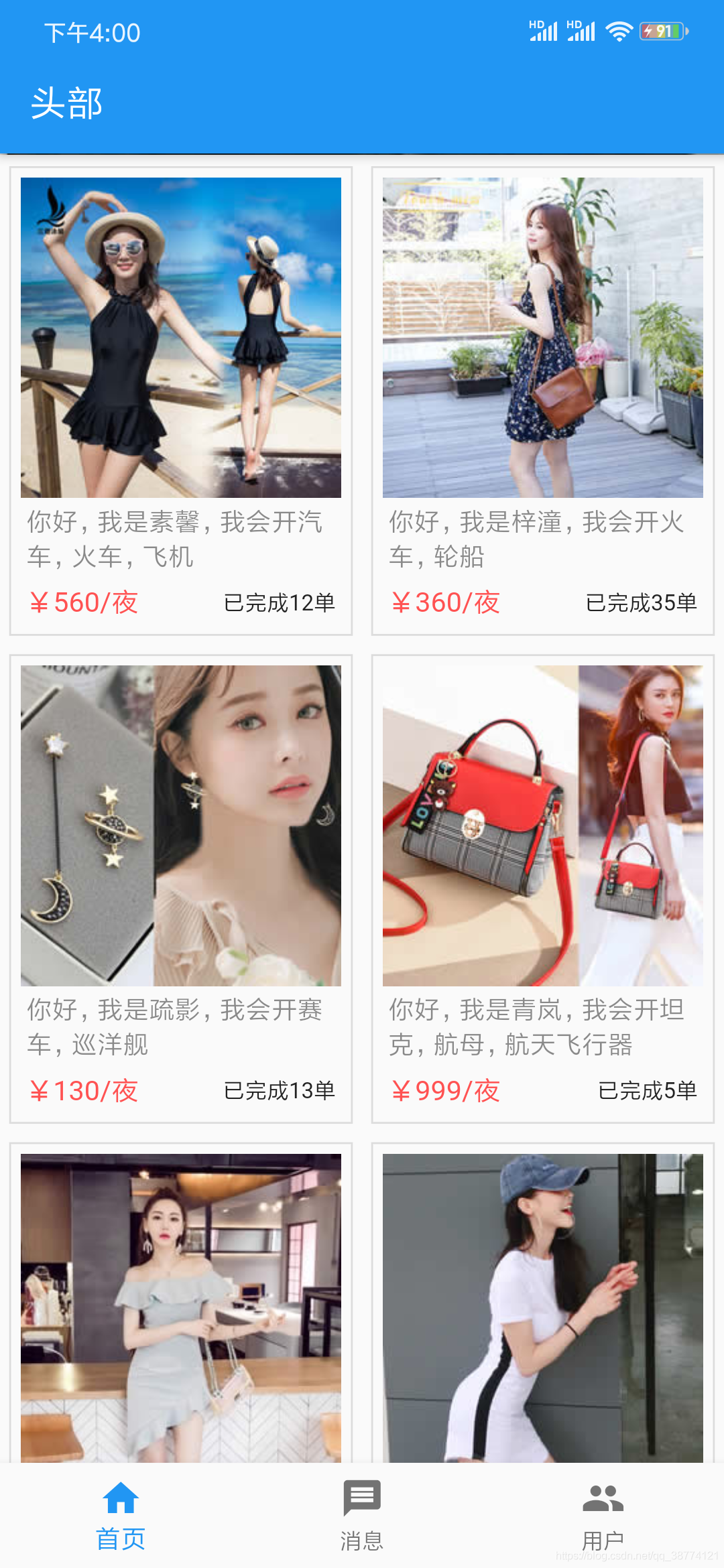
Widget recommendWidget(){
  // var str = '{"img":"http://img2.imgtn.bdimg.com/it/u=1953606852,863263430&fm=26&gp=0.jpg", "title":"你好,我是司机,我会开汽车,火车,飞机", "price":160, "rommond":16}';

  var itemWidth = (ScreenAdaper.getScreenWidth() - 20) /2;// 每一个网格的宽度

  List<Map> data = [
    {"img":"https://www.itying.com/images/flutter/list1.jpg", "title":"你好,我是素馨,我会开汽车,火车,飞机", "price":560, "rommond":12},
    {"img":"https://www.itying.com/images/flutter/list2.jpg", "title":"你好,我是梓潼,我会开火车,轮船", "price":360, "rommond":35},
    {"img":"https://www.itying.com/images/flutter/list3.jpg", "title":"你好,我是疏影,我会开赛车,巡洋舰", "price":130, "rommond":13},
    {"img":"https://www.itying.com/images/flutter/list4.jpg", "title":"你好,我是青岚,我会开坦克,航母,航天飞行器", "price":999, "rommond":5},
    {"img":"https://www.itying.com/images/flutter/list5.jpg", "title":"你好,我是若兰,我会开大炮,骑行车", "price":420, "rommond":32},
    {"img":"https://www.itying.com/images/flutter/list6.jpg", "title":"你好,我是甜甜,我会开客机,快艇", "price":500, "rommond":160},
    {"img":"https://www.itying.com/images/flutter/list7.jpg", "title":"你好,我是萱萱,我会吃鸡", "price":700, "rommond":1850},
  ];

  return Container(
    padding: EdgeInsets.symmetric(horizontal: 5),      // 两边内边距
    margin: EdgeInsets.only(bottom: ScreenAdaper.setWidth(10)),
    child: Wrap(
      spacing: 10,             // 平行距离
      runSpacing: 10,         // 上下距离
      children: data.map((value){
        return Container(
            width: itemWidth,
            padding: EdgeInsets.all(ScreenAdaper.setWidth(10)),
            decoration: BoxDecoration(
              border: Border.all(
                color:Colors.black12,
                width: 1
              )
            ),
            child: Column(
              children: <Widget>[
                Container(
                  width: double.infinity,           // 自适应占满全部
                  child: AspectRatio(
                    aspectRatio: 1/1,               // 图片宽高比 1/1
                    child: Image.network(value['img'], fit: BoxFit.cover,),  // 图片自适应
                  )
                ),
                Padding(
                  padding: EdgeInsets.all(ScreenAdaper.setWidth(5)),
                  child:Text(
                  value['title'],
                  maxLines: 2,
                  overflow: TextOverflow.ellipsis,
                  style: TextStyle(color:Colors.black45),
                ),
                ),
                Padding(
                  padding: EdgeInsets.all(ScreenAdaper.setWidth(5)),
                  child: Row(
                  children: <Widget>[
                    Expanded(
                      child: Text('¥'+value['price'].toString()+'/夜', textAlign:TextAlign.left,style: TextStyle(color: Colors.redAccent, fontSize: 15.0),),
                      flex: 1,
                    ),
                    Expanded(
                      child: Text('已完成'+value['rommond'].toString()+'单',textAlign:TextAlign.right,style: TextStyle(fontSize: 12.0)),
                      flex: 1,
                    )
                  ],
                ),
                )
              ],
            ),
          );
      }).toList()
    ),
  );
}
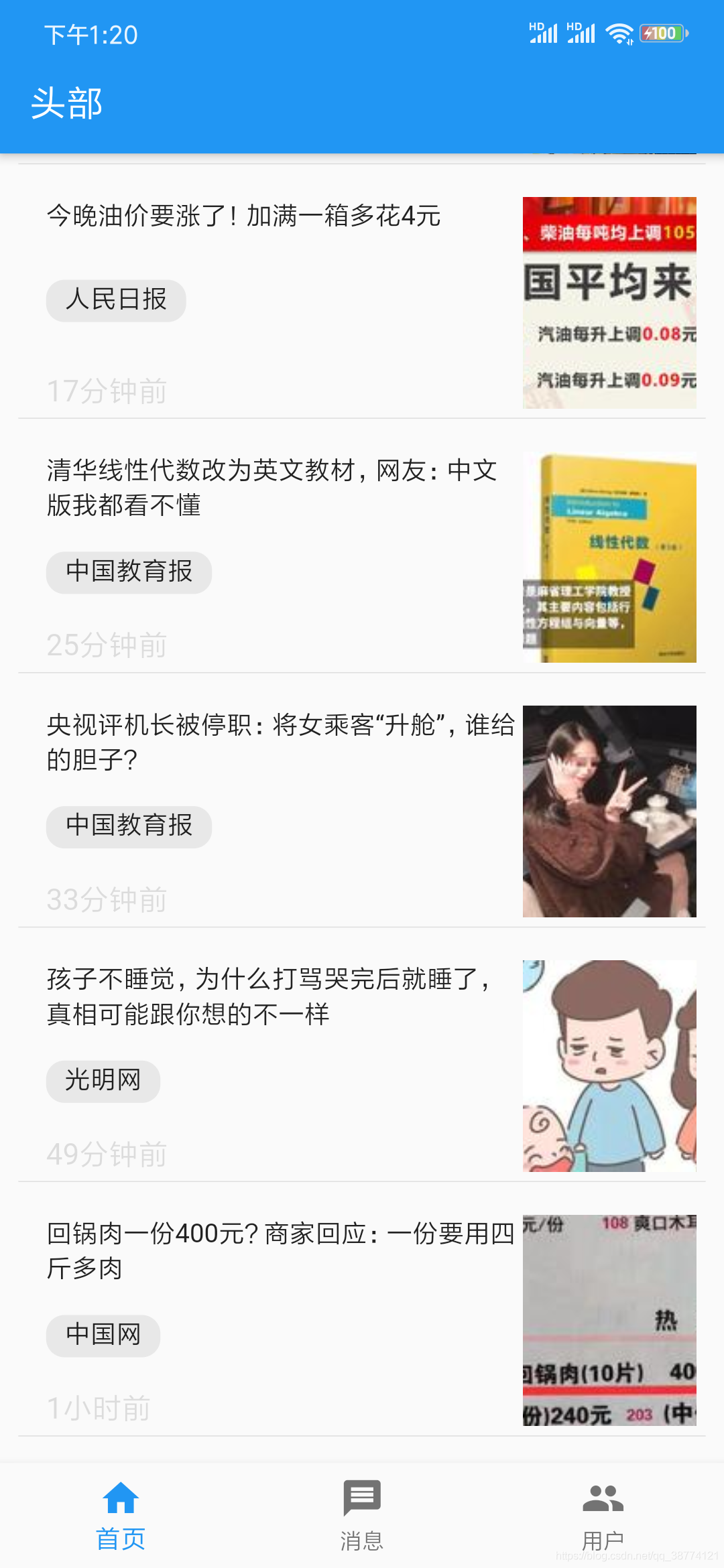
新闻展示页面
Widget Article(){

  List<Map> data = [

    {'title':'今晚油价要涨了!加满一箱多花4元', 'source':'人民日报', 'time':'17分钟前', 'img':'https://p3.pstatp.com/list/190x124/pgc-image/RgqIEDmFZZCSg6'},
    {'title':'清华线性代数改为英文教材,网友:中文版我都看不懂', 'source':'中国教育报', 'time':'25分钟前', 'img':'https://p9.pstatp.com/list/190x124/pgc-image/53731d7bf38541f48572e561e7ea0e24'},
    {'title':'央视评机长被停职:将女乘客“升舱”,谁给的胆子?', 'source':'中国教育报', 'time':'33分钟前', 'img':'https://p1.pstatp.com/list/190x124/pgc-image/RgqMRKyAA8aZ0K'},
    {'title':'孩子不睡觉,为什么打骂哭完后就睡了,真相可能跟你想的不一样', 'source':'光明网', 'time':'49分钟前', 'img':'https://p9.pstatp.com/list/190x124/pgc-image/RgpWgJGCPor2Yr'},
    {'title':'回锅肉一份400元?商家回应:一份要用四斤多肉', 'source':'中国网', 'time':'1小时前', 'img':'https://p3.pstatp.com/list/190x124/pgc-image/Rgomoy1CnbRosl'},
    {'title':'一年级小学生的“散装”拼音,让人笑破肚皮,家长:不会教', 'source':'光明网', 'time':'1小时前', 'img':'https://p1.pstatp.com/list/190x124/pgc-image/RgpWdrkC7LcYO'},
    {'title':'夫妻双双膝盖坏掉,竟因这个坚持10年的习惯', 'source':'中国经济网', 'time':'1小时前', 'img':'https://p1.pstatp.com/list/190x124/pgc-image/RgrGGZBEjH2HFa'},
    {'title':'公安部A级通缉令通缉20名重大黑恶在逃人员', 'source':'法制日报', 'time':'1小时前', 'img':'https://p3.pstatp.com/list/190x124/pgc-image/RgrLxiwDY0Z84u'},
  ];

  return Padding(
    padding: EdgeInsets.all(10),
    child: Column(
          children: data.map((value){
            return Container(
              margin: EdgeInsets.only(bottom: ScreenAdaper.setHeight(20)),
              padding: EdgeInsets.all(5),
              decoration: BoxDecoration(
                border: Border(
                  bottom:BorderSide(
                    width: 0.5,
                    color: Colors.black12
                  )
                )
              ),
              child:Row(
              children: <Widget>[
                Expanded(
                  flex: 1,
                  child: Container(
                    height: ScreenAdaper.setHeight(180),
                    margin: EdgeInsets.only(left:10),
                    child: Column(
                      mainAxisAlignment: MainAxisAlignment.spaceBetween,     //表示元素之间的间距一样(和flex布局中的between一样)
                      crossAxisAlignment: CrossAxisAlignment.start,
                      children: <Widget>[
                        Text(
                          value['title'],
                          maxLines: 2,
                          overflow: TextOverflow.ellipsis,
                        ),
                        Row(
                          children: <Widget>[
                            Container(
                              height: ScreenAdaper.setHeight(36),
                              margin: EdgeInsets.only(right: 10),
                              padding: EdgeInsets.fromLTRB(10, 0, 10, 0),
                              // 如果Container里面加上decoration属性,这个使用color一定要放到decoration当中
                              decoration: BoxDecoration(
                                borderRadius: BorderRadius.circular(10),
                                color: Color.fromRGBO(230, 230, 230, 0.9)
                              ),
                              child: Text(value['source']),
                            )
                          ],
                        ),
                        Text(
                          value['time'],
                         style: TextStyle(color:Colors.black12, fontSize: 16),
                        )
                      ],
                    ),
                  ),
                ),
                Container(
                  width: ScreenAdaper.setWidth(180),
                  height: ScreenAdaper.setHeight(180),
                  child: Image.network(value['img'], fit:BoxFit.cover),
                ),
              ],
            )
            );
          }).toList()
        )
  );
}
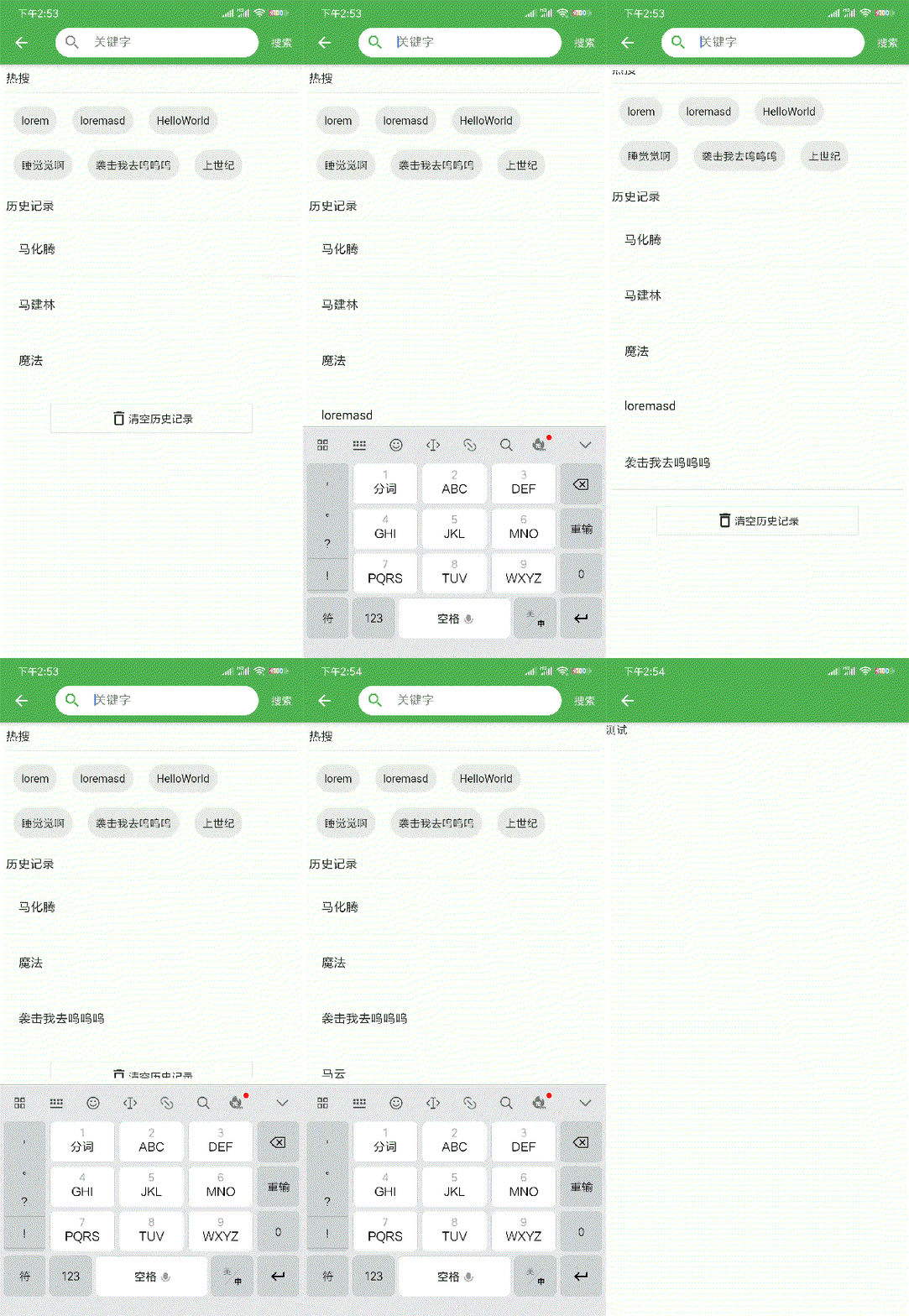
搜索页面
因为该页面牵扯到本地存储,如果不清楚的同学,请看我另外一篇配置本地存储的文章文章地址另外引入了屏幕适配screenUtils,具体可看这篇文章文章地址
完成的功能有:
- 本地存储搜索数据
- 关键字搜索匹配
- 搜索历史删除
- 清空全部搜索历史
- 点击后一键搜索
import 'package:flutter/material.dart';
import 'package:project/plugins/ScreenAdapter.dart';      // 屏幕适配
import 'package:project/plugins/PublicStorage.dart';      // 本地存储搜索数据

import 'package:fluttertoast/fluttertoast.dart';          // 提示

import 'asset.dart';                                      // 模拟数据

class SearchPage extends StatefulWidget {
  @override
  _SearchPageState createState() => _SearchPageState();
}

class _SearchPageState extends State<SearchPage> {
  // var _keywords = '';
  TextEditingController _keywords =  TextEditingController();
  List _historyListData = [];
  var isSearch = false;

  List data = ['lorem', 'loremasd', 'HelloWorld', '睡觉觉啊', '袭击我去呜呜呜', '上世纪'];

  @override
  void initState() {
    super.initState();
    this._getHistoryData();
  }

  // 获取本地存储
  _getHistoryData() async {
    var _historyListData = await PublicStorage.getHistoryList('searchList');
    // print('获取本地存储${_historyListData}');
    setState(() {
      this._historyListData = _historyListData;
    });
  }

  // 弹出框
  _alertDialog(keywords) async {
    var result = await showDialog(
        barrierDismissible: false, // 表示点击灰色背景的时候是否消失弹出框
        context: context,
        builder: (context) {
          return AlertDialog(
            title: Text('提示信息'),
            content: Text('您确定要删除吗?'),
            actions: <Widget>[
              FlatButton(
                child: Text('取消'),
                onPressed: () {
                  print('点击了取消');
                  Navigator.pop(context, 'Cancle');
                },
              ),
              FlatButton(
                child: Text('确定'),
                onPressed: () async {
                  // 只有异步才能删掉
                  await PublicStorage.removeHistoryData('searchList', keywords);
                  this._getHistoryData();
                  Navigator.pop(context, 'Ok');
                },
              )
            ],
          );
        });
  }

  // 历史记录控件
  Widget _historyListWidget() {
    if (_historyListData.length > 0) {
      return Column(
        crossAxisAlignment: CrossAxisAlignment.start,
        children: <Widget>[
          Container(
            child: Text(
              '历史记录',
              style: TextStyle(fontSize: ScreenAdapter.size(30)),
            ),
          ),
          Divider(),
          Column(
              children: this._historyListData.map((value) {
            return Column(
              children: <Widget>[
                ListTile(
                  title: Text("${value}"),
                  // 长按
                  onLongPress: () {
                    this._alertDialog("${value}");
                  },
                ),
                Divider()
              ],
            );
          }).toList()),
          SizedBox(
            height: ScreenAdapter.setHeight(20),
          ),
          Row(
            mainAxisAlignment: MainAxisAlignment.center,
            children: <Widget>[
              InkWell(
                child: Container(
                  width: ScreenAdapter.setWidth(500),
                  height: ScreenAdapter.setHeight(60),
                  decoration: BoxDecoration(
                      border: Border.all(
                          color: Color.fromRGBO(233, 233, 233, 0.9), width: 1)),
                  child: Row(
                    mainAxisAlignment: MainAxisAlignment.center,
                    children: <Widget>[
                      Icon(Icons.delete_outline),
                      Text('清空历史记录')
                    ],
                  ),
                ),
                onTap: () {
                  PublicStorage.clearHistoryList('searchList');
                  _getHistoryData();
                },
              )
            ],
          )
        ],
      );
    } else {
      return Text("");
    }
  }

  // 是否展示搜索推荐
  Widget _isShowRecommend(){
    // 如果没有数据,就返回推荐数组,如果有数据就返回数组当中查找到的
    final suggestionList = _keywords.text.isEmpty
        ? recentSuggest
        : searchList.where((input) => input.startsWith(_keywords.text)).toList();
    if(!isSearch){
      // 没有输入搜索内容
      return Padding(
          padding: EdgeInsets.all(ScreenAdapter.setWidth(15)),
          child: ListView(
            children: <Widget>[
              Container(
                child: Text(
                  '热搜',
                  style: TextStyle(fontSize: ScreenAdapter.size(30)),
                ),
              ),
              Divider(),
              Wrap(
                  children: data.map((value) {
                return InkWell(
                  child: Container(
                    padding: EdgeInsets.all(10),
                    margin: EdgeInsets.all(10),
                    decoration: BoxDecoration(
                        color: Color.fromRGBO(233, 233, 233, 0.9),
                        borderRadius: BorderRadius.circular(20)),
                    child: Text(value),
                  ),
                  onTap: (){
                    // print(value);
                    setState(() {
                     _keywords.text = value;
                     isSearch = true;
                     searchMetod();
                     print(_keywords.text);
                    });
                  },
                );
              }).toList()),
              SizedBox(
                height: ScreenAdapter.setHeight(20),
              ),
              // 历史记录
              _historyListWidget()
            ],
          ),
        );
    }else{
      // 输入搜索内容时
      return ListView.builder(
        itemCount: suggestionList.length,
        itemBuilder: (context, index){
          return InkWell(
            child: ListTile(
              title: RichText(
                  text: TextSpan(
                      text: suggestionList[index].substring(0, _keywords.text.length),
                      style: TextStyle(
                          color: Colors.black, fontWeight: FontWeight.bold),
                      children: [
                    TextSpan(
                        text: suggestionList[index].substring(_keywords.text.length),
                        style: TextStyle(color: Colors.grey))
                  ])),
            ),
            onTap: (){
              // print(suggestionList[index]);
               setState(() {
                _keywords.text = suggestionList[index];
                isSearch = true;
                searchMetod();
                print(_keywords.text);
              });
            },
          );
        }
      );
    }
  }

  @override
  Widget build(BuildContext context) {
    return Scaffold(
        appBar: AppBar(
          title: Container(
              height: ScreenAdapter.setHeight(60),
              decoration: BoxDecoration(
                  color: Colors.white, borderRadius: BorderRadius.circular(30)),
              padding: EdgeInsets.only(left: 10),
              child: TextField(
                controller: _keywords,
                autofocus: false,
                // 去掉boder的默认边框
                decoration: InputDecoration(
                    icon: Icon(Icons.search),
                    border: OutlineInputBorder(borderSide: BorderSide.none),
                    hintText: '关键字',
                    contentPadding: EdgeInsets.fromLTRB(0, 10, 0, 10)),
                onChanged: (value) {
                  if(value!= ''){
                    setState(() {
                     isSearch = true;
                     this._keywords.text = value;
                    });
                  }else{
                    setState(() {
                     isSearch = false;
                    });
                  }
                  // 如果绑定了控制器,可利用此方法避免文本框的Bug
                  _keywords.selection = TextSelection.fromPosition(
                    TextPosition(offset: _keywords.text.length)
                  );
                },
              )),
          actions: <Widget>[
            InkWell(
              child: Container(
                height: ScreenAdapter.setHeight(60),
                width: ScreenAdapter.setWidth(80),
                child: Row(
                  children: <Widget>[Text('搜索')],
                ),
              ),
              onTap: searchMetod
            )
          ],
        ),
        body: _isShowRecommend()
      );
  }


  searchMetod() async {
    if(isSearch){
      // 等待本地存储
      await PublicStorage.setHistoryList('searchList',this._keywords.text);
      // 本地存储过后,在搜索页面再一次获取一遍数据
      await this._getHistoryData();
      Navigator.pushNamed(context, '/register');
    }else{
      Fluttertoast.showToast(
        msg: '请输入内容'
      );
    }
  }
}

开源鸿蒙跨平台开发社区汇聚开发者与厂商,共建“一次开发,多端部署”的开源生态,致力于降低跨端开发门槛,推动万物智联创新。
更多推荐

 1
1 0
0- 0


 已为社区贡献17条内容

所有评论(0)