

云笔记 印象笔记
重点 (Top highlight)
Disclaimer: The goal of these notes is not to write an original commentary on this or any other topic, rather collect quotes and opinions from various sources and android experts in one place for better understanding!
免责声明:这些注释的目的不是要针对此主题或任何其他主题写原始的评论,而是在一个地方收集来自各种来源和android专家的引文和观点,以便更好地理解!
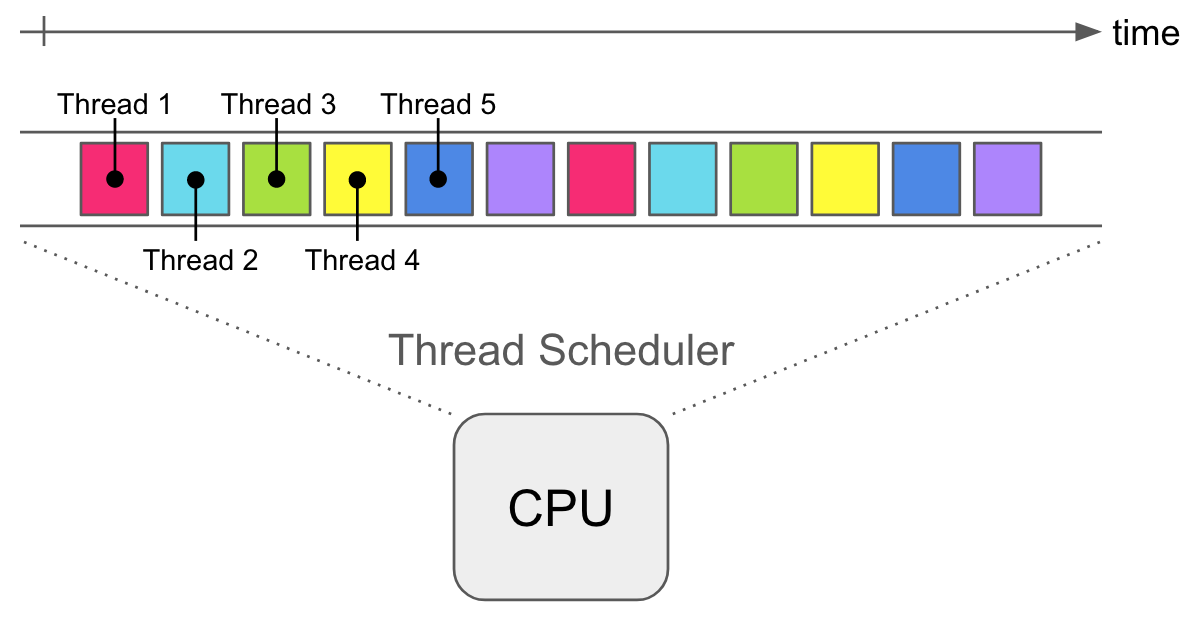
On the JVM, you can expect each thread to be about 1MB in size. Each thread has it’s own stack. And lastly is the cost of thread scheduling, context switching, and CPU cache invalidation.
在JVM上,可以预期每个线程的大小约为1MB。 每个线程都有自己的堆栈。 最后是线程调度,上下文切换和CPU缓存无效化的成本。
You can think of this like having multiple coroutines multiplexed on to a single thread. Coroutines have a small memory footprint — a few dozen bytes. That gives you a very high level of concurrency with very little overhead.
您可以认为这就像将多个协程多路复用到一个线程上。 协程具有较小的内存占用空间-几十个字节。 这样您可以以很少的开销获得很高的并发级别。
Android developers today have many async tools at hand. These include RxJava/Kotlin/Android, AsyncTasks, Jobs, Threads.
当今的Android开发人员手头有许多异步工具。 这些包括RxJava / Kotlin / Android,AsyncTasks,作业,线程。
The documentation says Kotlin Coroutines are like lightweight threads. They are lightweight because creating coroutines doesn’t allocate new threads. Instead, they use predefined thread pools and smart scheduling.
文档说Kotlin协程就像轻量级线程 。 它们是轻量级的,因为创建协程不会分配新线程。 相反,他们使用预定义的线程池和智能调度。
Scheduling is the process of determining which piece of work you will execute next, just like a regular schedule.
计划是确定下一步要执行的工作的过程,就像定期计划一样。
Additionally, coroutines can be suspended and resumed mid-execution. This means you can have a long-running task, which you can execute little-by-little. You can pause it any number of times, and resume it when you’re ready again. Knowing this, creating a large number of Kotlin Coroutines won’t bring unnecessary memory overhead to your program. You’ll just suspend some of them until the thread pool frees up.
此外,协程可以暂停 并恢复 执行中。 这意味着您可以执行一个长期运行的任务,可以一点一点地执行它。 您可以暂停它多次,然后在再次准备好时恢复它。 知道这一点,创建大量的Kotlin Coroutines不会给程序带来不必要的内存开销。 您只需暂停其中一些,直到线程池释放。
Also, you can easily change the context of the coroutine, and what that means is that if we think about threads as construction sites and coroutines as workers on the construction site, changing context means shifting a worker from one site to an another.
另外,您可以轻松更改协程的上下文,这意味着如果我们将线程视为施工现场,而将协程视为施工现场的工作人员,则更改上下文意味着将工作人员从一个站点转移到另一个站点。
如何使用它(来源: AndroidDevs ) (How To Use It (source: AndroidDevs))
First, let’s add dependencies:
首先,让我们添加依赖项:
implementation 'org.jetbrains.kotlinx:kotlinx-coroutines-core:1.3.5' implementation 'org.jetbrains.kotlinx:kotlinx-coroutines-android:1.3.5'The simplest way to start a coroutine:
启动协程的最简单方法是:
GlobalScope.launch { ... }Every coroutine needs to start in a scope, and GlobalScope is a scope that will live as long as our app lives. Of course, if coroutine finishes its job it will be destroyed, but also it will be destroyed if the app is destroyed even though coroutine didn’t finish a task.
每个协程都必须在一个范围内开始,而GlobalScope是一个范围,只要我们的应用程序有效就可以使用。 当然,如果协程完成工作,它将被销毁,但是即使协程没有完成任务,如果销毁了该应用程序,销毁它也将被销毁。
The code that is in GlobalScope will be launched in a different thread. Here is an example:
GlobalScope中的代码将在其他线程中启动。 这是一个例子:
GlobalScope.launch {
  Log.d(TAG, "Coroutine says hello from thread        ${Thread.currentThread().name}")
}Log.d(TAG, "Coroutine says hello from thread        ${Thread.currentThread().name}")-----------Output---------
Coroutine says hello from thread main
Coroutine says hello from thread DefaultDispather-worker-2
Now, similar to Thread.sleep(2000L) for coroutines to be delayed we have delay(2000L) :
现在,类似于Thread.sleep(2000L)的协程被延迟,我们有delay(2000L) :
GlobalScope.launch {
  delay(2000L)
  Log.d(TAG, "Coroutine says hello from thread        ${Thread.currentThread().name}")
}
Oppose to Thread.sleep() , delay() will not stop the whole thread that it belongs to, the same way that if one worker on construction site stops working the other workers will continue, but if we want for the whole construction site to stop working we would use Thread.sleep()
与Thread.sleep() , delay()不会停止其所属的整个线程,就像在建筑工地上的一个工人停止工作时其他工人将继续工作一样,但是如果我们希望整个建筑工地停止工作,我们将使用Thread.sleep()
If we increase the delay in the previous example to 5000L and after we launch our app we immediately closed the app, the printing of the log that is from coroutine will not be executed. Why? Because if the main thread is finished, then all other thread launched inside the app will be also finished.
如果将上一个示例中的延迟增加到5000L,并且在启动应用程序后立即关闭该应用程序,则不会执行协程打印日志。 为什么? 因为 如果主线程完成,则在应用程序内部启动的所有其他线程也将完成 。
暂停功能 (Suspend Functions)
If you inspect delay() function you will see that her definitions if actually
如果您检查delay()函数,您将看到她的定义实际上是
public suspend fun delay(
   timeMillis: Long
): Unit
Suspend function can only be executed inside a coroutine or inside another suspend function.
暂停功能只能在协程内部或另一个暂停功能内执行。
If we call two suspend functions one after the other in the same coroutine, the one will influence the other by delaying all executions by sums of both time delays, like in this example:
如果我们在同一个协程中一个接一个地调用两个暂挂函数,则一个将通过将所有执行延迟两个时间延迟的总和来影响另一个,例如本例:
GlobalScope.launch {
     val networkCallAnswer = doNetworkCall()
     val networkCallAnswer2 = doNetworkCall2()
     Log.d(TAG, networkCallAnswer + " " + networkCallAnswer2)
}
suspend fun doNetworkCall(): String {
   delay(3000L)
   return "this is the answer"
}
suspend fun doNetworkCall2(): String {
   delay(3000L)
   return "this is second answer"
}
--------output will be empty for 6 seconds--------
this is the answer
this is secons answer
协程上下文 (Coroutines Contexts)
Coroutines are always started in a specific context and the context will describe in which thread our coroutine will be started in.
协程始终在特定的上下文中启动,并且上下文将描述我们的协程将在哪个线程中启动。
As for now, we only used GlobalScope.launch {} but what we can do is to pass a Dispatcher to gain more control over coroutines. So we can write the following:
到目前为止,我们仅使用GlobalScope.launch {}但我们可以做的是传递Dispatcher以获得对协程的更多控制。 因此,我们可以编写以下代码:
GlobalScope.launch(Dispatchers.Main){} This will start coroutine in the main thread which is used for changes on UI that can only be changed from the main thread.
这将在主线程中启动协程,该协程用于在UI上进行更改,只能从主线程进行更改。
GlobalScope.launch(Dispatchers.IO){}This is used for all kinds of data operations such as networking, writing to databases, reading or writing to files.
这用于各种数据操作,例如联网,写入数据库,读取或写入文件。
GlobalScope.launch(Dispatchers.Default){}This is used for complex and long-running calculations that will block the main thread like for example sorting a huge number of elements.
这用于复杂且长时间运行的计算,这些计算将阻塞主线程,例如对大量元素进行排序。
GlobalScope.launch(Dispatchers.Unconfiend){}So this coroutine is not confined to a specific thread so if you start a coroutine that calls a suspend function it will stay in a thread that suspend function resumed.
因此,此协程不限于特定线程,因此,如果您启动一个调用暂停函数的协程,它将停留在恢复暂停函数的线程中。
And we can also start a coroutine in our own thread:
我们还可以在自己的线程中启动协程:
GlobalScope.launch(newSingleThreadContext("MyThread")){}But the really useful thing about coroutine context is that you can easily switch them within a coroutine:
但是协程上下文的真正有用之处在于,您可以轻松地在协程中切换它们:
GlobalScope.launch(Dispatchers.IO){
   val answer = doNetworkCall()
   withContext(Dispatchers.Main){
     textView.text = answer //update UI
So withContext is used to switch context of a coroutine, and the thread that doNetworkCall() was executed is different than the thread that updated UI.
因此,withContext用于切换协同程序的上下文,执行doNetworkCall()的线程与更新UI的线程不同。
runBlocking() (runBlocking())
It was previously elaborated that using a delay() won’t actually block the thread it was running in. However, runBlocking() will actually start a coroutine in the main thread and also block the main thread.
先前已经阐述过,使用delay()实际上不会阻塞正在运行的线程。但是, runBlocking()实际上会在主线程中启动协程,同时也会阻塞主线程。
runBlocking { this: CoroutineScopedelay(100L) //this will block our UI updates
}
This can be useful if you don’t need whole coroutine behavior but need to call suspend functions in the main thread.
如果您不需要整个协程行为,但需要在主线程中调用suspend函数 ,则此功能很有用。
Because we are already in a CoroutineScope we can create a new coroutine with launch{} :
因为我们已经在CoroutineScope中,所以可以使用launch{}创建一个新的协程:
runBlocking { this: CoroutineScopelaunch { this: CoroutineScope}Also, you can as well here use Dispatchers like:
另外,您也可以在这里使用Dispatchers,例如:
launch(Discpatchers.IO) {}Because this launch{} will actually run asynchronously to coroutine launched in the main thread (by runBlocking) this want be blocked:
由于此launch{}实际上将与在主线程中启动的协程异步运行(通过runBlocking),因此需要将其阻止:
runBlocking {
  launch(Dispatchers.IO) {
    delay(3000L)
    Log.d(TAG, "Finished IO Coroutine 1")
  }

  launch(Dispatchers.IO) {
    delay(3000L)
    Log.d(TAG, "Finished IO Coroutine 2")
  }

}
Even though we have two delays time want be add up, so two logs will be printed at the same time after 3 seconds, and the situation where the first log will be printed after 3 seconds and the next log after 6 seconds will happen if the IO thread is blocked which in the example above is not the case.
即使我们有两个延迟时间要加起来,所以3秒钟后将同时打印两个日志,并且如果3秒钟后将打印第一个日志而6秒钟后将打印下一个日志的情况IO线程被阻止,在上面的示例中情况并非如此。
协程作业以及如何取消它 (Coroutine jobs and how to cancel it)
Whenever we launch a new coroutine it returns a Job, which we can save in a variable.
每当我们启动新的协程时,它都会返回一个Job,我们可以将其保存在变量中。
val job = GlobalScope.launch(Dispatchers.Default) {}With this job, we can for an example wait for it until it is finished, by using job.join() and this join() function is actually suspend function so we have to use coroutine scope to execute it.
对于这个作业,我们可以使用job.join()作为示例,直到它完成为止,而这个join()函数实际上是暂停函数,因此我们必须使用协程范围来执行它。
val job = GlobalScope.launch(Dispatchers.Default) {}runBlocking { job.join() }And this will actually block all threads until this job is finished.
这实际上将阻塞所有线程,直到完成该作业。
We can also use job.cancel() to cancel our job.
我们还可以使用job.cancel()取消我们的工作。
val job = GlobalScope.launch(Dispatchers.Default) {
    repeat(5) {
      Log.d(TAG, "Coroutine is working")
      delay(1000L)
    }

runBlocking {
  delay(2000L)
  job.cancel()
  Log.d(TAG, "Main Thread is continuing...")
}
So in the beginning, we launched a coroutine that takes 5 seconds to finish printing logs, and after 2 seconds we cancel this job.
因此,在一开始,我们启动了一个协程,该协程需要5秒钟才能完成日志的打印,而2秒钟后我们将取消此作业。
Cancelation is not always as easy as in the previous example, because cancelation is cooperative which means that our coroutine needs to be set up to be correctly canceled. We have to have enough time to “tell” coroutine that it is canceled, and previously we did that with the help of delay() which is suspend function.
取消并不总是像前面的示例那样容易,因为取消是协作的,这意味着我们的协程需要设置为正确取消。 我们必须有足够的时间来“告知”协程已被取消,而以前我们是借助delay()这是暂停函数来完成的。
Here’s an example of another coroutine that cannot be canceled that easily:
这是另一个无法轻易取消的协程示例:
val job = GlobalScope.launch(Dispatchers.Default) {
  Log.d(TAG, "Starting long running calculation")
  for(i in 30..40) {
      Log.d(TAG, "Result for i = $i: ${fibonacci(i)}")
  }
  Log.d(TAG, "Ending long running calculation")
}


runBlocking {
  delay(2000L)
  job.cancel()
  Log.d(TAG, "Canceled job")
}


fun fibonacci(n: Int): Long {
  return if(n == 0) 0
         else if(n == 1) 1
         else fibonacci(n - 1) + fibonacci(n-2)
  }
If we run this code we will see that even though this job was canceled after 2 seconds, it will still continue to calculate fibonacci numbers between 30 and 40. The reason is that our coroutine is so busy with this calculation that is doesn’t have time to check for cancellations. If we did use suspend functions in coroutine then it would have enough time. So we have to do it manually:
如果运行此代码,我们将看到,即使此作业在2秒后被取消,它仍将继续计算30到40之间的斐波那契数。原因是我们的协程非常忙于该计算,因此没有是时候检查取消了。 如果我们确实在协程中使用了暂停函数,那么它将有足够的时间。 因此,我们必须手动执行此操作:
for(i in 30..40) {
   if(isActive) {
      Log.d(TAG, "Result...")
   ...
For other long-running operations, coroutines have a function withTimeOut()
对于其他长时间运行的操作,协程具有withTimeOut()函数
withTimeOut(3000L) {
  for(i in 30..40)
So withTimeOut will execute the task and if the task takes longer than 3 seconds it will cancel it automatically.
因此, withTimeOut将执行任务,并且如果任务花费的时间超过3秒,它将自动将其取消。
异步并等待 (Async and Await)
If we have several suspend functions and execute them in a coroutine, they will be executed sequentially, but if we want to do it at the same time like for example two network calls we have to use Async.
如果我们有几个暂停函数并在协程中执行它们,它们将被顺序执行,但是如果我们想同时执行,例如两个网络调用,则必须使用异步。
Let’s look at the following example:
让我们看下面的例子:
override fun onCreate(saveInstanceState: Bundle?) {
          ...


  GlobalScope.launch(Dispatchers.IO) {

     val time = measureTimeMillis {  //built-in function for measuring time


       val answer1 = networkCall1()
       val answer2 = networkCall2()

       Log.d(TAG, "Answer 1 is $answer")
       Log.d(TAG, "Answer 2 is $answer")


     }

     Log.d(TAG, "Time is $time ms ")
}


suspend fun networkCall1(): String {
   delay(3000L)
   return "Answer 1"
}


suspend fun networkCall2(): String {
   delay(3000L)
   return "Answer 2"
}
Output:
输出:
Answer1 is Answer 1
Answer2 is Answer 2
Time is 6000 ms
So we can see that because of the sequential execution of functions, line by line, the total time is summed-up which for network calls is not a good solution.
因此,我们可以看到,由于函数是逐行依次执行的,因此总时间汇总起来对于网络调用而言并不是一个很好的解决方案。
So how to solve this problem. Well, we could start a new coroutine for each function we execute, so let's do that:
那么如何解决这个问题。 好吧,我们可以为执行的每个函数启动一个新的协程,因此,我们可以这样做:
override fun onCreate(saveInstanceState: Bundle?) {
          ...


  GlobalScope.launch(Dispatchers.IO) {

     val time = measureTimeMillis {  //build in function for measuring time


       var answer1: String? = null
       var answer2: String? = null
       val job1 = launch { answer1 = networkCall1() }
       val job2 = launch { answer2 = networkCall2() }

       job1.join() //because log will print nulls
       job2.join()

       Log.d(TAG, "Answer 1 is $answer")
       Log.d(TAG, "Answer 2 is $answer")


     }

     Log.d(TAG, "Time is $time ms ")
}


suspend fun networkCall1(): String {
   delay(3000L)
   return "Answer 1"
}


suspend fun networkCall2(): String {
   delay(3000L)
   return "Answer 2"
}
Output:
输出:
Answer1 is Answer 1
Answer2 is Answer 2
Time is 3039 ms
We can see know that the request took only 3 seconds, but this approach was terrible. So how to do it properly? Instead of launch that returns job we can use async {} .
我们可以看到,请求只花了3秒钟,但是这种方法太糟糕了。 那么如何正确地做呢? 可以使用async {}来代替返回job的launch 。
Another way of starting a coroutine is
async {}. It is likelaunch {}, but returns an instance ofDeferred<T>, which has anawait()function that returns the result of the coroutine.Deferred<T>is a very basic future (fully-fledged JDK futures are also supported, but here we'll confine ourselves toDeferredfor now). -kotlinlang.org启动协程的另一种方法是
async {}。 就像launch {},但是返回Deferred<T>的实例,该实例具有await()函数,该函数返回协程的结果。Deferred<T>是一个非常基本的未来 (也支持成熟的JDK未来,但是在这里,我们现在仅限于Deferred)。 -kotlinlang.org
override fun onCreate(saveInstanceState: Bundle?) {
          ...


  GlobalScope.launch(Dispatchers.IO) {

     val time = measureTimeMillis {  //build in function for measuring time


       val answer1 = async { networkCall1() }
       val answer2 = async { networkCall2() }

       Log.d(TAG, "Answer 1 is $answer1")
       Log.d(TAG, "Answer 2 is $answer2")


     }

     Log.d(TAG, "Time is $time ms ")
}


suspend fun networkCall1(): String {
   delay(3000L)
   return "Answer 1"
}


suspend fun networkCall2(): String {
   delay(3000L)
   return "Answer 2"
}
Function await() will block the current coroutine until the deferred value answer is available.
函数await()将阻止当前协程,直到获得递延值答案为止。
Output:
输出:
Answer1 is Answer 1
Answer2 is Answer 2
Time is 3039 ms
So we should always use async{} if we want to return some kind of value from coroutine. We could also write GlobalScope.async {} but in this example, it doesn’t make any sense because we don’t return anything from the main coroutine.
因此,如果要从协程返回某种值,则应始终使用async{} 。 我们也可以编写GlobalScope.async {}但是在此示例中,这没有任何意义,因为我们不从主协程返回任何东西。
lifecycleScope和viewModelScope (lifecycleScope & viewModelScope)
These scopes are very useful ones. Previously mentioned, GlobalScope is used to start a coroutine that lives as long as the app does, however, most of the time it will be a bad practice to use GlobalScope because we rarely need a coroutine to be alive as long as our app.
这些范围是非常有用的。 如前所述,GlobalScope用于启动一个协程,该协程的寿命与该应用程序的寿命相同,但是,在大多数情况下,使用GlobalScope将是一种不好的做法,因为我们很少需要一个协程才能与我们的应用程序一样存活。
For Android, there are two very useful predefined scopes which are lifecycleScope and viewModelScope. To add there we need to add some dependencies:
对于Android,有两个非常有用的预定义范围,即lifecycleScope和viewModelScope。 要添加到那里,我们需要添加一些依赖项:
def arch_version = '2.2.0-alpha01'
implementation "androidx.lifecycle:lifecycle-viewmodel-ktx:$arch_version"
implementation "androidx.lifecycle:lifecycle-runtime-ktx:$arch_version"
Let’s examine another example:
让我们来看另一个例子:
override fun onCreate(savedInstanceState: Bundle?) {
             ...

      buttonStartActivity.setOnClickListener {
         GlobalScope.launch {
            while(true) {      //infinite loop
                delay(1000L)
                Log.d(TAG, "Still running...")
            }
          }
          GlobalScope.launch {
             delay(5000L)
             Intent(this@MainActivity, SecondActivity::class.java).also {
                startActivity(it)
                finish()
              }
          }
      }
}
So on the click of the button, we first start an infinite loop in a coroutine, and in a second coroutine, we start another activity after 5 seconds. If we run this code we will see that even though the second activity did start after 5 seconds, the infinite loop did not end after the main activity was destroyed. This is the main problem with GlobalScope. The infinite loop will stop only when the whole app is destroyed. This can cause memory leaks because if the coroutine started in the main activity, a uses the resources of the main activity, which is now destroyed, the resources won't be garbage collected because the coroutine still uses does resource. To solve this problem, we should change GlobalScope to lifecycleScope. This scope will bind a coroutine to a lifecycle of the activity, so if the activity is destroyed, the coroutine is also destroyed.
因此,单击该按钮,我们首先在协程中开始一个无限循环,然后在第二个协程中,在5秒钟后开始另一个活动。 如果运行此代码,我们将看到,即使第二个活动确实在5秒后开始,但无限循环并没有在主活动被销毁后结束。 这是GlobalScope的主要问题。 仅当整个应用程序被销毁时,无限循环才会停止。 这可能会导致内存泄漏,因为如果协程在主要活动中启动,则a使用主要活动的资源(现已销毁),该资源将不会被垃圾回收,因为协同活动仍在使用该资源。 要解决此问题,我们应该将GlobalScope更改为lifecycleScope。 该范围将协程绑定到活动的生命周期,因此,如果活动被破坏,协程也会被破坏。
The same thing goes to viewModelScope, only that it will keep your coroutine alive as long as your viewModel is alive.
viewModelScope也是如此,只是只要viewModel仍然存在,它就能使协程保持活跃。
A
ViewModelScopeis defined for eachViewModelin your app. Any coroutine launched in this scope is automatically canceled if theViewModelis cleared. Coroutines are useful here for when you have work that needs to be done only if theViewModelis active. For example, if you are computing some data for a layout, you should scope the work to theViewModelso that if theViewModelis cleared, the work is canceled automatically to avoid consuming resources. -docs一个
ViewModelScope为每个定义ViewModel在您的应用程序。 如果清除ViewModel则在此范围内启动的所有协程都会自动取消。 当您只有在ViewModel处于活动状态时才需要完成工作时,协程在这里很有用。 例如,如果您正在为布局计算某些数据,则应将工作范围ViewModel在ViewModel这样,如果清除ViewModel,则会自动取消工作以避免消耗资源。 - 文档
Additional:
额外:
When using
LiveData, you might need to calculate values asynchronously. For example, you might want to retrieve a user's preferences and serve them to your UI. In these cases, you can use theliveDatabuilder function to call asuspendfunction, serving the result as aLiveDataobject.-docs使用
LiveData,可能需要异步计算值。 例如,您可能想检索用户的首选项并将其提供给UI。 在这些情况下,您可以使用liveData构建器函数调用suspend函数,将结果作为LiveData对象提供。- docs
带有Firebase Firestore的协同程序 (Coroutines with Firebase Firestore)
To avoid “callback hell” we should consider using coroutines with Firebase.
为了避免“回调地狱”,我们应该考虑将协程与Firebase一起使用。
implementation 'com.google.firebase:firebase-firestore-ktx:21.4.2'
implementation 'org.jetbrains.kotlinx:kotlinx-coroutines-play-services:1.1.1'
Here’s an example:
这是一个例子:
data class Person(
    val name: String = "",
    val age: Int = -1
)


class MainActivity : AppCompactActivity() {
        ...


val tutorialDocument = Firebase.firestore.collection("coroutines")
            .document("tutorial")


val peter = Person("Peter", 25)


GlobalScope.launch(Dispatchers.IO) {
    tutorialDocument.set(peter).await()
    val person = tutorialDocument.get().await().toObject(Person::class.java)

    withContext(Dispatchers.Main) {
       //to change UI
       textview.text = person.toString()
    }
}
So as we can see, by selecting a set() or get() function, they return a Task<DocumentSnapshot> and in that case, we can use suspend function await() to avoid having listeners and callbacks. This does not apply to snapshot listeners for real-time updates, only for tasks.
如我们所见,通过选择set()或get()函数,它们将返回Task<DocumentSnapshot> ,在这种情况下,我们可以使用暂停函数await()来避免侦听器和回调。 这不适用于snapshot侦听器进行实时更新,仅适用于任务。
翻译自: https://medium.com/swlh/coroutines-pilove-notes-cb83654a88d4
云笔记 印象笔记




 已为社区贡献8条内容

所有评论(0)