react native 集成百度智能云文字识别(Android)
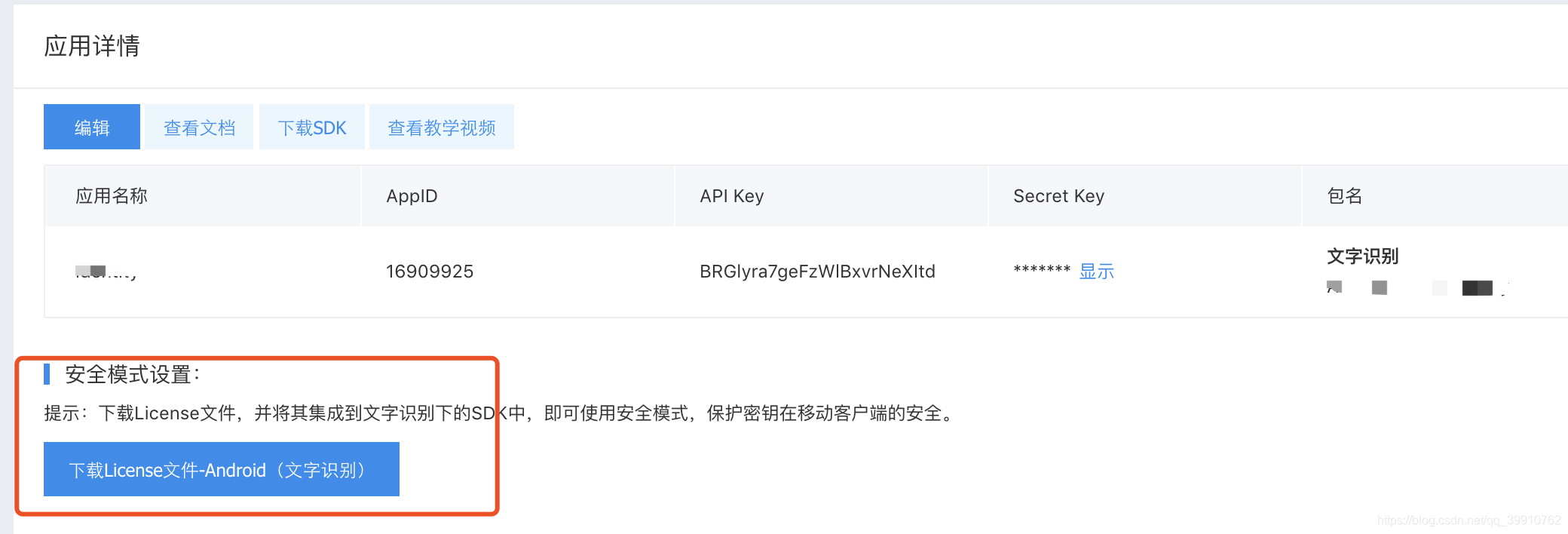
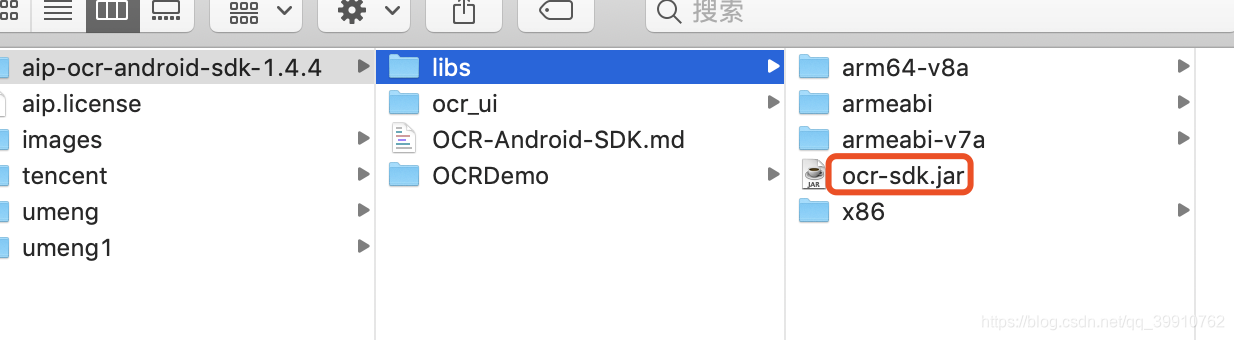
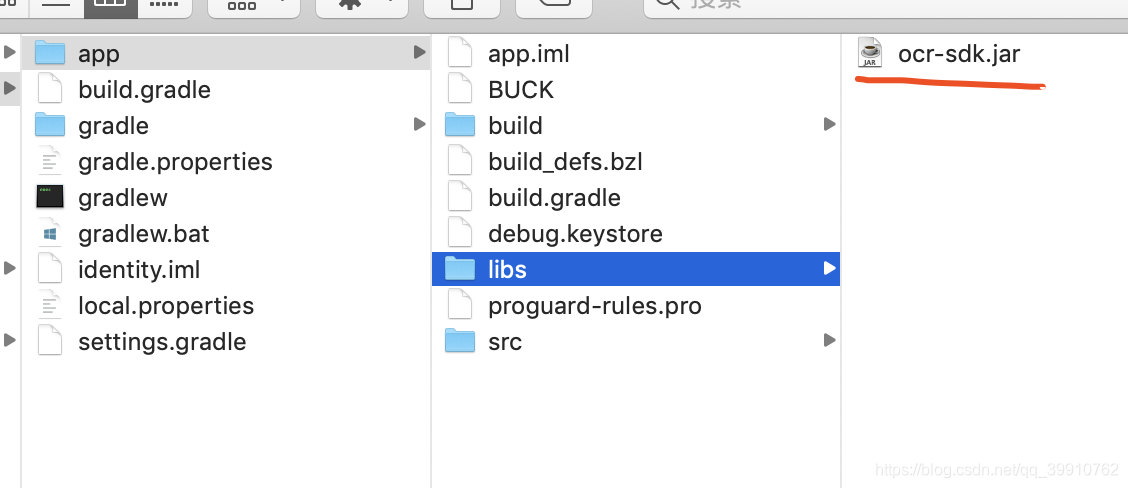
本文转载自https://blog.csdn.net/qq_39910762/article/details/97682404首先先申请账号,然后创建应用,创建应用一定要填写包名创建成功后,查看应用会有一个安全模式设置,将这个License文件下载到本地下载SDK,然后解压将ocr-sdk.jar文件拷到 app/libs将ocr-sdk.jar同级其余文件拷到main/jniLibs文件夹中An
本文转载自https://blog.csdn.net/qq_39910762/article/details/97682404
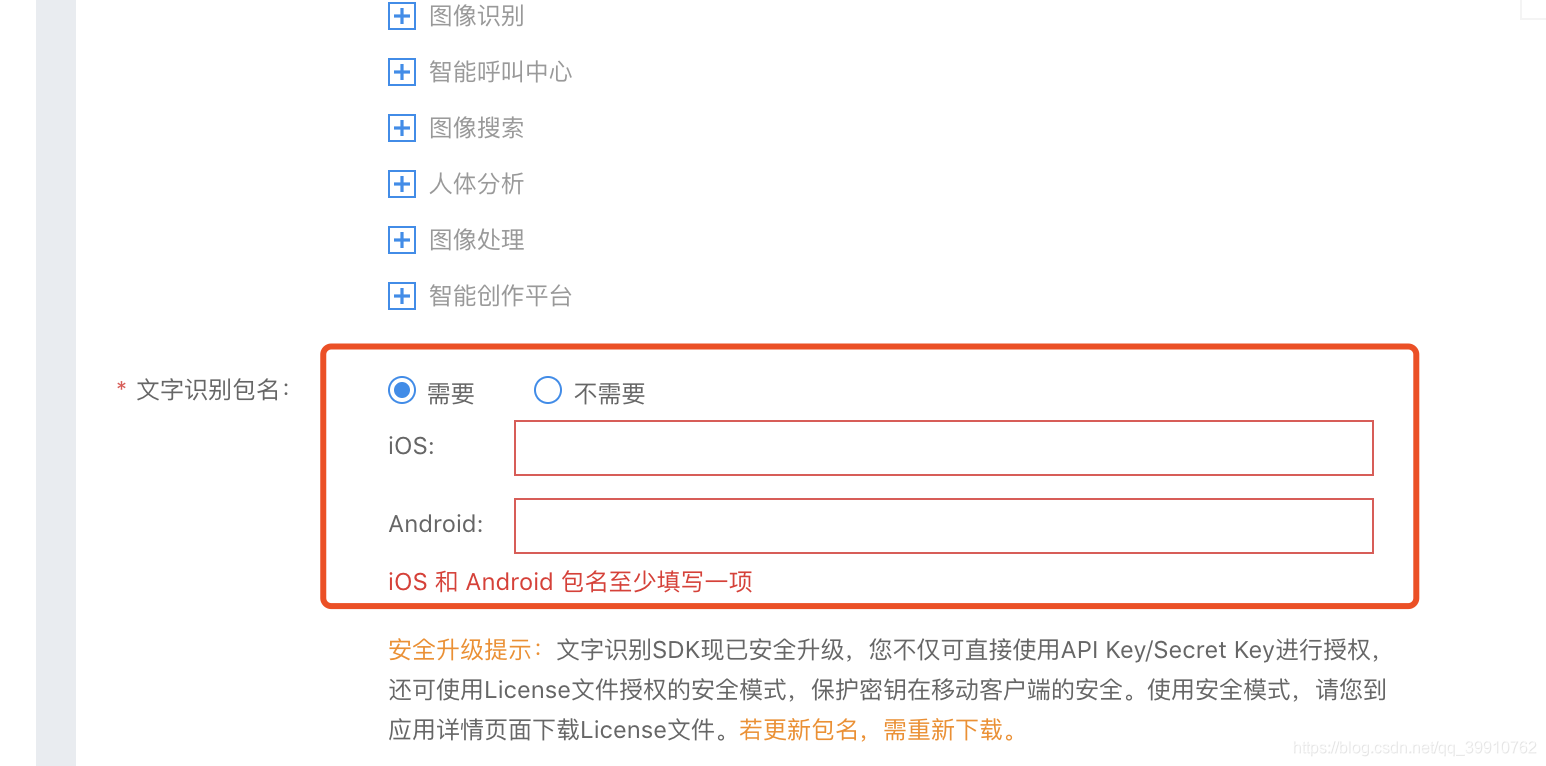
创建成功后,查看应用会有一个安全模式设置,将这个License文件下载到本地
下载SDK,然后解压
将ocr-sdk.jar文件拷到 app/libs
将ocr-sdk.jar同级其余文件拷到main/jniLibs文件夹中
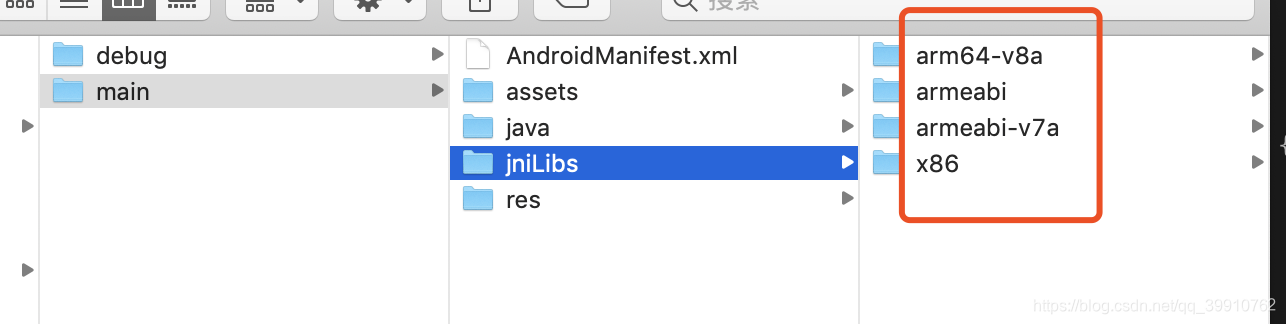
Android Studio 配置
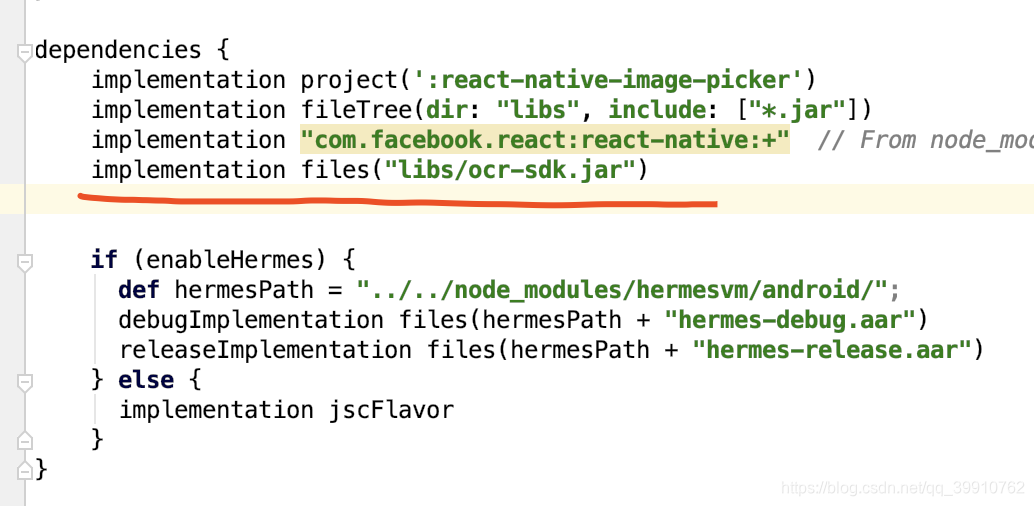
app/build.gradle 引入 ocr-sdk.jar 文件
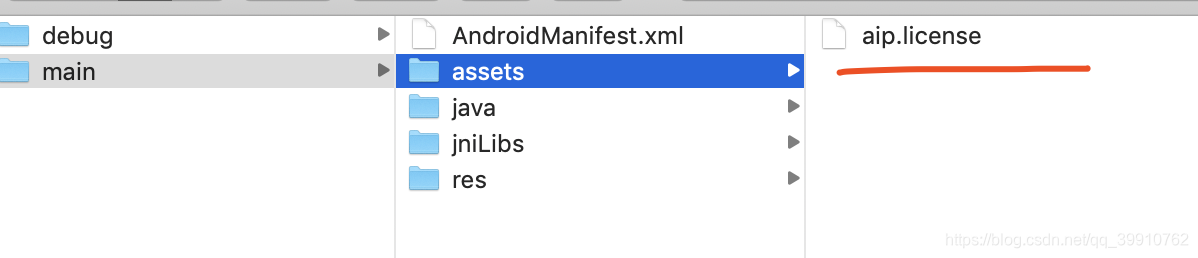
将之前下载好的aip.license文件拷到assets文件夹下(此文件防止被反编译后盗取AK/SK,详情)
添加权限配置
<uses-permission android:name="android.permission.CAMERA"/>
<uses-permission android:name="android.permission.READ_EXTERNAL_STORAGE"/>
<uses-permission android:name="android.permission.WRITE_EXTERNAL_STORAGE"/>
proguard-rules 添加混淆规则
-keep class com.baidu.ocr.sdk.**{*;}
-dontwarn com.baidu.ocr.**
创建原生模块
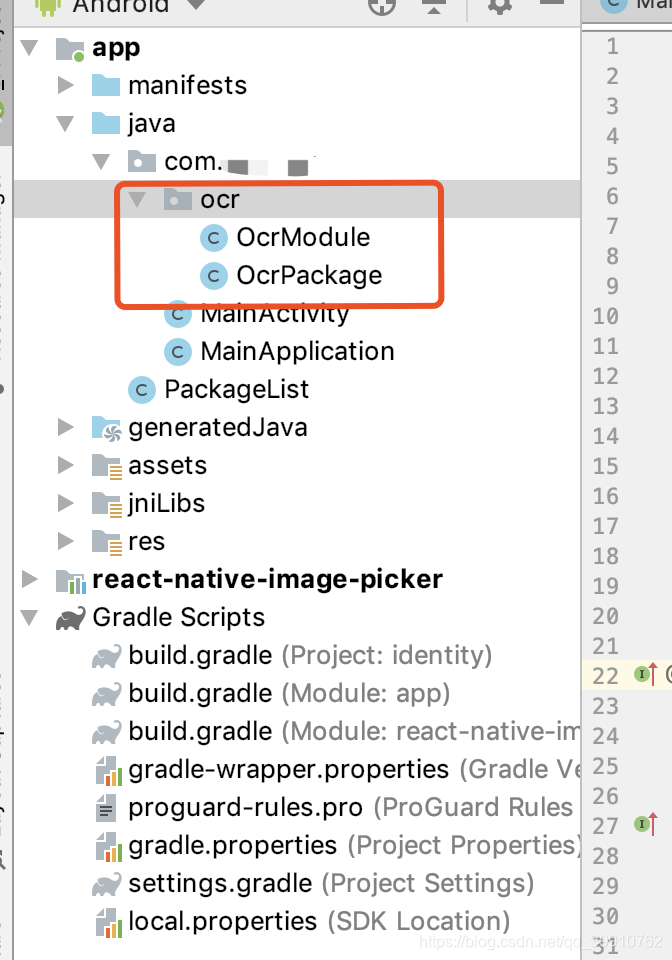
所有方法参考事例demo里的 java 文件以及官方文档
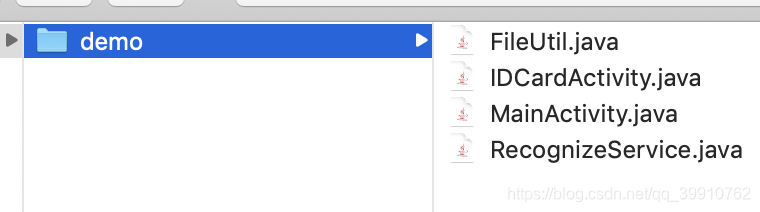
1. IDCardActivity.java 文件实现身份证识别
2. RecognizeService.java 文件实现其余的识别方法
OcrModule
package com.'你的包名'.ocr;

import com.baidu.ocr.sdk.OCR;
import com.baidu.ocr.sdk.OnResultListener;
import com.baidu.ocr.sdk.exception.OCRError;
import com.baidu.ocr.sdk.model.AccessToken;
import com.baidu.ocr.sdk.model.BankCardParams;
import com.baidu.ocr.sdk.model.BankCardResult;
import com.baidu.ocr.sdk.model.GeneralBasicParams;
import com.baidu.ocr.sdk.model.GeneralResult;
import com.baidu.ocr.sdk.model.IDCardParams;
import com.baidu.ocr.sdk.model.IDCardResult;
import com.baidu.ocr.sdk.model.OcrRequestParams;
import com.baidu.ocr.sdk.model.OcrResponseResult;
import com.facebook.react.bridge.Arguments;
import com.facebook.react.bridge.ReactApplicationContext;
import com.facebook.react.bridge.ReactContextBaseJavaModule;
import com.facebook.react.bridge.ReactMethod;
import com.facebook.react.bridge.WritableMap;
import com.facebook.react.modules.core.DeviceEventManagerModule;

import java.io.File;

public class OcrModule extends ReactContextBaseJavaModule {

    private ReactApplicationContext context;

    public OcrModule(ReactApplicationContext reactContext) {
        super(reactContext);
        context = reactContext;
    }

    @Override
    public String getName() {
        return "OcrModule";
    }

    /**
     * 初始化token
     */
    @ReactMethod
    private void init() {
        OCR.getInstance(context).initAccessToken(new OnResultListener<AccessToken>() {
            @Override
            public void onResult(AccessToken accessToken) {
                String token = accessToken.getAccessToken();
                WritableMap params = Arguments.createMap();
                params.putString("token", token);
                sendEvent("init", params);
            }

            @Override
            public void onError(OCRError error) {
                error.printStackTrace();
                WritableMap params = Arguments.createMap();
                params.putDouble("error", error.getErrorCode());
                sendEvent("init", params);
            }
        }, context);
    }

    /**
     * 通用文字识别
     * @param filePath 文件路径
     */
    @ReactMethod
    public void recGeneralBasic(String filePath) {
        GeneralBasicParams param = new GeneralBasicParams();
        param.setDetectDirection(true);
        param.setImageFile(new File(filePath));

        OCR.getInstance(context).recognizeGeneralBasic(param, new OnResultListener<GeneralResult>() {
            @Override
            public void onResult(GeneralResult result) {
                WritableMap params = Arguments.createMap();
                params.putString("result", result.getJsonRes());
                sendEvent("recGeneralBasic", params);
            }

            @Override
            public void onError(OCRError error) {
                WritableMap params = Arguments.createMap();
                params.putString("msg", error.getMessage());
                params.putDouble("errCode", error.getErrorCode());
                sendEvent("recGeneralBasic", params);
            }
        });
    }

    /**
     * 银行卡识别
     * @param filePath 文件路径
     */
    @ReactMethod
    public void recBankCard(String filePath) {
        BankCardParams param = new BankCardParams();
        param.setImageFile(new File(filePath));

        OCR.getInstance(context).recognizeBankCard(param, new OnResultListener<BankCardResult>() {
            @Override
            public void onResult(BankCardResult result) {
                WritableMap params = Arguments.createMap();
                params.putString("result", result.getJsonRes());
                sendEvent("recBankCard", params);
            }

            @Override
            public void onError(OCRError error) {
                WritableMap params = Arguments.createMap();
                params.putString("msg", error.getMessage());
                params.putDouble("errCode", error.getErrorCode());
                sendEvent("recBankCard", params);
            }
        });
    }

    /**
     * 身份证识别
     * @param filePath 文件路径
     * @param idCardSide 身份证正反面
     */
    @ReactMethod
    public void recIDCard(String filePath, String idCardSide) {
        IDCardParams param = new IDCardParams();
        param.setIdCardSide(idCardSide);
        param.setImageFile(new File(filePath));

        OCR.getInstance(context).recognizeIDCard(param, new OnResultListener<IDCardResult>() {
            @Override
            public void onResult(IDCardResult result) {
                WritableMap params = Arguments.createMap();
                params.putString("result", result.getJsonRes());
                sendEvent("recIDCard", params);
            }

            @Override
            public void onError(OCRError error) {
                WritableMap params = Arguments.createMap();
                params.putString("msg", error.getMessage());
                params.putDouble("errCode", error.getErrorCode());
                sendEvent("recIDCard", params);
            }
        });
    }

    /**
     * 行驶证识别
     * @param filePath 文件路径
     */
    @ReactMethod
    public void recVehicleLicense(String filePath) {
        OcrRequestParams param = new OcrRequestParams();
        param.setImageFile(new File(filePath));

        OCR.getInstance(context).recognizeVehicleLicense(param, new OnResultListener<OcrResponseResult>() {
            @Override
            public void onResult(OcrResponseResult result) {
                WritableMap params = Arguments.createMap();
                params.putString("result", result.getJsonRes());
                sendEvent("recVehicleLicense", params);
            }

            @Override
            public void onError(OCRError error) {
                WritableMap params = Arguments.createMap();
                params.putString("msg", error.getMessage());
                params.putDouble("errCode", error.getErrorCode());
                sendEvent("recVehicleLicense", params);
            }
        });
    }

    /**
     * 驾驶证识别
     * @param filePath 文件路径
     */
    @ReactMethod
    public void recDrivingLicense(String filePath) {
        OcrRequestParams param = new OcrRequestParams();
        param.setImageFile(new File(filePath));

        OCR.getInstance(context).recognizeDrivingLicense(param, new OnResultListener<OcrResponseResult>() {
            @Override
            public void onResult(OcrResponseResult result) {
                WritableMap params = Arguments.createMap();
                params.putString("result", result.getJsonRes());
                sendEvent("recDrivingLicense", params);
            }

            @Override
            public void onError(OCRError error) {
                WritableMap params = Arguments.createMap();
                params.putString("msg", error.getMessage());
                params.putDouble("errCode", error.getErrorCode());
                sendEvent("recDrivingLicense", params);
            }
        });
    }

    /**
     * 车牌识别
     * @param filePath 文件路径
     */
    @ReactMethod
    public void recLicensePlate(String filePath) {
        OcrRequestParams param = new OcrRequestParams();
        param.setImageFile(new File(filePath));

        OCR.getInstance(context).recognizeLicensePlate(param, new OnResultListener<OcrResponseResult>() {
            @Override
            public void onResult(OcrResponseResult result) {
                WritableMap params = Arguments.createMap();
                params.putString("result", result.getJsonRes());
                sendEvent("recLicensePlate", params);
            }

            @Override
            public void onError(OCRError error) {
                WritableMap params = Arguments.createMap();
                params.putString("msg", error.getMessage());
                params.putDouble("errCode", error.getErrorCode());
                sendEvent("recLicensePlate", params);
            }
        });
    }

    /**
     * 营业执照识别
     * @param filePath 文件路径
     */
    @ReactMethod
    public void recBusinessLicense(String filePath) {
        OcrRequestParams param = new OcrRequestParams();
        param.setImageFile(new File(filePath));

        OCR.getInstance(context).recognizeBusinessLicense(param, new OnResultListener<OcrResponseResult>() {
            @Override
            public void onResult(OcrResponseResult result) {
                WritableMap params = Arguments.createMap();
                params.putString("result", result.getJsonRes());
                sendEvent("recBusinessLicense", params);
            }

            @Override
            public void onError(OCRError error) {
                WritableMap params = Arguments.createMap();
                params.putString("msg", error.getMessage());
                params.putDouble("errCode", error.getErrorCode());
                sendEvent("recBusinessLicense", params);
            }
        });
    }

    /**
     * 通用票据识别
     * @param filePath 文件路径
     */
    @ReactMethod
    public void recReceipt(String filePath) {
        OcrRequestParams param = new OcrRequestParams();
        param.setImageFile(new File(filePath));

        OCR.getInstance(context).recognizeReceipt(param, new OnResultListener<OcrResponseResult>() {
            @Override
            public void onResult(OcrResponseResult result) {
                WritableMap params = Arguments.createMap();
                params.putString("result", result.getJsonRes());
                sendEvent("recReceipt", params);
            }

            @Override
            public void onError(OCRError error) {
                WritableMap params = Arguments.createMap();
                params.putString("msg", error.getMessage());
                params.putDouble("errCode", error.getErrorCode());
                sendEvent("recReceipt", params);
            }
        });
    }

    private void sendEvent(String eventName, WritableMap params) {
        context.
                getJSModule(DeviceEventManagerModule.RCTDeviceEventEmitter.class)
                .emit(eventName, params);
    }
}
OcrPackage
package com.'你的包名'.ocr;

import com.facebook.react.ReactPackage;
import com.facebook.react.bridge.NativeModule;
import com.facebook.react.bridge.ReactApplicationContext;
import com.facebook.react.uimanager.ViewManager;

import java.util.ArrayList;
import java.util.Collections;
import java.util.List;

public class OcrPackage implements ReactPackage {

    @Override
    public List<ViewManager> createViewManagers(ReactApplicationContext reactContext) {
        return Collections.emptyList();
    }

    @Override
    public List<NativeModule> createNativeModules(ReactApplicationContext reactContext) {
        List<NativeModule> modules = new ArrayList<>();
        modules.add(new OcrModule(reactContext));
        return modules;
    }
}
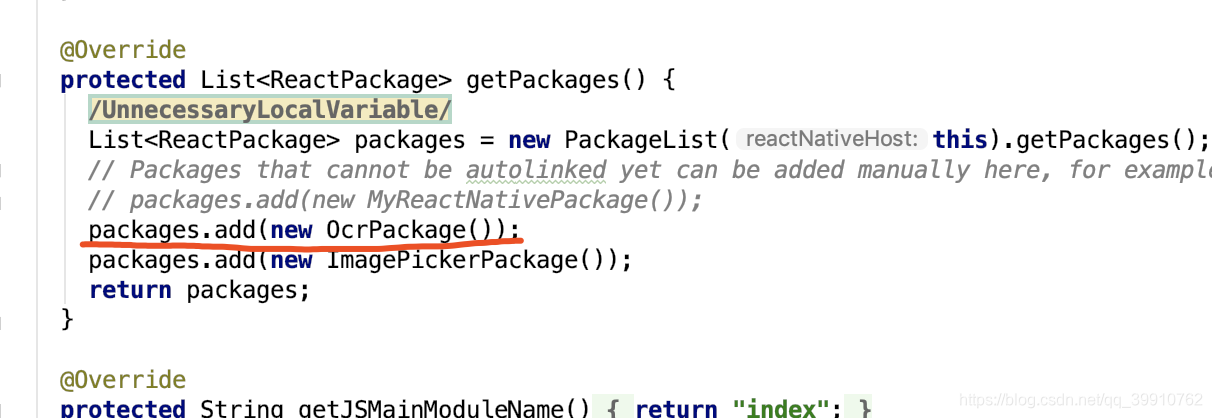
MainApplication中调用此方法
App.js ( 没有做Promise处理 )
import React, {Component} from 'react';
import {
  View,
  Text,
  StatusBar,
  NativeModules,
  DeviceEventEmitter,
  StyleSheet,
} from 'react-native';
import ImagePicker from 'react-native-image-picker'

const ocr = NativeModules.OcrModule;
const options = {
  title: 'Select Avatar',
  storageOptions: {
    skipBackup: true,
    path: 'images',
  },
};

export default class App extends Component {
  componentDidMount = () => {
    DeviceEventEmitter.once('init', result => {
      console.log(result)
    })
    // 通用文字识别
    DeviceEventEmitter.addListener('recGeneralBasic', result => {
      console.log(JSON.parse(result.result))
    })
    // 银行卡识别
    DeviceEventEmitter.addListener('recBankCard', result => {
      console.log(JSON.parse(result.result))
    })
    // 身份证识别
    DeviceEventEmitter.addListener('recIDCard', result => {
      console.log(JSON.parse(result.result))
    })
    // 行驶证识别
    DeviceEventEmitter.addListener('recVehicleLicense', result => {
      console.log(JSON.parse(result.result))
    })
    // 驾驶证识别
    DeviceEventEmitter.addListener('recDrivingLicense', result => {
      console.log(JSON.parse(result.result))
    })
    // 车牌识别
    DeviceEventEmitter.addListener('recLicensePlate', result => {
      console.log(JSON.parse(result.result))
    })
    // 营业执照识别
    DeviceEventEmitter.addListener('recBusinessLicense', result => {
      console.log(JSON.parse(result.result))
    })
    // 通用票据识别
    DeviceEventEmitter.addListener('recReceipt', result => {
      console.log(JSON.parse(result.result))
    })
    ocr.init()
  };

  render() {
    return (
      <View>
        <StatusBar barStyle="default" />
        <View>
          <Text style={styles.text} onPress={() => {
            ImagePicker.showImagePicker(options, (response) => {
              const path = response.path;
              ocr.recGeneralBasic(path)
            });
          }}>
            通用文字识别
          </Text>

          <Text style={styles.text} onPress={() => {
            ImagePicker.showImagePicker(options, (response) => {
              const path = response.path;
              ocr.recBankCard(path)
            });
          }}>
            银行卡识别
          </Text>

          <Text style={styles.text} onPress={() => {
            ImagePicker.showImagePicker(options, (response) => {
              const path = response.path;
              ocr.recIDCard(path, 'front')
            });
          }}>
            身份证正面识别
          </Text>

          <Text style={styles.text} onPress={() => {
            ImagePicker.showImagePicker(options, (response) => {
              const path = response.path;
              ocr.recIDCard(path, 'back')
            });
          }}>
            身份证反面识别
          </Text>

          <Text style={styles.text} onPress={() => {
            ImagePicker.showImagePicker(options, (response) => {
              const path = response.path;
              ocr.recVehicleLicense(path)
            });
          }}>
            行驶证识别
          </Text>

          <Text style={styles.text} onPress={() => {
            ImagePicker.showImagePicker(options, (response) => {
              const path = response.path;
              ocr.recDrivingLicense(path)
            });
          }}>
            驾驶证识别
          </Text>

          <Text style={styles.text} onPress={() => {
            ImagePicker.showImagePicker(options, (response) => {
              const path = response.path;
              ocr.recLicensePlate(path)
            });
          }}>
            车牌识别
          </Text>

          <Text style={styles.text} onPress={() => {
            ImagePicker.showImagePicker(options, (response) => {
              const path = response.path;
              ocr.recBusinessLicense(path)
            });
          }}>
            营业执照识别
          </Text>

          <Text style={styles.text} onPress={() => {
            ImagePicker.showImagePicker(options, (response) => {
              const path = response.path;
              ocr.recReceipt(path)
            });
          }}>
            通用票据识别
          </Text>
        </View>
      </View>
    );
  }
}

const styles = StyleSheet.create({
  text: {
    marginLeft: 15,
    padding: 5,
    fontSize: 20,
  }
})
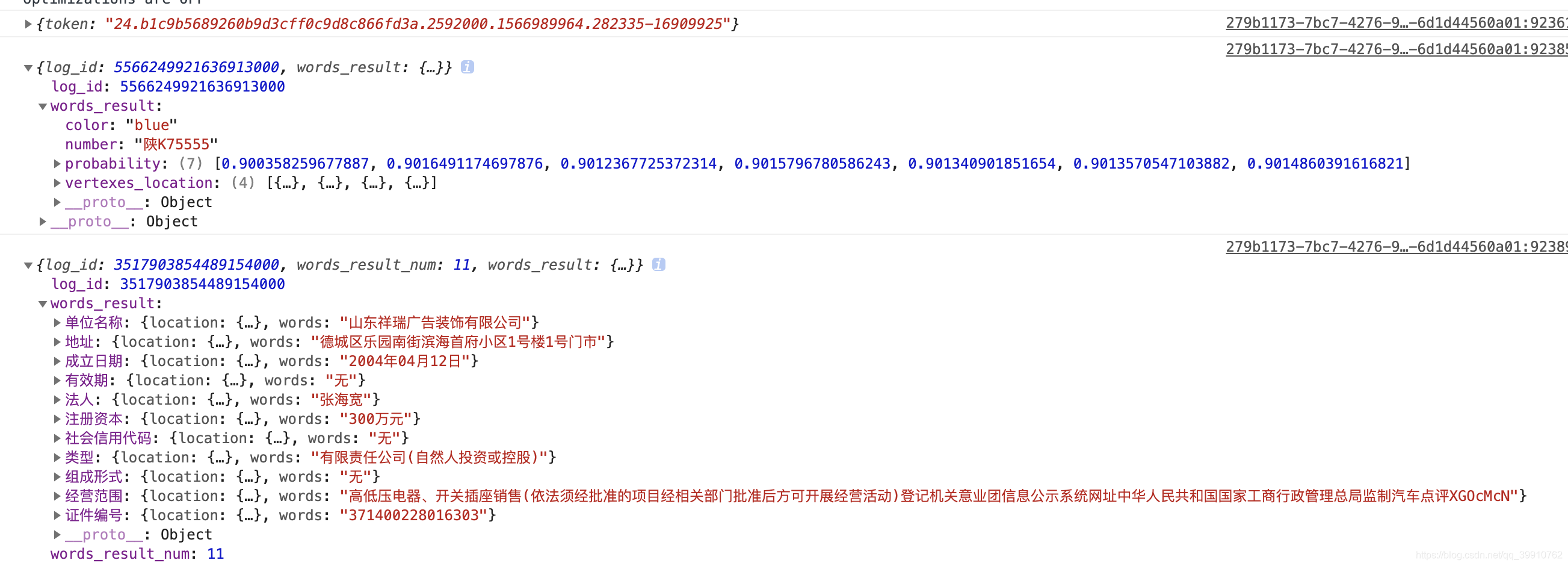
部分返回结果
IOS版本如果调用百度OCR出现授权失败,可能的原因如下:
1、检查BaiduOcr.m文件
RCT_EXPORT_MODULE();
RCT_EXPORT_METHOD(registToken:(RCTResponseSenderBlock)callback){
NSString *licenseFile = [[NSBundle mainBundle] pathForResource:@"aip-ios" ofType:@"license"];
NSData *licenseFileData = [NSData dataWithContentsOfFile:licenseFile];
if(!licenseFileData) {
callback(@[@"Fail",@"SDK授权失败"]);
}
[[AipOcrService shardService] authWithLicenseFileData:licenseFileData];
callback(@[@"OK",@"SDK授权成功"]);
}
这里的文件名是"aip.license"还是"aip-ios.license";
2、检查aip.license文件是否正常被xcode工程引用,如果被正常引用,那么在xcode的cloudBaidu文件夹下会看到aip.license文件,如果没有,自己再手动引入aip.license文件
3、检查百度OCR的依赖库是否被正常引入,依赖库导入可参考:https://ai.baidu.com/ai-doc/OCR/bkibizx99
4、检查在百度OCR平台申请aip.license时填入的bundleId跟自己xcode工程的bundleId是否一致
5、如何百度ocr拍照和转换成base64的接口正常,但是识别身份证接口不正常,通过调试发现,识别身份证接口可能未执行,这种情况有可能是aip.license文件过期了,需要更新aip.license

开源鸿蒙跨平台开发社区汇聚开发者与厂商,共建“一次开发,多端部署”的开源生态,致力于降低跨端开发门槛,推动万物智联创新。
更多推荐

 0
0 0
0- 0


 已为社区贡献9条内容

所有评论(0)