Flutter 按钮组件之RaisedButton、OutlineButton、FlatButton、IconButton、ButtonBar、FloatingActionButton
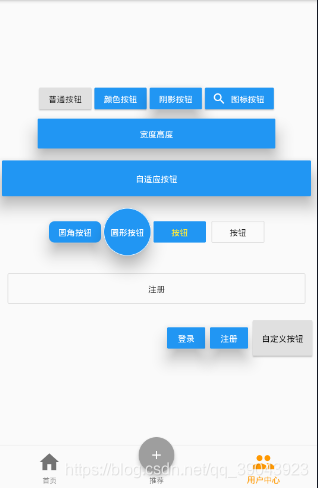
按钮UIRaisedButton普通按钮、颜色按钮、阴影按钮、图标按钮、圆角按钮、圆形按钮children: <Widget>[RaisedButton(child: Text('普通按钮'),//文本内容onPressed: () {//点击事件print("普通按钮");},),S...
·
按钮UI
RaisedButton
普通按钮、颜色按钮、阴影按钮、图标按钮、圆角按钮、圆形按钮
children: <Widget>[
    RaisedButton(
      child: Text('普通按钮'),//文本内容
      onPressed: () {//点击事件
        print("普通按钮");
      },
    ),
    SizedBox(width: 5),
    RaisedButton(
      child: Text('颜色按钮'),
      color: Colors.blue,//配置按钮颜色
      textColor: Colors.white,//配置文字颜色
      onPressed: () {
        print("有颜色按钮");
      },
    ),
    SizedBox(width: 5),
    RaisedButton(
      child: Text('阴影按钮'),
      color: Colors.blue,// 按钮颜色
      textColor: Colors.white,//按钮文字颜色
      elevation: 20,//阴影值
      onPressed: () {
        print("有阴影按钮");
      },
    ),
    SizedBox(width: 5),
    RaisedButton.icon(//按钮前面带图标
        icon: Icon(Icons.search),//图标
        label: Text('图标按钮'),//内容
        color: Colors.blue,//背景 颜色
        textColor: Colors.white,//
        // onPressed: null,//禁用按钮点击事件,结合颜色使用禁用属性
        onPressed: () {
          print("图标按钮");
        }),
        RaisedButton(
         child: Text('圆角按钮'),
         color: Colors.blue,//按钮背景颜色
         textColor: Colors.white,//文字颜色
         elevation: 20,//阴影值
         shape: RoundedRectangleBorder(//圆角属性
             borderRadius: BorderRadius.circular(10)),//设置圆角值
         onPressed: () {
           print("圆角按钮");
         }),
     Container(
       height: 80,
       child: RaisedButton(
           child: Text('圆形按钮'),
           color: Colors.blue,
           textColor: Colors.white,
           elevation: 20,
           splashColor: Colors.red,//水波纹颜色 需要长按出现的功能
           shape:
           CircleBorder(
           		side: BorderSide(color: Colors.white)//配置为何背景一样的颜色
           	),//圆形按钮、
           onPressed: () {
             print("圆形按钮");
           }),
     ),
  ],
自适应按钮
需要使用行布局,Expanded弹性布局来完成,默认是百分之百
Row(
   mainAxisAlignment: MainAxisAlignment.center,
   children: <Widget>[
     Expanded(
       child: Container(
         height: 60,
         margin: EdgeInsets.all(10),
         child: RaisedButton(
           child: Text('自适应按钮'),
           color: Colors.blue,
           textColor: Colors.white,
           elevation: 20,
           onPressed: () {
             print("自适应按钮");
           },
         ),
       ),
     )
   ],
 ),
FlatButton
扁平化按钮, 与上面的突起按钮没有太大区别
FlatButton(
   child: Text("按钮"),
   color: Colors.blue,
   textColor: Colors.yellow,
   onPressed: () {
     print('FlatButton');
   },
 ),
OutlineButton
默认的白色按钮
OutlineButton(
	 child: Text("按钮"),
	 //  color: Colors.red,  //没有效果
	 //  textColor: Colors.yellow,//文字颜色可以修改
	 onPressed: () {//有点击事件
	   print('OutlineButton');
	 })
IconButton
appBar: AppBar(//顶部导航加按钮图标
   title: Text("按钮演示页面"),
   actions: <Widget>[
     IconButton(
       icon: Icon(Icons.settings),
       onPressed: (){
         print("IconButton Settings");
       },
     )
   ],
 )
ButtonBar
Row(
   mainAxisAlignment: MainAxisAlignment.end,//定义按钮组显示位置,默认靠左
   children: <Widget>[
     ButtonBar(//按钮组 里面存放按钮
       children: <Widget>[
         RaisedButton(
           child: Text('登录'),
           color: Colors.blue,
           textColor: Colors.white,
           elevation: 20,
           onPressed: () {
             print("登录ButtonBar");
           },
         ),
         RaisedButton(
           child: Text('注册'),
           color: Colors.blue,
           textColor: Colors.white,
           elevation: 20,
           onPressed: () {
             print("注册ButtonBar");
           },
         ),
       ],
     )
   ],
 )
FloatingActionButton
return Scaffold(
  floatingActionButton: FloatingActionButton(//悬浮按钮
    child: Text("悬浮"),
    onPressed: () {
      print("悬浮按钮组件");
    },
  ),
  appBar: AppBar(
    title: Text("按钮演示页面"),
  ),
 );
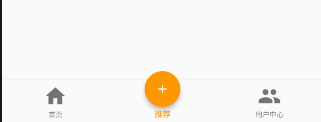
FloatingActionButton 仿咸鱼中间按钮
import 'package:flutter/material.dart';

import 'HomePage.dart';
import 'Payment.dart';
import 'People.dart';
class HomePageSet extends StatefulWidget {
  HomePageSet({Key key}) : super(key: key);

  @override
  _HomePageSetState createState() => _HomePageSetState();
}

class _HomePageSetState extends State<HomePageSet> {
  int curIndex = 0;

  List PageList = [
    HomePage(),
    Payment(),
    People(),
  ];

  @override
  Widget build(BuildContext context) {
    return Container(
      child: Scaffold(
        floatingActionButton: Container(//定义在盒子内来设置宽高大小
          height: 80,
          width: 80,
          padding: EdgeInsets.all(10),//留白
          margin: EdgeInsets.fromLTRB(0, 30, 0, 0),//使用边距向下移动
          child:FloatingActionButton(//
            child: Icon(Icons.add),//这里可以定义成图标,调整颜色大小, shape可以配置形状
            onPressed: () {
              setState((){
                this.curIndex=1;//动态设置成原来的按钮值,这样就相当于原来按钮没变
              });
            },
            //动态修改颜色
            backgroundColor: this.curIndex==1 ? Colors.orange : Colors.grey,
          ),
        ),
        //悬浮按钮调整到中间位置
        floatingActionButtonLocation: FloatingActionButtonLocation.centerDocked,
        appBar: AppBar(
          title: Text("StatefulWidget,BottomNavigationBar"),
        ),
        body: this.PageList[this.curIndex],
        bottomNavigationBar: BottomNavigationBar(
            currentIndex: curIndex,
            onTap: (int index) {
              print(index);
              setState(() {
                this.curIndex = index;
              });
            },
            iconSize: 40,
            fixedColor: Colors.orange,
            type: BottomNavigationBarType.fixed,
            //配置多个底布菜单
            items: [
              BottomNavigationBarItem(
                  icon: Icon(Icons.home), title: Text("首页")),
              BottomNavigationBarItem(
                  icon: Icon(Icons.payment), title: Text("推荐")),
              BottomNavigationBarItem(
                  icon: Icon(Icons.people), title: Text("用户中心")),
            ]),
      ),
    );
  }
}
完整案例:
import 'package:flutter/material.dart';

class ButtonDemoPage extends StatelessWidget {
  const ButtonDemoPage({Key key}) : super(key: key);

  @override
  Widget build(BuildContext context) {
    return Scaffold(
    	floatingActionButton: FloatingActionButton(
          child: Text("悬浮"),
          onPressed: () {
            print("悬浮按钮组件");
          },
        ),
        appBar: AppBar(
          title: Text("按钮演示页面"),
          actions: <Widget>[
            IconButton(
              icon: Icon(Icons.settings),
              onPressed: (){
              },
            )
          ],
        ),
        body: Column(
          mainAxisAlignment: MainAxisAlignment.center,
          children: <Widget>[
            Row(
              mainAxisAlignment: MainAxisAlignment.center,
              children: <Widget>[
                RaisedButton(
                  child: Text('普通按钮'),
                  onPressed: () {
                    print("普通按钮");
                  },
                ),
                SizedBox(width: 5),
                RaisedButton(
                  child: Text('颜色按钮'),
                  color: Colors.blue,
                  textColor: Colors.white,
                  onPressed: () {
                    print("有颜色按钮");
                  },
                ),
                SizedBox(width: 5),
                RaisedButton(
                  child: Text('阴影按钮'),
                  color: Colors.blue,
                  textColor: Colors.white,
                  elevation: 20,
                  onPressed: () {
                    print("有阴影按钮");
                  },
                ),
                SizedBox(width: 5),
                RaisedButton.icon(
                    icon: Icon(Icons.search),
                    label: Text('图标按钮'),
                    color: Colors.blue,
                    textColor: Colors.white,
                    // onPressed: null,
                    onPressed: () {
                      print("图标按钮");
                    })
              ],
            ),
            SizedBox(height: 10),
            Row(
              mainAxisAlignment: MainAxisAlignment.center,
              children: <Widget>[
                Container(
                  height: 50,
                  width: 400,
                  child: RaisedButton(
                    child: Text('宽度高度'),
                    color: Colors.blue,
                    textColor: Colors.white,
                    elevation: 20,
                    onPressed: () {
                      print("宽度高度");
                    },
                  ),
                )
              ],
            ),
            SizedBox(height: 10),
            Row(
              mainAxisAlignment: MainAxisAlignment.center,
              children: <Widget>[
                Expanded(
                  child: Container(
                    height: 60,
                    margin: EdgeInsets.all(10),
                    child: RaisedButton(
                      child: Text('自适应按钮'),
                      color: Colors.blue,
                      textColor: Colors.white,
                      elevation: 20,
                      onPressed: () {
                        print("自适应按钮");
                      },
                    ),
                  ),
                )
              ],
            ),
            SizedBox(height: 10),
            Row(
              mainAxisAlignment: MainAxisAlignment.center,
              children: <Widget>[
                RaisedButton(
                    child: Text('圆角按钮'),
                    color: Colors.blue,
                    textColor: Colors.white,
                    elevation: 20,
                    shape: RoundedRectangleBorder(
                        borderRadius: BorderRadius.circular(10)),
                    onPressed: () {
                      print("圆角按钮");
                    }),
                Container(
                  height: 80,
                  child: RaisedButton(
                      child: Text('圆形按钮'),
                      color: Colors.blue,
                      textColor: Colors.white,
                      elevation: 20,
                      splashColor: Colors.red,
                      shape:
                          CircleBorder(side: BorderSide(color: Colors.white)),
                      onPressed: () {
                        print("圆形按钮");
                      }),
                ),
                FlatButton(
                  child: Text("按钮"),
                  color: Colors.blue,
                  textColor: Colors.yellow,
                  onPressed: () {
                    print('FlatButton');
                  },
                ),
                SizedBox(width: 10),
                OutlineButton(
                    child: Text("按钮"),
                    //  color: Colors.red,  //没有效果
                    //  textColor: Colors.yellow,
                    onPressed: () {
                      print('FlatButton');
                    })
              ],
            ),
            SizedBox(height: 10),
            Row(
              mainAxisAlignment: MainAxisAlignment.center,
              children: <Widget>[
                Expanded(
                  child: Container(
                    margin: EdgeInsets.all(20),
                    height: 50,
                    child: OutlineButton(child: Text("注册"), onPressed: () {}),
                  ),
                )
              ],
            ),
            Row(
              mainAxisAlignment: MainAxisAlignment.end,
              children: <Widget>[
                ButtonBar(
                  children: <Widget>[

                    RaisedButton(
                      child: Text('登录'),
                      color: Colors.blue,
                      textColor: Colors.white,
                      elevation: 20,
                      onPressed: () {
                        print("宽度高度");
                      },
                    ),
                    RaisedButton(
                      child: Text('注册'),
                      color: Colors.blue,
                      textColor: Colors.white,
                      elevation: 20,
                      onPressed: () {
                        print("宽度高度");
                      },
                    ),
                    MyButton(text: "自定义按钮",height: 60.0,width: 100.0,pressed: (){
                      print('自定义按钮');
                    })

                  ],
                )
              ],
            )
          ],
        ));
  }
}
自定义按钮组件
class MyButton extends StatelessWidget {
  final text;
  final pressed;
  final width;
  final height;
  const MyButton({this.text='',this.pressed=null,this.width=80,this.height=30}) ;

  @override
  Widget build(BuildContext context) {
    return Container(
      height: this.height,
      width: this.width,
      child: RaisedButton(
        child: Text(this.text),
        onPressed:this.pressed ,
      ),
    );
  }
}

开源鸿蒙跨平台开发社区汇聚开发者与厂商,共建“一次开发,多端部署”的开源生态,致力于降低跨端开发门槛,推动万物智联创新。
更多推荐
 1
1 0
0- 0


 已为社区贡献9条内容

所有评论(0)