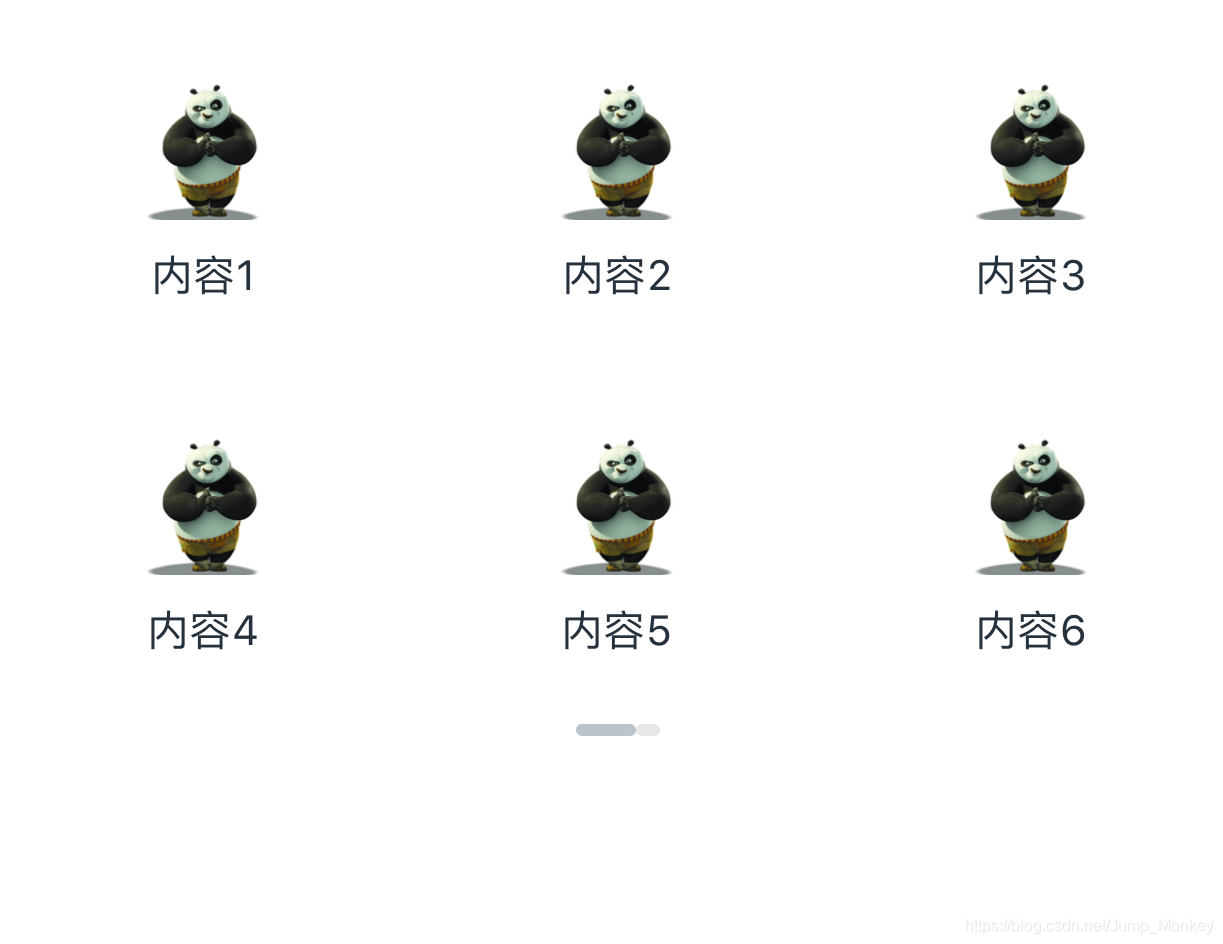
RN中怎样用FlatList做一个左右的滑动展示内容的Component
import React, { Component } from 'react';import {Text,View,FlatList,StyleSheet,Image,TouchableOpacity,Dimensions,} from 'react-native';const { width: screenWidth...
·
import React, { Component } from 'react';
import {
    Text,
    View,
    FlatList,
    StyleSheet,
    Image,
    TouchableOpacity,
    Dimensions,
} from 'react-native';

const { width: screenWidth } = Dimensions.get('window');

const items = [
    {
        title: '内容1',
        image: { uri: 'http://i1.sinaimg.cn/ent/d/2008-06-04/U105P28T3D2048907F326DT20080604225106.jpg' },
    },
    {
        title: '内容2',
        image: { uri: 'http://i1.sinaimg.cn/ent/d/2008-06-04/U105P28T3D2048907F326DT20080604225106.jpg' },
    },
    {
        title: '内容3',
        image: { uri: 'http://i1.sinaimg.cn/ent/d/2008-06-04/U105P28T3D2048907F326DT20080604225106.jpg' },
    },
    {
        title: '内容4',
        image: { uri: 'http://i1.sinaimg.cn/ent/d/2008-06-04/U105P28T3D2048907F326DT20080604225106.jpg' },
    },
    {
        title: '内容5',
        image: { uri: 'http://i1.sinaimg.cn/ent/d/2008-06-04/U105P28T3D2048907F326DT20080604225106.jpg' },
    },
    {
        title: '内容6',
        image: { uri: 'http://i1.sinaimg.cn/ent/d/2008-06-04/U105P28T3D2048907F326DT20080604225106.jpg' },
    },
    {
        title: '内容7',
        image: { uri: 'http://i1.sinaimg.cn/ent/d/2008-06-04/U105P28T3D2048907F326DT20080604225106.jpg' },
    },
    {
        title: '内容8',
        image: { uri: 'http://i1.sinaimg.cn/ent/d/2008-06-04/U105P28T3D2048907F326DT20080604225106.jpg' },
    },
];

export default class Slider extends Component {
    constructor(props) {
        super(props);
        this.state = {
            isViewable: 0,
            isShow: false,
        };
        this.contentViewMap = [
            { View: null, value: 0 },
            { View: null, value: 1 },
        ];
    }

    renderSliderList = ({ item }) => (
        <View style={styles.windowWidth}>
            {item.View}
        </View>
    )

    renderItem = ({ item }) => (
        <TouchableOpacity
            style={styles.item}
            onPress={() => this.onPressCell(item)}
        >
            <Image
                style={styles.icon}
                source={item.image}
            />
            <Text style={styles.itemsTitle}>{item.title}</Text>
        </TouchableOpacity>
    );

    renderOne = () => (
        <FlatList
            numColumns={3}
            data={items.slice(0, 6)}
            renderItem={this.renderItem}
            keyExtractor={(_, index) => index.toString()}
        />
    )

    renderTwo = () => (
        <FlatList
            numColumns={1}
            data={items.slice(6)}
            renderItem={this.renderItem}
            keyExtractor={(_, index) => index.toString()}
        />
    )

    onViewableItemsChanged = (change) => {
        // change包含来这个FlatList中的所有内容,当滑动滑块时总是将上一个滑块的内容最后打印
        if (change.viewableItems.length === 2) { // 判断是否是第一次加载的内容,如果是就将isShow设置为true
            this.setState({
                isShow: true,
            });
        }
        const data = change.changed[0];
        this.setState({
            isViewable: data.index,
        });
    }


    render() {
        const { isViewable, isShow } = this.state;
        // 这里不直接用Flatlist是因为在在这里用的话,不能显示字体,所以将每个分页中的内容存起来
        this.contentViewMap[0].View = this.renderOne();
        this.contentViewMap[1].View = this.renderTwo();
        const leftStyle = (isViewable === 1 || !isShow) ? styles.leftSlider : styles.rightSlider;
        const rightStyle = (isViewable === 0 && isShow) ? styles.leftSlider : styles.rightSlider;
        return (
            <View>
                <View>
                    <FlatList
                        data={this.contentViewMap}
                        horizontal={true} // 左右滑动
                        pagingEnabled={true} // 按页滑动
                        showsHorizontalScrollIndicator={false} // 去除水平方向的滚动条
                        showsVerticalScrollIndicator={false} // 去除垂直方向的滚动条
                        renderItem={this.renderSliderList}
                        onViewableItemsChanged={this.onViewableItemsChanged} // 滑动页面触发
                        keyExtractor={(_, index) => index.toString()}
                    />
                    <View style={styles.sliderBox}>
                        <View style={leftStyle}></View>
                        <View style={rightStyle}></View>
                    </View>
                </View>

            </View>
        );
    }
}
const { width } = Dimensions.get('window');

const styles = StyleSheet.create({
    windowWidth: {
        width: screenWidth,
    },
    item: {
        width: width / 3,
        height: width / 3.5,
        flexDirection: 'column',
        justifyContent: 'center',
        alignItems: 'center',

    },
    icon: {
        width: 46,
        height: 46,
    },
    leftSlider: {
        width: 20,
        height: 4,
        backgroundColor: '#BCC3CA',
        borderRadius: 2,
    },
    rightSlider: {
        width: 8,
        height: 4,
        borderRadius: 2,
        backgroundColor: '#E8E8E8',
    },
    sliderBox: {
        flexDirection: 'row',
        width: screenWidth,
        justifyContent: 'center',
    },
    itemsValue: {
        fontSize: 10,
        color: '#ccc',
        marginTop: 4,
    },
    itemsTitle: {
        lineHeight: 17,
        fontSize: 14,
        color: '#25313C',
        marginTop: 10,
    },
});


开源鸿蒙跨平台开发社区汇聚开发者与厂商,共建“一次开发,多端部署”的开源生态,致力于降低跨端开发门槛,推动万物智联创新。
更多推荐

 0
0 0
0- 0


 已为社区贡献8条内容

所有评论(0)