最新Kotlin学习手记——协程进阶(1),2024年最新完爆面试官
总结:
面试是一个不断学习、不断自我提升的过程,有机会还是出去面面,至少能想到查漏补缺效果,而且有些知识点,可能你自以为知道,但让你说,并不一定能说得很好。
有些东西有压力才有动力,而学到的知识点,都是钱(因为技术人员大部分情况是根据你的能力来定级、来发薪水的),技多不压身。
附上我的面试各大专题整理: 面试指南,满满的都是干货,希望对大家有帮助!
网上学习资料一大堆,但如果学到的知识不成体系,遇到问题时只是浅尝辄止,不再深入研究,那么很难做到真正的技术提升。
一个人可以走的很快,但一群人才能走的更远!不论你是正从事IT行业的老鸟或是对IT行业感兴趣的新人,都欢迎加入我们的的圈子(技术交流、学习资源、职场吐槽、大厂内推、面试辅导),让我们一起学习成长!
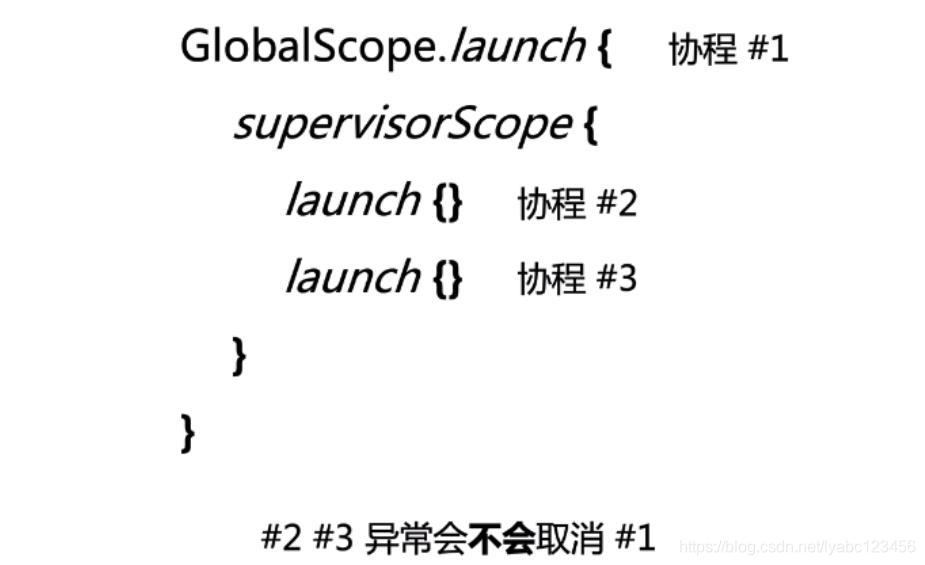
supervisorScope表示主从作用域,supervisorScope内部的协程挂掉不会影响外部的协程继续运行,它就像一道防火墙,隔离了异常,保证程序健壮,但是如果外部协程挂掉还是可以取消子协程的,即单向传播。


简单总结就是,主从关系:无法坑爹,爹可以坑儿子。协同关系:可以坑爹,可以坑儿子,互相坑。


如果是应用的话,主要掌握框架级别的使用即可,语言级别的支持api来源于标准库,写起来比较麻烦也非常难理解。


这里launch会进行一次调度 ,delay会进行一次调度,每次调度完成会执行一次resume, 最终协程体执行完毕会执行一次resume, 所以内部有n个挂起点的协程体会执行n+2次resume.

DEFAULT 立即开始调度 和 UNDISPATCHED 立即开始执行协程体,这两个含义的区别是 DEFAULT 只是立即启动协程执行可能是异步的,而后者是直接执行协程体中的代码了。LAZY 是先创建协程体,然后在未来的某个时刻才去启动执行。


UNDISPATCHED 立即开始执行协程体,如果遇到挂起点,就切回主流程了,后面的协程体继续执行在单独的调度器。
import kotlinx.coroutines.*
@ExperimentalCoroutinesApi
suspend fun main() {
println(“start”)
testDefaultMode()
// testAtomicMode()
// testLazyMode()
// testUNDISPATCHEDMode()
println(“finish”)
}
suspend fun testDefaultMode() {
val defaultMode = GlobalScope.launch(start = CoroutineStart.DEFAULT) {
println(“aaa”)
delay(3000)
println(“bbb”)
}
println(“222”)
defaultMode.join()
}
@ExperimentalCoroutinesApi
suspend fun testAtomicMode() {
val defaultMode = GlobalScope.launch(start = CoroutineStart.ATOMIC) {
println(“aaa”)
delay(3000)
println(“bbb”)
}
println(“222”)
defaultMode.join()
}
suspend fun testLazyMode() {
val defaultMode = GlobalScope.async(start = CoroutineStart.LAZY) {
println(“aaa”)
delay(3000)
println(“bbb”)
}
println(“222”)
defaultMode.await()
}
@ExperimentalCoroutinesApi
suspend fun testUNDISPATCHEDMode() {
val defaultMode = GlobalScope.launch(start = CoroutineStart.UNDISPATCHED) {
println(“aaa”)
delay(3000)
println(“bbb”)
}
println(“222”)
defaultMode.join()
}

Default和IO线程的区别,IO内部多了一个队列的维护


回调转协程的完整写法:
import com.bennyhuo.kotlin.coroutines.advanced.common.gitHubServiceApi
import kotlinx.coroutines.suspendCancellableCoroutine
import retrofit2.Call
import retrofit2.Callback
import retrofit2.HttpException
import retrofit2.Response
import kotlin.coroutines.resume
import kotlin.coroutines.resumeWithException
suspend fun Call.await(): T = suspendCancellableCoroutine { //可取消
continuation ->
continuation.invokeOnCancellation {
cancel() //调用retrofit的取消方法
}
enqueue(object: Callback {
override fun onFailure(call: Call, t: Throwable) {
continuation.resumeWithException(t)
}
override fun onResponse(call: Call, response: Response) {
response.takeIf { it.isSuccessful }?.body()?.also {continuation.resume(it) }
?: continuation.resumeWithException(HttpException(response))
}
})
}
suspend fun main() {
val user = gitHubServiceApi.getUserCallback(“flycumt”).await()
println(user)
}
也可以不自己写,retrofit的api中本身有实现await()方法,awaitResponse()方法等。
CompletableFuture 添加回调的写法:
import com.bennyhuo.kotlin.coroutines.advanced.utils.log
import kotlinx.coroutines.suspendCancellableCoroutine
import java.util.concurrent.CompletableFuture
import java.util.concurrent.ExecutionException
import kotlin.coroutines.resume
import kotlin.coroutines.resumeWithException
suspend fun main() {
val result = CompletableFuture.supplyAsync {
3
}.await()
log(result)
}
suspend fun CompletableFuture.await(): T {
if(isDone){
try {
return get()
} catch (e: ExecutionException) {
throw e.cause ?: e
}
}
return suspendCancellableCoroutine { //可取消
cancellableContinuation ->
cancellableContinuation.invokeOnCancellation {
cancel(true) //取消
}
whenComplete { value, throwable ->
if(throwable == null){
cancellableContinuation.resume(value)
} else {
cancellableContinuation.resumeWithException(throwable.cause ?: throwable)
}
}
}
}
CompletableFuture本身也有实现await()方法。
模仿给Handler扩展添加可取消的支持:
suspend fun Handler.run(block: () -> T) = suspendCoroutine { continuation ->
post {
try {
continuation.resume(block())
} catch (e: Exception) {
continuation.resumeWithException(e)
}
}
}
suspend fun Handler.runDelay(delay: Long, block: () -> T) = suspendCancellableCoroutine { continuation ->
val message = Message.obtain(this) { //Message obtain(Handler h, Runnable callback)
try {
continuation.resume(block())
} catch (e: Exception){
continuation.resumeWithException(e)
}
}.also {
it.obj = continuation //message.obj
}
continuation.invokeOnCancellation {
removeCallbacksAndMessages(continuation) //通过Handler的removeCallbacksAndMessages方法来取消回调, 参数就是前面设置的message.obj的值
}
sendMessageDelayed(message, delay)
}
suspend fun main() {
Looper.prepareMainLooper()
GlobalScope.launch {
val handler = Handler(Looper.getMainLooper())
val result = handler.run { “Hello” }
val delayedResult = handler.runDelay(5000){ “World” }
log(result, delayedResult)
Looper.getMainLooper().quit()
}
Looper.loop()
}
这个例子的主要意图是,Hanlder可以通过定义扩展函数的方式来延时获取一些东西,比如Activity刚创建的时候,拿不到view的宽和高,就可以使用这种方法。
上面三个例子主要是针对可取消的写法,如果实际用,不用自己写,直接导库就行。


其中CONFLATED比较适合用于状态更新,比如进度条的进度,因为它总是只取最新的。


关闭后再发送会抛异常:

channel关闭后,channel中的数据仍然可以被接受,只有当channel中的数据消费完了,isClosedForReceive才为true.

suspend fun main() {
basics()
}
suspend fun basics() {
val channel = Channel(Channel.RENDEZVOUS)
// val channel = Channel(Channel.UNLIMITED)
// val channel = Channel(Channel.CONFLATED)
// val channel = Channel(Channel.BUFFERED)
// val channel = Channel(1)
//生产者 发
val producer = GlobalScope.launch {
for (i in 0…3) {
log(“sending”, i)
channel.send(i)
log(“sent”, i)
}
channel.close()
}
//消费者 收
val consumer = GlobalScope.launch {
while (!channel.isClosedForReceive) {
log(“receiving”)
val value = channel.receiveOrNull()
log(“received”, value)
}
}
producer.join()
consumer.join()
}
Channel(Channel.RENDEZVOUS ) 的方式是发一个收一个,边发边收,如果没有接受的,发送者会挂起等待,输出如下:

Channel(Channel.UNLIMITED ) 的方式是全部发送完毕,才会接收到,先发后收,发送者发送完就返回了,不管有没有接受者,输出如下:
Channel(Channel.CONFLATED ) 的方式是不管发了多少个,只能收到最后一个,也是发送完就返回了,不管有没有接受者,输出如下:

Channel(Channel.BUFFERED ) 的方式也是发送者发送完就返回了,不管有没有接受者,可以指定buffer大小,输出如下:

Channel(1) 的方式指定管道的容量大小,如果数据超过容量,发送者就会挂起等待,直到有接受者取走数据,发送者才发送下一批数据,


channel接受数据的时候可以直接当成迭代器使用:
suspend fun iterateChannel() {
val channel = Channel(Channel.UNLIMITED)
val producer = GlobalScope.launch {
for (i in 0…3) {
log(“sending”, i)
channel.send(i)
log(“sent”, i)
}
channel.close()
}
val consumer = GlobalScope.launch {
for (i in channel) {
log("received: ", i)
}
}
producer.join()
consumer.join()
}

suspend fun producer() {
val receiveChannel = GlobalScope.produce(capacity = Channel.UNLIMITED) {
for (i in 0…3) {
log(“sending”, i)
send(i)
log(“sent”, i)
}
}
val consumer = GlobalScope.launch {
for (i in receiveChannel) {
log("received: ", i)
}
}
consumer.join()
}
suspend fun consumer() {
val sendChannel = GlobalScope.actor(capacity = Channel.UNLIMITED) {
for (i in this) {
log("received: ", i)
}
}
val producer = GlobalScope.launch {
for (i in 0…3) {
log(“sending”, i)
sendChannel.send(i)
log(“sent”, i)
}
}
producer.join()
}


suspend fun broadcast() {
//下面几种都可以创建一个BroadcastChannel
//val broadcastChannel = BroadcastChannel(Channel.BUFFERED)
//val broadcastChannel = Channel(Channel.BUFFERED).broadcast()
val broadcastChannel = GlobalScope.broadcast {
for (i in 0…5) {
send(i)
}
}
//启动5个接受者,每个都能收到
List(5) { index ->
GlobalScope.launch {
val receiveChannel = broadcastChannel.openSubscription()
for (i in receiveChannel) {
log(“[#$index] received: $i”)
}
}
}.joinAll()
}
输出:
Task :ChannelsKt.main()
21:07:12:924 [DefaultDispatcher-worker-3 @coroutine#2] [#0] received: 0
21:07:12:924 [DefaultDispatcher-worker-5 @coroutine#6] [#4] received: 0
21:07:12:924 [DefaultDispatcher-worker-1 @coroutine#3] [#1] received: 0
21:07:12:925 [DefaultDispatcher-worker-4 @coroutine#5] [#3] received: 0
21:07:12:925 [DefaultDispatcher-worker-2 @coroutine#4] [#2] received: 0
21:07:12:944 [DefaultDispatcher-worker-1 @coroutine#3] [#1] received: 1
21:07:12:943 [DefaultDispatcher-worker-3 @coroutine#2] [#0] received: 1
21:07:12:943 [DefaultDispatcher-worker-5 @coroutine#6] [#4] received: 1
【附】相关架构及资料
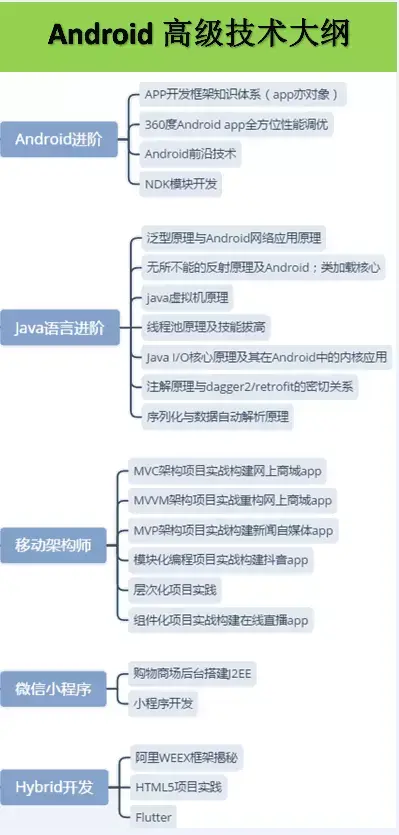
往期Android高级架构资料、源码、笔记、视频。高级UI、性能优化、架构师课程、NDK、混合式开发(ReactNative+Weex)微信小程序、Flutter全方面的Android进阶实践技术,群内还有技术大牛一起讨论交流解决问题。
网上学习资料一大堆,但如果学到的知识不成体系,遇到问题时只是浅尝辄止,不再深入研究,那么很难做到真正的技术提升。
一个人可以走的很快,但一群人才能走的更远!不论你是正从事IT行业的老鸟或是对IT行业感兴趣的新人,都欢迎加入我们的的圈子(技术交流、学习资源、职场吐槽、大厂内推、面试辅导),让我们一起学习成长!
4 @coroutine#5] [#3] received: 0
21:07:12:925 [DefaultDispatcher-worker-2 @coroutine#4] [#2] received: 0
21:07:12:944 [DefaultDispatcher-worker-1 @coroutine#3] [#1] received: 1
21:07:12:943 [DefaultDispatcher-worker-3 @coroutine#2] [#0] received: 1
21:07:12:943 [DefaultDispatcher-worker-5 @coroutine#6] [#4] received: 1
【附】相关架构及资料
[外链图片转存中…(img-CHj3nUxL-1715373086215)]
[外链图片转存中…(img-HbPJHHoy-1715373086217)]
往期Android高级架构资料、源码、笔记、视频。高级UI、性能优化、架构师课程、NDK、混合式开发(ReactNative+Weex)微信小程序、Flutter全方面的Android进阶实践技术,群内还有技术大牛一起讨论交流解决问题。
网上学习资料一大堆,但如果学到的知识不成体系,遇到问题时只是浅尝辄止,不再深入研究,那么很难做到真正的技术提升。
一个人可以走的很快,但一群人才能走的更远!不论你是正从事IT行业的老鸟或是对IT行业感兴趣的新人,都欢迎加入我们的的圈子(技术交流、学习资源、职场吐槽、大厂内推、面试辅导),让我们一起学习成长!

开源鸿蒙跨平台开发社区汇聚开发者与厂商,共建“一次开发,多端部署”的开源生态,致力于降低跨端开发门槛,推动万物智联创新。
更多推荐
 13
13 0
0- 0


 已为社区贡献1条内容

所有评论(0)