Flutter入门(一,Hello world)
清明节假期的最后一天,我把前两天学的东西稍微做了一下总结。其实第一天没学习,忙着打LOL,连续输了一天,我那个心累鸭,然后还容易生气,气不过那些沙雕网友都能让我遇到,转悲伤为力量跑去学习了声明。我只是想把flutter做一个入门,好去学我的Unity中的UIWidgets,因为他那个优化真不错。要跟上时代的潮流,并不是盲目跟风。所以应该不会做过深的了解flutter。...
清明节假期的最后一天,我把前两天学的东西稍微做了一下总结。
其实第一天没学习, 忙着打LOL,连续输了一天,我那个心累鸭,
然后还容易生气,气不过那些沙雕网友都能让我遇到,转悲伤为力量跑去学习了
声明。
我只是想把flutter做一个入门,好去学我的Unity中的UIWidgets,因为他那个优化真不错。要跟上时代的潮流,并不是盲目跟风。所以应该不会做过深的了解flutter。
一 打开vscode
最好开着ssr全局代理,因为这样在你创建工程的时候他会自动下载你所对应的补丁。或者什么玩意的。
二 新建工程
首先要配置环境,不说了都是泪 我配置了好几天。
在终端命令输入 flutter create demo_01 这个demo_01是工程的名字,自己可以随便修改
然后等待vscode创建完成
然后打开lib文件下的main.dart文件 这是一个官方写好的demo, 你自己可以详细的研究
然后我们把它全部删除,
如果test文件夹下的 widget_test.dart文件如果报错 就把它全部注释。
三切入正题 Helloworld
我目前用的是安卓模拟器因为没有安卓机, 之前知道这个可以跨平台 据说很强,但是ios开发要在mac上 因为他需要用到xcode??
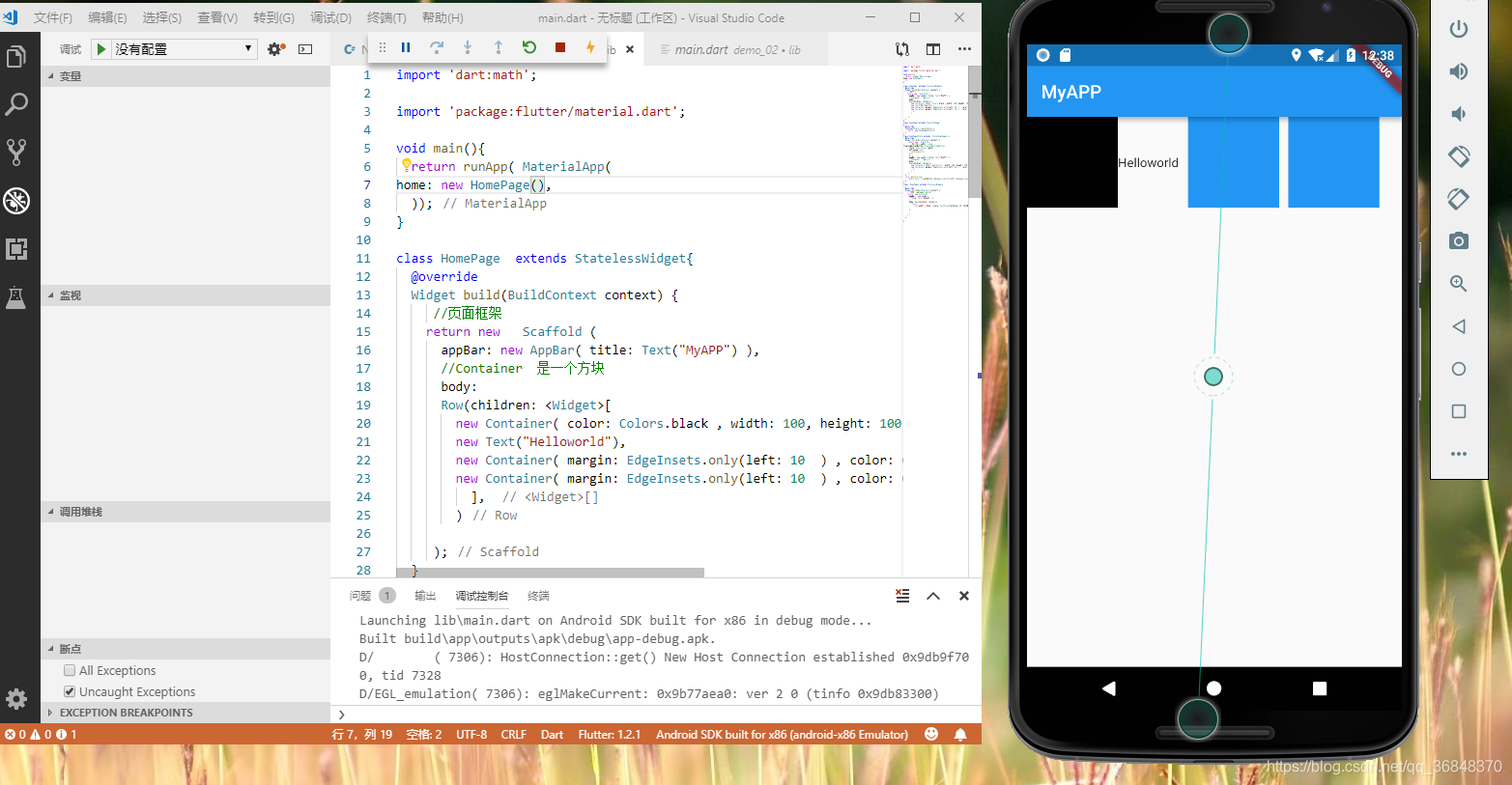
接下来我把代码粘贴出来
import 'dart:math';
import 'package:flutter/material.dart';

void main(){
  return runApp( MaterialApp(
    // 需要调用那个就调用 那个HomePage  HomePage2  homePage3
home: new HomePage(),
  ));
}
///Helloworld 创建一个行,行里面有文字和方块
class HomePage  extends StatelessWidget{
  @override
  Widget build(BuildContext context) {
     //页面框架
    return new   Scaffold (
      appBar: new AppBar( title: Text("MyAPP") ),
      //Container  是一个方块
      body:
      Row(children: <Widget>[
        new Container( color: Colors.black , width: 100, height: 100, ),
        new Text("Helloworld"),
        new Container( margin: EdgeInsets.only(left: 10  ) , color: Colors.blue , width: 100, height: 100,  ),
        new Container( margin: EdgeInsets.only(left: 10  ) , color: Colors.blue , width: 100, height: 100, ),
          ],
        )

     );
  }
}
//创建一个动态页面
class HomePage2 extends StatefulWidget
{
  @override
  HomePage2State createState() {
    return  new HomePage2State();
  }
}
//每次点击button 就会重新加载该页面
class HomePage2State extends  State<HomePage2> {
  @override
  Widget build(BuildContext context) {
     return new   Scaffold (
       //添加按钮 监听匿名方法??
floatingActionButton: FloatingActionButton(
      child: Icon( Icons.radio),
      onPressed: (){
        setState(() {
      });
      }, ),
      appBar: new AppBar( title: Text("MyAPP") ),
      //Container  是一个方块
      body:
      Row(children: <Widget>[
        new Container( color: getColor() , width: 100, height: 100, ),
        new Container( margin: EdgeInsets.only(left: 10  ) , color: getColor() , width: 100, height: 100, ),
          ],
        )
     );
  }
  Color getColor(){
     return Color.fromARGB(233, Random().nextInt(255), Random().nextInt(255),Random().nextInt(255));
  }
}
//  修改Text的属性等
class  HomePage3 extends StatelessWidget{

  @override
  Widget build(BuildContext context) {

    return  new Scaffold(
      appBar:  new AppBar(
        title: Text("你好呀?"),
      ),
      body: Row(children: <Widget>[
         Text(
           "大家好才是真的好" ,style: TextStyle(fontSize: 20 ,fontWeight:FontWeight.w900 ,color: Colors.red,fontStyle: FontStyle.italic),),

      ],

      ),
    ) ;
  }

}
为了加深理解我又跑youtube翻了一下教程 每一个都可以理解为一个widget


开源鸿蒙跨平台开发社区汇聚开发者与厂商,共建“一次开发,多端部署”的开源生态,致力于降低跨端开发门槛,推动万物智联创新。
更多推荐

 1
1 0
0- 0


 已为社区贡献1条内容

所有评论(0)