一篇文章带你彻底搞懂Kotlin的协程(2)
lifecycleScope.launch {
delay(2000)
tvTest.text=“Test”
}
上面这个例子实现的功能是等待2秒,然后修改id为tvTest的TextView控件的text值为Test
自定义延迟返回方法
在kotlin里面,对于需要延迟才能返回结果的方法,需要用suspend标明
lifecycleScope.launch {
val text=getText()
tvTest.text = text
}
suspend fun getText():String{
delay(2000)
return “getText”
}
如果在其他线程,需要使用Continuation进行线程切换,可使用suspendCancellableCoroutine 或 suspendCoroutine包裹(前者可取消,相当于后者的扩展),成功调用it.resume(),失败调用it.resumeWithException(Exception()),抛出异常
suspend fun getTextInOtherThread() = suspendCancellableCoroutine {
thread {
Thread.sleep(2000)
it.resume(“getText”)
}
}
异常捕获
协程里面的失败都可以通过异常捕获,来统一处理特殊情况
lifecycleScope.launch {
try {
val text=getText()
tvTest.text = text
} catch (e:Exception){
e.printStackTrace()
}
}
取消功能
下面执行了两个job,第一个是原始的,第二个是在1秒后取消第一个job,这会导致tvText的文本并不会改变
val job = lifecycleScope.launch {
try {
val text=getText()
tvTest.text = text
} catch (e:Exception){
e.printStackTrace()
}
}
lifecycleScope.launch {
delay(1000)
job.cancel()
}
设置超时
这个相当于系统封装了自动取消功能,对应函数withTimeout
lifecycleScope.launch {
try {
withTimeout(1000) {
val text = getText()
tvTest.text = text
}
} catch (e:Exception){
e.printStackTrace()
}
}
带返回值的Job
与launch类似的还有一个async方法,它会返回一个Deferred对象,属于Job的扩展类,Deferred可以获取返回的结果,具体使用如下
lifecycleScope.launch {
val one= async {
delay(1000)
return@async 1
}
val two= async {
delay(2000)
return@async 2
}
Log.i(“scope test”,(one.await()+two.await()).toString())
}
自定义CoroutineScope
先看CoroutineScope源码
public interface CoroutineScope {
public val coroutineContext: CoroutineContext
}
CoroutineScope中主要包含一个coroutineContext对象,我们要自定义只需实现coroutineContext的get方法
class TestScope() : CoroutineScope {
override val coroutineContext: CoroutineContext
get() = TODO(“Not yet implemented”)
}
要创建coroutineContext,得要先知道CoroutineContext是什么,我们再看CoroutineContext源码
/**
-
Persistent context for the coroutine. It is an indexed set of [Element] instances.
-
An indexed set is a mix between a set and a map.
-
Every element in this set has a unique [Key].
*/
public interface CoroutineContext {
public operator fun get(key: Key): E?
public fun fold(initial: R, operation: (R, Element) -> R): R
public operator fun plus(context: CoroutineContext): CoroutineContext =
…
public fun minusKey(key: Key<*>): CoroutineContext
public interface Key
public interface Element : CoroutineContext {
…
}
}
通过注释说明,我们知道它本质就是一个包含Element的集合,只是不像set和map集合一样,它自己实现了获取(get),折叠(fold,添加和替换的组合),相减(minusKey,移除),对象组合(plus,如val coroutineContext=coroutineContext1+coroutineContext2)
它的主要内容是Element,而Element的实现有
-
Job 任务
-
ContinuationInterceptor 拦截器
-
AbstractCoroutineContextElement
-
CoroutineExceptionHandler
-
ThreadContextElement
-
DownstreamExceptionElement
-
…
可以看到很多地方都有实现Element,它主要目的是限制范围以及异常的处理。这里我们先了解两个重要的Element,一个是Job,一个是CoroutineDispatcher
Job
-
Job:子Job取消,会导致父job和其他子job被取消;父job取消,所有子job被取消
-
SupervisorJob:父job取消,所有子job被取消
CoroutineDispatcher
-
Dispatchers.Main:主线程执行
-
Dispatchers.IO:IO线程执行
我们模拟一个类似lifecycleScope的自定义TestScope
class TestScope() : CoroutineScope {
override val coroutineContext: CoroutineContext
get() = SupervisorJob() +Dispatchers.Main
}
这里我们定义了一个总流程线SupervisorJob()以及具体执行环境Dispatchers.Main(Android主线程),假如我们想替换掉activity的lifecycleScope,就需要在activity中创建实例
val testScope=TestScope()
然后在activity销毁的时候取消掉所有job
override fun onDestroy() {
testScope.cancel()
super.onDestroy()
}
其他使用方式同lifecycleScope,如
testScope.launch{
val text = getText()
tvTest.text = text
}
深入理解Job
CoroutineScope中包含一个主Job,之后调用的launch或其他方法创建的job都属于CoroutineScope的子Job,每个job都有属于自己的状态,其中包括isActive、isCompleted、isCancelled,以及一些基础操作start()、cancel()、join(),具体的转换流程如下

我们先从创建job开始,当调用launch的时候默认有三个参数CoroutineContext、CoroutineStart以及代码块参数。
-
context:CoroutineContext的对象,默认为CoroutineStart.DEFAULT,会与CoroutineScope的context进行折叠
-
start:CoroutineStart的对象,默认为CoroutineStart.DEFAULT,代表立即执行,同时还有CoroutineStart.LAZY,代表非立即执行,必须调用job的start()才会开始执行
val job2= lifecycleScope.launch(start = CoroutineStart.LAZY) {
delay(2000)
Log.i(“scope test”,“lazy”)
}
job2.start()
当使用这种模式创建时默认就是new状态,此时isActive,isCompleted,isCancelled都为false,当调用start后,转换为active状态,其中只有isActive为true,如果它的任务完成了则会进入Completing状态,此时为等待子job完成,这种状态下还是只有isActive为true,如果所有子job也完成了则会进入Completed状态,只有isCompleted为true。如果在active或Completing状态下出现取消或异常,则会进入Cancelling状态,如果需要取消父job和其他子job则会等待它们取消完成,此时只有isCancelled为true,取消完成后最终进入Cancelled状态,isCancelled和isCompleted都为true
| State | isActive | isCompleted | isCancelled |
| — | — | — | — |
| | | | |
| New | FALSE | FALSE | FALSE |
| Active | TRUE | FALSE | FALSE |
| Completing | TRUE | FALSE | FALSE |
| Cancelling | FALSE | FALSE | TRUE |
| Cancelled | FALSE | TRUE | TRUE |
| Completed | FALSE | TRUE | FALSE |
不同job交互需使用join()与cancelAndJoin()
-
join():将当前job添加到其他协程任务里面
-
cancelAndJoin():取消操作,只是添加进去后再取消
val job1= GlobleScope.launch(start = CoroutineStart.LAZY) {
delay(2000)
Log.i(“scope test”,“job1”)
}
lifecycleScope.launch {
job1.join()
delay(2000)
Log.i(“scope test”,“job2”)
}
深入理解suspend
suspend作为kotlin新增的方法修饰词,最终实现还是java,我们先看它们的差异性
suspend fun test1(){}
fun test2(){}
对应java代码
public final Object test1(@NotNull Continuation $completion) {
return Unit.INSTANCE;
}
public final void test2() {
}
对应字节码
public final test1(Lkotlin/coroutines/Continuation;)Ljava/lang/Object;
…
L0
LINENUMBER 6 L0
GETSTATIC kotlin/Unit.INSTANCE : Lkotlin/Unit;
ARETURN
L1
LOCALVARIABLE this Lcom/lieni/android_c/ui/test/TestActivity; L0 L1 0
LOCALVARIABLE $completion Lkotlin/coroutines/Continuation; L0 L1 1
MAXSTACK = 1
MAXLOCALS = 2
public final test2()V
L0
LINENUMBER 9 L0
RETURN
L1
LOCALVARIABLE this Lcom/lieni/android_c/ui/test/TestActivity; L0 L1 0
MAXSTACK = 0
MAXLOCALS = 1
可以看到,加了suspend的方法其实和普通方法一样,只是传入时多了个Continuation对象,并返回了Unit.INSTANCE对象
Continuation是一个接口,包含了context对象和resumeWith方法
public interface Continuation {
public val context: CoroutineContext
public fun resumeWith(result: Result)
}
而Continuation的具体实现在BaseContinuationImpl中
internal abstract class BaseContinuationImpl(…) : Continuation<Any?>, CoroutineStackFrame, Serializable {
public final override fun resumeWith(result: Result<Any?>) {
…
while (true) {
…
with(current) {
val outcome = invokeSuspend(param)
…
releaseIntercepted()
if (completion is BaseContinuationImpl) {
…
} else {
…
return
}
}
}
}
…
}
当我们调用resumeWith时,它会一直执行一个循环,调用invokeSuspend(param)和releaseIntercepted() ,直到最顶层completion执行完成后返回,并且释放协程的interceptor
最终的释放在ContinuationImpl中实现
internal abstract class ContinuationImpl(…) : BaseContinuationImpl(completion) {
…
protected override fun releaseIntercepted() {
val intercepted = intercepted
if (intercepted != null && intercepted !== this) {
context[ContinuationInterceptor]!!.releaseInterceptedContinuation(intercepted)
}
this.intercepted = CompletedContinuation
}
}
通过这里知释放最终通过CoroutineContext中为ContinuationInterceptor的Element来实现
而暂停也是同理,继续看suspendCoroutine
public suspend inline fun suspendCoroutine(crossinline block: (Continuation) -> Unit): T =
suspendCoroutineUninterceptedOrReturn { c: Continuation ->
val safe = SafeContinuation(c.intercepted())
…
}
默认会调用Continuation的intercepted()方法
internal abstract class ContinuationImpl(…) : BaseContinuationImpl(completion) {
…
public fun intercepted(): Continuation<Any?> =intercepted
?: (context[ContinuationInterceptor]?.interceptContinuation(this) ?: this)
.also { intercepted = it }
}
可以看到暂停最终也是通过CoroutineContext中为ContinuationInterceptor的Element来实现
流程总结(线程切换)
最后:学习总结——Android框架体系架构知识脑图(纯手绘xmind文档)
学完之后,若是想验收效果如何,其实最好的方法就是可自己去总结一下。比如我就会在学习完一个东西之后自己去手绘一份xmind文件的知识梳理大纲脑图,这样也可方便后续的复习,且都是自己的理解,相信随便瞟几眼就能迅速过完整个知识,脑补回来。
下方即为我手绘的Android框架体系架构知识脑图,由于是xmind文件,不好上传,所以小编将其以图片形式导出来传在此处,细节方面不是特别清晰。但可给感兴趣的朋友提供完整的Android框架体系架构知识脑图原件(包括上方的面试解析xmind文档)
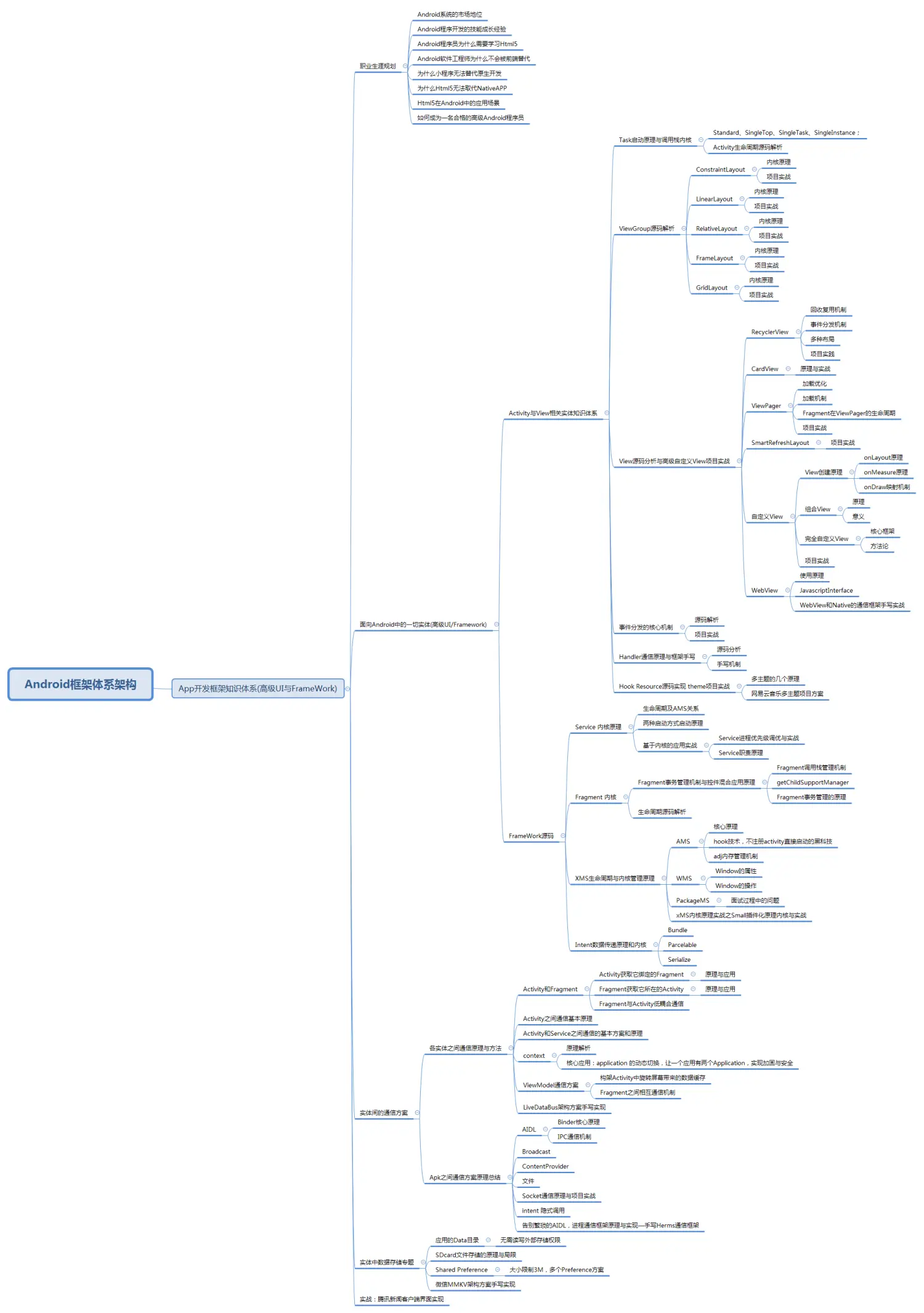
除此之外,前文所提及的Alibaba珍藏版 Android框架体系架构 手写文档以及一本 《大话数据结构》 书籍等等相关的学习笔记文档,也皆可分享给认可的朋友!
——感谢大家伙的认可支持,请注意:点赞+点赞+点赞!!!
《Android学习笔记总结+移动架构视频+大厂面试真题+项目实战源码》,点击传送门,即可获取!
cepted(): Continuation<Any?> =intercepted
?: (context[ContinuationInterceptor]?.interceptContinuation(this) ?: this)
.also { intercepted = it }
}
可以看到暂停最终也是通过CoroutineContext中为ContinuationInterceptor的Element来实现
流程总结(线程切换)
最后:学习总结——Android框架体系架构知识脑图(纯手绘xmind文档)
学完之后,若是想验收效果如何,其实最好的方法就是可自己去总结一下。比如我就会在学习完一个东西之后自己去手绘一份xmind文件的知识梳理大纲脑图,这样也可方便后续的复习,且都是自己的理解,相信随便瞟几眼就能迅速过完整个知识,脑补回来。
下方即为我手绘的Android框架体系架构知识脑图,由于是xmind文件,不好上传,所以小编将其以图片形式导出来传在此处,细节方面不是特别清晰。但可给感兴趣的朋友提供完整的Android框架体系架构知识脑图原件(包括上方的面试解析xmind文档)
[外链图片转存中…(img-6PBVRT6Z-1715167553560)]
除此之外,前文所提及的Alibaba珍藏版 Android框架体系架构 手写文档以及一本 《大话数据结构》 书籍等等相关的学习笔记文档,也皆可分享给认可的朋友!
——感谢大家伙的认可支持,请注意:点赞+点赞+点赞!!!
《Android学习笔记总结+移动架构视频+大厂面试真题+项目实战源码》,点击传送门,即可获取!

开源鸿蒙跨平台开发社区汇聚开发者与厂商,共建“一次开发,多端部署”的开源生态,致力于降低跨端开发门槛,推动万物智联创新。
更多推荐

 8
8 0
0- 0


 已为社区贡献3条内容

所有评论(0)