Flutter 简单实现BaseWidget
总之啊,家里没矿的同学们,如果你们想以后的日子过得好一些,多想想你们的业余时间怎么安排吧;技术方面的提升肯定是重中之重,但是技术外的一些“软实力”也不能完全忽视,很多时候升职确实是因为你的技术足够强,但也与你的“软实力”密切相关在这我也分享一份大佬自己收录整理的Android学习PDF+架构视频+面试文档+源码笔记,还有高级架构技术进阶脑图、Android开发面试专题资料,高级进阶架构资料这些都是
.deactivate
If the subtree containing the State object is removed from the tree (e.g., because the parent built a widget with a different runtimeType or Widget.key), the framework calls the deactivate method. Subclasses should override this method to clean up any links between this object and other elements in the tree (e.g. if you have provided an ancestor with a pointer to a descendant’s RenderObject).
如果视图集合中删除子视图(因为父视图由一个个不同runTimetype或key创建的子视图构建),框架层会调用deactivate函数。State子类应该重写该函数来清除此对象与树中的其他元素之间的任何关联(如果你为此对象提供了指向其他元素 RenderObject的指针)
返回到第一个page时:
I/flutter ( 7347): BaseWidgetState__HomePageWidgetState_deactivate
I/flutter ( 7347): BaseWidgetState__HomePageWidgetState_build
I/flutter ( 7347): BaseWidgetState__NextPageWidgetState_deactivate
I/flutter ( 7347): BaseWidgetState__NextPageWidgetState_dispose
. dispose
At this point, the framework might reinsert this subtree into another part of the tree. If that happens, the framework will ensure that it calls build to give the State object a chance to adapt to its new location in the tree. If the framework does reinsert this subtree, it will do so before the end of the animation frame in which the subtree was removed from the tree. For this reason, State objects can defer releasing most resources until the framework calls their dispose method.
此时此刻,框架层可能重新插入子视图到另外区域的视图中。如果发生这种情况,框架层将会调用build,State对象的子视图能够适应父视图新的位置。如果框架层确实插入了子视图,它将在动画帧结束之前重新插入,在动画帧中子树被从树中移除。因此,State对象可以推迟释放大部分资源,直到框架调用dispose函数。
If the framework does not reinsert this subtree by the end of the current animation frame, the framework will call dispose, which indicates that this State object will never build again. Subclasses should override this method to release any resources retained by this object (e.g., stop any active animations).
如果框架层在当前动画帧结束之前没有重新插入这个子树,那么框架将调用dispose函数,这表明这个状态对象将永远不再构建。子类应该覆盖这个方法来释放这个对象保留的任何资源(例如,停止任何活动的动画)。
After the framework calls dispose, the State object is considered unmounted and the mounted property is false. It is an error to call setState at this point. This stage of the lifecycle is terminal: there is no way to remount a State object that has been disposed.
框架层调用dispose函数后,当前State对象被视为不在挂载了,并且挂载的属性值为false。此刻调用setState是个错误,生命周期的这个阶段是终端:无法重新加载已经释放的State对象。
总结大概意思就是:框架层将要执行销毁函数时,若插入了widget到视图树种那么State对象释放会推迟同时会执行build函数;若没有插入widget到视图树中,框架层很快调用dispose函数,执行资源释放。
基类:
import ‘package:flutter/material.dart’;
abstract class BaseWidget extends StatefulWidget {
@override
BaseWidgetState createState() {
return getState();
}
BaseWidgetState getState();
}
abstract class BaseWidgetState extends State {
String curPage;
String tag = “BaseWidgetState_”;
@override
void initState() {
super.initState();
onCreate();
tag = tag + curPage+“_”;
print(tag + “initState\n”);
}
@override
void didChangeDependencies() {
print(tag + “didChangeDependencies\n”);
super.didChangeDependencies();
}
@override
Widget build(BuildContext context) {
print(tag + “build\n”);
return Scaffold(
body: baseBuild(context),
);
}
@override
void didUpdateWidget(T oldWidget) {
print(tag + “didUpdateWidget\n”);
super.didUpdateWidget(oldWidget);
}
@override
void reassemble() {
print(tag + “reassemble\n”);
super.reassemble();
}
@override
void deactivate() {
print(tag + “deactivate\n”);
super.deactivate();
}
@override
void dispose() {
print(tag + “dispose\n”);
onDes();
super.dispose();
}
void onCreate() {}
baseBuild(BuildContext context) {}
void onDes() {}
}
Page1:
class HomePage extends BaseWidget {
@override
BaseWidgetState getState() {
return _HomePageWidgetState();
}
}
class _HomePageWidgetState extends BaseWidgetState {
@override
void onCreate() {
super.onCreate();
curPage = “_HomePageWidgetState”;
}
@override
baseBuild(BuildContext context) {
// TODO: implement baseBuild
//return super.baseBuild(context);
return Center(
child: Container(
margin: EdgeInsets.only(top: 200.0),
child: Column(
crossAxisAlignment: CrossAxisAlignment.center,
children: [
Text(“首页”),
GestureDetector(
onTap: () async {
Navigator.push(context,
new MaterialPageRoute(builder: (BuildContext context) {
return new NextPage();
}));
},
child: Padding(
padding: EdgeInsets.all(10.0),
child: Text(
“\n跳转下一页”,
style: TextStyle(backgroundColor: Colors.blue),
),
),
)
],
),
),
);
}
}
Page2:
import ‘package:flutter/material.dart’;
import ‘package:flutter/services.dart’;
import ‘package:flutter_base_widget/base_widget.dart’;
import ‘package:flutter_base_widget/view/three_page.dart’;
class NextPage extends BaseWidget {
@override
BaseWidgetState getState() {
// TODO: implement getState
return _NextPageWidgetState();
}
}
class _NextPageWidgetState extends BaseWidgetState {
@override
void onCreate() {
super.onCreate();
curPage = “_NextPageWidgetState”;
}
最后
总之啊,家里没矿的同学们,如果你们想以后的日子过得好一些,多想想你们的业余时间怎么安排吧;
技术方面的提升肯定是重中之重,但是技术外的一些“软实力”也不能完全忽视,很多时候升职确实是因为你的技术足够强,但也与你的“软实力”密切相关
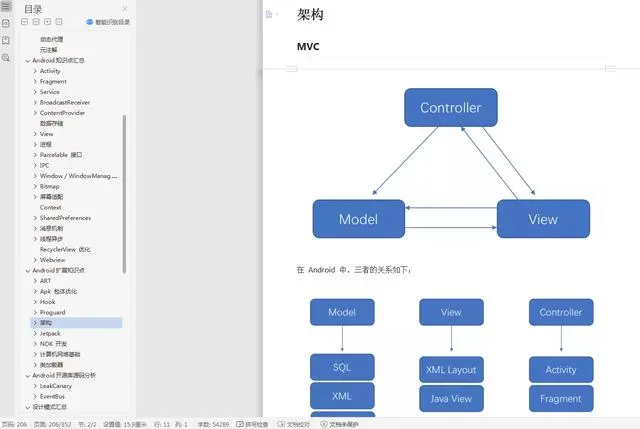
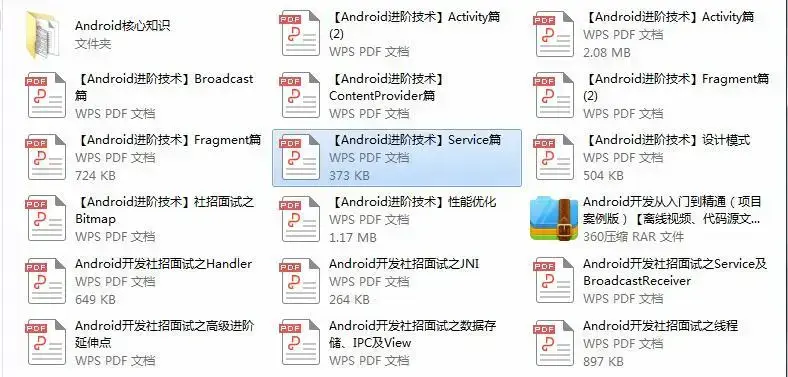
在这我也分享一份大佬自己收录整理的 Android学习PDF+架构视频+面试文档+源码笔记 ,还有高级架构技术进阶脑图、Android开发面试专题资料,高级进阶架构资料这些都是我闲暇还会反复翻阅并给下属员工学习的精品资料。在脑图中,每个知识点专题都配有相对应的实战项目,可以有效的帮助大家掌握知识点。
总之也是在这里帮助大家学习提升进阶,也节省大家在网上搜索资料的时间来学习,也可以分享给身边好友一起学习
相信自己,没有做不到的,只有想不到的
《Android学习笔记总结+移动架构视频+大厂面试真题+项目实战源码》,点击传送门,即可获取!
** ,还有高级架构技术进阶脑图、Android开发面试专题资料,高级进阶架构资料这些都是我闲暇还会反复翻阅并给下属员工学习的精品资料。在脑图中,每个知识点专题都配有相对应的实战项目,可以有效的帮助大家掌握知识点。
总之也是在这里帮助大家学习提升进阶,也节省大家在网上搜索资料的时间来学习,也可以分享给身边好友一起学习
[外链图片转存中…(img-RdLYnrLK-1714961990067)]
[外链图片转存中…(img-P1hnRx0f-1714961990068)]
相信自己,没有做不到的,只有想不到的
《Android学习笔记总结+移动架构视频+大厂面试真题+项目实战源码》,点击传送门,即可获取!

开源鸿蒙跨平台开发社区汇聚开发者与厂商,共建“一次开发,多端部署”的开源生态,致力于降低跨端开发门槛,推动万物智联创新。
更多推荐
 20
20 0
0- 0


 已为社区贡献9条内容

所有评论(0)