如何在React Native中使用文本输入组件?
You know, an app becomes more authentic and professional when there is the interaction between the app and the user.
您知道,当应用程序与用户之间存在交互时,该应用程序将变得更加真实和专业。
The text input component in react-native brings that interaction between the application and the users by allowing the text to be input by the users using the keyboard.
react-native中的文本输入组件通过允许用户使用键盘输入文本,从而在应用程序和用户之间带来了交互。
You will surely find some differences with that of React JS.
您一定会发现与React JS有所不同。
The text input component has some attributes like onChangeText and onSubmitEditing which make text input fascinating and more interactive.
文本输入组件具有一些属性,例如onChangeText和onSubmitEditing ,这些属性使文本输入引人入胜并且更具交互性。
Text input is like a self-closing tag and is written as a word. Below is a brief example.
文本输入就像一个自动关闭标签,被写成一个单词。 下面是一个简短的示例。
Open your App's App.js file and type the following,
打开您应用的App.js文件,然后输入以下内容,
import * as React from 'react';
import {useState} from 'react';
import { Text, View, StyleSheet, Button, TextInput } from 'react-native';

export default function App () {
  return (
    <View style={styles.container}>

      <Text> I love JESUS</Text>

      <TextInput
      placeholder='type your message here'
      autoCapitalize = "characters"

      />

    </View>
  );
}
const styles = StyleSheet.create({
  container: {
    flex: 1,
    backgroundColor: '#fff',
    alignItems: 'center',
    justifyContent: 'center',
  },
});
From the code above, we begin by importing the component from react native before being able to use it else, an error will occur.From the code above, we begin by importing the component from react native before being able to use it else, an error will occur.
从上面的代码开始,我们先从react native导入组件,然后才能使用其他组件,然后会发生错误。从上面的代码开始,我们首先要从react native导入组件,然后再使用其他组件。将会发生错误。
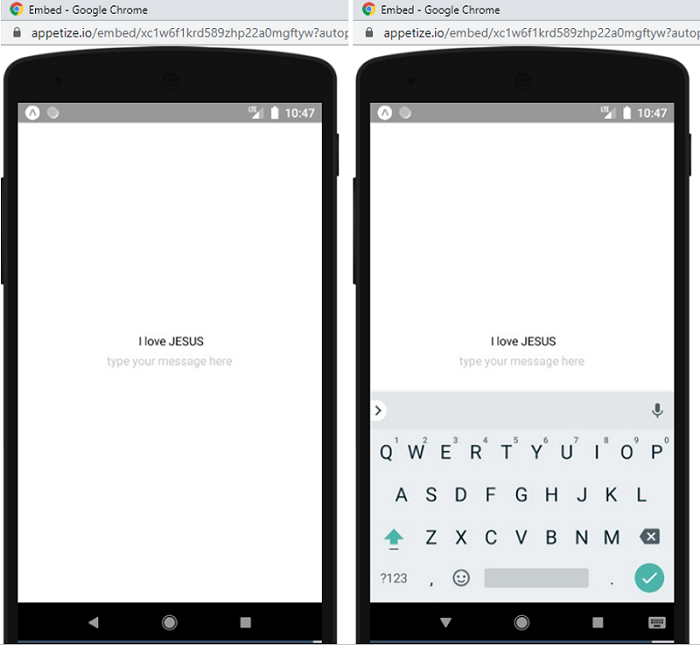
I have also implemented the placeholder attribute which works here just like in html and the autoCapitalize property which simply converts every text input to capital letters. Other attributes and props can be seen on the official documentation.
我还实现了占位符属性,该属性在这里像html一样工作,而autoCapitalize属性仅将输入的每个文本转换为大写字母。 其他属性和道具可以在官方文档中找到。
Take Note: Auto Capitalize doesn't work from all keyboards.
请注意:并非所有键盘都支持自动大写。
Output
输出量
Thanks for coding with me! See you @ the next article. Feel free to drop a comment or question. God Bless You!
感谢您与我编码! 下次见。 随意发表评论或问题。 上帝祝福你!
翻译自: https://www.includehelp.com/react-js/how-to-use-text-input-component-in-react-native.aspx

开源鸿蒙跨平台开发社区汇聚开发者与厂商,共建“一次开发,多端部署”的开源生态,致力于降低跨端开发门槛,推动万物智联创新。
更多推荐
 0
0 0
0- 0


 已为社区贡献11条内容

所有评论(0)