封装IOS原生组件——导出组件属性到RN端使用
导出IOS原生的组件属性给RN端使用,主要有以下几个步骤。1、RN组件桥接类导出属性宏定义代码如下:TestReactNativeViewManager.m////TestReactNativeViewManager.m//NativeCommunicationDemo////Created by chenlw on 2019/4/10.//...
·
导出IOS原生的组件属性给RN端使用,主要有以下几个步骤。
1、RN组件桥接类导出属性宏定义
代码如下:
TestReactNativeViewManager.m
//
//  TestReactNativeViewManager.m
//  NativeCommunicationDemo
//
//  Created by chenlw on 2019/4/10.
//  Copyright © 2019 Facebook. All rights reserved.
//

#import "TestReactNativeViewManager.h"
#import "TestReactNativeView.h"

@implementation TestReactNativeViewManager


//导出桥接宏标记
RCT_EXPORT_MODULE()

//导出RN组件的属性
RCT_EXPORT_VIEW_PROPERTY(type, NSString)

- (UIView *)view
{
    //创建组件实例
    TestReactNativeView * viewInstance =[[TestReactNativeView alloc] init];
    return viewInstance;
}

@end
2、在组件的头文件定义属性,在实现文件中重写组件的属性设置方法
代码如下:
(1)TestReactNativeView.h,添加了属性定义,定义property的时候要注意线程关键字,不然会导致页面卡死。
//
//  TestReactNativeView.h
//  NativeCommunicationDemo
//
//  Created by chenlw on 2019/4/10.
//  Copyright © 2019 Facebook. All rights reserved.
//

#import <UIKit/UIKit.h>

NS_ASSUME_NONNULL_BEGIN

@interface TestReactNativeView : UIView
// type操作类型
@property(nonatomic,weak) NSString * type;

//如果使用assign会导致线程锁死,使用weak弱引用就没有问题
//@property(nonatomic,assign) UITextView *textView;
@property(nonatomic,weak) UITextView *textView;

@end

NS_ASSUME_NONNULL_END
3、RN端使用
在封装组件的时候声明props,代码如下:
TestReactNativeViewComponent.propTypes = {
    type: PropTypes.string,
    ...View.propTypes,
};
使用组件的props,代码如下:
<TestReactNativeView
    style={{
        flex: 1,
        width: screenWidth,
    }}
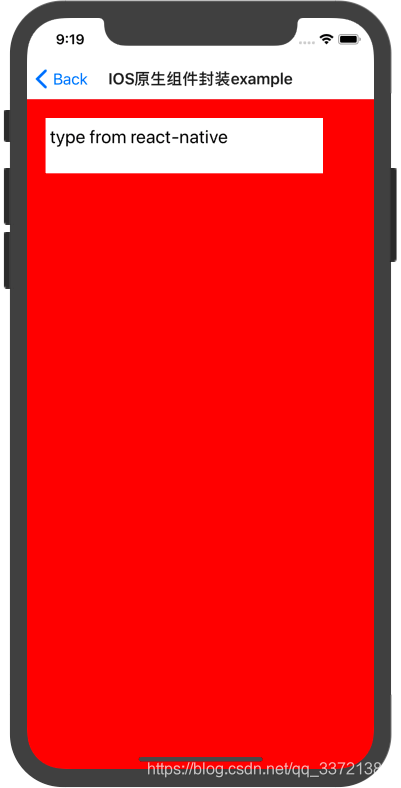
    type={'type from react-native'}
/>
4、运行效果

开源鸿蒙跨平台开发社区汇聚开发者与厂商,共建“一次开发,多端部署”的开源生态,致力于降低跨端开发门槛,推动万物智联创新。
更多推荐


 0
0 0
0- 0


 已为社区贡献8条内容

所有评论(0)