flutter-banner
//the margin of between indicator items
final double indicatorMargin;
final PageController controller;
//whether cycle rolling
final bool cycleRolling;
//whether auto rolling
final bool autoRolling;
final Curve curve;
final ValueChanged onPageChanged;
final bool log;
BannerView(this.banners, {
Key key,
this.initIndex = 0,
this.intervalDuration = const Duration(seconds: 1),
this.animationDuration = const Duration(milliseconds: 500),
this.indicatorBuilder,
this.indicatorNormal,
this.indicatorSelected,
this.indicatorMargin = 5.0,
this.controller,
this.cycleRolling = true,
this.autoRolling = true,
this.curve = Curves.easeInOut,
this.onPageChanged,
this.log = true,
}):
assert(banners?.isNotEmpty ?? true),
assert(null != indicatorMargin),
assert(null != intervalDuration),
assert(null != animationDuration),
assert(null != cycleRolling),
super(key: key);
@override
_BannerViewState createState() => new _BannerViewState();
}
/// Created by yangxiaowei
class _BannerViewState extends State {
List _originBanners = [];
List _banners = [];
Duration _duration;
PageController _pageController;
int _currentIndex = 0;
@override
void initState() {
super.initState();
_Logger.debug = widget.log ?? true;
this._isActive = true;
this._originBanners = widget.banners;
this._banners = this._banners…addAll(this._originBanners);
if(widget.cycleRolling) {
Widget first = this._originBanners[0];
Widget last = this._originBanners[this._originBanners.length - 1];
this._banners.insert(0, last);
this._banners.add(first);
this._currentIndex = widget.initIndex + 1;
}else {
this._currentIndex = widget.initIndex;
}
this._duration = widget.intervalDuration;
this._pageController = widget.controller ?? PageController(initialPage: this._currentIndex);
this._nextBannerTask();
}
Timer _timer;
void _nextBannerTaskBy({int milliseconds = 0}) {
if(!mounted) {
return;
}
if(!widget.autoRolling) {
return;
}
this._cancel();
_timer = new Timer(new Duration(milliseconds: _duration.inMilliseconds + milliseconds), () {
this._doChangeIndex();
});
}
void _nextBannerTask() {
this._nextBannerTaskBy(milliseconds: 0);
}
void _cancel() {
_timer?.cancel();
}
void _doChangeIndex({bool increment = true}) {
if(!mounted) {
return;
}
if(increment) {
this._currentIndex++;
}else{
this._currentIndex–;
}
this._currentIndex = this._currentIndex % this._banners.length;
_Logger.d(TAG, “_doChangeIndex $_currentIndex .”);
if(0 == this._currentIndex) {
this._pageController.jumpToPage(this._currentIndex + 1);
this._nextBannerTaskBy(milliseconds: -_duration.inMilliseconds);
setState(() {});
}else{
this._pageController.animateToPage(
this._currentIndex,
duration: widget.animationDuration,
curve: widget.curve,
);
}
}
@override
Widget build(BuildContext context) {
return this._generateBody();
}
/// compose the body, banner view and indicator view
Widget _generateBody() {
return new Stack(
children: [
this._renderBannerBody(),
this._renderIndicator(),
],
);
}
/// Banner container
Widget _renderBannerBody() {
Widget pageView = new PageView.builder(
itemBuilder: (context, index) {
Widget widget = this._banners[index];
return new GestureDetector(
child: widget,
);
},
controller: this._pageController,
itemCount: this._banners.length,
onPageChanged: (index) {
_Logger.d(TAG, ‘********** changed index: $index cu: $_currentIndex’);
this._currentIndex = index;
this._nextBannerTask();
setState(() {});
if(null != widget.onPageChanged) {
widget.onPageChanged(index);
}
},
physics: new ClampingScrollPhysics(),
);
// return pageView;
return new NotificationListener(
child: pageView,
onNotification: (notification) {
this._handleScrollNotification(notification);
return true;
},
);
}
void _handleScrollNotification(Notification notification) {
void _resetWhenAtEdge(PageMetrics pm) {
if(null == pm || !pm.atEdge) {
return;
}
if(!widget.cycleRolling) {
return;
}
try{
if(this._currentIndex == 0) {
this._pageController.jumpToPage(this._banners.length - 2);
}else if(this._currentIndex == this._banners.length - 1) {
this._pageController.jumpToPage(1);
}
setState(() {});
}catch (e){
_Logger.d(TAG, ‘Exception: ${e?.toString()}’);
}
}
void _handleUserScroll(UserScrollNotification notification) {
UserScrollNotification sn = notification;
PageMetrics pm = sn.metrics;
var page = pm.page;
var depth = sn.depth;
var left = page == .0 ? .0 : page % (page.round());
if(depth == 0) {
_Logger.d(TAG, ‘** page: $page , left: $left , atEdge: ${pm.atEdge} , index: $_currentIndex’);
if(left == 0) {
setState(() {
_resetWhenAtEdge(pm);
});
}
}
}
if(notification is UserScrollNotification) {
if(_isStartByUser) {
return;
}
if(_isEndByUser) {
_isEndByUser = false;
}else {
_Logger.d(TAG, ‘######### 手动开始’);
_isStartByUser = true;
this._cancel();
}
_handleUserScroll(notification);
}else if(notification is ScrollEndNotification) {
_Logger.d(TAG, ‘######### ${notification.runtimeType} $_isStartByUser’);
if(_isEndByUser) {
return;
}
if(_isStartByUser) {
_Logger.d(TAG, ‘######### 手动结束’);
_isEndByUser = true;
_isStartByUser = false;
} else {
_isEndByUser = false;
}
this._nextBannerTask();
}
}
bool _isEndByUser = false;
bool _isStartByUser = false;
/// indicator widget
Widget _renderIndicator() {
int index = widget.cycleRolling ? this._currentIndex - 1 : this._currentIndex;
index = index <= 0 ? 0 : index;
index = index % _originBanners.length;
return new IndicatorWidget(
size: this._originBanners.length,
currentIndex: index,
indicatorBuilder: this.widget.indicatorBuilder,
indicatorNormal: this.widget.indicatorNormal,
indicatorSelected: this.widget.indicatorSelected,
indicatorMargin: this.widget.indicatorMargin,
);
}
bool _isActive = true;
@override
void deactivate() {
super.deactivate();
_isActive = !_isActive;
if(_isActive) {
_nextBannerTask();
} else {
_cancel();
}
}
@override
void dispose() {
_isActive = false;
_pageController?.dispose();
_cancel();
super.dispose();
}
}
class _Logger {
static bool debug = true;
static void d(String tag, String msg) {
if(debug) {
print(‘$tag - $msg’);
}
}
}
IndicatorWidget.dart
import ‘package:flutter/material.dart’;
import ‘…/banner_view.dart’;
import ‘IndicatorUtil.dart’;
//Created by yangxiaowei at 2018/06/06
//indicator view of banner
class IndicatorWidget extends StatelessWidget {
final IndicatorContainerBuilder indicatorBuilder;
final Widget indicatorNormal;
final Widget indicatorSelected;
final double indicatorMargin;
final int size;
final int currentIndex;
IndicatorWidget({
Key key,
this.size,
this.currentIndex,
this.indicatorBuilder,
this.indicatorNormal,
this.indicatorSelected,
this.indicatorMargin = 5.0,
}):
assert(indicatorMargin != null),
assert(size != null && size > 0),
assert(currentIndex != null && currentIndex >= 0),
super(key: key);
@override
Widget build(BuildContext context) {
return this._renderIndicator(context);
}
//indicator container
Widget _renderIndicator(BuildContext context) {
Widget smallContainer = new Container(
// color: Colors.purple[100],
child: new Row(
mainAxisSize: MainAxisSize.min,
children: _renderIndicatorTag(),
),
);
if(null != this.indicatorBuilder) {
return this.indicatorBuilder(context, smallContainer);
}
//default implement
return new Align(
alignment: Alignment.bottomCenter,
child: new Opacity(
opacity: 0.5,
child: new Container(
height: 40.0,
padding: new EdgeInsets.symmetric(horizontal: 16.0),
color: Colors.black45,
alignment: Alignment.centerRight,
child: smallContainer,
),
),
);
}
//generate every indicator item
List _renderIndicatorTag() {
如何做好面试突击,规划学习方向?
面试题集可以帮助你查漏补缺,有方向有针对性的学习,为之后进大厂做准备。但是如果你仅仅是看一遍,而不去学习和深究。那么这份面试题对你的帮助会很有限。最终还是要靠资深技术水平说话。
网上学习 Android的资料一大堆,但如果学到的知识不成体系,遇到问题时只是浅尝辄止,不再深入研究,那么很难做到真正的技术提升。建议先制定学习计划,根据学习计划把知识点关联起来,形成一个系统化的知识体系。
学习方向很容易规划,但是如果只通过碎片化的学习,对自己的提升是很慢的。
同时我还搜集整理2020年字节跳动,以及腾讯,阿里,华为,小米等公司的面试题,把面试的要求和技术点梳理成一份大而全的“ Android架构师”面试 Xmind(实际上比预期多花了不少精力),包含知识脉络 + 分支细节。
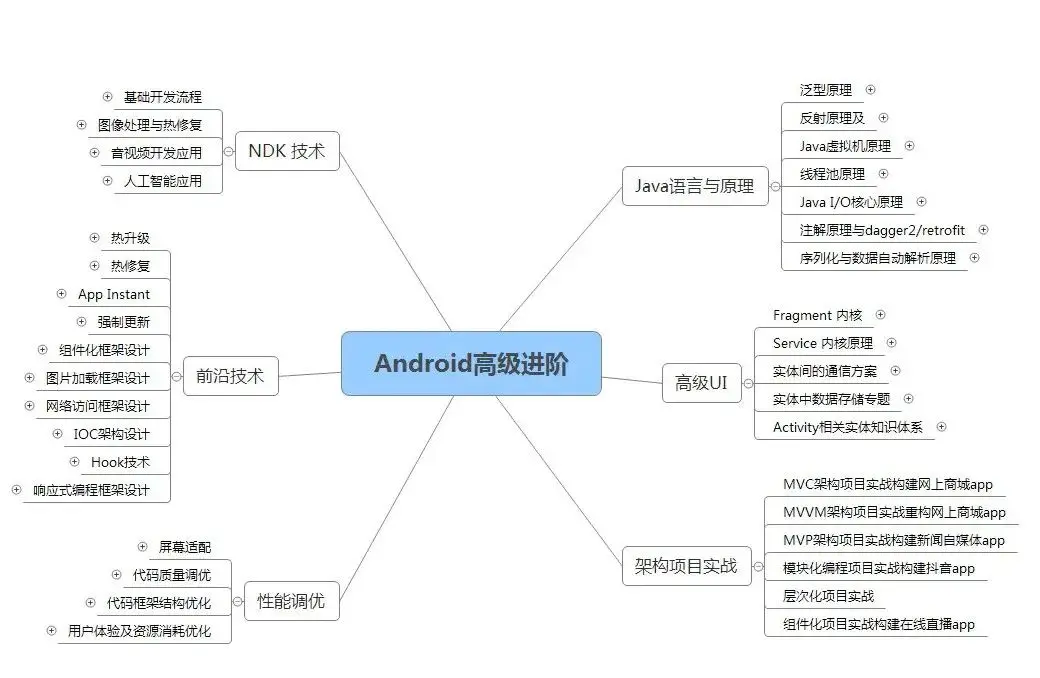
在搭建这些技术框架的时候,还整理了系统的高级进阶教程,会比自己碎片化学习效果强太多。
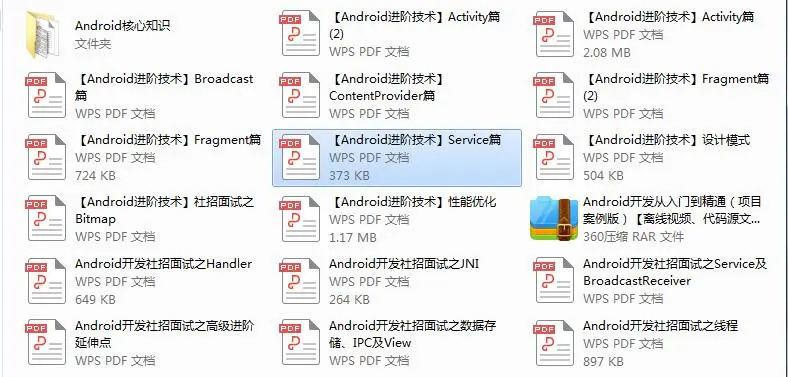
网上学习 Android的资料一大堆,但如果学到的知识不成体系,遇到问题时只是浅尝辄止,不再深入研究,那么很难做到真正的技术提升。希望这份系统化的技术体系对大家有一个方向参考。
《Android学习笔记总结+移动架构视频+大厂面试真题+项目实战源码》,点击传送门,即可获取!
List _renderIndicatorTag() {
如何做好面试突击,规划学习方向?
面试题集可以帮助你查漏补缺,有方向有针对性的学习,为之后进大厂做准备。但是如果你仅仅是看一遍,而不去学习和深究。那么这份面试题对你的帮助会很有限。最终还是要靠资深技术水平说话。
网上学习 Android的资料一大堆,但如果学到的知识不成体系,遇到问题时只是浅尝辄止,不再深入研究,那么很难做到真正的技术提升。建议先制定学习计划,根据学习计划把知识点关联起来,形成一个系统化的知识体系。
学习方向很容易规划,但是如果只通过碎片化的学习,对自己的提升是很慢的。
同时我还搜集整理2020年字节跳动,以及腾讯,阿里,华为,小米等公司的面试题,把面试的要求和技术点梳理成一份大而全的“ Android架构师”面试 Xmind(实际上比预期多花了不少精力),包含知识脉络 + 分支细节。
[外链图片转存中…(img-MSNtE5P2-1714962591669)]
在搭建这些技术框架的时候,还整理了系统的高级进阶教程,会比自己碎片化学习效果强太多。
[外链图片转存中…(img-UgYmKr8L-1714962591670)]
网上学习 Android的资料一大堆,但如果学到的知识不成体系,遇到问题时只是浅尝辄止,不再深入研究,那么很难做到真正的技术提升。希望这份系统化的技术体系对大家有一个方向参考。
《Android学习笔记总结+移动架构视频+大厂面试真题+项目实战源码》,点击传送门,即可获取!

开源鸿蒙跨平台开发社区汇聚开发者与厂商,共建“一次开发,多端部署”的开源生态,致力于降低跨端开发门槛,推动万物智联创新。
更多推荐
 28
28 0
0- 0


 已为社区贡献4条内容

所有评论(0)