Flutter 10天高仿大厂App及小技巧积累总结
GStyle.badge(0, isdot:true)GStyle.badge(13)GStyle.badge(29, color: Colors.orange, height: 15.0, width: 15.0)另外本地存储使用的是shared\_preferences,至于如何使用可参看https://pub.flutter-io.cn/packages/shared_preferences
}
}
支持自定义红点大小、颜色,默认数字超过99就…显示;GStyle.badge(0, isdot:true)GStyle.badge(13)GStyle.badge(29, color: Colors.orange, height: 15.0, width: 15.0)
6、flutter长按自定义弹窗
================
- 在flutter中如何实现长按,并在长按位置弹出菜单,类似微信消息长按弹窗效果;

通过InkWell组件提供的onTapDown事件获取坐标点实现
InkWell(
splashColor: Colors.grey[200],
child: Container(…),
onTapDown: (TapDownDetails details) {
_globalPositionX = details.globalPosition.dx;
_globalPositionY = details.globalPosition.dy;
},
onLongPress: () {
_showPopupMenu(context);
},
),
// 长按弹窗
double _globalPositionX = 0.0; //长按位置的横坐标
double _globalPositionY = 0.0; //长按位置的纵坐标
void _showPopupMenu(BuildContext context) {
// 确定点击位置在左侧还是右侧
bool isLeft = _globalPositionX > MediaQuery.of(context).size.width/2 ? false : true;
// 确定点击位置在上半屏幕还是下半屏幕
bool isTop = _globalPositionY > MediaQuery.of(context).size.height/2 ? false : true;
showDialog(
context: context,
builder: (context) {
return Stack(
children: [
Positioned(
top: isTop ? _globalPositionY : _globalPositionY - 200.0,
left: isLeft ? _globalPositionX : _globalPositionX - 120.0,
width: 120.0,
child: Material(
…
),
)
],
);
}
);
}
- flutter如何实现去掉AlertDialog弹窗大小限制?
可通过SizedBox和无限制容器UnconstrainedBox组件实现
void _showCardPopup(BuildContext context) {
showDialog(
context: context,
builder: (context) {
return UnconstrainedBox(
constrainedAxis: Axis.vertical,
child: SizedBox(
width: 260,
child: AlertDialog(
content: Container(
…
),
elevation: 0,
contentPadding: EdgeInsets.symmetric(horizontal: 10.0, vertical: 20.0),
),
),
);
}
);
}
7、flutter登录/注册表单|本地存储
=====================
flutter提供了两个文本框组件:TextField 和 TextFormField本文是使用TextField实现,并在文本框后添加清空文本框/密码查看图标
TextField(
keyboardType: TextInputType.phone,
controller: TextEditingController.fromValue(TextEditingValue(
text: formObj[‘tel’],
selection: new TextSelection.fromPosition(TextPosition(affinity: TextAffinity.downstream, offset: formObj[‘tel’].length))
)),
decoration: InputDecoration(
hintText: “请输入手机号”,
isDense: true,
hintStyle: TextStyle(fontSize: 14.0),
suffixIcon: Visibility(
visible: formObj[‘tel’].isNotEmpty,
child: InkWell(
child: GStyle.iconfont(0xe69f, color: Colors.grey, size: 14.0), onTap: () {
setState(() { formObj[‘tel’] = ‘’; });
}
),
),
border: OutlineInputBorder(borderSide: BorderSide.none)
),
onChanged: (val) {
setState(() { formObj[‘tel’] = val; });
},
)
TextField(
decoration: InputDecoration(
hintText: “请输入密码”,
isDense: true,
hintStyle: TextStyle(fontSize: 14.0),
suffixIcon: InkWell(
child: Icon(formObj[‘isObscureText’] ? Icons.visibility_off : Icons.visibility, color: Colors.grey, size: 14.0),
onTap: () {
setState(() {
formObj[‘isObscureText’] = !formObj[‘isObscureText’];
});
},
),
border: OutlineInputBorder(borderSide: BorderSide.none)
),
obscureText: formObj[‘isObscureText’],
onChanged: (val) {
setState(() { formObj[‘pwd’] = val; });
},
)
验证消息提示则是使用flutter提供的SnackBar实现
// SnackBar提示
final _scaffoldkey = new GlobalKey();
void _snackbar(String title, {Color color}) {
_scaffoldkey.currentState.showSnackBar(SnackBar(
backgroundColor: color ?? Colors.redAccent,
content: Text(title),
duration: Duration(seconds: 1),
));
}
另外本地存储使用的是shared\_preferences,至于如何使用可参看https://pub.flutter-io.cn/packages/shared_preferences
void handleSubmit() async {
if(formObj[‘tel’] == ‘’) {
_snackbar(‘手机号不能为空’);
}else if(!Util.checkTel(formObj[‘tel’])) {
_snackbar(‘手机号格式有误’);
}else if(formObj[‘pwd’] == ‘’) {
_snackbar(‘密码不能为空’);
}else {
// …接口数据
// 设置存储信息
final prefs = await SharedPreferences.getInstance();
prefs.setBool(‘hasLogin’, true);
prefs.setInt(‘user’, int.parse(formObj[‘tel’]));
prefs.setString(‘token’, Util.setToken());
_snackbar(‘恭喜你,登录成功’, color: Colors.greenAccent[400]);
Timer(Duration(seconds: 2), (){
Navigator.pushNamedAndRemoveUntil(context, ‘/tabbarpage’, (route) => route == null);
});
}
}
8、flutter聊天页面功能
===============
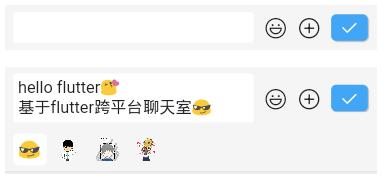
- 在flutter中如何实现类似上图编辑器功能?通过TextField提供的多行文本框属性maxLines就可实现。
Container(
margin: GStyle.margin(10.0),
decoration: BoxDecoration(color: Colors.white, borderRadius: BorderRadius.circular(3.0)),
constraints: BoxConstraints(minHeight: 30.0, maxHeight: 150.0),
child: TextField(
maxLines: null,
keyboardType: TextInputType.multiline,
decoration: InputDecoration(
hintStyle: TextStyle(fontSize: 14.0),
isDense: true,
contentPadding: EdgeInsets.all(5.0),
border: OutlineInputBorder(borderSide: BorderSide.none)
),
controller: _textEditingController,
focusNode: _focusNode,
onChanged: (val) {
setState(() {
editorLastCursor = _textEditingController.selection.baseOffset;
});
},
onTap: () {handleEditorTaped();},
),
),
- flutter实现滚动聊天信息到最底部
通过ListView里controller属性提供的jumpTo方法及_msgController.position.maxScrollExtent
【附】相关架构及资料
往期Android高级架构资料、源码、笔记、视频。高级UI、性能优化、架构师课程、NDK、混合式开发(ReactNative+Weex)微信小程序、Flutter全方面的Android进阶实践技术,群内还有技术大牛一起讨论交流解决问题。
网上学习资料一大堆,但如果学到的知识不成体系,遇到问题时只是浅尝辄止,不再深入研究,那么很难做到真正的技术提升。
一个人可以走的很快,但一群人才能走的更远!不论你是正从事IT行业的老鸟或是对IT行业感兴趣的新人,都欢迎加入我们的的圈子(技术交流、学习资源、职场吐槽、大厂内推、面试辅导),让我们一起学习成长!
中…(img-jEcMFqsh-1714486109584)]
[外链图片转存中…(img-QGqWqdpw-1714486109585)]
往期Android高级架构资料、源码、笔记、视频。高级UI、性能优化、架构师课程、NDK、混合式开发(ReactNative+Weex)微信小程序、Flutter全方面的Android进阶实践技术,群内还有技术大牛一起讨论交流解决问题。
网上学习资料一大堆,但如果学到的知识不成体系,遇到问题时只是浅尝辄止,不再深入研究,那么很难做到真正的技术提升。
一个人可以走的很快,但一群人才能走的更远!不论你是正从事IT行业的老鸟或是对IT行业感兴趣的新人,都欢迎加入我们的的圈子(技术交流、学习资源、职场吐槽、大厂内推、面试辅导),让我们一起学习成长!

开源鸿蒙跨平台开发社区汇聚开发者与厂商,共建“一次开发,多端部署”的开源生态,致力于降低跨端开发门槛,推动万物智联创新。
更多推荐
 10
10 0
0- 0


 已为社区贡献7条内容

所有评论(0)