Flutter 自定义steps(横向步骤条,纵向步骤条)
·
- 近期做flutter开发,实现一个自定义进度条功能
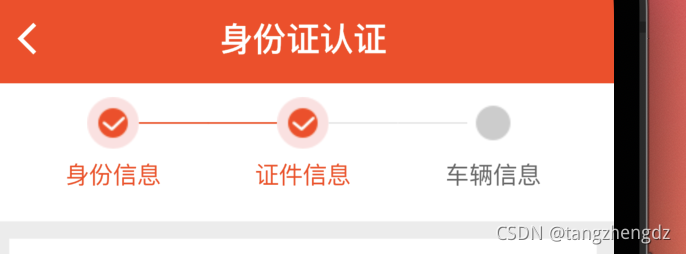
- 直接上代码
import 'package:flutter/material.dart'; import 'package:flutter_screenutil/flutter_screenutil.dart'; import 'package:pinmancheapp/utils/colors.dart'; import 'package:pinmancheapp/utils/constant_utils.dart'; /// @Author: tzh /// /// @CreateDate: 2021/8/30 11:46 /// /// @Description: 自定义步骤条 /// class StepsWidget extends StatefulWidget { const StepsWidget({Key? key, required this.currentIndex}) : super(key: key); final int currentIndex; @override _StepsWidgetState createState() => _StepsWidgetState(); } class _StepsWidgetState extends State<StepsWidget> { var _items = ["身份信息", "证件信息", "车辆信息"]; @override Widget build(BuildContext context) { return Container( color: AppColors.white, height: 80.h, alignment: Alignment.center, width: double.infinity, child: ListView.builder( shrinkWrap: true, scrollDirection: Axis.horizontal, itemCount: _items.length, itemBuilder: (context, index) { //如果显示到最后一个并且Icon总数小于200时继续获取数据 return _buildItem(index); }), ); } Widget _buildItem(int index) { return Container( padding: EdgeInsets.only(top: 8.h), child: Column( children: [ Row( children: [ Opacity( opacity: index == 0 ? 0 : 1, child: Container( width: 40.w, height: 1, decoration: BoxDecoration( color: index <= widget.currentIndex ? AppColors.primaryElement : AppColors.E5E5E5), ), ), Image.asset( index <= widget.currentIndex ? Constants.getAssetsImage("ic_oval_red") : Constants.getAssetsImage("ic_oval_gray"), width: 30.w, height: 30.w, ), Opacity( opacity: _items.length - 1 == index ? 0 : 1, child: Container( width: 40.w, height: 1, decoration: BoxDecoration( color: index < widget.currentIndex ? AppColors.primaryElement : AppColors.E5E5E5), ), ) ], ), Padding( padding: EdgeInsets.only(top: 5.h), child: Text( _items[index], style: TextStyle( color: index <= widget.currentIndex ? AppColors.primaryElement : AppColors.gray6), ), ) ], ), ); } } -
使用方法
Container( child:StepsWidget( currentIndex: 1, ) -
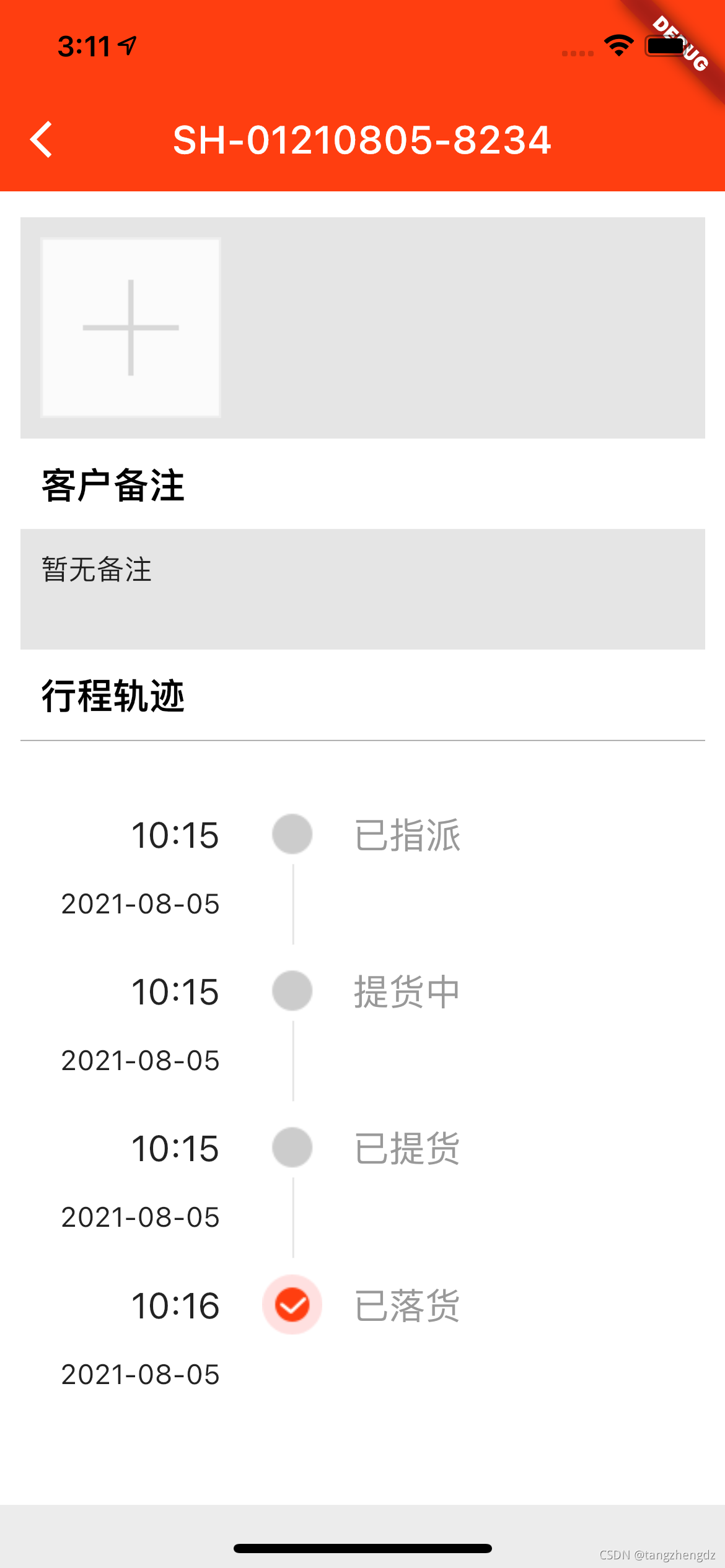
纵向步骤条效果
-
封装组件
import 'package:flutter/material.dart'; import 'package:flutter_screenutil/flutter_screenutil.dart'; import 'package:pinmancheapp/utils/colors.dart'; import 'package:pinmancheapp/utils/constant_utils.dart'; /// @Author: tzh /// /// @CreateDate: 2021/10/08 15:45 /// /// @Description: 自定义步骤条 竖向 /// class StepsVehticalWidget extends StatefulWidget { StepsVehticalWidget({Key key}) : super(key: key); @override StepsVehticalWidgetState createState() => StepsVehticalWidgetState(); } class StepsVehticalWidgetState extends State<StepsVehticalWidget> { var _items = []; int _index = -1; @override Widget build(BuildContext context) { return Container( color: AppColors.white, height: 80.h, alignment: Alignment.center, width: double.infinity, child: ListView.builder( shrinkWrap: true, scrollDirection: Axis.vertical, physics:NeverScrollableScrollPhysics(), itemCount: _items.length, itemBuilder: (context, index) { //如果显示到最后一个并且Icon总数小于200时继续获取数据 return _buildItem(index); }), ); } Widget _buildItem(int index) { return Container( padding: EdgeInsets.only(top: 8.h), child: Column( children: [ // Opacity( // opacity: index == 0 ? 0 : 0, // child: Container( // width: 1, // height: 40.h, // decoration: BoxDecoration( // color: index <= widget.currentIndex // ? AppColors.primaryElement // : AppColors.E5E5E5), // ), // ), Container( child: Row( children: [ Container( alignment: Alignment.topRight, width: 120.w, padding: EdgeInsets.only(right: 20.w), child: Text( "${_items[index]['time']}", style: TextStyle(fontSize: 18.sp), ), ), Image.asset( index == _index ? Constants.getAssetsImage("ic_oval_red") : Constants.getAssetsImage("ic_oval_gray"), width: 30.w, height: 30.w, ), Padding( padding: EdgeInsets.only(left: 15.w), child: Text( "${_items[index]["statusDesc"]}", style: TextStyle(fontSize: 18.sp, color: AppColors.gray9), ), ) ], ), ), Row( children: [ Container( alignment: Alignment.topRight, width: 120.w, padding: EdgeInsets.only(right: 20.w), child: Text("${_items[index]['date']}"), ), Opacity( opacity: _items.length - 1 == index ? 0 : 1, child: Container( width: 1, height: 40.h, margin: EdgeInsets.only(left: 15.w), decoration: BoxDecoration( color: AppColors.E5E5E5), ), ), ], ), ], ), ); } void setData(List items,int index) { setState(() { this._items = items; this._index = index; }); } } -
使用方式
        Container(
                    padding: EdgeInsets.only(top: 10.w),
                    height: 380.h,
                    child: StepsVehticalWidget(
                      key: _stepsKey,
                    ))


        _stepsKey.currentState.setData(stepsList, _index);

开源鸿蒙跨平台开发社区汇聚开发者与厂商,共建“一次开发,多端部署”的开源生态,致力于降低跨端开发门槛,推动万物智联创新。
更多推荐
 2
2 0
0- 0


 已为社区贡献1条内容

所有评论(0)