Android 开发 Gradle 相关问题
问题汇总
1、Gradle 无法下载 / 下载慢的问题
Could not install Gradle distribution from 'https://services.gradle.org/distributions/gradle-8.10.2-all.zip'. Reason: java.net.SocketTimeoutException: Read timed out
解决:使用国内的镜像站点加速下载。
以下是一些国内镜像站点提供的Gradle下载地址:
官网 Gradle 下载地址: https://services.gradle.org/distributions/
腾讯云镜像 Gradle下载地址: https://mirrors.cloud.tencent.com/gradle/
阿里云镜像 Gradle下载地址: https://mirrors.aliyun.com/macports/distfiles/gradle/
阿里云镜像 Gradle下载地址: https://mirrors.aliyun.com/gradle/
国内镜像站点可以更快地获取Gradle的安装包,避免官方下载地址带来的下载速度问题,提高效率。

distributionBase=GRADLE_USER_HOME
distributionPath=wrapper/dists
distributionUrl=https://mirrors.aliyun.com/macports/distfiles/gradle/gradle-8.10.2-all.zip
networkTimeout=10000
validateDistributionUrl=true
zipStoreBase=GRADLE_USER_HOME
zipStorePath=wrapper/dists
2、Gradle 插件版本不匹配问题
The project is using an incompatible version (AGP 8.7.2) of the Android Gradle plugin. Latest supported version is AGP 8.5.0See Android Studio & AGP compatibility options.
解决:升级到最新的 Android Studio 即可
参考:https://blog.csdn.net/shulianghan/article/details/130194426
3、RN 真机或模拟器无法连接的一种情况
path: android\app\src\main\AndroidManifest.xml
<manifest xmlns:android="http://schemas.android.com/apk/res/android"
    xmlns:tools="http://schemas.android.com/tools">

    <uses-permission android:name="android.permission.INTERNET" />

    <application
        android:networkSecurityConfig="@xml/network_security_config"
        android:name=".MainApplication"
        android:allowBackup="false"
        android:icon="@mipmap/ic_launcher"
        android:label="@string/app_name"
        android:roundIcon="@mipmap/ic_launcher_round"
        android:supportsRtl="true"
        android:theme="@style/AppTheme"
        >
        <activity
            android:name=".MainActivity"
            android:configChanges="keyboard|keyboardHidden|orientation|screenLayout|screenSize|smallestScreenSize|uiMode"
            android:exported="true"
            android:theme="@style/SplashTheme"
            android:launchMode="singleTask"
            android:windowSoftInputMode="adjustResize">
            <intent-filter>
                <action android:name="android.intent.action.MAIN" />
                <category android:name="android.intent.category.LAUNCHER" />
            </intent-filter>
        </activity>
    </application>
</manifest>
解决办法: 检查 network-security-config 配置
在 <domain-config> 中,允许特定域名及其子域名使用明文传输(HTTP)非加密连接(cleartextTrafficPermitted="true"):10.0.2.2(通常用于 Android 模拟器访问本地开发服务器)localhost(本地调试)
默认禁止其他所有明文传输
在 <base-config> 中,设置了 cleartextTrafficPermitted=“false”,这意味着除了上述明确列出的域名外,其他所有网络请求都必须使用 HTTPS 加密连接。同时只信任系统预装的 CA 证书(<certificates src="system" />),这是推荐的安全做法。`
<network-security-config>
    <domain-config cleartextTrafficPermitted="true">
        <domain includeSubdomains="true">api.example.net</domain>
        <domain includeSubdomains="true">10.0.2.2</domain>
        <domain includeSubdomains="true">localhost</domain>
    </domain-config>
    <base-config cleartextTrafficPermitted="false">
        <trust-anchors>
            <certificates src="system" />
        </trust-anchors>
    </base-config>
</network-security-config>
4、command node 错误
FAILURE: Build failed with an exception.What went wrong: Execution failed for task ':expo-constants:createDebugExpoConfig'. A problem occurred starting process 'command 'node''
解决:更改 Android Studio 设置 使用 JDK 17
参考:
https://github.com/expo/expo/issues/28309
https://reactnative.dev/docs/set-up-your-environment?platform=android#installing-dependencies
-> java --version
openjdk 17.0.10 2024-01-16 LTS
OpenJDK Runtime Environment Zulu17.48+15-CA (build 17.0.10+7-LTS)
OpenJDK 64-Bit Server VM Zulu17.48+15-CA (build 17.0.10+7-LTS, mixed mode, sharing)

5、新架构下的 RN cmake 编译问题
[CXX1429] error when building with cmake using xxx\node_modules\react-native-gesture-handler\android\src\main\jni\CMakeLists.txt: -- The C compiler identification is Clang 17.0.2
Caused by: org.gradle.process.internal.ExecException: Process 'command '/Android/sdk/cmake/3.22.1/bin/cmake'' finished with non-zero exit value 1
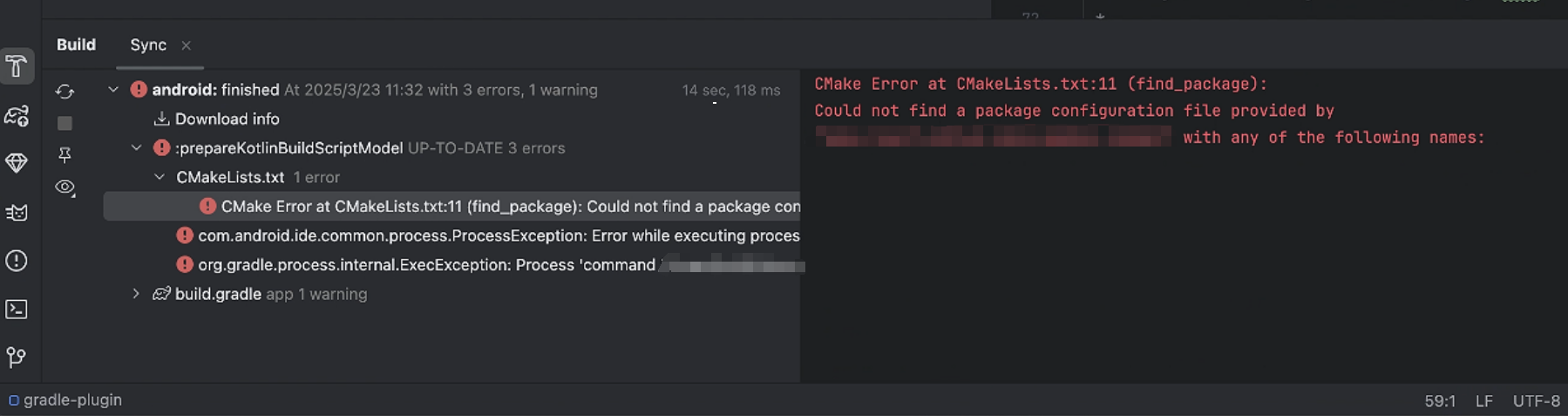
初步判断是 第三方依赖包没有自动 autolink 导致 Android Studio 找不到包。
重新拉取新项目可能解决。

开源鸿蒙跨平台开发社区汇聚开发者与厂商,共建“一次开发,多端部署”的开源生态,致力于降低跨端开发门槛,推动万物智联创新。
更多推荐
 10
10 0
0- 0


 已为社区贡献3条内容

所有评论(0)