flutter图标按钮_第四篇-用Flutter手撸一个抖音国内版,看看有多炫
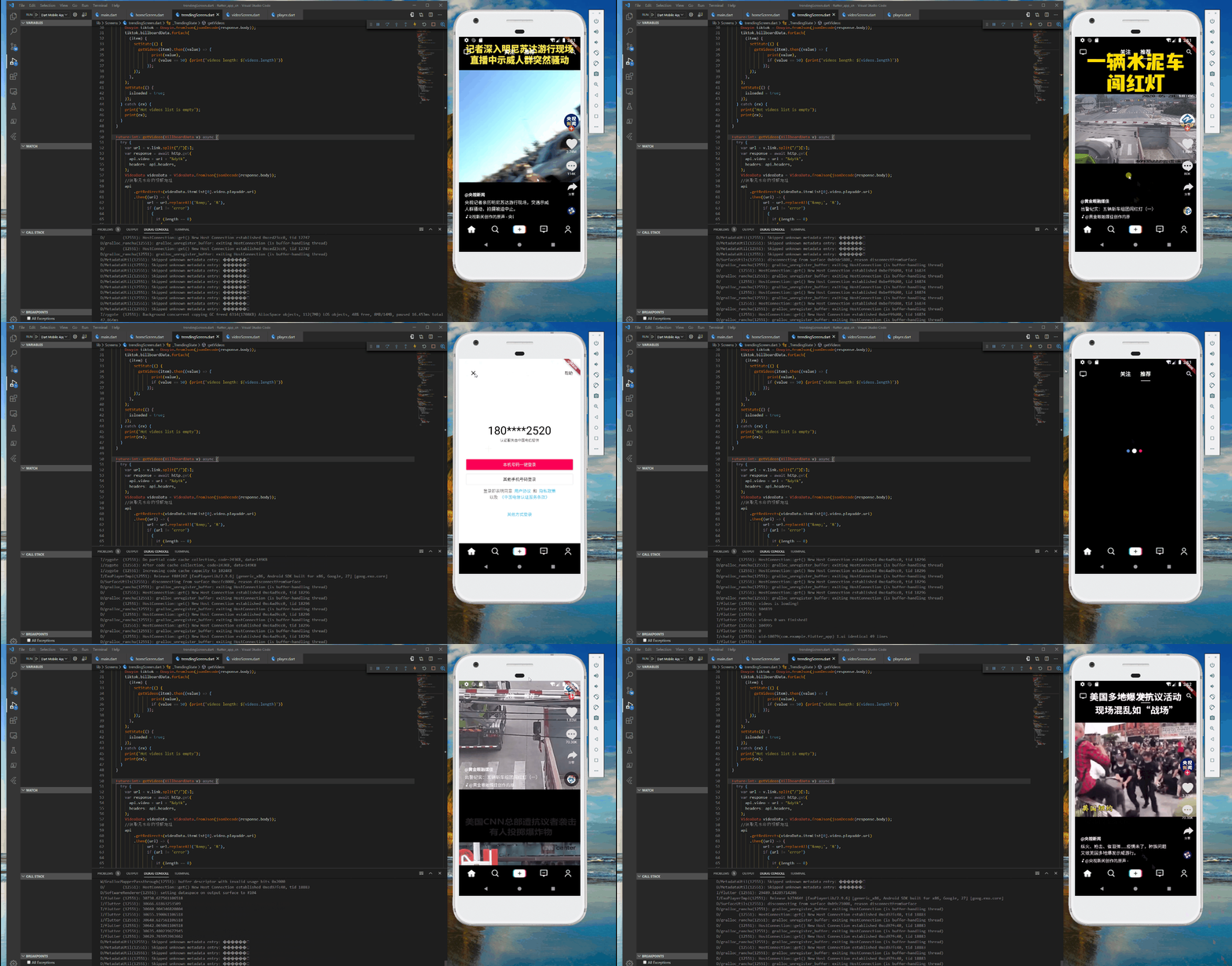
前言这次对布局进行优化,主要包含了首页tabview pageview 以及添加几个按钮的操作过程.主要使用到stack层叠布局,tabpview和pageview,tabview两个页面,一个关注,一个推荐,左右切换,pageview被包含在tabview里面.布局优化抖音的顶部appbar 是悬浮层叠展示,而flutter的层叠组件是stack, 因此最外面采用stack, 其次中间是tabv
前言
这次对布局进行优化,主要包含了首页tabview pageview 以及添加几个按钮的操作过程.主要使用到stack层叠布局,tabpview和pageview,tabview两个页面,一个关注,一个推荐,左右切换,pageview被包含在tabview里面.
布局优化
抖音的顶部appbar 是悬浮层叠展示,而flutter的层叠组件是stack, 因此最外面采用stack, 其次中间是tabview,分别是关注和推荐两个选项卡,关注在没有登录的时候会弹出一个提示需要认证登录的页面,这里加了两个页面,subscriptionScreen.dart,另外一个是loginScreen.dart
@overrideWidget build(BuildContext context) {return Scaffold(//backgroundColor: Colors.transparent,body: Stack(//fit: StackFit.expand,children: <Widget>[TabBarView(controller: _tabController,children: <Widget>[Subscription(),PageView(allowImplicitScrolling: true,controller: _pageController,children: <Widget>[Trending(),],onPageChanged: (int index) {setState(() {currentIndex = index;});},),],),Column(children: [AppBar(backgroundColor: Colors.transparent,elevation: 0,centerTitle: true,leading: IconButton(icon: Icon(Icons.tv),onPressed: () {print('点击了直播按钮');}),actions: <Widget>[//导航栏右侧菜单IconButton(icon: Icon(Icons.search),onPressed: () {print('点击了搜索按钮');}),],title: TabBar(indicator: UnderlineTabIndicator(borderSide: BorderSide(width: 2.0, color: Colors.white),insets: EdgeInsets.symmetric(horizontal: 18.0)),labelStyle: TextStyle(fontSize: 18),isScrollable: true,controller: _tabController,tabs: toptabs,onTap: (index) {print(index);},),)],),],),bottomNavigationBar: bottomItems(),);}
底部弹出提示认证页面
在 onTap 方法里
Scaffold.of(context).showBottomSheet<void>((BuildContext context) {return Login();});
BottomSheet 是一个底部滑出的组件

new BottomSheet(onClosing: () {},builder: (BuildContext context) {return new Text('aaa');},),
通常很少直接使用 BottomSheet 而是使用 showModalBottomSheet。直接时候的时候看到的知识 builder 里的内容。
Future<T> showModalBottomSheet <T>({@required BuildContext context,@required WidgetBuilder builder});
看一个示例
new MaterialButton(color: Colors.blue,child: new Text('点我'),onPressed: () {showModalBottomSheet(context: context,builder: (BuildContext context) {return new Container(height: 300.0,child: new Image.network(this.imgurl),);},).then((val) {print(val);});
具体详细介绍参考官网.
关注页面
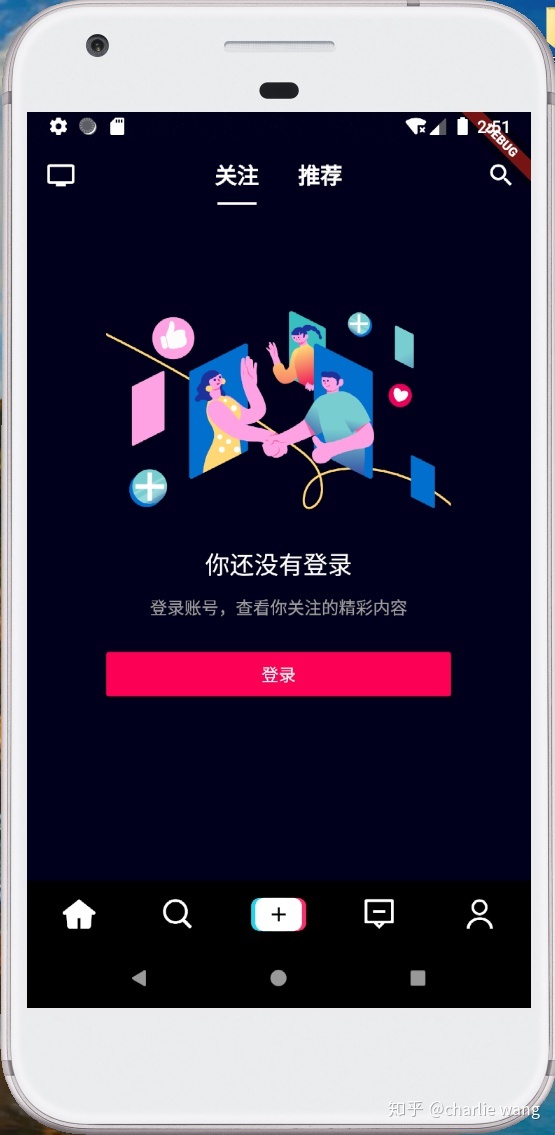
整个页面布局,左右都有边距,顶部也有边距,所有采用Container包含,边距使用padding: EdgeInsets.only(top: 150.0, left: 65.0, right: 65.0), 背景颜色 color: Color.fromRGBO(14, 15, 26, 1),依次image,另外使用sizebox占用空间,
其他的中间层都是居中,所以采用center都是居中,另外登录按钮是占满屏幕的,所以也采用SizeBox,并且把width:设置为double.infinity,这样就占满屏幕,button采用默认的RaisedButton,在button的onpressed事件调用showBottomSheet
import 'package:flutter/material.dart';import 'package:flutter_app/Screens/loginScreen.dart';class Subscription extends StatefulWidget {@overrideState<StatefulWidget> createState() => _SubscriptionState();}class _SubscriptionState extends State<Subscription>with TickerProviderStateMixin {final GlobalKey<ScaffoldState> scaffoldKey = GlobalKey<ScaffoldState>();@overrideWidget build(BuildContext context) {return Container(padding: EdgeInsets.only(top: 150.0, left: 65.0, right: 65.0),color: Color.fromRGBO(14, 15, 26, 1),child: Column(crossAxisAlignment: CrossAxisAlignment.start,children: <Widget>[Image(image: AssetImage("assets/images/int_1581491273221.png")),SizedBox(height: 20),Center(child: Text('你还没有登录',style: TextStyle(color: Colors.white,fontSize: 20.0,fontWeight: FontWeight.w400),),),SizedBox(height: 10),Center(child: Text('登录账号,查看你关注的精彩内容',style: TextStyle(color: Color.fromRGBO(253, 253, 253, 0.6),fontSize: 14.0,fontWeight: FontWeight.w400),),),SizedBox(height: 20),SizedBox(width: double.infinity,child: RaisedButton(color: Color.fromRGBO(252, 1, 86, 1),child: Text('登录',style: TextStyle(color: Colors.white),),onPressed: () {Scaffold.of(context).showBottomSheet<void>((BuildContext context) {return Login();});},),),]),);}}
登录页面
布局如下图:
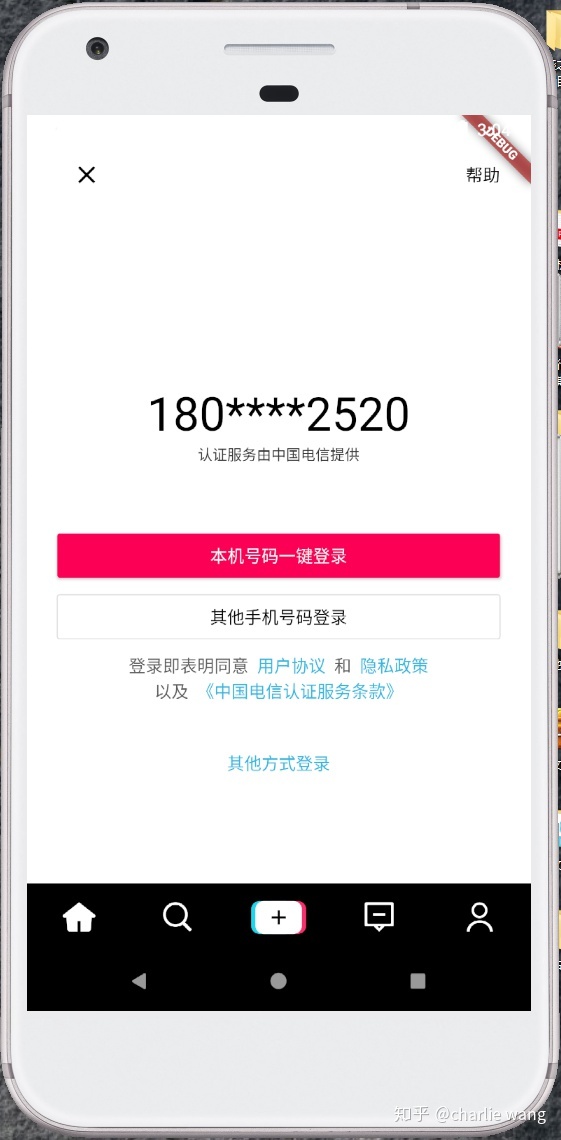
这个页面整体布局顶部,左右都有边距,因此使用Container比较合适,设置背景颜色为color: Colors.white, 边距设置为padding:EdgeInsets.only(top: 25.0, left: 25.0, right: 25.0, bottom: 50.0),整体布局采用Column,因为是上下布局,因此Column 设置
crossAxisAlignment: CrossAxisAlignment.start,顶部的布局是左边一个clear图标按钮,右边一个帮助按钮,所以使用Row布局,并且设置Row的mainAxisAlignment: MainAxisAlignment.spaceBetween,这样就左右布局了,其他依次采用SizeBox占位,
中间则采用Center来展示文字控件,底部的登录部分因为包含标签 超链接,所有采用RichText比较合适,包含TextSpan即可.
全部代码如下:
import 'package:flutter/gestures.dart';import 'package:flutter/material.dart';import 'package:url_launcher/url_launcher.dart';class Login extends StatefulWidget {@overrideState<StatefulWidget> createState() => _LoginState();}class _LoginState extends State<Login> {TapGestureRecognizer _myTapGestureRecognizer;@overridevoid initState() {super.initState();_myTapGestureRecognizer = TapGestureRecognizer()..onTap = () {launch('https://open.douyin.com/platform');};}@overridevoid dispose() {_myTapGestureRecognizer.dispose();super.dispose();}@overrideWidget build(BuildContext context) {return Container(color: Colors.white,padding:EdgeInsets.only(top: 25.0, left: 25.0, right: 25.0, bottom: 50.0),child: Column(crossAxisAlignment: CrossAxisAlignment.start,children: [Row(mainAxisAlignment: MainAxisAlignment.spaceBetween,children: [IconButton(icon: Icon(Icons.clear),onPressed: () {Navigator.pop(context);},color: Colors.black,),Text('帮助', style: TextStyle(color: Colors.black)),],),SizedBox(height: 150.0,),Center(child: Text('180****2520',style: TextStyle(color: Colors.black, fontSize: 38)),),Center(child: Text('认证服务由中国电信提供',style: TextStyle(color: Color.fromRGBO(53, 53, 53, 1), fontSize: 12)),),SizedBox(height: 50.0,),SizedBox(width: double.infinity,child: RaisedButton(color: Color.fromRGBO(252, 1, 86, 1),child: Text('本机号码一键登录',style: TextStyle(color: Colors.white),),onPressed: () {showBottomSheet(context: context, builder: (context) => Login());},),),SizedBox(height: 2.0,),SizedBox(width: double.infinity,child: OutlineButton(color: Color.fromRGBO(252, 1, 86, 1),child: Text('其他手机号码登录',style: TextStyle(color: Colors.black),),onPressed: () {showBottomSheet(context: context, builder: (context) => Login());},),),SizedBox(height: 5.0,),Center(child: RichText(text: TextSpan(children: [TextSpan(text: '登录即表明同意',style: TextStyle(color: Color.fromRGBO(53, 53, 53, 0.8)),),TextSpan(text: ' '),TextSpan(text: '用户协议',style: TextStyle(color: Color.fromRGBO(0, 164, 219, 0.8)),),TextSpan(text: ' '),TextSpan(text: '和',style: TextStyle(color: Color.fromRGBO(53, 53, 53, 0.8)),),TextSpan(text: ' '),TextSpan(text: '隐私政策',style: TextStyle(color: Color.fromRGBO(0, 164, 219, 0.8)),),],),)),Center(child: RichText(text: TextSpan(children: [TextSpan(text: '以及',style: TextStyle(color: Color.fromRGBO(53, 53, 53, 0.8)),),TextSpan(text: ' '),TextSpan(text: '《中国电信认证服务条款》',style: TextStyle(color: Color.fromRGBO(0, 164, 219, 0.8)),recognizer: _myTapGestureRecognizer),],),)),Expanded(flex: 1,child: Center(heightFactor: 25.0,child: Text('其他方式登录',style:TextStyle(color: Color.fromRGBO(0, 164, 219, 0.8))))),],),);}}
变更记录
本次变更主要体现在首页的选项卡设计,需要层叠展示,并且透明的采用appbar显示出顶部的关注、推荐按钮,另外新增了关注页,登录页,并且把底部按钮以及右边的按钮都加上了触发时间
接下来要完成的双击心形按钮点赞,评论页面,分享页面,这些都可以采用showmodalbottomsheet方法打开一个底部抽屉页面
还有底部的首页刷新,消息页面,拍短视频页面,消息页面,我的个人信息页面
结语
请继续关注本博客,其他页面持续更新完成,源码地址:https://github.com/WangCharlie/douyin,欢迎fork和star,谢谢!!!

开源鸿蒙跨平台开发社区汇聚开发者与厂商,共建“一次开发,多端部署”的开源生态,致力于降低跨端开发门槛,推动万物智联创新。
更多推荐
 0
0 0
0- 0


 已为社区贡献1条内容

所有评论(0)