KMP OpenHarmony 中的 Kotlin 颜色格式验证工具 - 格式检测与转换
·
📚 概述
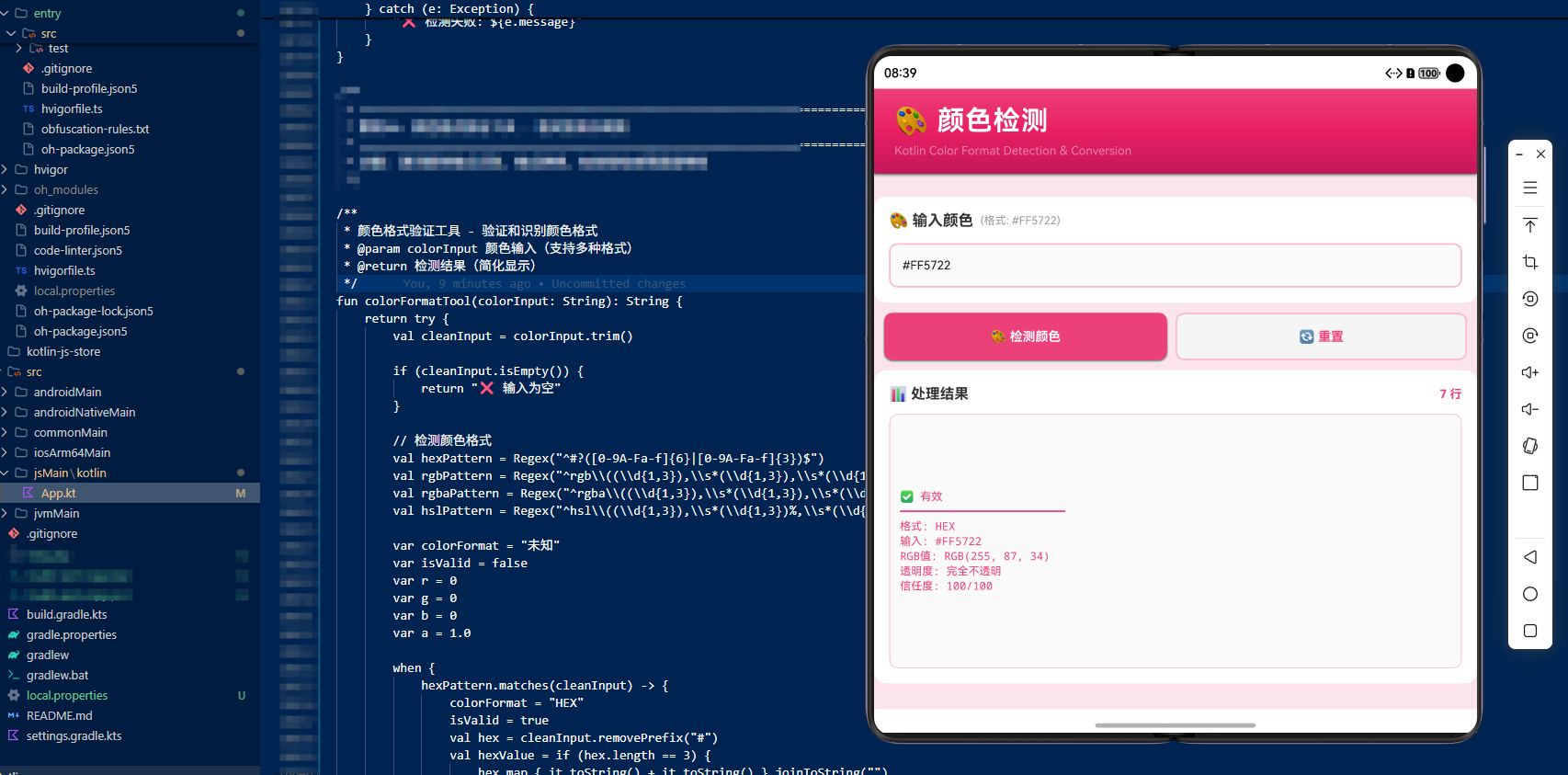
本案例深入探讨了在 Kotlin Multiplatform (KMP) 项目中实现颜色格式验证工具的完整流程。通过将 Kotlin 代码编译为 JavaScript,并在 OpenHarmony 的 ArkTS 中调用,我们展示了如何充分利用 Kotlin 的特性来进行颜色格式识别、格式转换和有效性检查。
颜色格式验证是前端开发的重要功能,允许我们验证用户输入的颜色值、识别颜色格式、转换不同格式。在 KMP 项目中,我们可以利用这些特性来构建具有强大颜色处理能力的应用。
本文将详细介绍如何在 KMP 项目中实现颜色格式识别、格式转换、有效性检查等核心概念。
🎯 核心概念
1. 颜色格式识别 (Color Format Recognition)
识别多种颜色格式。
// 检测颜色格式
val hexPattern = Regex("^#?([0-9A-Fa-f]{6}|[0-9A-Fa-f]{3})$")
val rgbPattern = Regex("^rgb\\((\\d{1,3}),\\s*(\\d{1,3}),\\s*(\\d{1,3})\\)$")
val rgbaPattern = Regex("^rgba\\((\\d{1,3}),\\s*(\\d{1,3}),\\s*(\\d{1,3}),\\s*([0-9.]+)\\)$")
val hslPattern = Regex("^hsl\\((\\d{1,3}),\\s*(\\d{1,3})%,\\s*(\\d{1,3})%\\)$")
代码解释:
- HEX 格式:#RRGGBB 或 #RGB
- RGB 格式:rgb(r, g, b)
- RGBA 格式:rgba(r, g, b, a)
- HSL 格式:hsl(h, s%, l%)
2. HEX 格式处理 (HEX Format Processing)
处理十六进制颜色格式。
hexPattern.matches(cleanInput) -> {
    colorFormat = "HEX"
    isValid = true
    val hex = cleanInput.removePrefix("#")
    val hexValue = if (hex.length == 3) {
        hex.map { it.toString() + it.toString() }.joinToString("")
    } else {
        hex
    }
    r = hexValue.substring(0, 2).toInt(16)
    g = hexValue.substring(2, 4).toInt(16)
    b = hexValue.substring(4, 6).toInt(16)
}
代码解释:
- 移除 # 前缀
- 处理短格式(#RGB)
- 转换为 RGB 值
3. RGB 格式验证 (RGB Format Validation)
验证 RGB 格式。
rgbPattern.matches(cleanInput) -> {
    colorFormat = "RGB"
    val match = rgbPattern.find(cleanInput)
    if (match != null) {
        r = match.groupValues[1].toInt()
        g = match.groupValues[2].toInt()
        b = match.groupValues[3].toInt()
        isValid = r in 0..255 && g in 0..255 && b in 0..255
    }
}
代码解释:
- 提取 RGB 值
- 验证范围(0-255)
- 检查有效性
4. RGBA 格式处理 (RGBA Format Processing)
处理带透明度的 RGBA 格式。
rgbaPattern.matches(cleanInput) -> {
    colorFormat = "RGBA"
    val match = rgbaPattern.find(cleanInput)
    if (match != null) {
        r = match.groupValues[1].toInt()
        g = match.groupValues[2].toInt()
        b = match.groupValues[3].toInt()
        a = match.groupValues[4].toDouble()
        isValid = r in 0..255 && g in 0..255 && b in 0..255 && a in 0.0..1.0
    }
}
代码解释:
- 提取 RGBA 值
- 验证 RGB 范围
- 验证透明度范围(0.0-1.0)
5. HSL 格式验证 (HSL Format Validation)
验证 HSL 格式。
hslPattern.matches(cleanInput) -> {
    colorFormat = "HSL"
    val match = hslPattern.find(cleanInput)
    if (match != null) {
        val h = match.groupValues[1].toInt()
        val s = match.groupValues[2].toInt()
        val l = match.groupValues[3].toInt()
        isValid = h in 0..360 && s in 0..100 && l in 0..100
    }
}
代码解释:
- 提取 HSL 值
- 验证色调范围(0-360)
- 验证饱和度和亮度范围(0-100)
6. 信任度评分 (Trust Score Calculation)
计算颜色格式的信任度。
var trustScore = 0
if (isValid) trustScore += 50
if (colorFormat != "未知") trustScore += 30
if (cleanInput.isNotEmpty()) trustScore += 20
代码解释:
- 有效格式:50分
- 已识别格式:30分
- 非空输入:20分
💡 实现代码详解
Kotlin 源代码
fun colorFormatTool(colorInput: String): String {
    return try {
        val cleanInput = colorInput.trim()

        if (cleanInput.isEmpty()) {
            return "❌ 输入为空"
        }

        // 定义颜色格式模式
        val hexPattern = Regex("^#?([0-9A-Fa-f]{6}|[0-9A-Fa-f]{3})$")
        val rgbPattern = Regex("^rgb\\((\\d{1,3}),\\s*(\\d{1,3}),\\s*(\\d{1,3})\\)$")
        val rgbaPattern = Regex("^rgba\\((\\d{1,3}),\\s*(\\d{1,3}),\\s*(\\d{1,3}),\\s*([0-9.]+)\\)$")
        val hslPattern = Regex("^hsl\\((\\d{1,3}),\\s*(\\d{1,3})%,\\s*(\\d{1,3})%\\)$")

        var colorFormat = "未知"
        var isValid = false
        var r = 0
        var g = 0
        var b = 0
        var a = 1.0

        // 识别颜色格式
        when {
            hexPattern.matches(cleanInput) -> {
                colorFormat = "HEX"
                isValid = true
                val hex = cleanInput.removePrefix("#")
                val hexValue = if (hex.length == 3) {
                    hex.map { it.toString() + it.toString() }.joinToString("")
                } else {
                    hex
                }
                r = hexValue.substring(0, 2).toInt(16)
                g = hexValue.substring(2, 4).toInt(16)
                b = hexValue.substring(4, 6).toInt(16)
            }
            rgbPattern.matches(cleanInput) -> {
                colorFormat = "RGB"
                val match = rgbPattern.find(cleanInput)
                if (match != null) {
                    r = match.groupValues[1].toInt()
                    g = match.groupValues[2].toInt()
                    b = match.groupValues[3].toInt()
                    isValid = r in 0..255 && g in 0..255 && b in 0..255
                }
            }
            rgbaPattern.matches(cleanInput) -> {
                colorFormat = "RGBA"
                val match = rgbaPattern.find(cleanInput)
                if (match != null) {
                    r = match.groupValues[1].toInt()
                    g = match.groupValues[2].toInt()
                    b = match.groupValues[3].toInt()
                    a = match.groupValues[4].toDouble()
                    isValid = r in 0..255 && g in 0..255 && b in 0..255 && a in 0.0..1.0
                }
            }
            hslPattern.matches(cleanInput) -> {
                colorFormat = "HSL"
                val match = hslPattern.find(cleanInput)
                if (match != null) {
                    val h = match.groupValues[1].toInt()
                    val s = match.groupValues[2].toInt()
                    val l = match.groupValues[3].toInt()
                    isValid = h in 0..360 && s in 0..100 && l in 0..100
                }
            }
            else -> {
                colorFormat = "未知"
                isValid = false
            }
        }

        // 计算信任度
        var trustScore = 0
        if (isValid) trustScore += 50
        if (colorFormat != "未知") trustScore += 30
        if (cleanInput.isNotEmpty()) trustScore += 20

        // 返回结果
        val status = if (isValid) "✅ 有效" else "❌ 无效"
        val rgbInfo = if (isValid && colorFormat in setOf("HEX", "RGB", "RGBA")) {
            "RGB($r, $g, $b)"
        } else {
            "N/A"
        }

        return """
            $status
            ━━━━━━━━━━━━━━━━━━━━━━━━━
            格式: $colorFormat
            输入: $cleanInput
            RGB值: $rgbInfo
            透明度: ${if (a < 1.0) a.toString() else "完全不透明"}
            信任度: $trustScore/100
        """.trimIndent()

    } catch (e: Exception) {
        "❌ 验证失败: ${e.message}"
    }
}
🔍 支持的颜色格式
- HEX: #RRGGBB 或 #RGB
- RGB: rgb(r, g, b)
- RGBA: rgba(r, g, b, a)
- HSL: hsl(h, s%, l%)
📝 总结
Kotlin 的颜色格式验证工具提供了强大的功能。通过在 KMP 项目中使用这些特性,我们可以:
- 格式识别:自动识别颜色格式
- 格式转换:转换不同的颜色格式
- 有效性检查:验证颜色值有效性
- 简化显示:只显示关键信息
颜色格式验证是前端开发的重要功能,掌握这些技能对于编写安全、可靠的代码至关重要。
欢迎加入开源鸿蒙跨平台社区:https://openharmonycrossplatform.csdn.net

开源鸿蒙跨平台开发社区汇聚开发者与厂商,共建“一次开发,多端部署”的开源生态,致力于降低跨端开发门槛,推动万物智联创新。
更多推荐

 5
5 0
0- 0


 已为社区贡献10条内容

所有评论(0)