flutter瀑布式图文列表
flutter瀑布式图文列表
·
先在pubspec.yaml引入flutter_staggered_grid_view
dependencies:
   flutter_staggered_grid_view: ^0.6.2

引入后运行pub get
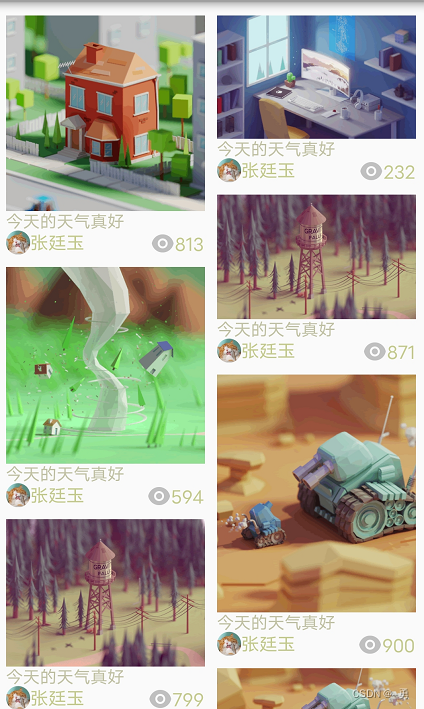
完整源码:
import 'dart:collection';
import 'dart:math';

import 'package:flutter/material.dart';
import 'package:flutter_staggered_grid_view/flutter_staggered_grid_view.dart';

class PhotoList extends StatelessWidget {
  const PhotoList({Key? key}) : super(key: key);

  @override
  Widget build(BuildContext context) {
    return MaterialApp(
      home: Scaffold(
        appBar: AppBar(
          title: const Text('Flutter Demo'),
        ),
        body: HomeContent(),
      ),
      theme: ThemeData(
        primarySwatch: Colors.blue,
      ),
    );
  }
}

class HomeContent extends StatefulWidget {
  const HomeContent({Key? key}) : super(key: key);

  @override
  _HomeContentState createState() => _HomeContentState();
}

class _HomeContentState extends State<HomeContent> {
  List _waterFallList = [];

  @override
  void initState() {
    // TODO: implement initState
    super.initState();
    var randomNum = new Random();
    for (var i = 0; i < 40; i++) {
      Map<String, dynamic> temp = HashMap();
      temp["height"] = Random().nextInt(150) + 50.5;
      temp["text"] = "今天的天气真好";
      _waterFallList.add(temp);
    }
    print(_waterFallList);
  }

  @override
  Widget build(BuildContext context) {
    return SingleChildScrollView(
      child: Container(
        padding: EdgeInsets.all(10),
        child: MasonryGridView.count(
          // 展示几列
          crossAxisCount: 2,
          // 元素总个数
          itemCount: _waterFallList.length,
          // 单个子元素
          itemBuilder: (BuildContext context, int index) =>
              waterCard(_waterFallList[index]),
          // 纵向元素间距
          mainAxisSpacing: 10,
          // 横向元素间距
          crossAxisSpacing: 10,
          //本身不滚动,让外面的singlescrollview来滚动
          physics: const NeverScrollableScrollPhysics(),
          shrinkWrap: true, //收缩,让元素宽度自适应
        ),
      ),
    );
  }

  Widget waterCard(Map<String, dynamic> item) {
    return Container(
        // height: item,
        // decoration: BoxDecoration(
        //     border: Border.all(color: Colors.yellow, width: 1),
        //     borderRadius: BorderRadius.circular(10)),
        child: Column(
            crossAxisAlignment: CrossAxisAlignment.start,
            children: <Widget>[
          // child: Text(item.toStringAsFixed(0)),
          Column(
            children: <Widget>[
              Image.network(
                "https://www.itying.com/images/flutter/3.png",
                // height: _items[index]['height'],
                fit: BoxFit.cover,
                height: item["height"],
                width: MediaQuery.of(context).size.width, // 屏幕宽度
              ),
              // SizedBox(height: 12),
            ],
          ),
          Text(item["text"],
              textAlign: TextAlign.center,
              style: TextStyle(
                  fontSize: 14, color: Color.fromARGB(88, 87, 86, 1))),
          Row(
            mainAxisAlignment: MainAxisAlignment.spaceBetween,
            crossAxisAlignment: CrossAxisAlignment.center,
            children: [
              Row(
                children: [
                  Container(
                      width: 20,
                      height: 20,
                      decoration: BoxDecoration(
                          shape: BoxShape.rectangle,
                          borderRadius: BorderRadius.circular(20),
                          image: DecorationImage(
                              image: NetworkImage(
                                  'https://pic2.zhimg.com/v2-639b49f2f6578eabddc458b84eb3c6a1.jpg')))),
                  Text("张廷玉",
                      style: TextStyle(
                          fontSize: 15,
                          color: Color.fromARGB(112, 128, 144, 1))),
                ],
              ),
              Row(
                mainAxisAlignment: MainAxisAlignment.end,
                crossAxisAlignment: CrossAxisAlignment.end,
                children: [
                  Icon(Icons.remove_red_eye_outlined, color: Color.fromRGBO(88, 87, 86, 1)),
                  Text("582",
                      style: TextStyle(
                          fontSize: 15,
                          color: Color.fromARGB(112, 128, 144, 1))),
                ],
              )
            ],
          ),
        ]));
  }
}

开源鸿蒙跨平台开发社区汇聚开发者与厂商,共建“一次开发,多端部署”的开源生态,致力于降低跨端开发门槛,推动万物智联创新。
更多推荐


 1
1 0
0- 0


 已为社区贡献2条内容

所有评论(0)