茶叶库管理模块 Cordova 与 OpenHarmony 混合开发实战
茶叶库管理模块摘要(150字): 茶叶库管理模块实现了茶叶信息的全生命周期管理,支持添加、编辑、删除和查询功能。采用Cordova+OpenHarmony混合架构,数据存储在IndexedDB和原生关系型数据库中。核心功能包括:1)茶叶信息加载展示,支持分组浏览;2)交互式编辑界面,通过模态框修改茶叶名称、类型、产地等属性;3)实时数据同步机制,确保操作立即持久化。前端实现包含响应式列表展示、分类
📌 概述
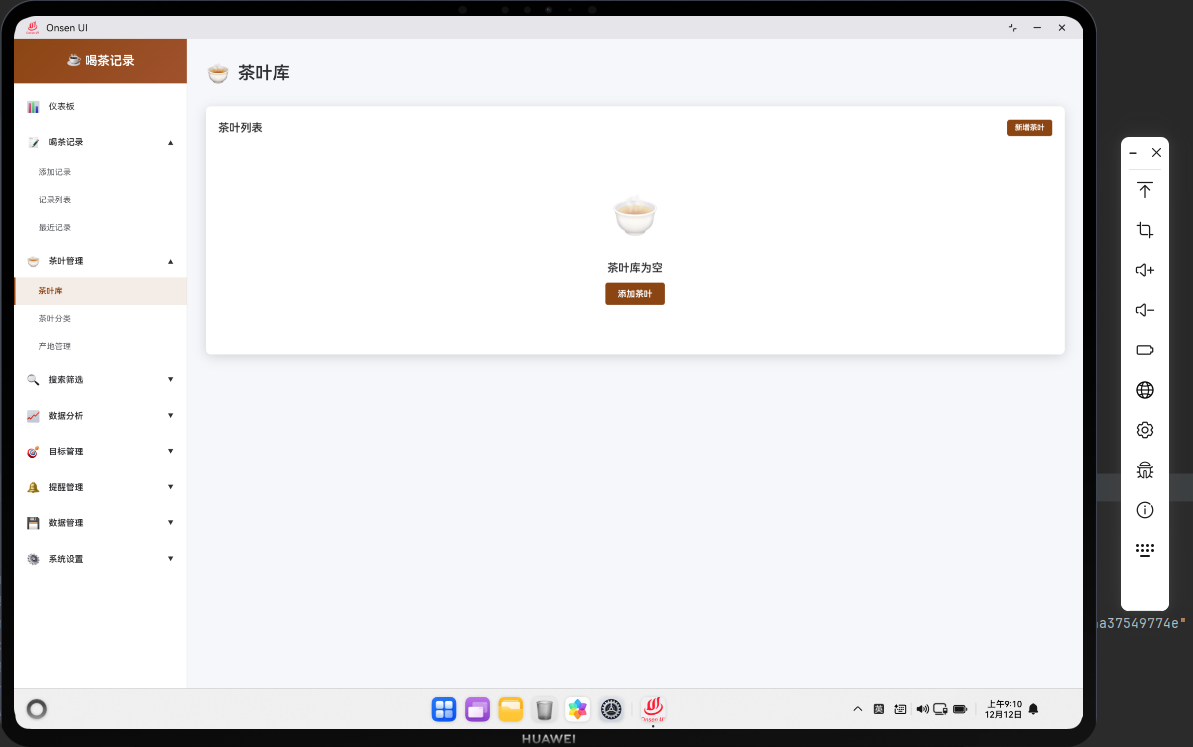
茶叶库管理模块允许用户管理应用中的茶叶信息库,包括添加新茶叶、编辑茶叶信息和删除茶叶。该模块集成了 Cordova 框架与 OpenHarmony 原生能力,提供了完整的茶叶数据管理功能。用户可以为每种茶叶设置名称、产地、茶叶类型、价格范围等信息。模块支持茶叶搜索和分类浏览,帮助用户快速找到需要的茶叶信息。
🔗 完整流程
第一步:茶叶库数据加载
当用户进入茶叶库页面时,应用会从数据库中加载所有已保存的茶叶信息。应用会按茶叶类型分组显示,便于用户浏览。同时,应用会加载茶叶分类和产地信息,用于筛选和编辑。应用会显示加载动画直到数据加载完成。
第二步:茶叶信息展示与编辑
数据加载完成后,应用会将茶叶信息显示为列表或卡片形式。用户可以点击茶叶项查看详细信息或进行编辑。编辑时,应用会打开模态框,允许用户修改茶叶的各项信息。用户也可以添加新的茶叶到库中。
第三步:数据同步与持久化
当用户添加、编辑或删除茶叶时,应用会立即更新 IndexedDB 数据库。同时,应用会通过 Cordova 调用原生插件,将数据同步到应用的关系型数据库中,确保数据的一致性和持久化。
🔧 Web 代码实现
HTML 茶叶库列表
<div id="tea-library-page" class="page">
    <div class="page-header">
        <h1>茶叶库</h1>
        <button class="btn btn-primary" onclick="openAddTeaModal()">+ 添加茶叶</button>
    </div>

    <div class="library-toolbar">
        <input type="text" id="tea-search" class="search-box" placeholder="搜索茶叶...">
        <select id="tea-type-filter" onchange="filterTeaByType()">
            <option value="">全部类型</option>
        </select>
    </div>

    <div id="tea-list" class="tea-list">
        <!-- 茶叶项动态生成 -->
    </div>

    <!-- 添加/编辑茶叶模态框 -->
    <div id="tea-modal" class="modal" style="display: none;">
        <div class="modal-content">
            <div class="modal-header">
                <h2 id="modal-title">添加茶叶</h2>
                <button class="btn-close" onclick="closeTeaModal()">×</button>
            </div>

            <form id="tea-form" class="form">
                <div class="form-group">
                    <label for="tea-name">茶叶名称 *</label>
                    <input type="text" id="tea-name" name="name" required>
                </div>

                <div class="form-group">
                    <label for="tea-type">茶叶类型 *</label>
                    <select id="tea-type" name="type" required>
                        <option value="">请选择</option>
                    </select>
                </div>

                <div class="form-group">
                    <label for="tea-origin">产地 *</label>
                    <select id="tea-origin" name="origin" required>
                        <option value="">请选择</option>
                    </select>
                </div>

                <div class="form-group">
                    <label for="tea-price-min">价格范围 (元)</label>
                    <div class="price-range">
                        <input type="number" id="tea-price-min" name="priceMin" min="0" step="0.01" placeholder="最低价">
                        <span>-</span>
                        <input type="number" id="tea-price-max" name="priceMax" min="0" step="0.01" placeholder="最高价">
                    </div>
                </div>

                <div class="form-group">
                    <label for="tea-description">描述</label>
                    <textarea id="tea-description" name="description" rows="3"></textarea>
                </div>

                <div class="modal-actions">
                    <button type="submit" class="btn btn-primary">保存</button>
                    <button type="button" class="btn btn-secondary" onclick="closeTeaModal()">取消</button>
                </div>
            </form>
        </div>
    </div>
</div>
茶叶库页面包含搜索和筛选功能,用户可以快速找到特定的茶叶。模态框用于添加或编辑茶叶信息。
茶叶库数据管理
let allTeas = [];
let currentEditingTeaId = null;

async function renderTeaLibrary() {
    try {
        // 加载茶叶数据
        allTeas = await db.getAllTeas();

        // 加载分类和产地
        const categories = await db.getTeaCategories();
        const origins = await db.getOrigins();

        // 填充筛选下拉框
        const typeFilter = document.getElementById('tea-type-filter');
        categories.forEach(cat => {
            const option = document.createElement('option');
            option.value = cat.id;
            option.textContent = cat.name;
            typeFilter.appendChild(option);
        });

        // 填充模态框下拉框
        populateSelectOptions('tea-type', categories);
        populateSelectOptions('tea-origin', origins);

        // 渲染茶叶列表
        renderTeaList(allTeas);

        // 绑定事件
        document.getElementById('tea-search').addEventListener('input', function(e) {
            const keyword = e.target.value.toLowerCase();
            const filtered = allTeas.filter(t =>
                t.name.toLowerCase().includes(keyword)
            );
            renderTeaList(filtered);
        });

        document.getElementById('tea-form').addEventListener('submit', handleSaveTea);

    } catch (error) {
        console.error('Failed to render tea library:', error);
        showToast('加载茶叶库失败', 'error');
    }
}

function renderTeaList(teas) {
    const listContainer = document.getElementById('tea-list');
    listContainer.innerHTML = '';

    if (teas.length === 0) {
        listContainer.innerHTML = '<div class="no-data"><p>暂无茶叶</p></div>';
        return;
    }

    teas.forEach(tea => {
        const teaEl = document.createElement('div');
        teaEl.className = 'tea-item';
        teaEl.dataset.teaId = tea.id;

        const priceRange = tea.priceMin && tea.priceMax
            ? `¥${tea.priceMin.toFixed(2)} - ¥${tea.priceMax.toFixed(2)}`
            : '价格未设置';

        teaEl.innerHTML = `
            <div class="tea-info">
                <div class="tea-name">${tea.name}</div>
                <div class="tea-meta">
                    <span>${tea.type}</span>
                    <span>${tea.origin}</span>
                    <span>${priceRange}</span>
                </div>
                ${tea.description ? `<div class="tea-description">${tea.description}</div>` : ''}
            </div>
            <div class="tea-actions">
                <button class="btn-icon" onclick="editTea(${tea.id})" title="编辑">✏️</button>
                <button class="btn-icon" onclick="deleteTea(${tea.id})" title="删除">🗑️</button>
            </div>
        `;

        listContainer.appendChild(teaEl);
    });
}

function openAddTeaModal() {
    currentEditingTeaId = null;
    document.getElementById('modal-title').textContent = '添加茶叶';
    document.getElementById('tea-form').reset();
    document.getElementById('tea-modal').style.display = 'flex';
}

async function editTea(teaId) {
    try {
        const tea = await db.getTea(teaId);
        if (!tea) {
            showToast('茶叶不存在', 'error');
            return;
        }

        currentEditingTeaId = teaId;
        document.getElementById('modal-title').textContent = '编辑茶叶';

        // 填充表单
        document.getElementById('tea-name').value = tea.name;
        document.getElementById('tea-type').value = tea.type;
        document.getElementById('tea-origin').value = tea.origin;
        document.getElementById('tea-price-min').value = tea.priceMin || '';
        document.getElementById('tea-price-max').value = tea.priceMax || '';
        document.getElementById('tea-description').value = tea.description || '';

        document.getElementById('tea-modal').style.display = 'flex';
    } catch (error) {
        console.error('Failed to edit tea:', error);
        showToast('加载茶叶信息失败', 'error');
    }
}

async function handleSaveTea(event) {
    event.preventDefault();

    const formData = new FormData(document.getElementById('tea-form'));
    const teaData = {
        name: formData.get('name'),
        type: formData.get('type'),
        origin: formData.get('origin'),
        priceMin: parseFloat(formData.get('priceMin')) || null,
        priceMax: parseFloat(formData.get('priceMax')) || null,
        description: formData.get('description')
    };

    try {
        if (currentEditingTeaId) {
            // 更新茶叶
            await db.updateTea(currentEditingTeaId, teaData);

            // 调用原生插件
            if (window.cordova) {
                cordova.exec(
                    null, null,
                    'TeaLogger',
                    'logEvent',
                    ['tea_updated', { teaId: currentEditingTeaId }]
                );
            }

            showToast('茶叶已更新', 'success');
        } else {
            // 添加新茶叶
            const teaId = await db.addTea(teaData);

            if (window.cordova) {
                cordova.exec(
                    null, null,
                    'TeaLogger',
                    'logEvent',
                    ['tea_added', { teaId: teaId }]
                );
            }

            showToast('茶叶已添加', 'success');
        }

        closeTeaModal();
        renderTeaLibrary();
    } catch (error) {
        console.error('Failed to save tea:', error);
        showToast('保存失败,请重试', 'error');
    }
}

async function deleteTea(teaId) {
    if (!confirm('确定要删除这种茶叶吗?')) {
        return;
    }

    try {
        await db.deleteTea(teaId);

        if (window.cordova) {
            cordova.exec(
                null, null,
                'TeaLogger',
                'logEvent',
                ['tea_deleted', { teaId: teaId }]
            );
        }

        showToast('茶叶已删除', 'success');
        renderTeaLibrary();
    } catch (error) {
        console.error('Failed to delete tea:', error);
        showToast('删除失败,请重试', 'error');
    }
}

function closeTeaModal() {
    document.getElementById('tea-modal').style.display = 'none';
    currentEditingTeaId = null;
}

function filterTeaByType() {
    const selectedType = document.getElementById('tea-type-filter').value;
    const filtered = selectedType
        ? allTeas.filter(t => t.type === selectedType)
        : allTeas;
    renderTeaList(filtered);
}
这段代码实现了完整的茶叶库管理功能。renderTeaLibrary() 加载茶叶数据并初始化页面。renderTeaList() 渲染茶叶列表。openAddTeaModal() 打开添加茶叶的模态框。editTea() 加载茶叶信息进行编辑。handleSaveTea() 保存新增或修改的茶叶。deleteTea() 删除茶叶。
🔌 OpenHarmony 原生代码
茶叶数据库操作
// entry/src/main/ets/plugins/TeaLibraryManager.ets
import { relationalStore } from '@kit.ArkData';

export class TeaLibraryManager {
    private store: relationalStore.RdbStore;

    async createTeaTable(): Promise<void> {
        const createTableSql = `
            CREATE TABLE IF NOT EXISTS tea_library (
                id INTEGER PRIMARY KEY AUTOINCREMENT,
                name TEXT NOT NULL UNIQUE,
                type TEXT NOT NULL,
                origin TEXT NOT NULL,
                price_min REAL,
                price_max REAL,
                description TEXT,
                created_at TIMESTAMP DEFAULT CURRENT_TIMESTAMP,
                updated_at TIMESTAMP DEFAULT CURRENT_TIMESTAMP
            )
        `;

        await this.store.executeSql(createTableSql);
    }

    async addTea(tea: Tea): Promise<number> {
        const values: relationalStore.ValuesBucket = {
            name: tea.name,
            type: tea.type,
            origin: tea.origin,
            price_min: tea.priceMin,
            price_max: tea.priceMax,
            description: tea.description,
            created_at: new Date().toISOString()
        };

        return await this.store.insert('tea_library', values);
    }

    async updateTea(teaId: number, tea: Partial<Tea>): Promise<void> {
        const predicates = new relationalStore.RdbPredicates('tea_library');
        predicates.equalTo('id', teaId);

        const values: relationalStore.ValuesBucket = {
            ...tea,
            updated_at: new Date().toISOString()
        };

        await this.store.update(values, predicates);
    }

    async getAllTeas(): Promise<Tea[]> {
        const predicates = new relationalStore.RdbPredicates('tea_library');
        predicates.orderByAsc('type').orderByAsc('name');

        const resultSet = await this.store.query(predicates);
        const teas: Tea[] = [];

        while (resultSet.goToNextRow()) {
            teas.push(this.parseTea(resultSet));
        }

        resultSet.close();
        return teas;
    }

    private parseTea(resultSet: relationalStore.ResultSet): Tea {
        return {
            id: resultSet.getColumnValue(resultSet.getColumnIndex('id')) as number,
            name: resultSet.getColumnValue(resultSet.getColumnIndex('name')) as string,
            type: resultSet.getColumnValue(resultSet.getColumnIndex('type')) as string,
            origin: resultSet.getColumnValue(resultSet.getColumnIndex('origin')) as string,
            priceMin: resultSet.getColumnValue(resultSet.getColumnIndex('price_min')) as number,
            priceMax: resultSet.getColumnValue(resultSet.getColumnIndex('price_max')) as number,
            description: resultSet.getColumnValue(resultSet.getColumnIndex('description')) as string
        };
    }
}

interface Tea {
    id?: number;
    name: string;
    type: string;
    origin: string;
    priceMin?: number;
    priceMax?: number;
    description?: string;
}
这个类提供了茶叶库的数据库操作。createTeaTable() 创建茶叶表。addTea() 添加新茶叶。updateTea() 更新茶叶信息。getAllTeas() 查询所有茶叶。
茶叶搜索优化
// entry/src/main/ets/plugins/TeaSearch.ets
export class TeaSearch {
    static buildSearchIndex(teas: Tea[]): Map<string, Tea[]> {
        const index = new Map<string, Tea[]>();

        teas.forEach(tea => {
            // 按名称索引
            const nameKey = tea.name.substring(0, 2).toLowerCase();
            if (!index.has(nameKey)) {
                index.set(nameKey, []);
            }
            index.get(nameKey)?.push(tea);

            // 按类型索引
            if (!index.has(tea.type)) {
                index.set(tea.type, []);
            }
            index.get(tea.type)?.push(tea);
        });

        return index;
    }

    static search(teas: Tea[], keyword: string): Tea[] {
        const lowerKeyword = keyword.toLowerCase();
        return teas.filter(tea =>
            tea.name.toLowerCase().includes(lowerKeyword) ||
            tea.type.toLowerCase().includes(lowerKeyword) ||
            tea.origin.toLowerCase().includes(lowerKeyword)
        );
    }
}
这个搜索类提供了茶叶搜索功能。buildSearchIndex() 构建搜索索引以加快搜索速度。search() 执行搜索操作。
📝 总结
茶叶库管理模块展示了如何在 Cordova 框架中实现完整的数据库管理功能。通过 Web 层的用户界面和交互,结合原生层的数据库操作和搜索优化,为用户提供了高效的茶叶信息管理体验。该模块的设计模式可以应用到其他需要数据库管理的功能中。

开源鸿蒙跨平台开发社区汇聚开发者与厂商,共建“一次开发,多端部署”的开源生态,致力于降低跨端开发门槛,推动万物智联创新。
更多推荐


 30
30 0
0- 0


 已为社区贡献12条内容

所有评论(0)