Cordova与OpenHarmony运动类型管理系统
本文介绍了基于Cordova和OpenHarmony的运动类型管理系统设计。系统采用WorkoutType类定义运动类型数据结构,包含名称、图标、卡路里消耗率等属性。通过IndexedDB实现数据存储管理,支持增删改查操作。系统提供默认运动类型初始化、分类管理(按卡路里消耗率分为有氧、力量等类别)和搜索功能。界面采用卡片式布局展示类型列表,支持编辑和删除操作。该系统结合了OpenHarmony的数
欢迎大家加入开源鸿蒙跨平台开发者社区,一起共建开源鸿蒙跨平台生态。
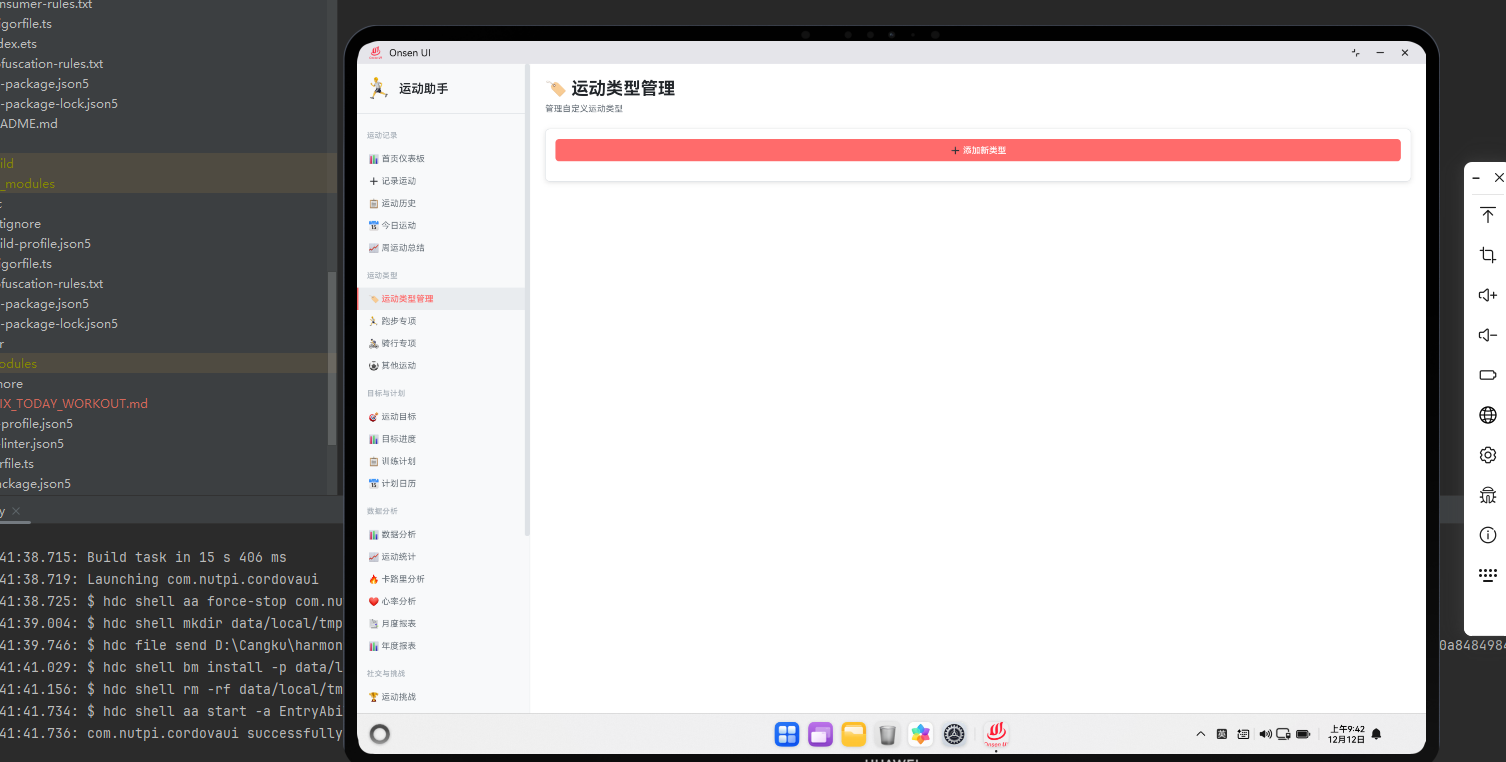
系统架构设计
运动类型管理系统允许用户自定义和管理不同的运动类型。通过Cordova框架与OpenHarmony的数据管理能力,我们可以构建一个灵活的运动类型管理平台。本文将介绍这个系统的实现细节。
运动类型数据模型
class WorkoutType {
  constructor(name, icon, calorieRate, description) {
    this.id = generateUUID();
    this.name = name;
    this.icon = icon;
    this.calorieRate = calorieRate;
    this.description = description;
    this.createdAt = new Date().getTime();
    this.isCustom = true;
  }

  toJSON() {
    return {
      id: this.id,
      name: this.name,
      icon: this.icon,
      calorieRate: this.calorieRate,
      description: this.description
    };
  }
}
WorkoutType类定义了运动类型的数据结构。每个运动类型包含名称、图标、卡路里消耗率和描述等信息。通过toJSON方法,我们能够轻松地将对象序列化为JSON格式,便于存储和传输。这种面向对象的设计使得代码更加模块化。
类型存储管理
async function saveWorkoutType(workoutType) {
  const db = await openDatabase('SportsDB');
  const transaction = db.transaction(['workoutTypes'], 'readwrite');
  const store = transaction.objectStore('workoutTypes');

  const data = workoutType.toJSON();
  const request = store.add(data);

  return new Promise((resolve, reject) => {
    request.onsuccess = () => resolve(workoutType.id);
    request.onerror = () => reject(request.error);
  });
}
这段代码实现了运动类型的数据库存储。通过IndexedDB的事务机制,我们确保了数据的一致性。当存储成功时,返回新创建的运动类型ID。这种异步处理方式使得应用能够在后台进行数据操作,不阻塞用户界面。
类型列表展示
function renderWorkoutTypeList(types) {
  const container = document.getElementById('type-list');
  container.innerHTML = '';

  types.forEach(type => {
    const item = document.createElement('div');
    item.className = 'type-item harmony-card';
    item.innerHTML = `
      <div class="type-icon">${type.icon}</div>
      <div class="type-info">
        <div class="type-name">${type.name}</div>
        <div class="type-description">${type.description}</div>
        <div class="type-rate">卡路里率: ${type.calorieRate} cal/min</div>
      </div>
      <div class="type-actions">
        <button onclick="editType('${type.id}')">编辑</button>
        <button onclick="deleteType('${type.id}')">删除</button>
      </div>
    `;
    container.appendChild(item);
  });
}
这个函数使用OpenHarmony的卡片样式展示运动类型列表。每个类型卡片包含图标、名称、描述和卡路里率等信息。通过提供编辑和删除按钮,用户可以管理自己的运动类型。这种卡片式布局符合现代应用的设计趋势。
类型编辑功能
async function updateWorkoutType(typeId, updates) {
  const db = await openDatabase('SportsDB');
  const transaction = db.transaction(['workoutTypes'], 'readwrite');
  const store = transaction.objectStore('workoutTypes');

  const getRequest = store.get(typeId);

  getRequest.onsuccess = () => {
    const type = getRequest.result;
    Object.assign(type, updates);
    store.put(type);
  };

  return new Promise((resolve, reject) => {
    transaction.oncomplete = () => resolve();
    transaction.onerror = () => reject(transaction.error);
  });
}
这段代码实现了运动类型的更新功能。首先从数据库中获取指定ID的运动类型,然后使用Object.assign方法将更新内容合并到原对象中,最后将更新后的对象存回数据库。这种方式确保了数据的完整性和一致性。
默认类型初始化
function initializeDefaultTypes() {
  const defaultTypes = [
    new WorkoutType('跑步', '🏃', 12, '户外或室内跑步'),
    new WorkoutType('骑行', '🚴', 10, '自行车骑行'),
    new WorkoutType('游泳', '🏊', 15, '游泳运动'),
    new WorkoutType('健身', '💪', 8, '健身房锻炼'),
    new WorkoutType('瑜伽', '🧘', 4, '瑜伽练习'),
    new WorkoutType('篮球', '🏀', 11, '篮球运动'),
    new WorkoutType('足球', '⚽', 13, '足球运动')
  ];

  defaultTypes.forEach(type => saveWorkoutType(type));
}
初始化默认运动类型为新用户提供了开箱即用的体验。这个函数创建了七种常见的运动类型,每种类型都有相应的卡路里消耗率。通过预设这些类型,用户可以立即开始记录运动,无需手动创建。
类型搜索功能
function searchWorkoutTypes(keyword) {
  return cordova.exec(
    (results) => {
      console.log('Search results:', results);
      renderWorkoutTypeList(results);
    },
    (error) => {
      console.error('Search error:', error);
    },
    'SearchPlugin',
    'searchTypes',
    [keyword.toLowerCase()]
  );
}
搜索功能帮助用户快速找到特定的运动类型。通过Cordova调用原生搜索插件,我们可以利用系统的全文搜索能力。这对于拥有大量自定义运动类型的用户特别有用。
类型分类管理
function categorizeWorkoutTypes(types) {
  const categories = {
    cardio: [],
    strength: [],
    flexibility: [],
    sports: [],
    other: []
  };

  types.forEach(type => {
    if (type.calorieRate > 10) {
      categories.cardio.push(type);
    } else if (type.calorieRate > 8) {
      categories.strength.push(type);
    } else if (type.calorieRate > 5) {
      categories.flexibility.push(type);
    } else {
      categories.other.push(type);
    }
  });

  return categories;
}
这个函数根据卡路里消耗率将运动类型分为不同的类别。通过分类,用户可以更清晰地了解不同运动的强度等级。这种分类方式帮助用户选择适合自己的运动类型。
总结
运动类型管理系统通过Cordova与OpenHarmony的结合,提供了灵活的类型管理能力。从数据模型设计到存储管理,从列表展示到编辑更新,这个系统为用户提供了完整的运动类型管理功能。通过预设默认类型和支持自定义,系统能够满足不同用户的需求。

开源鸿蒙跨平台开发社区汇聚开发者与厂商,共建“一次开发,多端部署”的开源生态,致力于降低跨端开发门槛,推动万物智联创新。
更多推荐


 5
5 0
0- 0


 已为社区贡献6条内容

所有评论(0)