宠物列表模块 - Cordova与OpenHarmony混合开发实战
欢迎大家加入开源鸿蒙跨平台开发者社区,一起共建开源鸿蒙跨平台生态。
📌 概述
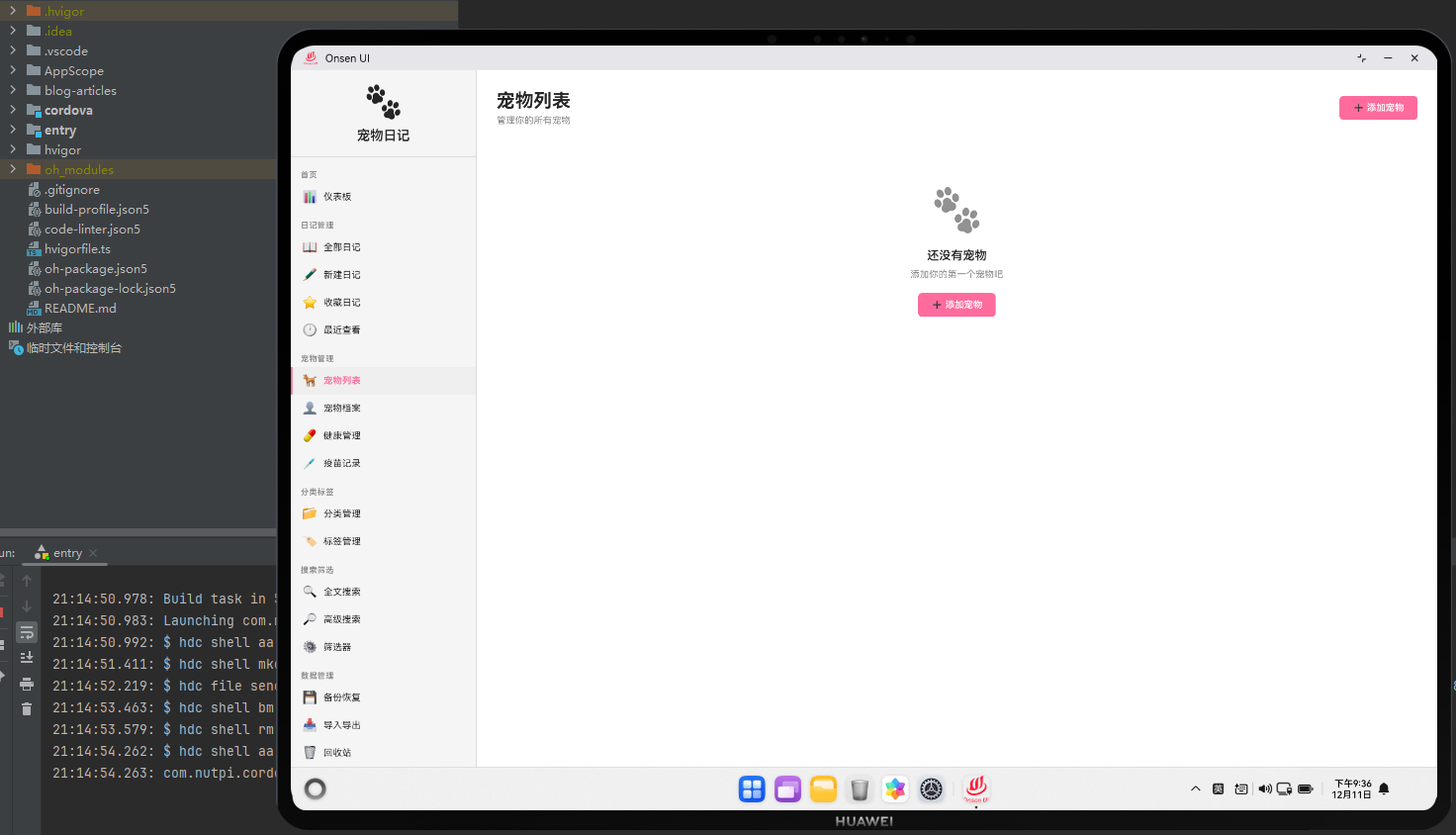
宠物列表模块是宠物日记应用的核心功能,用于展示和管理所有宠物信息。这个模块提供了宠物的卡片式展示、快速操作和详细信息查看等功能。通过Cordova框架,我们能够在Web层实现灵活的宠物管理界面,同时利用OpenHarmony的媒体库能力处理宠物头像和照片。
宠物列表模块采用了网格布局,每个宠物显示为一个卡片,包含宠物头像、名称、品种等基本信息。用户可以点击卡片查看详细信息,或者通过快速操作按钮进行编辑和删除。
🔗 完整流程
宠物列表加载流程:当用户进入宠物列表页面时,应用从IndexedDB数据库中加载所有宠物信息。应用支持按宠物类型、状态等维度过滤宠物列表。同时,应用会从OpenHarmony的媒体库中加载宠物头像,并缓存在本地以提高加载速度。
宠物卡片展示流程:每个宠物卡片显示宠物的基本信息,包括头像、名称、品种、年龄等。用户可以点击卡片进入宠物档案页面查看详细信息。卡片还提供了快速操作按钮,如编辑、删除和查看健康记录。
宠物添加流程:用户可以点击"添加宠物"按钮,打开宠物添加表单。表单包含宠物名称、品种、出生日期、性别等字段。用户可以上传宠物头像,应用会自动压缩和优化图片。
🔧 Web代码实现
// 加载宠物列表
async function loadPetList() {
    try {
        const pets = await db.getAllPets();
        return pets.sort((a, b) => {
            return new Date(b.createdAt) - new Date(a.createdAt);
        });
    } catch (error) {
        console.error('加载宠物列表失败:', error);
        return [];
    }
}

// 删除宠物
async function deletePet(petId) {
    const confirmed = confirm('确定要删除这只宠物吗?相关的日记和记录也会被删除。');
    if (!confirmed) return;

    try {
        await db.deletePet(petId);
        showSuccess('宠物已删除');
        renderPetList();
    } catch (error) {
        showError('删除宠物失败: ' + error.message);
    }
}
这两个函数处理宠物列表的加载和删除。加载函数按创建时间倒序排列宠物。删除函数要求用户确认,防止误操作。
// 渲染宠物列表
async function renderPetList() {
    const pets = await loadPetList();

    const html = `
        <div class="pet-list-container">
            <div class="list-header">
                <h1>宠物列表</h1>
                <p>共 ${pets.length} 只宠物</p>
                <button class="btn-primary" onclick="app.navigateTo('pet-profile')">添加宠物</button>
            </div>

            <div class="pet-grid">
                ${pets.length > 0 ? pets.map(pet => `
                    <div class="pet-card" data-id="${pet.id}">
                        <div class="pet-avatar">
                            <img src="${pet.avatar || 'assets/default-pet.png'}" alt="${pet.name}">
                        </div>
                        <div class="pet-info">
                            <h3>${pet.name}</h3>
                            <p class="pet-breed">${pet.breed}</p>
                            <p class="pet-age">年龄: ${calculateAge(pet.birthDate)}</p>
                        </div>
                        <div class="pet-stats">
                            <div class="stat">
                                <span class="label">日记</span>
                                <span class="value">${pet.diaryCount || 0}</span>
                            </div>
                            <div class="stat">
                                <span class="label">记录</span>
                                <span class="value">${pet.recordCount || 0}</span>
                            </div>
                        </div>
                        <div class="pet-actions">
                            <button class="btn-small" onclick="app.navigateTo('pet-profile', ${pet.id})">档案</button>
                            <button class="btn-small" onclick="app.navigateTo('pet-health', ${pet.id})">健康</button>
                            <button class="btn-small btn-danger" onclick="deletePet(${pet.id})">删除</button>
                        </div>
                    </div>
                `).join('') : '<p class="empty-state">还没有添加任何宠物</p>'}
            </div>
        </div>
    `;

    document.getElementById('page-container').innerHTML = html;
}
这个渲染函数生成了网格布局的宠物列表。每个宠物卡片显示头像、名称、品种、年龄和统计信息。
// 添加宠物
async function addPet(petData) {
    try {
        const pet = {
            name: petData.name,
            breed: petData.breed,
            birthDate: petData.birthDate,
            gender: petData.gender,
            avatar: petData.avatar,
            createdAt: new Date()
        };

        const id = await db.addPet(pet);
        showSuccess('宠物已添加');
        renderPetList();
    } catch (error) {
        showError('添加宠物失败: ' + error.message);
    }
}
添加宠物函数将宠物数据保存到数据库,然后刷新宠物列表。
🔌 原生代码实现
// PetListPlugin.ets - 宠物列表原生插件
import { photoAccessHelper } from '@kit.MediaLibraryKit';
import { fileIo } from '@kit.BasicServicesKit';

@Entry
@Component
struct PetListPlugin {
    // 获取宠物头像
    getPetAvatar(petId: string, callback: (imagePath: string) => void): void {
        try {
            const avatarPath = `/data/pet_avatars/${petId}.jpg`;
            if (fileIo.accessSync(avatarPath)) {
                callback(avatarPath);
            } else {
                callback('');
            }
        } catch (error) {
            console.error('[PetListPlugin] 获取头像失败:', error);
            callback('');
        }
    }

    // 保存宠物头像
    savePetAvatar(petId: string, imagePath: string, callback: (success: boolean) => void): void {
        try {
            const sourceFile = fileIo.openSync(imagePath, fileIo.OpenMode.READ);
            const destPath = `/data/pet_avatars/${petId}.jpg`;
            const destFile = fileIo.openSync(destPath, fileIo.OpenMode.CREATE | fileIo.OpenMode.WRITE);

            const buffer = new ArrayBuffer(1024 * 1024);
            let bytesRead = fileIo.readSync(sourceFile.fd, buffer);
            while (bytesRead > 0) {
                fileIo.writeSync(destFile.fd, buffer, { offset: 0, length: bytesRead });
                bytesRead = fileIo.readSync(sourceFile.fd, buffer);
            }

            fileIo.closeSync(sourceFile.fd);
            fileIo.closeSync(destFile.fd);

            callback(true);
        } catch (error) {
            console.error('[PetListPlugin] 保存头像失败:', error);
            callback(false);
        }
    }

    // 获取宠物统计信息
    getPetStatistics(petId: string, callback: (stats: string) => void): void {
        try {
            const stats = {
                diaryCount: 0,
                recordCount: 0,
                lastActivityDate: null,
                totalWeight: 0
            };

            callback(JSON.stringify(stats));
        } catch (error) {
            console.error('[PetListPlugin] 获取统计失败:', error);
            callback(JSON.stringify({ error: error.message }));
        }
    }

    build() {
        Column() {
            Web({ src: 'resource://rawfile/www/index.html', controller: new WebviewController() })
        }
    }
}
这个原生插件提供了头像管理和统计功能。通过fileIo模块,我们能够保存和读取宠物头像。通过统计功能,我们能够获取宠物的活动数据。
Web-Native通信代码
// 保存宠物头像
function saveNativePetAvatar(petId, imagePath) {
    return new Promise((resolve, reject) => {
        cordova.exec(
            (success) => {
                if (success) {
                    showSuccess('头像已保存');
                    resolve(true);
                } else {
                    reject(new Error('保存失败'));
                }
            },
            (error) => {
                console.error('保存头像失败:', error);
                reject(error);
            },
            'PetListPlugin',
            'savePetAvatar',
            [petId, imagePath]
        );
    });
}

// 获取宠物统计
function getNativePetStats(petId) {
    return new Promise((resolve, reject) => {
        cordova.exec(
            (result) => {
                try {
                    const stats = JSON.parse(result);
                    resolve(stats);
                } catch (error) {
                    reject(error);
                }
            },
            (error) => {
                console.error('获取统计失败:', error);
                reject(error);
            },
            'PetListPlugin',
            'getPetStatistics',
            [petId]
        );
    });
}
这段代码展示了如何通过Cordova调用原生的头像保存和统计功能。通过Promise包装,我们能够以异步的方式处理这些操作。
📝 总结
宠物列表模块展示了Cordova与OpenHarmony在媒体管理和数据统计方面的应用。在Web层,我们实现了灵活的宠物列表展示和管理。在原生层,我们提供了头像管理和统计功能。
通过网格布局和卡片设计,宠物列表提供了直观的用户界面。通过快速操作按钮,用户可以快速访问宠物的各项功能。通过Web-Native通信,我们能够充分利用OpenHarmony的媒体库能力,为用户提供完整的宠物管理体验。
在实际开发中,建议实现宠物搜索功能,提供宠物分类过滤,并支持批量操作以提高管理效率。

开源鸿蒙跨平台开发社区汇聚开发者与厂商,共建“一次开发,多端部署”的开源生态,致力于降低跨端开发门槛,推动万物智联创新。
更多推荐
 16
16 0
0- 0


 已为社区贡献22条内容

所有评论(0)