最近查看 Cordova 与 OpenHarmony 混合开发实战
文章摘要: 本文介绍了"最近查看"功能的实现方案,该功能通过记录用户访问笔记的历史记录,帮助用户快速定位最近工作内容。系统自动更新笔记的lastViewedAt字段和访问次数,并按时间排序展示。实现包含三个核心步骤:1) 实时记录访问历史;2) 按时间排序加载历史记录;3) 渲染交互界面,支持打开、删除和清空操作。文中提供了Web和OpenHarmony两种实现代码,包含笔记访
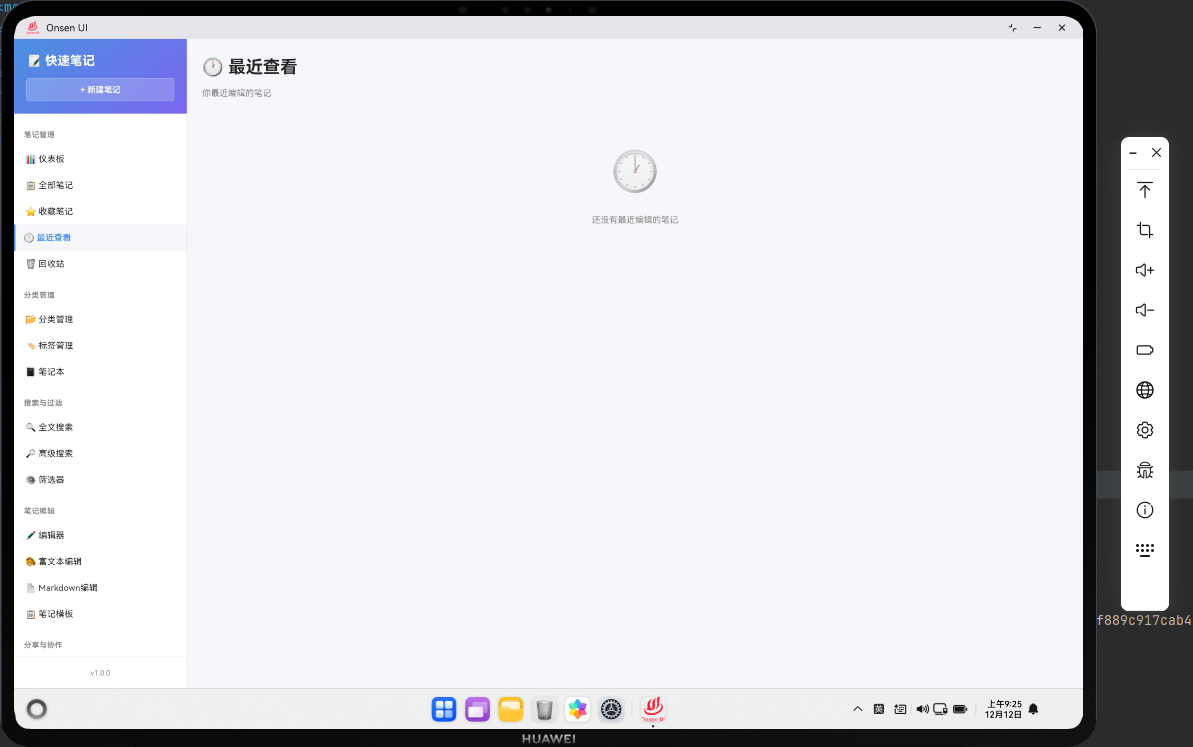
📌 模块概述
最近查看页面展示了用户最近打开或编辑过的笔记。这个功能基于用户的浏览历史,记录了用户访问笔记的时间和顺序。通过最近查看页面,用户可以快速回到最近工作的笔记,无需通过搜索或浏览完整的笔记列表。
这个功能对于提高用户的工作效率非常重要。用户经常需要在多个笔记之间切换,最近查看功能使得这个过程变得更加便捷。我们可以在最近查看列表中显示笔记的最后访问时间,这样用户可以了解自己最近在做什么。
🔗 完整流程
第一步:记录访问历史
每当用户打开或编辑一个笔记时,我们需要记录这个访问事件。这涉及到更新笔记的lastViewedAt字段,记录用户最后一次访问该笔记的时间。这个操作应该是自动进行的,用户不需要手动操作。
访问历史的记录应该是实时的,但为了避免频繁的数据库写操作,我们可以使用防抖技术,只在用户停止编辑一段时间后才更新数据库。
第二步:加载和排序历史
当用户进入最近查看页面时,需要从数据库中加载所有笔记,然后按照lastViewedAt字段排序,最近访问的笔记排在前面。为了提高性能,我们可以只加载最近访问的笔记,比如最近100条。
排序应该考虑到笔记可能没有lastViewedAt字段的情况,对于这样的笔记,我们可以使用createdAt或updatedAt作为默认值。
第三步:渲染和交互
加载完成后,需要将历史笔记渲染成HTML列表。每个历史项都包含笔记的基本信息和最后访问时间。用户可以点击历史项来打开笔记,或者删除历史记录。
为了提高用户体验,我们可以添加一个"清空历史"按钮,允许用户一次性清空所有历史记录。这对于那些想要隐私的用户很有用。
🔧 Web代码实现
// 最近查看页面渲染函数
async renderRecent() {
  // 从数据库获取所有笔记
  const allNotes = await noteDB.getAllNotes();
  // 过滤出有访问记录的笔记
  const recentNotes = allNotes.filter(note => note.lastViewedAt);
  // 按最后访问时间排序
  const sortedRecent = recentNotes.sort((a, b) =>
    new Date(b.lastViewedAt) - new Date(a.lastViewedAt)
  );

  return `
    <div class="page active">
      <div class="page-header">
        <h1 class="page-title">🕐 最近查看</h1>
        <div class="page-actions">
          <button class="btn btn-danger" onclick="app.clearRecentHistory()">清空历史</button>
        </div>
      </div>
  `;
}
这段代码展示了最近查看页面的初始化。首先获取所有笔记,然后过滤出有lastViewedAt字段的笔记(即有访问记录的笔记)。最后按照最后访问时间排序,最近访问的笔记排在前面。
页面头部有一个"清空历史"按钮,用户可以通过这个按钮一次性清空所有历史记录。
// 生成最近查看列表HTML
const recentListHTML = sortedRecent.map((note, index) => {
  const viewedTime = Utils.formatDate(note.lastViewedAt);
  const viewCount = note.viewCount || 0;

  return `
    <div class="table-row recent-item" data-note-id="${note.id}">
      <div class="table-cell">
        <span class="recent-index">${index + 1}</span>
      </div>
      <div class="table-cell">
        <strong onclick="app.navigateTo('edit-note', ${note.id})" style="cursor: pointer;">
          ${Utils.escapeHtml(note.title)}
        </strong>
      </div>
      <div class="table-cell">
        <span class="badge">${note.category || '未分类'}</span>
      </div>
      <div class="table-cell">
        最后访问: ${viewedTime}
      </div>
      <div class="table-cell">
        访问次数: ${viewCount}
      </div>
      <div class="table-cell">
        <button class="btn btn-sm btn-info" onclick="app.navigateTo('edit-note', ${note.id})">打开</button>
        <button class="btn btn-sm btn-danger" onclick="app.removeFromRecent(${note.id})">删除</button>
      </div>
    </div>
  `;
}).join('');
这段代码生成了最近查看列表的HTML。每个历史项都包含序号、笔记标题、分类、最后访问时间和访问次数。我们还添加了访问次数的显示,这样用户可以看到自己访问某个笔记的频率。
笔记标题是可点击的,用户可以直接点击标题来打开笔记。"打开"按钮和"删除"按钮提供了额外的操作选项。
// 记录笔记访问事件
async recordNoteView(noteId) {
  try {
    // 获取笔记
    const note = await noteDB.getNote(noteId);
    if (!note) return;

    // 更新最后访问时间
    note.lastViewedAt = new Date().toISOString();
    // 增加访问次数
    note.viewCount = (note.viewCount || 0) + 1;

    // 保存到数据库
    await noteDB.updateNote(note);
  } catch (error) {
    console.error('记录访问失败:', error);
  }
}

// 清空历史记录函数
async clearRecentHistory() {
  // 显示确认对话框
  if (!confirm('确定要清空所有历史记录吗?')) {
    return;
  }

  try {
    // 获取所有笔记
    const allNotes = await noteDB.getAllNotes();

    // 清空所有笔记的访问记录
    for (const note of allNotes) {
      note.lastViewedAt = null;
      note.viewCount = 0;
      await noteDB.updateNote(note);
    }

    // 显示成功提示
    Utils.showToast('历史记录已清空', 'success');

    // 重新渲染页面
    await this.renderRecent();
  } catch (error) {
    console.error('清空历史失败:', error);
    Utils.showToast('操作失败,请重试', 'error');
  }
}

// 从历史中删除单个笔记
async removeFromRecent(noteId) {
  try {
    // 获取笔记
    const note = await noteDB.getNote(noteId);
    if (!note) return;

    // 清空访问记录
    note.lastViewedAt = null;
    note.viewCount = 0;

    // 保存到数据库
    await noteDB.updateNote(note);

    // 显示成功提示
    Utils.showToast('已从历史中删除', 'success');

    // 重新渲染页面
    await this.renderRecent();
  } catch (error) {
    console.error('删除历史失败:', error);
    Utils.showToast('操作失败,请重试', 'error');
  }
}
这段代码实现了访问历史的管理。recordNoteView()方法在用户打开笔记时调用,更新笔记的lastViewedAt字段和viewCount计数器。
clearRecentHistory()方法清空所有笔记的访问记录。为了防止用户误操作,我们先显示一个确认对话框。
removeFromRecent()方法从历史中删除单个笔记的访问记录。这样用户可以选择性地删除某些历史记录,而不是一次性清空所有历史。
🔌 OpenHarmony 原生代码
// RecentPlugin.ets - 最近查看管理插件
import { webview } from '@kit.ArkWeb';
import { common } from '@kit.AbilityKit';
import { fileIo } from '@kit.CoreFileKit';

@NativeComponent
export class RecentPlugin {
  private context: common.UIAbilityContext;
  private recentCache: Array<any> = [];

  constructor(context: common.UIAbilityContext) {
    this.context = context;
  }

  // 初始化插件
  public init(webviewController: webview.WebviewController): void {
    webviewController.registerJavaScriptProxy(
      new RecentJSProxy(this),
      'recentPlugin',
      ['getRecentNotes', 'recordView', 'clearHistory']
    );
  }

  // 获取最近查看的笔记
  public getRecentNotes(limit: number = 50): Promise<Array<any>> {
    return new Promise((resolve) => {
      try {
        const notesPath = this.context.cacheDir + '/notes.json';
        const content = fileIo.readTextSync(notesPath);
        const allNotes = JSON.parse(content);

        // 过滤出有访问记录的笔记
        const recentNotes = allNotes.filter((note: any) => note.lastViewedAt);

        // 按最后访问时间排序
        recentNotes.sort((a: any, b: any) =>
          new Date(b.lastViewedAt).getTime() - new Date(a.lastViewedAt).getTime()
        );

        // 返回指定数量的笔记
        const result = recentNotes.slice(0, limit);
        this.recentCache = result;
        resolve(result);
      } catch (error) {
        console.error('Failed to get recent notes:', error);
        resolve([]);
      }
    });
  }

  // 记录笔记访问
  public recordView(noteId: number): Promise<boolean> {
    return new Promise((resolve) => {
      try {
        const notesPath = this.context.cacheDir + '/notes.json';
        const content = fileIo.readTextSync(notesPath);
        const allNotes = JSON.parse(content);

        // 查找笔记并更新访问记录
        const note = allNotes.find((n: any) => n.id === noteId);
        if (note) {
          note.lastViewedAt = new Date().toISOString();
          note.viewCount = (note.viewCount || 0) + 1;

          // 写回文件
          fileIo.writeTextSync(notesPath, JSON.stringify(allNotes, null, 2));
          resolve(true);
        } else {
          resolve(false);
        }
      } catch (error) {
        console.error('Failed to record view:', error);
        resolve(false);
      }
    });
  }

  // 清空历史记录
  public clearHistory(): Promise<boolean> {
    return new Promise((resolve) => {
      try {
        const notesPath = this.context.cacheDir + '/notes.json';
        const content = fileIo.readTextSync(notesPath);
        const allNotes = JSON.parse(content);

        // 清空所有笔记的访问记录
        allNotes.forEach((note: any) => {
          note.lastViewedAt = null;
          note.viewCount = 0;
        });

        // 写回文件
        fileIo.writeTextSync(notesPath, JSON.stringify(allNotes, null, 2));
        resolve(true);
      } catch (error) {
        console.error('Failed to clear history:', error);
        resolve(false);
      }
    });
  }
}

// RecentJSProxy.ets - JavaScript代理类
class RecentJSProxy {
  private plugin: RecentPlugin;

  constructor(plugin: RecentPlugin) {
    this.plugin = plugin;
  }

  getRecentNotes(limit: number): void {
    this.plugin.getRecentNotes(limit).then(notes => {
      console.log('Recent notes loaded:', notes.length);
    });
  }

  recordView(noteId: number): void {
    this.plugin.recordView(noteId).then(success => {
      console.log('View recorded:', success);
    });
  }

  clearHistory(): void {
    this.plugin.clearHistory().then(success => {
      console.log('History cleared:', success);
    });
  }
}
这段OpenHarmony原生代码展示了如何在原生层实现最近查看的管理。RecentPlugin类提供了获取最近查看的笔记、记录访问和清空历史的功能。
getRecentNotes()方法读取笔记文件,过滤出有lastViewedAt字段的笔记,按最后访问时间排序,然后返回指定数量的笔记。这样可以限制返回的数据量,提高性能。
recordView()方法更新笔记的lastViewedAt字段和viewCount计数器。这个方法应该在用户打开笔记时调用。
clearHistory()方法清空所有笔记的访问记录。这是一个危险操作,应该在Web端显示确认对话框后再调用。
Web-Native 通信
// 在Web端调用原生方法获取最近查看的笔记
async function getRecentNotesFromNative(limit = 50) {
  return new Promise((resolve) => {
    cordova.exec(
      function(notes) {
        console.log('Recent notes from native:', notes);
        resolve(notes);
      },
      function(error) {
        console.error('Failed to get recent notes:', error);
        resolve([]);
      },
      'RecentPlugin',
      'getRecentNotes',
      [limit]
    );
  });
}

// 在Web端调用原生方法记录访问
async function recordViewNative(noteId) {
  return new Promise((resolve) => {
    cordova.exec(
      function(success) {
        console.log('View recorded:', success);
        resolve(success);
      },
      function(error) {
        console.error('Failed to record view:', error);
        resolve(false);
      },
      'RecentPlugin',
      'recordView',
      [noteId]
    );
  });
}
这段代码展示了Web端如何通过Cordova与原生插件通信来管理最近查看的笔记。getRecentNotesFromNative()方法调用原生的getRecentNotes()方法来获取最近查看的笔记。recordViewNative()方法调用原生的recordView()方法来记录用户的访问。
📝 总结
最近查看功能展示了如何在Cordova与OpenHarmony混合开发中实现一个基于用户行为的功能。通过记录用户的访问历史,我们可以为用户提供一个快速访问常用笔记的途径。
这个功能的实现涉及到数据库的更新、历史记录的管理和UI的交互。通过合理的设计,我们可以为用户提供一个高效、易用的笔记访问方式,提高用户的工作效率。
欢迎加入开源鸿蒙跨平台社区:https://openharmonycrossplatform.csdn.net

开源鸿蒙跨平台开发社区汇聚开发者与厂商,共建“一次开发,多端部署”的开源生态,致力于降低跨端开发门槛,推动万物智联创新。
更多推荐



 12
12 0
0- 0


 已为社区贡献32条内容

所有评论(0)