【OpenHarmony】设计模式模块详解
设计模式模块摘要 本模块提供两种经典设计模式的实现: 单例模式:确保类只有一个实例,包含3种实现: Singleton:饿汉式(启动时创建) DelayedSingleton:懒汉式+智能指针(首次使用时创建) DelayedRefSingleton:懒汉式+裸指针(首次使用时创建) 观察者模式:实现对象间一对多的依赖关系,包含: Observable:被观察者基类 Observer:观察者基类
·
设计模式模块详解
🎨 一句话概括:设计模式模块提供了单例模式和观察者模式的现成实现,让你的代码更优雅、更易维护。
📚 目录
- 什么是设计模式?
- 模块组件一览
- 单例模式 - Singleton
- 延迟单例 - DelayedSingleton
- 引用延迟单例 - DelayedRefSingleton
- 观察者模式 - Observer
- 模式对比与选择
- 使用示例与最佳实践
1. 什么是设计模式?
1.1 通俗理解
设计模式就像建筑图纸 📐:
- 不用每次都从零开始设计
- 经过验证的解决方案
- 让其他开发者一看就懂
1.2 c_utils 提供的设计模式
2. 模块组件一览
| 组件 | 类型 | 特点 | 线程安全 |
|---|---|---|---|
| Singleton | 饿汉式单例 | 程序启动时创建 | ✅ |
| DelayedSingleton | 懒汉式单例 | 首次使用时创建,智能指针管理 | ✅ |
| DelayedRefSingleton | 懒汉式单例 | 首次使用时创建,裸指针管理 | ✅ |
| Observable | 被观察者 | 维护观察者列表,发送通知 | ✅ |
| Observer | 观察者 | 接收通知,执行更新 | - |
3. 单例模式 - Singleton
3.1 什么是单例模式?
单例模式确保一个类只有一个实例,并提供全局访问点。
3.2 Singleton(饿汉式)
特点:程序启动时就创建实例,简单但可能浪费资源。
实现原理
template<typename T>
class Singleton : public NoCopyable {
public:
    static T& GetInstance() { return instance_; }
private:
    static T instance_;  // 静态成员,程序启动时初始化
};

template<typename T>
T Singleton<T>::instance_;
使用方式
#include "singleton.h"

// 方式1:使用宏声明
class ConfigManager {
    DECLARE_SINGLETON(ConfigManager)
public:
    void LoadConfig() { /* ... */ }
    std::string GetValue(const std::string& key) { /* ... */ }
};

// 使用
ConfigManager& config = Singleton<ConfigManager>::GetInstance();
config.LoadConfig();
// 方式2:手动实现
class Logger {
public:
    static Logger& GetInstance() {
        return Singleton<Logger>::GetInstance();
    }

    void Log(const std::string& msg) {
        std::cout << msg << std::endl;
    }

private:
    friend Singleton<Logger>;
    Logger() = default;
    ~Logger() = default;
    Logger(const Logger&) = delete;
    Logger& operator=(const Logger&) = delete;
};

// 使用
Logger::GetInstance().Log("Hello");
3.3 生命周期
4. 延迟单例 - DelayedSingleton
4.1 概述
DelayedSingleton 是懒汉式单例,特点:
- ⏰ 延迟创建:首次调用 GetInstance 时才创建
- 🔒 线程安全:双重检查锁定(DCL)
- 🧹 自动管理:使用 shared_ptr 管理内存
4.2 类结构
4.3 实现原理
template<typename T>
class DelayedSingleton : public NoCopyable {
public:
    static std::shared_ptr<T> GetInstance() {
        if (instance_ == nullptr) {                    // 第一次检查(无锁)
            std::lock_guard<std::mutex> lock(mutex_);  // 加锁
            if (instance_ == nullptr) {                // 第二次检查(有锁)
                std::shared_ptr<T> temp(new (std::nothrow) T);
                instance_ = temp;
            }
        }
        return instance_;
    }

    static void DestroyInstance() {
        std::lock_guard<std::mutex> lock(mutex_);
        if (instance_ != nullptr) {
            instance_.reset();
            instance_ = nullptr;
        }
    }

private:
    static std::shared_ptr<T> instance_;
    static std::mutex mutex_;
};
4.4 双重检查锁定(DCL)
为什么需要两次检查?
4.5 使用方式
#include "singleton.h"

class DatabasePool {
    DECLARE_DELAYED_SINGLETON(DatabasePool)
public:
    void Connect() { /* ... */ }
    void Query(const std::string& sql) { /* ... */ }
};

// 实现构造和析构
DatabasePool::DatabasePool() {
    std::cout << "数据库连接池创建" << std::endl;
}

DatabasePool::~DatabasePool() {
    std::cout << "数据库连接池销毁" << std::endl;
}

// 使用
void UseDatabasePool() {
    // 获取实例(首次调用时创建)
    auto pool = DelayedSingleton<DatabasePool>::GetInstance();
    pool->Connect();
    pool->Query("SELECT * FROM users");

    // 可以主动销毁
    DelayedSingleton<DatabasePool>::DestroyInstance();
}
4.6 shared_ptr 的优势
5. 引用延迟单例 - DelayedRefSingleton
5.1 概述
DelayedRefSingleton 与 DelayedSingleton 类似,但:
- 📌 返回引用:而不是智能指针
- ⚠️ 手动管理:不会自动销毁
5.2 类结构
5.3 与 DelayedSingleton 对比
| 特性 | DelayedSingleton | DelayedRefSingleton |
|---|---|---|
| 返回类型 | shared_ptr<T> |
T& |
| 内存管理 | 自动(引用计数) | 手动 |
| DestroyInstance | ✅ 有 | ❌ 无 |
| 使用方式 | -> 访问 |
. 访问 |
| 适用场景 | 需要灵活管理生命周期 | 全程序生命周期 |
5.4 使用方式
#include "singleton.h"

class AppConfig {
    DECLARE_DELAYED_REF_SINGLETON(AppConfig)
public:
    void Load() { /* ... */ }
    std::string Get(const std::string& key) { return "value"; }
};

AppConfig::AppConfig() {
    std::cout << "配置加载" << std::endl;
}

AppConfig::~AppConfig() {
    std::cout << "配置卸载" << std::endl;
}

// 使用
void UseAppConfig() {
    // 获取引用
    AppConfig& config = DelayedRefSingleton<AppConfig>::GetInstance();
    config.Load();
    std::string value = config.Get("key");
}
6. 观察者模式 - Observer
6.1 什么是观察者模式?
观察者模式定义了对象间的一对多依赖关系,当一个对象状态改变时,所有依赖它的对象都会收到通知。
6.2 生活中的例子
6.3 类结构
6.4 核心方法
Observable(被观察者)
| 方法 | 说明 |
|---|---|
AddObserver(o) |
添加观察者 |
RemoveObserver(o) |
移除观察者 |
RemoveAllObservers() |
移除所有观察者 |
NotifyObservers() |
通知所有观察者(无参数) |
NotifyObservers(arg) |
通知所有观察者(带参数) |
SetChanged() |
标记状态已改变 |
ClearChanged() |
清除改变标记 |
HasChanged() |
检查是否有改变 |
Observer(观察者)
| 方法 | 说明 |
|---|---|
Update(o, arg) |
收到通知时的回调(纯虚函数) |
6.5 通知流程
6.6 使用示例
定义被观察者
#include "observer.h"
#include <iostream>

using namespace OHOS;

// 自定义参数
struct StockPriceArg : public ObserverArg {
    std::string symbol;
    double price;

    StockPriceArg(const std::string& s, double p)
        : symbol(s), price(p) {}
};

// 股票行情(被观察者)
class StockMarket : public Observable {
public:
    void UpdatePrice(const std::string& symbol, double price) {
        std::cout << "股票 " << symbol << " 价格更新: " << price << std::endl;

        SetChanged();  // 标记状态改变

        StockPriceArg arg(symbol, price);
        NotifyObservers(&arg);  // 通知所有观察者
    }
};
定义观察者
// 投资者(观察者)
class Investor : public Observer {
public:
    Investor(const std::string& name) : name_(name) {}

    void Update(const Observable* o, const ObserverArg* arg) override {
        auto* priceArg = dynamic_cast<const StockPriceArg*>(arg);
        if (priceArg) {
            std::cout << name_ << " 收到通知: "
                      << priceArg->symbol << " = " << priceArg->price
                      << std::endl;

            // 根据价格做出决策
            if (priceArg->price < 100) {
                std::cout << name_ << ": 买入!" << std::endl;
            } else if (priceArg->price > 150) {
                std::cout << name_ << ": 卖出!" << std::endl;
            }
        }
    }

private:
    std::string name_;
};
使用
void ObserverDemo() {
    // 创建被观察者
    StockMarket market;

    // 创建观察者
    auto investor1 = std::make_shared<Investor>("张三");
    auto investor2 = std::make_shared<Investor>("李四");
    auto investor3 = std::make_shared<Investor>("王五");

    // 注册观察者
    market.AddObserver(investor1);
    market.AddObserver(investor2);
    market.AddObserver(investor3);

    std::cout << "观察者数量: " << market.GetObserversCount() << std::endl;

    // 更新价格,自动通知所有观察者
    market.UpdatePrice("AAPL", 95.0);
    std::cout << "---" << std::endl;
    market.UpdatePrice("AAPL", 160.0);

    // 移除一个观察者
    market.RemoveObserver(investor2);
    std::cout << "---" << std::endl;
    market.UpdatePrice("AAPL", 120.0);
}
输出
观察者数量: 3
股票 AAPL 价格更新: 95
张三 收到通知: AAPL = 95
张三: 买入!
李四 收到通知: AAPL = 95
李四: 买入!
王五 收到通知: AAPL = 95
王五: 买入!
---
股票 AAPL 价格更新: 160
张三 收到通知: AAPL = 160
张三: 卖出!
李四 收到通知: AAPL = 160
李四: 卖出!
王五 收到通知: AAPL = 160
王五: 卖出!
---
股票 AAPL 价格更新: 120
张三 收到通知: AAPL = 120
王五 收到通知: AAPL = 120
7. 模式对比与选择
7.1 单例模式选择指南
7.2 三种单例对比
| 特性 | Singleton | DelayedSingleton | DelayedRefSingleton |
|---|---|---|---|
| 创建时机 | 程序启动 | 首次使用 | 首次使用 |
| 线程安全 | ✅ | ✅ DCL | ✅ DCL |
| 返回类型 | T& | shared_ptr | T& |
| 可销毁 | ❌ | ✅ | ❌ |
| 内存管理 | 自动 | 自动 | 手动 |
| 性能 | 最高 | 中等 | 中等 |
| 适用场景 | 必须存在的全局对象 | 可选的全局对象 | 全程序生命周期 |
7.3 何时使用观察者模式?
flowchart TB
    A[场景分析] --> B{一对多关系?}
    B -->|否| C[不适用]
    B -->|是| D{状态变化需通知?}
    D -->|否| C
    D -->|是| E{松耦合要求?}
    E -->|否| F[直接调用可能更简单]
    E -->|是| G[✅ 使用观察者模式]
适用场景:
- 📰 消息订阅系统
- 📊 数据绑定(MVC/MVVM)
- 🔔 事件通知
- 📈 股票行情推送
- 💬 聊天室消息广播
8. 使用示例与最佳实践
8.1 单例模式最佳实践
✅ 推荐做法
// 1. 使用宏简化声明
class MyService {
    DECLARE_DELAYED_SINGLETON(MyService)
public:
    void DoWork();
};

// 2. 正确使用 DelayedSingleton
auto service = DelayedSingleton<MyService>::GetInstance();
if (service) {  // 检查是否创建成功
    service->DoWork();
}

// 3. 在适当时机销毁
void Cleanup() {
    DelayedSingleton<MyService>::DestroyInstance();
}

// 4. 饿汉式用于必须存在的对象
class Logger {
    DECLARE_SINGLETON(Logger)
public:
    void Log(const std::string& msg);
};
❌ 避免的错误
// 错误1: 手动 new 单例类
MyService* service = new MyService();  // ❌ 破坏单例

// 错误2: 忘记检查 nullptr
auto service = DelayedSingleton<MyService>::GetInstance();
service->DoWork();  // ❌ 如果内存不足,service 可能为 nullptr

// 错误3: 在析构函数中访问其他单例
MyService::~MyService() {
    // ❌ 其他单例可能已经销毁
    Singleton<Logger>::GetInstance().Log("Service destroyed");
}

// 错误4: 循环依赖
class A {
    DECLARE_DELAYED_SINGLETON(A)
    void Init() {
        DelayedSingleton<B>::GetInstance();  // A 依赖 B
    }
};
class B {
    DECLARE_DELAYED_SINGLETON(B)
    void Init() {
        DelayedSingleton<A>::GetInstance();  // B 依赖 A → 💥
    }
};
8.2 观察者模式最佳实践
✅ 推荐做法
// 1. 使用 shared_ptr 管理观察者
auto observer = std::make_shared<MyObserver>();
subject.AddObserver(observer);

// 2. 在析构前移除观察者
class MyObserver : public Observer {
public:
    ~MyObserver() {
        if (subject_) {
            subject_->RemoveObserver(shared_from_this());
        }
    }
};

// 3. 检查参数类型
void Update(const Observable* o, const ObserverArg* arg) override {
    auto* myArg = dynamic_cast<const MyArg*>(arg);
    if (myArg) {
        // 安全使用
    }
}

// 4. 记得 SetChanged
void NotifyPriceChange(double price) {
    SetChanged();         // ✅ 必须先设置
    NotifyObservers(&arg);
}
❌ 避免的错误
// 错误1: 忘记 SetChanged
void NotifyPriceChange(double price) {
    NotifyObservers(&arg);  // ❌ 不会通知任何人!
}

// 错误2: 在 Update 中修改观察者列表
void Update(const Observable* o, const ObserverArg* arg) override {
    o->RemoveObserver(this);  // ❌ 可能导致迭代器失效
}

// 错误3: 观察者泄漏
void SomeFunction() {
    auto observer = std::make_shared<MyObserver>();
    subject.AddObserver(observer);
    // ❌ 函数结束后 observer 被销毁,但 subject 还持有引用
}
8.3 综合示例:配置管理系统
#include "singleton.h"
#include "observer.h"
#include <map>
#include <string>

using namespace OHOS;

// 配置变更参数
struct ConfigChangeArg : public ObserverArg {
    std::string key;
    std::string oldValue;
    std::string newValue;
};

// 配置管理器(单例 + 被观察者)
class ConfigManager : public Observable {
    DECLARE_DELAYED_SINGLETON(ConfigManager)
public:
    void Set(const std::string& key, const std::string& value) {
        std::string oldValue = configs_[key];
        configs_[key] = value;

        // 通知观察者
        SetChanged();
        ConfigChangeArg arg{key, oldValue, value};
        NotifyObservers(&arg);
    }

    std::string Get(const std::string& key) {
        return configs_[key];
    }

private:
    std::map<std::string, std::string> configs_;
};

ConfigManager::ConfigManager() = default;
ConfigManager::~ConfigManager() = default;

// 配置监听器
class ConfigListener : public Observer {
public:
    ConfigListener(const std::string& name) : name_(name) {}

    void Update(const Observable* o, const ObserverArg* arg) override {
        auto* configArg = dynamic_cast<const ConfigChangeArg*>(arg);
        if (configArg) {
            std::cout << name_ << " 检测到配置变更: "
                      << configArg->key << " = " << configArg->newValue
                      << " (原值: " << configArg->oldValue << ")"
                      << std::endl;
        }
    }

private:
    std::string name_;
};

// 使用
void ConfigDemo() {
    auto configMgr = DelayedSingleton<ConfigManager>::GetInstance();

    // 添加监听器
    auto listener1 = std::make_shared<ConfigListener>("UI模块");
    auto listener2 = std::make_shared<ConfigListener>("网络模块");

    configMgr->AddObserver(listener1);
    configMgr->AddObserver(listener2);

    // 修改配置
    configMgr->Set("theme", "dark");
    configMgr->Set("language", "zh-CN");

    // 清理
    configMgr->RemoveAllObservers();
    DelayedSingleton<ConfigManager>::DestroyInstance();
}
📊 API 速查表
Singleton 宏
| 宏 | 说明 |
|---|---|
DECLARE_SINGLETON(MyClass) |
声明为饿汉式单例 |
DECLARE_DELAYED_SINGLETON(MyClass) |
声明为延迟单例(shared_ptr) |
DECLARE_DELAYED_REF_SINGLETON(MyClass) |
声明为延迟引用单例 |
Singleton 类
| 方法 | 说明 | 返回值 |
|---|---|---|
Singleton<T>::GetInstance() |
获取实例 | T& |
DelayedSingleton<T>::GetInstance() |
获取实例 | shared_ptr |
DelayedSingleton<T>::DestroyInstance() |
销毁实例 | void |
DelayedRefSingleton<T>::GetInstance() |
获取实例 | T& |
Observable 类
| 方法 | 说明 |
|---|---|
AddObserver(o) |
添加观察者 |
RemoveObserver(o) |
移除观察者 |
RemoveAllObservers() |
移除所有观察者 |
NotifyObservers() |
通知观察者(无参数) |
NotifyObservers(arg) |
通知观察者(带参数) |
GetObserversCount() |
获取观察者数量 |
SetChanged() |
设置改变标记 |
ClearChanged() |
清除改变标记 |
HasChanged() |
检查改变标记 |
Observer 类
| 方法 | 说明 |
|---|---|
Update(o, arg) |
接收通知的回调(纯虚函数) |
🎯 总结
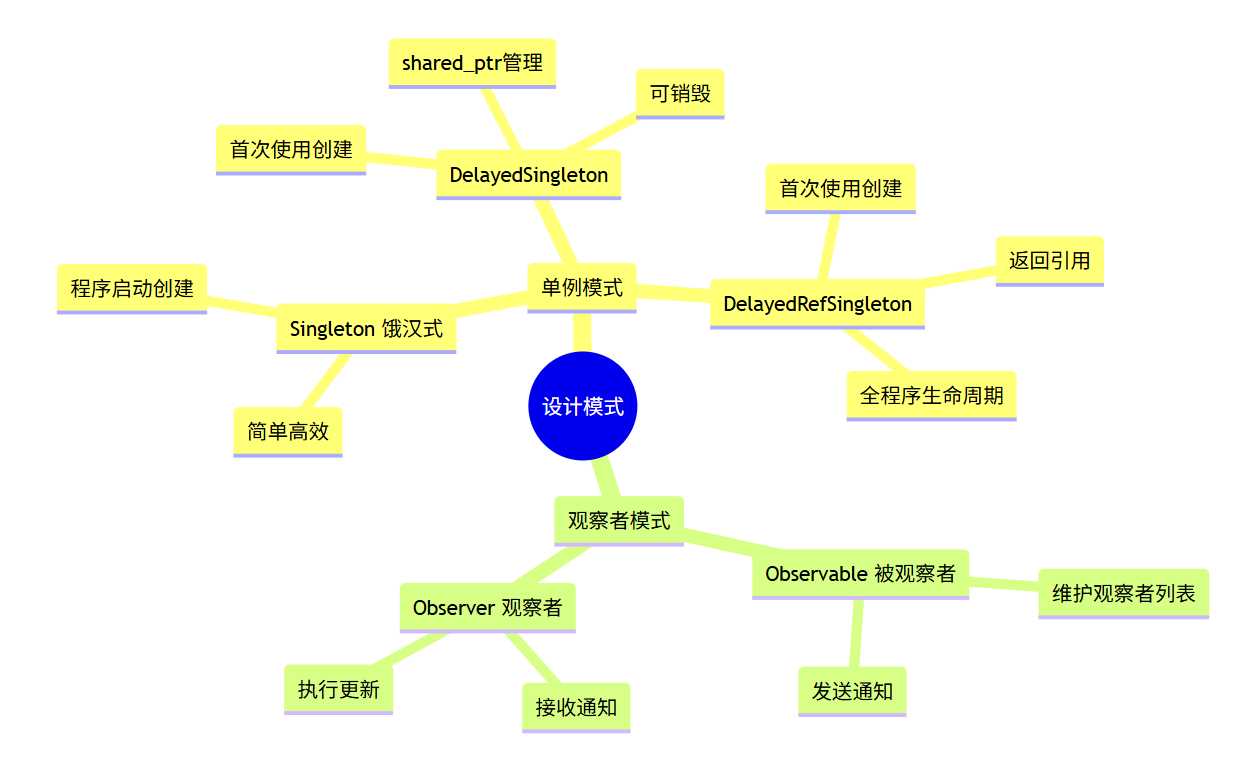
记住这三点:
- 饿汉式简单高效,懒汉式节省资源
- DelayedSingleton 用 shared_ptr,可以销毁;DelayedRefSingleton 用裸指针,不能销毁
- 观察者模式通知前必须调用 SetChanged()

开源鸿蒙跨平台开发社区汇聚开发者与厂商,共建“一次开发,多端部署”的开源生态,致力于降低跨端开发门槛,推动万物智联创新。
更多推荐
 22
22 0
0- 0


 已为社区贡献11条内容

所有评论(0)