ReactNative登录界面善用原生组件
ReactNative要善用原生组件比如这个button按钮效果我们可以使用原生组件ActivityIndicatorimport { ActivityIndicator} from 'react-native';<Button block style={styles.loginButton} onPress={this.login.bind(this)} activeOpaci...
·
ReactNative要善用原生组件
比如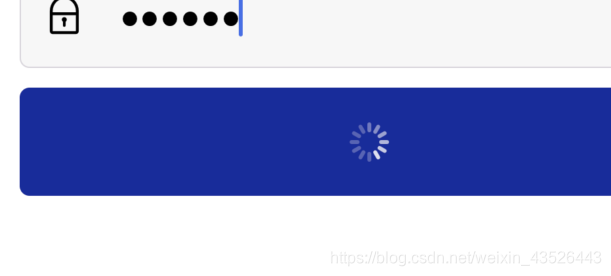 这个button按钮效果
我们可以使用原生组件ActivityIndicator
import { ActivityIndicator} from 'react-native';

<Button block style={styles.loginButton} onPress={this.login.bind(this)} activeOpacity={1}>
                {
                    this.state.loginProgress
                    ? <ActivityIndicator color="white"/>
                    : <Text style={Theme.lightBold}>{i18n.t('login')}</Text>
                }
            </Button>
一般登陆还会有个问题
就是键盘会把界面往上挤,这是我们可以调整原生组件KeyboardAvoidingView的behavior属性
import {  KeyboardAvoidingView } from 'react-native';
render() {
    return (
        <KeyboardAvoidingView behavior="padding" style={styles.container}>
            {this.renderLogo()}
            {this.renderForm()}
        </KeyboardAvoidingView>
    );
}

开源鸿蒙跨平台开发社区汇聚开发者与厂商,共建“一次开发,多端部署”的开源生态,致力于降低跨端开发门槛,推动万物智联创新。
更多推荐

 0
0 0
0- 0


 已为社区贡献2条内容

所有评论(0)