flutter适配openHarmony Platform Channel 平台通道
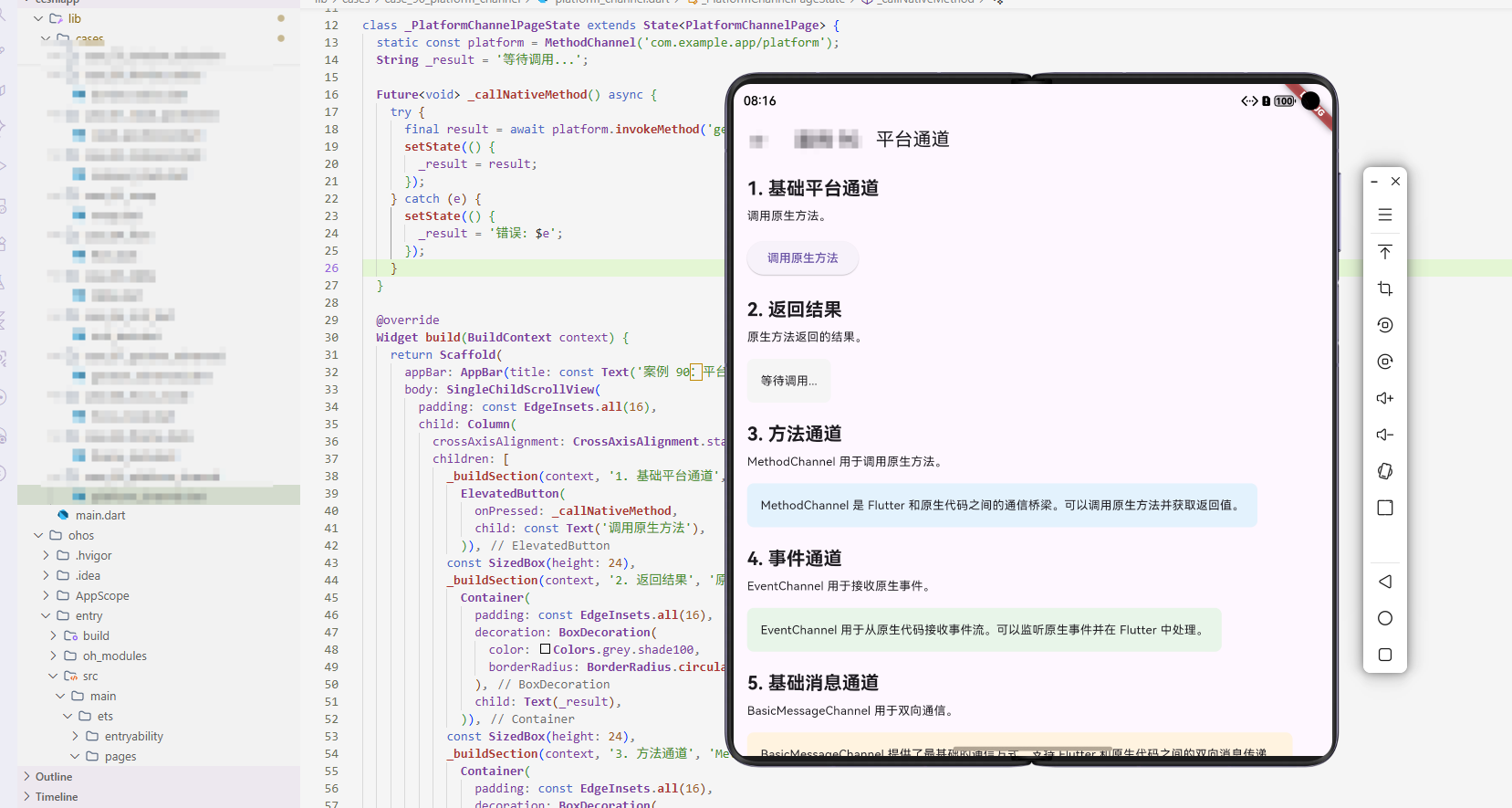
案例概述
Platform Channel 用于 Flutter 与原生代码(Android/iOS)通信。本案例展示了如何使用 Platform Channel。
核心概念
1. Platform Channel 基础
Platform Channel 是 Flutter 与原生代码的通信桥梁。
2. 方法通道
MethodChannel 用于调用原生方法。
3. 事件通道
EventChannel 用于接收原生事件。
代码详解
示例 1:基础方法通道
class BasicMethodChannelExample extends StatefulWidget {
State<BasicMethodChannelExample> createState() => _BasicMethodChannelExampleState();
}
class _BasicMethodChannelExampleState extends State<BasicMethodChannelExample> {
static const platform = MethodChannel('com.example.app/channel');
String _result = '';
Future<void> _callNativeMethod() async {
try {
final result = await platform.invokeMethod('getNativeData');
setState(() {
_result = result;
});
} catch (e) {
setState(() {
_result = '错误: $e';
});
}
}
Widget build(BuildContext context) {
return Column(
children: [
ElevatedButton(
onPressed: _callNativeMethod,
child: const Text('调用原生方法'),
),
Text('结果: $_result'),
],
);
}
}
代码解释: MethodChannel 用于 Flutter 和原生代码的双向通信。invokeMethod 调用原生方法,第一个参数是方法名,第二个是参数。必须用 try-catch 处理异常。
示例 2:传递参数
class ParameterPassingExample extends StatefulWidget {
State<ParameterPassingExample> createState() => _ParameterPassingExampleState();
}
class _ParameterPassingExampleState extends State<ParameterPassingExample> {
static const platform = MethodChannel('com.example.app/channel');
String _result = '';
Future<void> _callNativeMethodWithParams() async {
try {
final result = await platform.invokeMethod(
'processData',
{'input': 'Hello Native'},
);
setState(() {
_result = result;
});
} catch (e) {
setState(() {
_result = '错误: $e';
});
}
}
Widget build(BuildContext context) {
return Column(
children: [
ElevatedButton(
onPressed: _callNativeMethodWithParams,
child: const Text('传递参数调用'),
),
Text('结果: $_result'),
],
);
}
}
代码解释: invokeMethod 的第二个参数可以传递 Map 或其他数据。原生代码接收这些参数并处理。这实现了 Flutter 和原生代码的数据交互。
示例 3:事件通道
class EventChannelExample extends StatefulWidget {
State<EventChannelExample> createState() => _EventChannelExampleState();
}
class _EventChannelExampleState extends State<EventChannelExample> {
static const eventChannel = EventChannel('com.example.app/event');
String _event = '';
void initState() {
super.initState();
eventChannel.receiveBroadcastStream().listen(
(event) {
setState(() {
_event = event;
});
},
onError: (error) {
setState(() {
_event = '错误: $error';
});
},
);
}
Widget build(BuildContext context) {
return Column(
children: [
const Text('监听原生事件'),
Text('事件: $_event'),
],
);
}
}
代码解释: EventChannel 用于原生代码向 Flutter 发送事件流。receiveBroadcastStream().listen 监听事件。这适合处理持续的原生事件,如传感器数据、位置更新等。
示例 4:双向通信
class BidirectionalCommunicationExample extends StatefulWidget {
State<BidirectionalCommunicationExample> createState() => _BidirectionalCommunicationExampleState();
}
class _BidirectionalCommunicationExampleState extends State<BidirectionalCommunicationExample> {
static const platform = MethodChannel('com.example.app/channel');
String _result = '';
void initState() {
super.initState();
platform.setMethodCallHandler((call) async {
if (call.method == 'onNativeEvent') {
setState(() {
_result = call.arguments;
});
}
});
}
Future<void> _sendToNative() async {
try {
await platform.invokeMethod('sendData', {'data': 'Hello Native'});
} catch (e) {
print('错误: $e');
}
}
Widget build(BuildContext context) {
return Column(
children: [
ElevatedButton(
onPressed: _sendToNative,
child: const Text('发送数据到原生'),
),
Text('接收: $_result'),
],
);
}
}
代码解释: setMethodCallHandler 让 Flutter 接收原生代码的调用。这里监听 ‘onNativeEvent’ 方法,原生代码可以主动调用 Flutter。_sendToNative 向原生发送数据。这实现了完全的双向通信。
示例 5:错误处理
class ErrorHandlingExample extends StatefulWidget {
State<ErrorHandlingExample> createState() => _ErrorHandlingExampleState();
}
class _ErrorHandlingExampleState extends State<ErrorHandlingExample> {
static const platform = MethodChannel('com.example.app/channel');
String _result = '';
Future<void> _callWithErrorHandling() async {
try {
final result = await platform.invokeMethod('riskyOperation');
setState(() {
_result = '成功: $result';
});
} on PlatformException catch (e) {
setState(() {
_result = '平台错误: ${e.message}';
});
} catch (e) {
setState(() {
_result = '未知错误: $e';
});
}
}
Widget build(BuildContext context) {
return Column(
children: [
ElevatedButton(
onPressed: _callWithErrorHandling,
child: const Text('带错误处理的调用'),
),
Text('结果: $_result'),
],
);
}
}
代码解释: 必须分别捕获 PlatformException(原生异常)和其他异常。PlatformException 包含 code、message、details 等信息。正确的错误处理提升应用稳定性。
高级话题
1. 动态/响应式设计
根据屏幕大小调整通道。
2. 动画与过渡
自定义通道动画。
3. 搜索/过滤/排序
通道可以触发搜索。
4. 选择与批量操作
支持批量操作。
5. 加载与缓存
缓存通道数据。
6. 键盘导航
支持键盘快捷键。
7. 无障碍支持
提供无障碍支持。
8. 样式自定义
自定义样式。
9. 数据持久化/导出
保存通道数据。
10. 单元测试与集成测试
测试功能。
PC 端适配要点
- 根据屏幕大小调整通道
- 支持键盘快捷键
- 提供清晰的通道指示
实际应用场景
- 调用原生功能:调用相机、位置等
- 获取系统信息:获取设备信息
- 原生库集成:集成原生库
- 性能优化:使用原生代码优化
扩展建议
- 学习高级通道库
- 研究性能优化
- 探索自定义效果
- 集成原生库
总结
Platform Channel 是 Flutter 与原生代码通信的有效方式。通过灵活使用 Platform Channel,可以创建各种通信效果。欢迎加入开源鸿蒙跨平台社区:https://openharmonycrossplatform.csdn.net

开源鸿蒙跨平台开发社区汇聚开发者与厂商,共建“一次开发,多端部署”的开源生态,致力于降低跨端开发门槛,推动万物智联创新。
更多推荐
 19
19 0
0- 0


 已为社区贡献12条内容

所有评论(0)