HarmonyOS实战开发:@ohos.matrix4 (矩阵变换)
本模块提供矩阵变换功能,可对图形进行平移、旋转和缩放等。
说明:
本模块首批接口从API Version 7开始支持。后续版本如有新增内容,则采用上角标单独标记该内容的起始版本。
导入模块
import matrix4 from '@ohos.matrix4'矩阵4.init
init(options: [number,number,number,number,number]):矩阵4Transit
Matrix的构造函数,可以通过传入的参数创建一个四阶矩阵,矩阵为列优先。
系统能力:SystemCapability.ArkUI.ArkUI.Full
参数:
| 参数名 | 类型 | 必填 | 说明 |
|---|---|---|---|
| 选择 | [数字,数字,数字,数字, 数字, 数字] | 是 | 参数为长度为16(4*4)的number数组, 详情见四阶矩阵说明。 默认值: [1, 0, 0, 0,0, 1, 0, 0,0, 0, 1, 0,0 , 0, 0, 1] |
返回值:
| 类型 | 说明 |
|---|---|
| 矩阵4运输 | 根据入参创建的四阶矩阵对象。 |
四阶矩阵说明:
| 参数名 | 类型 | 必填 | 说明 |
|---|---|---|---|
| M00型 | 数 | 是 | x轴缩放值,单位矩阵默认为1。 |
| M01型 | 数 | 是 | 第2个值,xyz轴旋转会影响这个值。 |
| M02型 | 数 | 是 | 第3个值,xyz轴旋转会影响这个值。 |
| M03型 | 数 | 是 | 无实际意义。 |
| M10型 | 数 | 是 | 第5个值,xyz轴旋转会影响这个值。 |
| M11型 | 数 | 是 | y轴缩放值,单位矩阵默认为1。 |
| 米12 | 数 | 是 | 第7个值,xyz轴旋转会影响这个值。 |
| M13型 | 数 | 是 | 无实际意义。 |
| M20型 | 数 | 是 | 第9个值,xyz轴旋转会影响这个值。 |
| M21型 | 数 | 是 | 第10个值,xyz轴旋转会影响这个值。 |
| M22型 | 数 | 是 | z轴缩放值,单位矩阵默认为1。 |
| M23型 | 数 | 是 | 无实际意义。 |
| M30型 | 数 | 是 | x轴平移值,单位px,单位矩阵默认为0。 |
| M31型 | 数 | 是 | y轴平移值,单位px,单位矩阵默认为0。 |
| M32型 | 数 | 是 | z轴平移值,单位px,单位矩阵默认为0。 |
| M33型 | 数 | 是 | 齐次坐标下生效,产生透视投影效果。 |
示例
import matrix4 from '@ohos.matrix4'
// 创建一个四阶矩阵
let matrix = matrix4.init([1.0, 0.0, 0.0, 0.0,
                          0.0, 1.0, 0.0, 0.0,
                          0.0, 0.0, 1.0, 0.0,
                          0.0, 0.0, 0.0, 1.0])
@Entry
@Component
struct Tests {
  build() {
    Column() {
      Image($r("app.media.zh"))
        .width("40%")
        .height(100)
        .transform(matrix)
    }
  }
}
matrix4.identity
identity(): Matrix4Transit
Matrix的初始化函数,可以返回一个单位矩阵对象。
系统能力: SystemCapability.ArkUI.ArkUI.Full
返回值:
| 类型 | 说明 |
|---|---|
| Matrix4Transit | 单位矩阵对象。 |
示例:
// matrix1 和 matrix2 效果一致
import matrix4 from '@ohos.matrix4'
let matrix1 = matrix4.init([1.0, 0.0, 0.0, 0.0,
                          0.0, 1.0, 0.0, 0.0,
                          0.0, 0.0, 1.0, 0.0,
                          0.0, 0.0, 0.0, 1.0])
let matrix2 = matrix4.identity()
@Entry
@Component
struct Tests {
  build() {
    Column() {
      Image($r("app.media.zh"))
        .width("40%")
        .height(100)
        .transform(matrix1)
      Image($r("app.media.zh"))
        .width("40%")
        .height(100)
        .margin({ top: 150 })
        .transform(matrix2)
    }
  }
}
matrix4.copy
copy(): Matrix4Transit
Matrix的拷贝函数,可以拷贝一份当前的矩阵对象。
系统能力: SystemCapability.ArkUI.ArkUI.Full
返回值:
| 类型 | 说明 |
|---|---|
| Matrix4Transit | 当前矩阵的拷贝对象。 |
示例:
// xxx.ets
import matrix4 from '@ohos.matrix4'

@Entry
@Component
struct Test {
  private matrix1 = matrix4.identity().translate({ x: 100 })
  // 对matrix1的拷贝矩阵做scale操作,不影响到matrix1
  private matrix2 = this.matrix1.copy().scale({ x: 2 })

  build() {
    Column() {
      Image($r("app.media.bg1"))
        .width("40%")
        .height(100)
        .transform(this.matrix1)
      Image($r("app.media.bg2"))
        .width("40%")
        .height(100)
        .margin({ top: 50 })
        .transform(this.matrix2)
    }
  }
}
matrix4.invert(已弃用)
invert():矩阵4Transit
Matrix的逆函数,可以返回一个当前矩阵对象的逆矩阵,即效果正好相反。
该接口从Api 10开始废弃。
系统能力:SystemCapability.ArkUI.ArkUI.Full
返回值:
| 类型 | 说明 |
|---|---|
| 矩阵4运输 | 当前矩阵的逆矩阵对象。 |
matrix4.combine(已弃用)
combine(options: Matrix4Transit): Matrix4Transit
Matrix的叠加函数,可以将两个矩阵的效果叠加起来生成一个新的矩阵对象。
该接口从Api 10开始废弃。
系统能力:SystemCapability.ArkUI.ArkUI.Full
参数:
| 参数名 | 类型 | 必填 | 说明 |
|---|---|---|---|
| 选择 | 矩阵4运输 | 是 | 待叠加的矩阵对象。 |
返回值:
| 类型 | 说明 |
|---|---|
| 矩阵4运输 | 叠加后的矩阵对象。 |
matrix4.translate(已弃用)
translate(options: TranslateOption): Matrix4Transit
Matrix的平移函数,可以为当前矩阵增加x轴/y轴/z轴平移效果。
该接口从Api 10开始废弃。
系统能力:SystemCapability.ArkUI.ArkUI.Full
参数:
| 参数名 | 类型 | 必填 | 说明 |
|---|---|---|---|
| 选择 | TranslateOption | 是 | 设置平移参数。 |
返回值:
| 类型 | 说明 |
|---|---|
| 矩阵4运输 | 平移后的矩阵对象。 |
matrix4.scale(已弃用)
scale(options: ScaleOption): Matrix4Transit
Matrix的缩放函数,可以为当前矩阵增加x轴/y轴/z轴缩放效果。
该接口从Api 10开始废弃。
系统能力:SystemCapability.ArkUI.ArkUI.Full
参数:
| 参数名 | 类型 | 必填 | 说明 |
|---|---|---|---|
| 选择 | ScaleOption | 是 | 设置缩放参数。 |
返回值:
| 类型 | 说明 |
|---|---|
| 矩阵4运输 | 缩放后的矩阵对象。 |
matrix4.rotate(已弃用)
rotate(options: RotateOption): Matrix4Transit
Matrix的旋转函数,可以为当前矩阵增加x轴/y轴/z轴旋转效果。
该接口从Api 10开始废弃。
系统能力:SystemCapability.ArkUI.ArkUI.Full
参数:
| 参数名 | 类型 | 必填 | 说明 |
|---|---|---|---|
| 选择 | 旋转选项 | 是 | 设置旋转参数。 |
返回值:
| 类型 | 说明 |
|---|---|
| 矩阵4运输 | 旋转后的矩阵对象。 |
matrix4.transformPoint(已弃用)
transformPoint(options: [number, number]): [number, number]
Matrix的坐标点转换函数,可以将当前的变换效果作用到一个坐标点上。
该接口从Api 10开始废弃。
系统能力:SystemCapability.ArkUI.ArkUI.Full
参数:
| 参数名 | 类型 | 必填 | 说明 |
|---|---|---|---|
| 选择 | [数字,数字] | 是 | 需要转换的坐标点。 |
返回值:
| 类型 | 说明 |
|---|---|
| [数字,数字] | 返回矩阵变换后的Point对象。 |
矩阵4运输
合
combine(options: Matrix4Transit): Matrix4Transit
Matrix的叠加函数,可以将两个矩阵的效果叠加起来生成一个新的矩阵对象。会改变调用该函数的原始矩阵。
系统能力:SystemCapability.ArkUI.ArkUI.Full
参数:
| 参数名 | 类型 | 必填 | 说明 |
|---|---|---|---|
| 选择 | 矩阵4运输 | 是 | 待叠加的矩阵对象。 |
返回值:
| 类型 | 说明 |
|---|---|
| 矩阵4运输 | 矩阵叠加后的对象。 |
示例:
// xxx.ets
import matrix4 from '@ohos.matrix4'

@Entry
@Component
struct Test {
  private matrix1 = matrix4.identity().translate({ x: 200 })
  private matrix2 = matrix4.identity().scale({ x: 2 })

  build() {
    Column() {
      // 矩阵变换前
      Image($r("app.media.icon"))
        .width("40%")
        .height(100)
        .margin({ top: 50 })
      // 先平移x轴200px,再缩放两倍x轴,得到矩阵变换后的效果图
      Image($r("app.media.icon"))
        .transform(this.matrix1.copy().combine(this.matrix2))
        .width("40%")
        .height(100)
        .margin({ top: 50 })
    }
  }
}
转化
invert():矩阵4Transit
Matrix的逆函数,可以返回一个当前矩阵对象的逆矩阵,即效果正好相反。会改变调用该函数的原始矩阵。
系统能力:SystemCapability.ArkUI.ArkUI.Full
返回值:
| 类型 | 说明 |
|---|---|
| 矩阵4运输 | 当前矩阵的逆矩阵对象。 |
示例:
import matrix4 from '@ohos.matrix4'
// matrix1(宽放大2倍) 和 matrix2(宽缩小2倍) 效果相反
let matrix1 = matrix4.identity().scale({ x: 2 })
let matrix2 = matrix1.copy().invert()

@Entry
@Component
struct Tests {
  build() {
    Column() {
      Image($r("app.media.zh"))
        .width(200)
        .height(100)
        .transform(matrix1)
        .margin({ top: 100 })
      Image($r("app.media.zh"))
        .width(200)
        .height(100)
        .margin({ top: 150 })
        .transform(matrix2)
    }
  }
}
翻译
translate(options: TranslateOption): Matrix4Transit
Matrix的平移函数,可以为当前矩阵增加x轴/y轴/z轴平移效果。会改变调用该函数的原始矩阵。
系统能力:SystemCapability.ArkUI.ArkUI.Full
参数:
| 参数名 | 类型 | 必填 | 说明 |
|---|---|---|---|
| 选择 | TranslateOption | 是 | 设置平移参数。 |
返回值:
| 类型 | 说明 |
|---|---|
| 矩阵4运输 | 平移效果后的矩阵对象。 |
示例:
// xxx.ets
import matrix4 from '@ohos.matrix4'

@Entry
@Component
struct Test {
  private matrix1 = matrix4.identity().translate({ x: 100, y: 200, z: 30 })

  build() {
    Column() {
      Image($r("app.media.bg1")).transform(this.matrix1)
        .width("40%")
        .height(100)
    }
  }
}
规模
scale(options: ScaleOption): Matrix4Transit
Matrix的缩放函数,可以为当前矩阵增加x轴/y轴/z轴缩放效果。会改变调用该函数的原始矩阵。
系统能力:SystemCapability.ArkUI.ArkUI.Full
参数:
| 参数名 | 类型 | 必填 | 说明 |
|---|---|---|---|
| 选择 | ScaleOption | 是 | 设置缩放参数。 |
返回值:
| 类型 | 说明 |
|---|---|
| 矩阵4运输 | 缩放效果后的矩阵对象。 |
示例:
// xxx.ets
import matrix4 from '@ohos.matrix4'
@Entry
@Component
struct Test {
  private matrix1 = matrix4.identity().scale({ x:2, y:3, z:4, centerX:50, centerY:50 })

  build() {
    Column() {
      Image($r("app.media.bg1")).transform(this.matrix1)
        .width("40%")
        .height(100)
    }
  }
}
旋转
rotate(options: RotateOption): Matrix4Transit
Matrix的旋转函数,可以为当前矩阵增加x轴/y轴/z轴旋转效果。会改变调用该函数的原始矩阵。
系统能力:SystemCapability.ArkUI.ArkUI.Full
参数:
| 参数名 | 类型 | 必填 | 说明 |
|---|---|---|---|
| 选择 | 旋转选项 | 是 | 设置旋转参数。 |
返回值:
| 类型 | 说明 |
|---|---|
| 矩阵4运输 | 旋转效果后的矩阵对象。 |
示例:
// xxx.ets
import matrix4 from '@ohos.matrix4'

@Entry
@Component
struct Test {
  private matrix1 = matrix4.identity().rotate({ x: 1, y: 1, z: 2, angle: 30 })

  build() {
    Column() {
      Image($r("app.media.bg1")).transform(this.matrix1)
        .width("40%")
        .height(100)
    }.width("100%").margin({ top: 50 })
  }
}
transformPoint
transformPoint(options: [number, number]): [number, number]
Matrix的坐标点转换函数,可以将当前的变换效果作用到一个坐标点上。
系统能力:SystemCapability.ArkUI.ArkUI.Full
参数:
| 参数名 | 类型 | 必填 | 说明 |
|---|---|---|---|
| 选择 | [数字,数字] | 是 | 需要转换的坐标点。 |
返回值:
| 类型 | 说明 |
|---|---|
| [数字,数字] | 返回矩阵变换后的Point对象。 |
示例:
// xxx.ets
import matrix4 from '@ohos.matrix4'

@Entry
@Component
struct Test {
  private originPoint: number[] = [50, 50]
  private matrix_1 = matrix4.identity().translate({ x: 150, y: -50 })
  private transformPoint = this.matrix_1.transformPoint([this.originPoint[0], this.originPoint[1]])
  private matrix_2 = matrix4.identity().translate({ x: this.transformPoint[0], y: this.transformPoint[1] })

  build() {
    Column() {
      Text(`矩阵变换前的坐标:[${this.originPoint}]`)
        .fontSize(16)
      Image($r("app.media.image"))
        .width('600px')
        .height('300px')
        .margin({ top: 50 })
      Text(`矩阵变换后的坐标:[${this.transformPoint}]`)
        .fontSize(16)
        .margin({ top: 100 })
      Image($r("app.media.image"))
        .width('600px')
        .height('300px')
        .margin({ top: 50 })
        .transform(this.matrix_2)
    }.width("100%").padding(50)
  }
}
TranslateOption
系统能力:SystemCapability.ArkUI.ArkUI.Full
| 名称 | 类型 | 必填 | 说明 |
|---|---|---|---|
| x | 数 | 否 | x轴的平移距离,单位px。 默认值:0 取值范围 (-∞, +∞) |
| y | 数 | 否 | y轴的平移距离,单位px。 默认值:0 取值范围 (-∞, +∞) |
| z | 数 | 否 | z轴的平移距离,单位px。 默认值:0 取值范围 (-∞, +∞) |
ScaleOption
系统能力:SystemCapability.ArkUI.ArkUI.Full
| 名称 | 类型 | 必填 | 说明 |
|---|---|---|---|
| x | 数 | 否 | x轴的缩放倍数。x>1时以x轴方向放大,0<x<1时以x轴方向缩小,x<0时沿x轴反向并缩放。 默认值:1 取值范围 (-∞, +∞) |
| y | 数 | 否 | y轴的缩放倍数。y>1时以y轴方向放大,0<y<1时以y轴方向缩小,y<0时沿y轴反向并缩放。 默认值:1 取值范围 (-∞, +∞) |
| z | 数 | 否 | z轴的缩放倍数。z>1时以z轴方向放大,0<z<1时以z轴方向缩小,z<0时沿z轴反向并缩放。 默认值:1 取值范围 (-∞, +∞) |
| 中心X | 数 | 否 | 变换中心点x轴坐标。 默认值:0。 取值范围 (-∞, +∞) |
| 中心Y | 数 | 否 | 变换中心点y轴坐标。 默认值:0。 取值范围 (-∞, +∞) |
旋转选项
系统能力:SystemCapability.ArkUI.ArkUI.Full
| 名称 | 类型 | 必填 | 说明 |
|---|---|---|---|
| x | 数 | 否 | 旋转轴向量x坐标。 默认值:0。 取值范围 (-∞, +∞) |
| y | 数 | 否 | 旋转轴向量y坐标。 默认值:0。 取值范围 (-∞, +∞) |
| z | 数 | 否 | 旋转轴向量z坐标。 默认值:0。 取值范围 (-∞, +∞)。 说明: 旋转向量中x、y、z至少有一个不为0才有意义。 |
| 角度 | 数 | 否 | 旋转角度。 默认值:0 |
| 中心X | 数 | 否 | 变换中心点x轴坐标。 默认值:0 |
| 中心Y | 数 | 否 | 变换中心点y轴坐标。 默认值:0 |
最后
有很多小伙伴不知道学习哪些鸿蒙开发技术?不知道需要重点掌握哪些鸿蒙应用开发知识点?而且学习时频繁踩坑,最终浪费大量时间。所以有一份实用的鸿蒙(HarmonyOS NEXT)资料用来跟着学习是非常有必要的。
这份鸿蒙(HarmonyOS NEXT)资料包含了鸿蒙开发必掌握的核心知识要点,内容包含了(ArkTS、ArkUI开发组件、Stage模型、多端部署、分布式应用开发、音频、视频、WebGL、OpenHarmony多媒体技术、Napi组件、OpenHarmony内核、Harmony南向开发、鸿蒙项目实战等等)鸿蒙(HarmonyOS NEXT)技术知识点。
希望这一份鸿蒙学习资料能够给大家带来帮助,有需要的小伙伴自行领取,限时开源,先到先得~无套路领取!!
获取这份完整版高清学习路线,请点击→纯血版全套鸿蒙HarmonyOS学习资料
鸿蒙(HarmonyOS NEXT)最新学习路线

-
HarmonOS基础技能

- HarmonOS就业必备技能

- HarmonOS多媒体技术

- 鸿蒙NaPi组件进阶

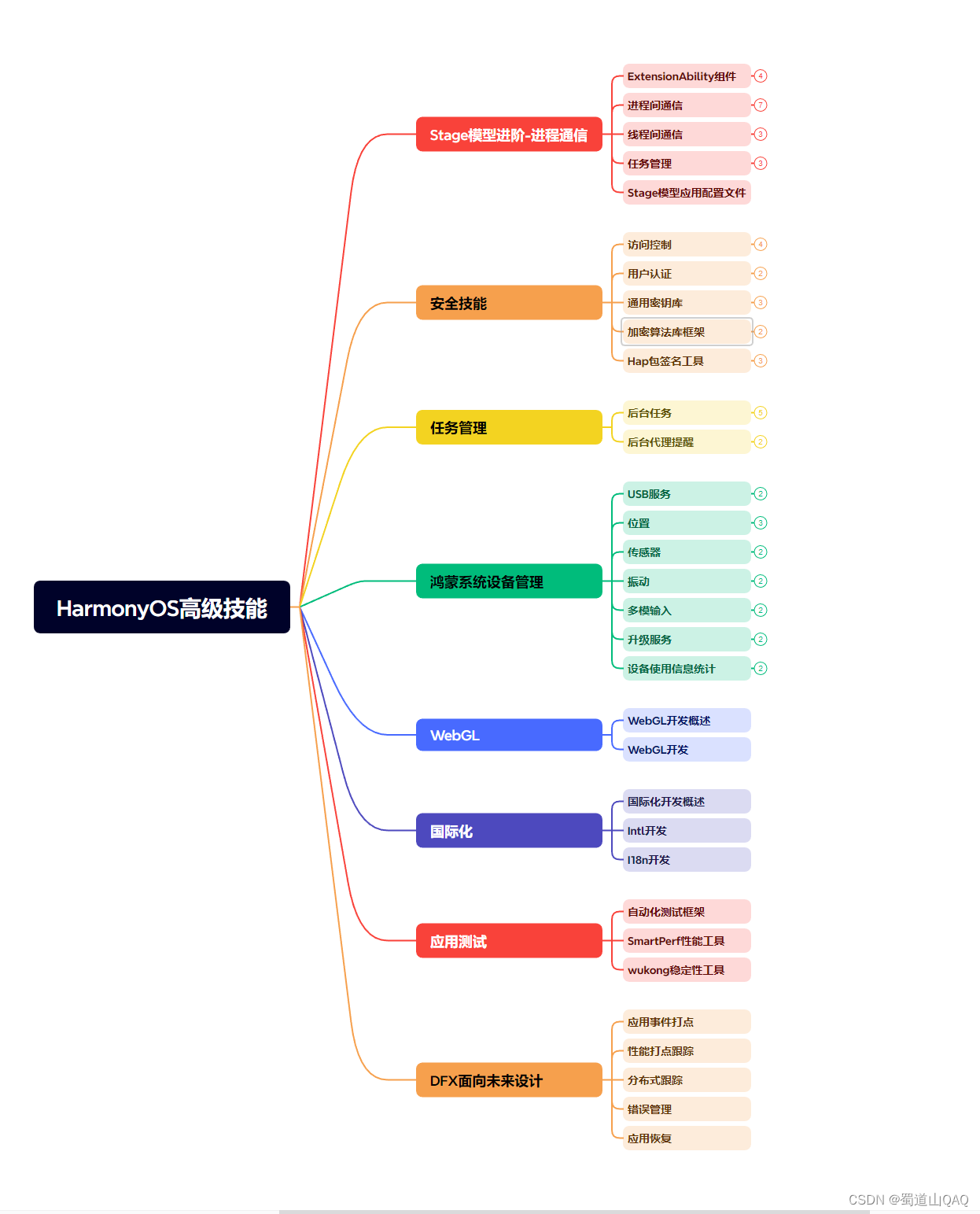
- HarmonOS高级技能
- 初识HarmonOS内核

- 实战就业级设备开发

有了路线图,怎么能没有学习资料呢,小编也准备了一份联合鸿蒙官方发布笔记整理收纳的一套系统性的鸿蒙(OpenHarmony )学习手册(共计1236页)与鸿蒙(OpenHarmony )开发入门教学视频,内容包含:ArkTS、ArkUI、Web开发、应用模型、资源分类…等知识点。
获取以上完整版高清学习路线,请点击→纯血版全套鸿蒙HarmonyOS学习资料
《鸿蒙 (OpenHarmony)开发入门教学视频》

《鸿蒙生态应用开发V2.0白皮书》

《鸿蒙 (OpenHarmony)开发基础到实战手册》
OpenHarmony北向、南向开发环境搭建

《鸿蒙开发基础》
- ArkTS语言
- 安装DevEco Studio
- 运用你的第一个ArkTS应用
- ArkUI声明式UI开发
- .……

《鸿蒙开发进阶》
- Stage模型入门
- 网络管理
- 数据管理
- 电话服务
- 分布式应用开发
- 通知与窗口管理
- 多媒体技术
- 安全技能
- 任务管理
- WebGL
- 国际化开发
- 应用测试
- DFX面向未来设计
- 鸿蒙系统移植和裁剪定制
- ……

《鸿蒙进阶实战》
- ArkTS实践
- UIAbility应用
- 网络案例
- ……

获取以上完整鸿蒙HarmonyOS学习资料,请点击→纯血版全套鸿蒙HarmonyOS学习资料
总结
总的来说,华为鸿蒙不再兼容安卓,对中年程序员来说是一个挑战,也是一个机会。只有积极应对变化,不断学习和提升自己,他们才能在这个变革的时代中立于不败之地。

开源鸿蒙跨平台开发社区汇聚开发者与厂商,共建“一次开发,多端部署”的开源生态,致力于降低跨端开发门槛,推动万物智联创新。
更多推荐
 23
23 0
0- 0


 已为社区贡献47条内容

所有评论(0)